





Shinobu
Members
-
Joined
-
Last visited
Everything posted by Shinobu
-
That was during booting into unRAID, yes. I control my server via an IPMI interface over the network, but having a monitor plugged in while it's booting would accomplish the same thing
-
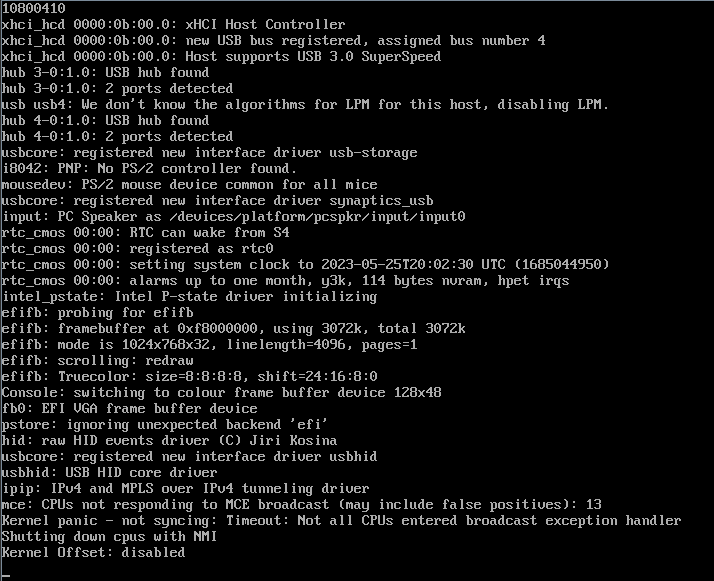
On mine, it was reporting MCE errors for core 13. Though the way the Linux kernal and the BIOS sees cores is different it seems. I went through each core until I found that core 11 was causing the problems. If I disable core 11, system boots fine. As soon as I re-enable it, system will fail to boot.
-
Found it to be a faulty core. Narrowed it down to core 11 being defective. System boots with core 11 disabled but fails with it enabled. Seller's accepted a return so will look for a replacement.
-
It's on the latest BIOS, with support for E5-2600v4 processors so should be okay there. Going to try booting into a fresh install to see if that works, then possibly do a restore.
-
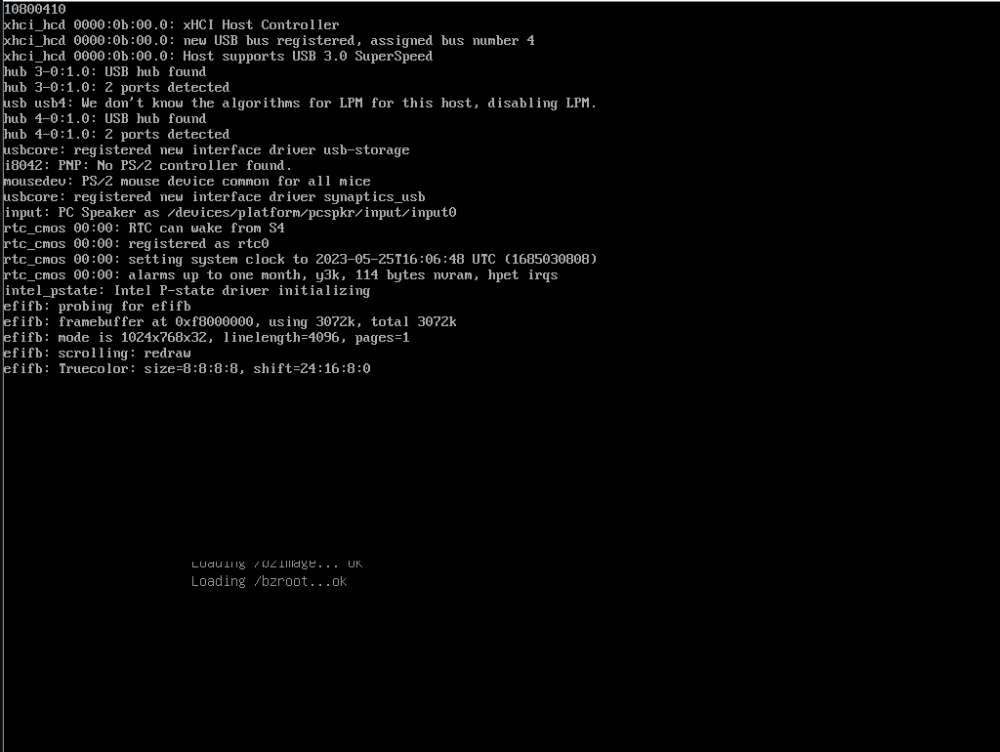
Hi, I'm having an issue with unRAID hanging on boot after changing CPU. It loads part way but then will just hang with no further progress. System is booting from UEFI, as it did before the upgrade. It seems like it outright freezes rather than hanging to be honest. Sometimes it will freeze at different times. Booting into safe mode makes no difference. Suggestions welcome It sometimes gets a weird graphical error where the loading /bzroot...OK stays on the screen when it freezes System specs: Intel Xeon E5-2697Av4 (old CPU was Intel Xeon E5-2690v3) Asus X99 WS IPMI 128GB 2133MHz ECC RDIMM LSI SAS HBA Mellanox X3 Connect See attached image for where it gets stuck. It's not always in the same place
-
Hello, just a couple of questions as I can't find options to do these. If they're not possible right now, would like to submit them as feature requests: Can you assign SMB permissions on a per-drive/share basis rather than assigning global permissions for all unaasigned drives? Can you create multiple partitions/mount points on one disk, to essentially create two logical shares on a single disk? Is it possible to have unassigned drives remain mounted and accessible when stopping the array? It seems to dismount them when stopping the array, but you can then mount them again. I'd like to be able to set this to keep them mounted so I can work on the array disks without having to manually re-mount the unassigned drives. Thanks
-
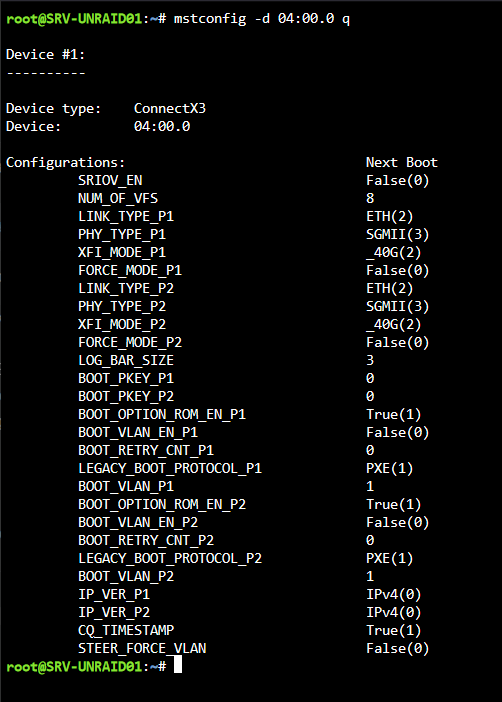
Hi, yep I've got it working now. Had to use PHY_TYPE_P1/P2 to set the physical type first, then reboot and you can then set the link type via LINK_TYPE_P1/P2 and reboot again. If anyone comes across this, setting the PHY_TYPE_P1/P2 to SGMII(3) seems to result in best performance, though I still have some testing and tuning to do. You can use mstconfig -d 04:00.0 query to show the current settings and options as below. You may need to change "04:00.0" depending on what your Mellanox card reports via lspci.
-
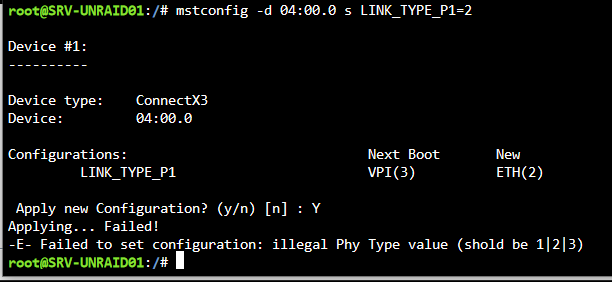
Hi there, I'm using the Mellanox Firmware Tools plugin and I'm having some issues getting my ConnectX-3 card out of VPI and in to Ethernet mode. When running the command "mstconfig -d 04:00.0 set LINK_TYPE_P2=2" (same on P1) I get the message after confirming to apply config -E- Failed to set configuration: illegal Phy Type value (shold be 1|2|3). Any suggestions. These are IBM branded versions if that helps. Not sure if they need a specific firmware flashing. Specific model is 00D9552, which I believe is the MCX354A-FCBT. I updated to the same/latest version for both adapters on a Windows machine EDIT: Right, so you need to set PHY_LINK_P1/2 to 1(xaui) 2(XFI) or 3(SGMII) before it will allow you to change the link type. No idea which one of those is appropriate and can't find much about it really. Removed the network and network-rules.cfg files and rebooting to see what happens. It did pick up more NICs but all were showing the same MAC address at first
-
Hi there, I have an issue with the webUI loading extremely slowly when VPN is enabled. Using an identical config to before it's suddenly stopped working properly. I've tried the latest and 4.3.9-2-01 release but get the same result. The UI does load, but it hangs and takes a very long time to load. Disabling VPN fixes the issue and UI loads immediately. I've tried fresh ovpn config files but get the same issue. I'm using SurfShark VPN if that helps. EDIT: Just tried with NordVPN as well, get the same issue EDIT2: Interesting discovery. If I have the VPN enabled and route another qbittorrent instance with the VPN disabled through the container, UI loads instantly and it will connect via the container's VPN no problem, but the UI on the container with VPN enabled will still hang.
-
Right, so the pre-read, clear and post-read have all completed successfully now for some reason. I did disable spin down on this drive before, but not globally, so wonder if that helped somehow. Fairly happy to say the drive appears healthy then and I'm good to sell it on. Thanks for your help.
-
Right, first set of errors came in at about 65% complete on the pre-read. Before then, everything looks good as it normally does. Spin down is disabled globally, the only spindowns were done manually on drives in the array as I knew I wasn't going to be using them for 8+ hours. srv-unraid01-diagnostics-20220419-1924.zip
-
It's completed a few long tests, none of them have reported any SMART errors. It hasn't been running for the 17 hours or so it takes to complete the current long test, so is showing as still running. I've tested before with disabling spin down on the drive while it was in the array, still got read errors from it. I've just put it back in the system and disabled spin down again, though the drive's not really doing anything as it's unassigned. During a pre-read I'd expect it not to spin down, so I'd be surprised if spin-down were the cause for a pre-read failure. Started a pre-read again to see if it reports the same errors with spindown disabled. I'll allow it to run for a bit and post new diags later
-
Hi, So I have an issue with a 12TB SAS drive I have. I've previously had this in the array, after a pre-clear, but it started giving occassional read errors (about 2 at a time) and eventually the disk was marked as disabled by unRAID. SMART tests all come back showing no errors, though SMART does seem to not quite function correctly with SAS drives in unRAID. The drive is close to brand new and a pre-clear will succeed, but a pre/post read will fail, so if you skip the pre/post reads it will complete. Looking at logs, there are repeated logs for this disk alone (sdg): kernel: Buffer I/O error on dev sdg, logical block 1387229646, async page read kernel: blk_update_request: I/O error, dev sdg, sector 11098420608 op 0x0:(READ) flags 0x80700 phys_seg 1 prio class 0 The drive is connected via a Broadcom/LSI 9207-8i SAS controller. I have tried it on both ports, which obviously use different cables, and get the same results each time. I have 7 other HDDs connected to the same controller and none have issues, though all of them are SATA, though I'd be surprised for the controller to have an issue specifically with SAS drives and not SATA drives. I only have this one SAS drive so can't test if others have the same issue. There are PCIe errors too, but I imagine that's just due to the errors coming from the disk rather than the controller itself. If the disk is not doing anything, the PCIe errors do not occur, even though all the other drives are active. I'm mostly looking to sell this drive as I've already replaced it with a SATA version, but don't want to sell a faulty drive, if that is the case. Any input is appreciated. srv-unraid01-diagnostics-20220417-0340.zip
-
Hi there, I'm currently running 10GbE on my unraid server (6.9.2) via an Asus XG-C100C and it's working well. However, my NVMe cache easily caps out this connection, hitting 1GB/s+ transfers, so I've been looking at moving up to 25 or 40Gbps networking. I've decided on 25Gbps via a Broadcom 57414 or 57404 chip as they're a nice balance between price of the NIC themselves and being able to run over standard OM4 LC fibre, not needing any super expensive or short range cables that 40 and 100GbE do. Will have to go direct attach from NIC to NIC as switches are expensive, but only need one client really. Does anyone know if these are supported by unraid? Can't seem to find any indication one way or another, but not 100% sure where to look in the first place. Thanks
-
Right, so update on this. Found that this was caused by remnants of being on Active Directory, but rather than being a permissions issue, it was an extended ACL issue. Using the command "setfacl -Rb /mnt/user/" resets the ACL on all user shares, then re-ran docker safe permissions tool and voilà, dockers are able to assign permissions as expected.
-
Hi, I'm having issues with the docker seeming to set permissions as 770 for all created files on Private shares, even with the umask set to 000. This means that even users with read/write access on the shares the docker is writing to, they cannot read any file or directory created by the docker. If I run the docker as another user (other than 99), I can access the files with that user account, but not from any other account. Is there any way to override the default permissions the docker is setting? Having to amend permissions every time the docker touches a file is not great. EDIT: Found that this was caused by remnants of being on Active Directory, but rather than being a permissions issue, it was an extended ACL issue. Using the command "setfacl -Rb /mnt/user/" resets the ACL on all user shares, then re-ran docker safe permissions tool and voilà, dockers are able to assign permissions as expected.
-
Hi, I'm having issues with the docker seeming to set permissions as 770 for all created files on Private shares, even with the umask set to 000. This means that even users with read/write access on the shares the docker is writing to, they cannot read any file or directory created by the docker. Is there any way to override the default permissions the docker is setting? Having to amend permissions every time the docker touches a file is not great. EDIT: Found that this was caused by remnants of being on Active Directory, but rather than being a permissions issue, it was an extended ACL issue. Using the command "setfacl -Rb /mnt/user/" resets the ACL on all user shares, then re-ran docker safe permissions tool and voilà, dockers are able to assign permissions as expected.
-
Hello, First, apologies if this is not in the correct location, first post on the forum. I'm having issues with permissions on files and directories that are created through docker containers. This applies to multiple containers. I have researched what I can about docker permissions, but as far as I can tell, everything is set up as it should be. So the containers are running with PUID 99 and PGID 100 with a umask of 000 (also tried 002). I have added paths to user shares with read/write permissions, which works fine in terms of the dockers being able to access and write to them. The shares it has access to are private, if that matters. Moving them to public or even secure is not an option due to access requirements. When the dockers write something to the mounted shares, I can see the file from a client accessing the share but get access denied if I try to read it in any way. However, I can delete them no issue. Looking at permissions, all files created have -rw-rw----+ permissions, while everything not created by them has -rw-rw-rw-+. Same applies to directories but with the same result for directory permissions. I've tried setting the access mode to read/write slave and shared with no apparent difference (not 100% on what the difference in modes is). I can get around this by manually changing permissions via CLI, but having to do that every time a file or folder is created is not a solution. Please give your suggestions, or point out where I'm going obviously wrong. I'm new to Linux and Docker as a whole, recently migrated to unRAID from Windows Server 2019. EDIT: So I've actually tracked down this issue to it being a permissions issue leftover from when I had the server integrated into Active Directory. I removed it because it was causing too many problems. Running the new permissions (and docker safe new permissions) on all disks and shares does not fix the problem. However, if I create a new share it works as expected. I've found that leftover AD permissions appear to be breaking the way dockers assign permissions, however I cannot find an efficient way to remove all permissions other than the Linux 777 that are required, either through unRAID or Windows. Is there a way to create a new share, then move all pointers for data from another share across? As the data is not stored on the shares themselves, there shouldn't be any reason to have to copy across data, plus there's 15+ TB of data that would need to be moved, which would take a very long time.



