





Barry Staes
Members
-
Joined
-
Last visited
Everything posted by Barry Staes
-
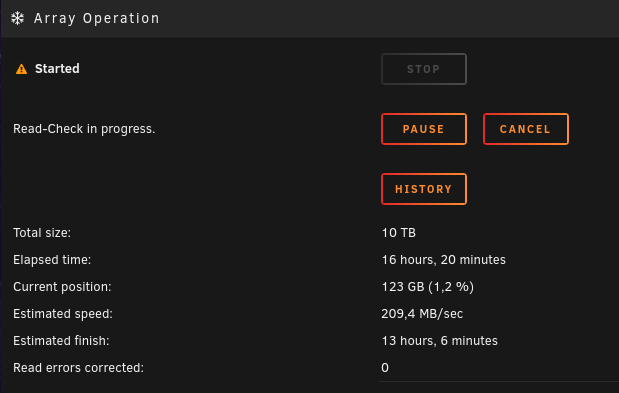
A few days ago the parity disk got disabled by Unraid because unrecoverable errors. (probably the cable) Yesterday the scheduled parity check started, which ran as a read-check because of the above. It says its busy, but i cant stop it. The Cancel and Pause buttons are unresponsive. Its also showing the wrong amount 10 TB, should be 20 TB. Its stuck at 123 GB for half a day now. How can i stop the read-check, so i can enable (and rebuild) my parity drive?

-
While typing out a new post, and after having to do the "i am not a robot" two times, the forum logged me out, and it wont log me back in. Refreshing the page did not help, but it does work fine when i use another browser.
-
+ Another strange issue is that i cant seem to install most VMs, bootmenus work but the guests wont start. Looks like the same issue i saw on the physical hardware. Perhaps related, i'll report results here in a few days.
-
Shuttle was quick to investigate! After this we double-checked.. their test is with similar hardware, the identical bios versions, and identical OS versions. Even sent me a screenshot of the Ubuntu 22 working fine. Must be some thing on my end then 🤔 [Click and drag to move] we considered the USB stick, CPU, or the NVMe SSD (gen4), and firmware upgrade again after the install. But in particular they mentioned something about RAM: ..and i bought Corsair 🤯 My system is busy with preclearing all the new disks, when its done in a day or two i'm going to investigate further.
-
Another response from Shuttle, politely pointing out the time it takes.
-
So i mailed Shuttle support pointing to this thread, this was their fast response:
-
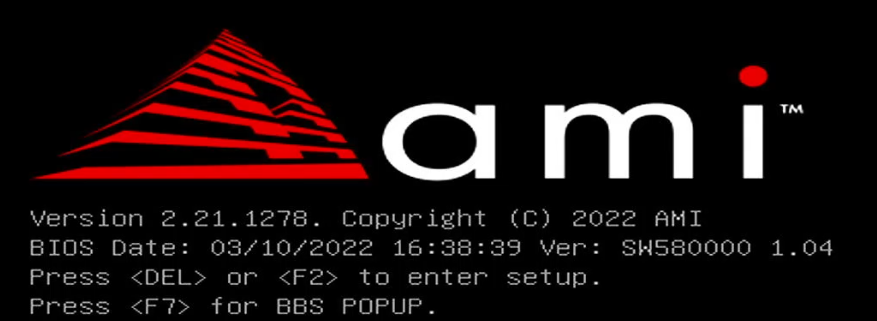
Perhaps its all the same sub supplier (AMI?) for BIOS on the different MoBo's? Here is a screenshot (boot, before entering setup) of what the Shuttle came supplied with originally. I'll point Shuttle support to this thread.
-
update: FINAL SOLUTION: after bios downgrade, and OS install, tried another bios upgrade. See post below. Fixed with a bios downgrade! Now the system is able to run Ubuntu and Unraid again. I found a similar issue in this post (a similar Unraid + Ubuntu boot problem) .. that got fixed with a bios-downgrade. Different vendor though. My Shuttle motherboard came shipped with the latest BIOS "03/10/2022 16:38:39 Ver: SW580000 1.04") and had no such problems listed. But went ahead and downloaded the previous 1.01 BIOS , thats all, just wanted to share and save you the worrying, i already did that.
-
Looks like i have a similar issue with a new Shuttle SW580R8 motherboard, which i solved by downgrading the bios from 1.04 to 1.01.
-
Thank you!
-
I wanted to store my new post as a draft, so i can continue testing and trying things, and post it in a day or so. So i used the "Hide topic" option shown on the right, but now not even I can find my topic in my profile. In hind sight, its probably to permanently hide. Maybe a moderator can PM me my post text? Its about boot being stuck at "bzroot" on a Shuttle SW580R8

-
Since i'm so happy with Unraid on my old shuttle pc, i bought a new one to also run Unraid. Hardware / used: (all new) Motherboard: Shuttle SW580R8 USB boot: Samsung FIT Plus 64GB "USB 3.1 and 2.0 compatible" (i could not find the smaller 32GB version from this SpaceInvader Unraid USB test) Unraid USB Flash Creator (with UEFI allowed) Problems: Boot Unraid 6.11.3 hangs in seconds at "Loading /bzroot..", same goes for the Unraid GUI option. Boot Ubuntu 22.04 but it wont install: boot menu works but install is a black screen. Works fine: (same hardware) MemTest86 v10 (downloaded with UEFI support) Proxmox 7.2 Tried already: Bios defaults, and update (already using latest 1.04) Different USB ports including ones USB 2.0, 3.2 Gen1, and 3.2 Gen2. Try old USB 2.0 key (1 GB) Unraid USB Flash Creator (with UEFI not allowed) Disconnect all other drives. Verify the CPU motherboard compatibility.
-
Had exactly this problem, when i tried to upgrade cache SSD, and found no solution. Suspect causes: - Maybe i forgot to stop the VM before i started Mover. (cache > array > new cache) - Bad cable for new disk caused 10 UDMA errors. The commands found here resulted in unexpected errors in my Unraid terminal: modprobe ndb max_part=8 modprobe: FATAL: Module ndb not found in directory /lib/modules/5.10.28-Unraid root@bTower:/mnt/user/domains/HassOS# qemu-nbd --connect=/dev/nbd0 /mnt/user/domains/HassOS/hassos_ova-3.1.qcow2 qemu-nbd: Failed to open /dev/nbd0: No such file or directory qemu-nbd: Disconnect client, due to: Failed to read request: Unexpected end-of-file before all bytes were read I just tried removing the libvirt.img and the VM webpage now lists ancient VMs that i maybe had years ago, so something is going wrong there as well..
-
Reproduce: Have a docker, with a variable, its a text that includes some pipe symbols and it should be passed 1-on-1 to the docker, e.g. username|password|/home/username The docker i was trying to use and requires this syntax is https://hub.docker.com/r/delfer/alpine-ftp-server Problems/bugs seen: The UI made the default value into a dropdown with 3 options. This was not desired. The UI forgot the value because it included the pipe symbol as well. Things i tried: So i went looking for how to escape this pipe symbol, tried these but it didnt work: username||password||/home/username username\|password\|/home/username "username|password|/home/username" 'username|password|/home/username' And went into the documentation starting with the link on the Docker Edit page. All i found was this "TBD" section comment on environment variables, but no explanation on regular variables. https://wiki.unraid.net/Manual/Docker_Management#Environment_Variables Seems like a bug. Or did i miss something? Either there already is a way to escape or encode this symbol in a string value, then please update documentation. Regardless in the docker edit page (UI dropdown feature) there is some flaw in processing this, because it forgets my value if it contains a | symbol. diagnostics-20220124-2242.zip
-
Downloading not so much.. but if you receive the channel unencrypted you could record it. For example a Plex (DVR) and/or TvHeadend docker on your Unraid server + a networked HDHomerun 4DC tuner.
-
Thanks! Also thanks for this notice in the plugin: Though that site confused me because i mistook the kernel versions for (really old..) Unraid versions. Also https://github.com/theone11/virtualbox_plugin hasn't been updated for a while, so i had the impression this was being abandoned until i found your post here. Just to be sure - I must admit i have not read the entire thread, but is it safe to say this VirtualBox plugin "just works" when updating to Unraid 6.2 with existing VMs? PS. At first i was looking for something like "Fixed unRAID v6.2 compatibility" in the plugin changelog.. which is where i naively expected this info.
-
I haven't done much testing with dockers (will do..) but i think its because i dont use the default 80 port for Dynamix.
-
Thanks for the headsup. So i take it this fixes the Dynamix web interface going down? http://lime-technology.com/forum/index.php?topic=44637.msg442500#msg442500 I cant use virtualbox plugin without crashing the webinterface..
-
I've started a preclear via the plugin, but after a few hours i cant see any progress. The CPU top command shows two dd processes at 100% each, but there is no disk activity.. I decided to start a new subject to not hijack this thread. https://lime-technology.com/forum/index.php?topic=46303.0 I'm using a fairly virgin Unraid system, which makes me think this is a bug.
-
I take it that the author of this plugin is not the author of the preclear bash script. First, thanks for making these. But please for the love of whatever is holy, consider adding the explanation from the 1st post of the preclear_disk.sh topic to the plugin UI. There is a minimal " dont do this " and a few " for that, do it in this order " explanations that you really cant do without, especially if the UI allows for doing these things wrong! As a newcomer to unraid, i really dont get why all the information is dispersed along this forum, but not actually shown on the relevant place. IMHO, each plugin and docker should have a CHANGELOG and a HELP link, and the forum link comes third. At the least, add a link to the script download and help location, so that people can help themselves.
-
Thanks for this insight! So this basically replaces the SNAP plugin functionality? In that case what i dont understand is that i didn't found out about this in one of the many (now deprecated) SNAP plugin threads.
-
Thanks! Your answer pointed me to these posts and it all makes sense now. Now i should just make sure that it gets mounted/unmounted at boot/shutdown. And it made me wonder .. would that be something i could automate by programming a plugin? Assuming it doesnt exist yet. Perhaps thats something for another topic.. but insights welcome..
-
Until we've got ISCSI, i wonder how to allow my Plex docker to browse my NAS devices? Is there even an alternative? (using Unraid6)
-
As a new Unraid user, i can confirm that this is the first thing i was missing after completing my installation and adding my first VM. I'd like to be able to switch VM's via my phone. But there are no Unraid apps in the Play Store. (i was actually somewhat flabbergasted by this) The app should allow me to ask for authentication every time. (and transmit that securely to the Unraid server) Perhaps a good bet would be to re-do the whole interface using React and a backend REST API.. it wouldnt hurt! But cost a lot of time tho.
-
Well ISCSI LUN might be a perfect fit with Unraid.. On terminology: NAS = a host sharing folders via SMB/FTP/whatever ..with any device. SAN = a device sharing logical volumes via ISCSI/FibreChannel ..with a server. I had to look up ISCSI LUN but yes it should allow each SAN to (simply?) appear as a Unraid drive. This is how its usually used on servers. I see no use in the Unraid parity drive, however. And that disk would be as big as your biggest SAN, also not very realistic. In my case, i would very much like all the SAN volumes to be presented as one big archive, so i'd gladly use the user shares for that.

