





chansearrington
Members
-
Joined
-
Last visited
-
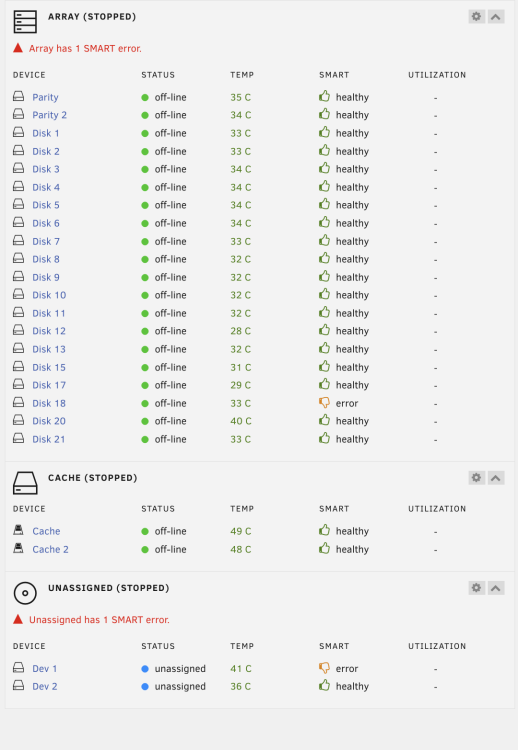
Can someone tell me where in the logs I can see what's causing this error? Attached is my diagnostic export the-ark-diagnostics-20240114-1826.zip
-
@JorgeB Thanks. I restarted and I'm currently running the job again. I'll post back when it's finished. Currently at 57%
-
Only one.
-
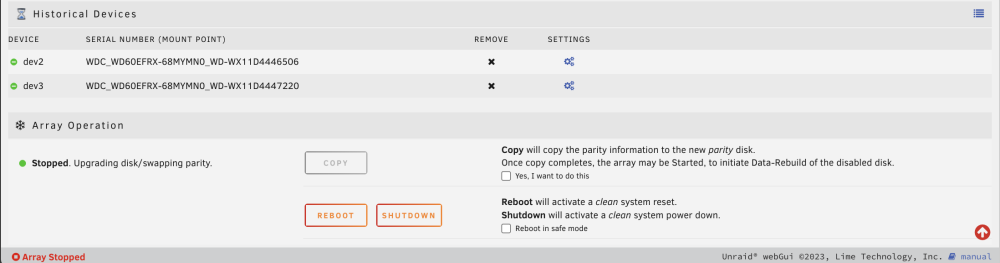
Yes, that’s another server (Cronos). I’m working on fixing that one as well. But the server that I experienced this bug on is “the Ark” ignore “Cronos” for this bug thread. on “the Ark”, I followed the docs for parity swap to add a larger new parity drive, and move the old parity drive to replace another failing drive. https://docs.unraid.net/legacy/FAQ/parity-swap-procedure/ After a ~48 hour "copy" process, I watched the copy process go from 98 to 100%. Then a couple minutes later the array updated to show "Stopped. Upgrading disk/swapping parity" which is expected according to the document. However, it does not show the "START" button. Instead, it is still presenting the "COPY" button with copy information/checkbox. (See screenshot above)
-
@trurl / @JorgeB So Sorry. I uploaded the diagnostics of the wrong Unraid Server. Here's the correct one. the-ark-diagnostics-20231217-0745.zip
-
@JorgeB it for sure was done. This is what the screen showed after it hit 100%
-
@trurl I just experienced the same. I added a new drive (sdx) to be the new parity drive and assigned me old parity (SDC) to a failed drive spot. I then waited for 2 days for the copy parity to complete but the start button doesn't show like it says in the docs, just as @carlosliu highlighted Here is my diagnostic file. cronos-diagnostics-20231216-2344.zip
-
@jrmcmillan most of what I’ve read / found online about this problem points to using a reverse tunnel like CloudFlare Tunnel, BUT CloudFlare doesn’t allow you to use media apps like Plex in their tunnel. i found another service called LocalXpose that does the same thing, but I don’t know how to set it up on UnRaid. It has a docker image, but I don’t understand how to just use a docked image on UnRaid. I typically install everything via the store and their isn’t a LocalXpose app in there.
-
@jrmcmillan I recently switched to T-Mobile Home Internet and I’m looking to solve the same problem. did Tailscale help you directly connect to Plex? I can get my Plex to connect remotely, but it’s not a “direct connection” and is limited to 480p
-
@corvo? did you find a solution to this?
-
There's prompt for an update
-
Did you get this resolved?
-
@parsec have you looked into Duplicati or rClone for this? I don't know much about either, but I'm about to look into doing the same for OneDrive Offload to Unraid.
-
@dkerlee any news on this?
-
@noski thanks! I'm definitely not an expert in this area. I decided to go the same route as everyone else and just get a DS4246 from here -> https://www.ebay.com/itm/202404952486 I assume that what you are talking about doing would work the same, but I don't know. If yours works the same as mine, I only connected 1x cable from the Disk Shelf to my Server. Works fine. And I don't use the second disk manager module at all. Doing so, as I understand it, would make my disksehlf show up as two separate drives vs 1x combined one. Still not sure if this is how I should be doing it, lol.

