





pfp
Members
-
Joined
-
Last visited
Everything posted by pfp
-
I have two Unraid servers both of which have two Supermicro AOC-SASLP-MV8 controllers (Marvell based). I’ve had these servers running for many years never seeing any issues with the controllers. While I would not buy a Marvell controller for a new server I’m left wondering if there is any reason to replace the ones I already have that seem to be working fine. It looks like the 9400-16i is available on EBay for about $100 which is not a lot but I see no sense in spending it if there is nothing gained by doing so. Is there any reason to do so if I’m not having issues with the current cards? Will these 9400’s perform any better/faster?
-
Replaced the motherboard, CPU, and RAM. No more problems.
-
I went ahead and purchased the gear and will see how the build goes. Decided to go with a little better CPU but otherwise the same MB and RAM. MB: ASRock B550 Phantom Gaming 4 AC CPU: AMD Ryzen 5 3400G RAM: G.Skill Ripjaws V Series 16GB As far as I can tell the Supermicro AOC-SASLP-MV8 HBA's should work and this will be what I try first. I'm still considering the 9305-16i or 9400-16i HBA. Of the two I prefer the 9400-16i but the ones listed on eBay are mostly Lenovo brand and not LSI. I'm a bit worried that might present a complication.
-
It's been well over a decade since I built my unRAID server and it's looking like it is in need of a replacement. Issue is I have not kept up on hardware and am very rusty on this type of thing now. The server is just a NAS and the current hardware suits my needs just fine. I don't run any dockers, VM's transcoding, etc. The current server: MB: Supermicro C2SEA CPU: Core 2 Duo E8400 RAM: 4gb Controller: 2x Supermicro AOC-SASLP-MV8 Drives: 15 Case: Norco 4224 PSU: Corsair TX750 V2 This upgrade is not something I was planning and is due to a MB that has become problematic. I have no budget for it so a primary concern is keeping the cost as low as possible. Ideally I'd also like to keep the power usage as low as possible too. I'd prefer not to go with used equipment and realize anything new will likely have far more power than I need. I'd like to keep the same case and PSU. I believe this means I need an ATX MB. I know the controller cards (Marvell) are not recommended but if I could still use them this would help keep the cost down. Here is a setup I found that I think will work. I would really appreciate any thoughts or advice on this. https://newegg.io/7a942545 MB: ASRock B550 Phantom Gaming 4 AC CPU: AMD Ryzen 3 2nd Gen with Radeon Graphics RAM: G.Skill Ripjaws V Series 16GB It's the controllers that I really don't know about. Will the current ones work on this MB? Would I be be better of replacing them with an LSI9305-16i and would this work with the MB? Thank you
-
I tried the trial dive that was not working in my server on two different desktop machines. It worked on both even with multiple reboots. This would seem to indicate that I have a problem with my server, no? I'm guessing either BIOS or motherboard or perhaps RAM / CPU? I know the BIOS is the latest version (if one can call 2012 latest) and it has not been edited in years. Is it possible that the settings just changed on its own? Any good way to track down what the culprit might be, or with the age of the MB (Supermicro C2SEA) would I be best off to just replace it? My concern here is that this very likely means replacing almost everything since the CPU and RAM won't fit in newer MB sockets and even the drive adapters (two Supermicro AOC-SASLP-MV8) may not fit in the slots available on newer MB.
-
I would agree but it seems to be the only common change when the system goes from working to not. I'm not really sure where to go from here. I think I can get the system up and running and start the array but I whenever I reboot this problem will resurface. Obviously not good but I don't know what else to do.
-
I rebuilt the same USB as in the previous try. Did not copy any files over to it and did not install any license file. I've been able to add multiple apps, users, and change settings all with multiple reboots (at least 10) and no problems. There was not much left to do without adding drives so I recovered the trial key via the UI (not directly copying the file to the USB drive). I rebooted, which did work (once) and then I added my drives and started the array. I rebooted again and this time it stopped in the same place. it should be noted that I'm using UNRADI USB Creator V1.0.1 on a Mac and I am running the make_bootable_mac script once complete and cleanly ejecting the USB drive when done.
-
I rebuilt the same USB as in the previous try. Did not copy any files over to it and did not install any license file. I've been able to add multiple apps, users, and change settings all with multiple reboots and no problems. Or even a correct trial key makes it stop too.
-
I may have been a bit premature with this post. While this was a freshly built new USB drive I did, mistakenly, copy over my license file from the old drive (config/Pro.key). I say mistakenly becuase this license file was for a different USB drive. I tried this again without copying over the license file and it started up just fine. There was no license so the array would not start but at least UNRAID was running. I didn't do anything on the system and just rebooted. It came back up just fine. I rebooted at least half a dozen times and each time it came back up fine. At this point I decided to request a trial key via the UI. It was downloaded and installed just fine. Then I rebooted again and now it stopped at the same place as all the other times. I realized that as I've been working on this every time there was failure I either copied the entire config folder over to the USB drive or I copied nothing over and added the license via link in the UI and it was after this where the system would no longer boot up. I'm not sure if this is related to the license file itself, any file being added to the USB drive, or just a big coincidence. Any ideas on what I can do next?
-
Now it stops in the same place even with a freshly built new USB drive (7.1.4)
-
The quick boot option is disabled
-
I'm a bit skeptical that this is caused by a switch in BIOS since it's been running fine with no BIOS changes for years. That being said I'm happy to check the Fastboot in BIOS when I get back home but on my SuperMicro motherboard it looks like this feature is called Quickboot. Thank you for the suggestion.
-
I've tried this with 7.1.4 and I can reboot one time. On the second reboot, even if nothing is done, it stops at the same place. I've done this twice now and got the same result both times.
-
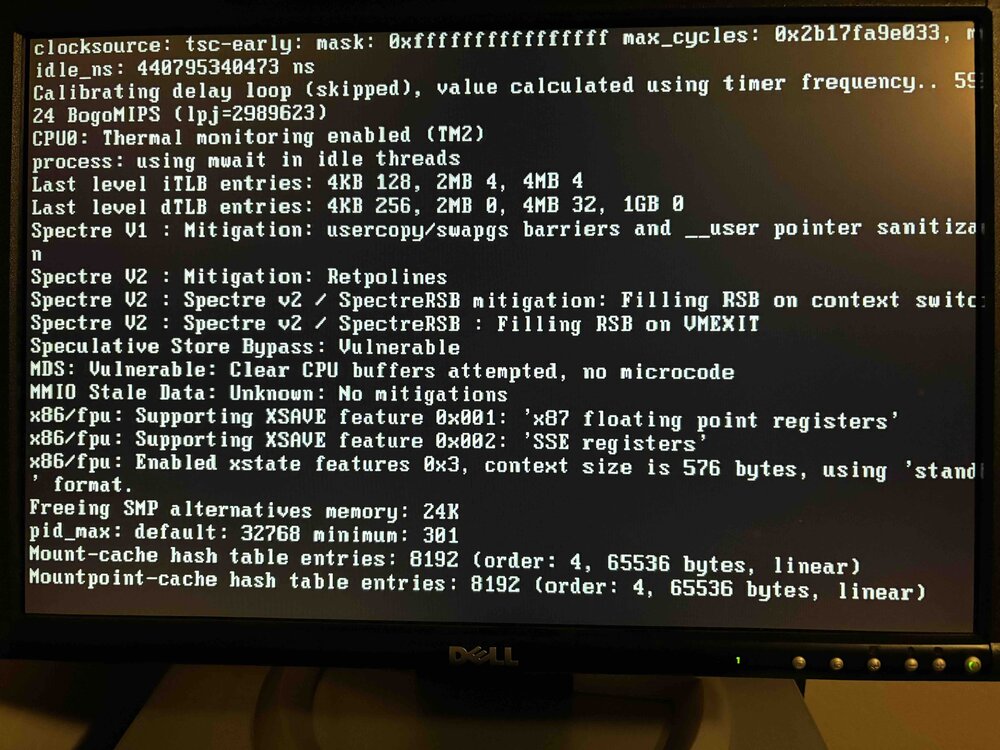
Every time I shutdown and restart my server, or just reboot, UNRAID does not come back up. During the boot process it always stops at the same place. The link at the bottom of this post is from my original report on this and the solution, at least till the next reboot. It's now happened a total of three times with three different USB drives. The two most recent USB drives are PNY, I'm not sure what the first was. I've tried plugging the drive into different USB ports but this has not helped. This started on version 6.12.14 but also happened on 6.12.15 and 7.1.4. The system always stops at the same place shown in the image below. I need some assistance figuring out what is causing this and how I can fix it for good. https://forums.unraid.net/topic/191531-power-loss-server-will-not-come-back-up/
-
My instinct told me that the flash drive was likely toast but I didn't know what files were needed when creating a new one. This was indeed the fix I needed. Thank you! There is one thing I have learned in the many years I have been using unRAID and that is to ALWAYS check here for assistance BEFORE acting on any guess of what the right solution is.
-
I lost power and my server went down. When the power came back the server restarted but unRAID never came back up. What I found is that it boots to the screen where you can choose what variation of unRAID should start and unRAID OS is the default choice. It loads /bzimage then loads /bzroot. Up till this point nothing seems abnormal. The screen clears and it almost immediately shows the image you can see linked below and never moves on. I'm fairly certain this is unRAID 6.12.14 There is no network connectivity. Any assistance on what I need to do to get this operational again would be much appreciated. Thank you
-
The script is the very last thing in the first post here: But you do have to modify it to run on 6.2. See my previous post.
-
It's the first Q&A question One thing to note is that you must make the change noted here to the Joe L preclear script for it to run on 6.2+ Run that very last bold command in a telnet session while in the same directory as the Joe L preclear script.
-
I'm attempting to preclear a couple 2tb drives and am seeing the same type of behavior. First both drives made it to the post read. On the preclear screen one drive was frozen at 26% and the other at 76%. Neither the percent nor the time was advancing any more. When I checked the Main > unassigned drives I could see that both drives were still reading. The both eventually finished but even then preclear showed them frozen. I'm not sure if it really completed or not. On a second attempt at clearing the disks one disk appeared to freeze in preclear during the preread. The other disk was looked fine and was well into the zeroing cycle. I checked the main > unassigned drives screen and the disk that preclear showed as frozen was not reading or writing. It's just a wild guess but i suspect when preclear freezes the current task finishes but any additional tasks never start. I'm not sure what to make of this. I stopped this preclear and am now trying it with the joe l script instead.
-
Thank you for the very detailed information.
-
CORSAIR Enthusiast Series TX750 V2 750W ATX12V v2.31/ EPS12V v2.92 80 PLUS BRONZE Certified Active PFC High Performance Power Supply $69.99 after code EMCNJNG29 and MIR.
-
That is when checking parity on the entire array
-
Other than checking parity it's fairly rare for more than a couple to be spinning but when they are all going one or two will top out at 41-42 and the rest will be in the high 30's.
-
I currently have an array with 16 7K2000 drives. These are 7,200RPM drives but Hitachi shows the power at 2.0 and not three like has been suggested here for faster drives (should I believe Hitachi?). I'm getting close to needing more space so I'm looking to replace the Antec case/PSU with a Norco 4224 and have every intent to max it out with 24 drives as soon as unraid supports that many. I'm waiting for the next great sale on the 5K3000 drives and am trying to figure out the power requirements for the 4224 loaded with all these drives. I'm leaning towards the CORSAIR CMPSU-750TX (http://www.newegg.com/Product/Product.aspx?Item=N82E16817139006). With a single 60A rail it seems that this should do just fine, no? Also could someone please clue me in on the difference between their normal PSU and the enthusiast line such as this: http://www.newegg.com/Product/Product.aspx?Item=N82E16817139021 It looks like it's justa $5 difference but I'd like to understand what the $5 gets you.
-
Thank you. I downloaded the newest one from the preclear thread but as it was running I thought something was off since it did not show the status in unmenu. Turns out I had the old one too and when I ran it that's the one that ran. Running it again with 1.1 now, hopefully with better results.

