





xangetzu
Members
-
Joined
-
Last visited
Everything posted by xangetzu
-
Getting this error. Following instructions in the link, says to post diagnostics. So they are attached. Can anyone advise? tower-diagnostics-20251022-1057.zip
-
Fix Common problems identified an issue "Your server has detected hardware errors. The output of mcelog has been loggeg. Post your diagnostics and ask for assistance on the Unraid forums" So I am doing just that. Any ideas? tower-diagnostics-20250610-0930.zip
-
You are correct in this assumption. The whole format changed when they added some "difficulty" control. A few things I have started to figure out. the password is now user group specific. If the game sees a password, in the old password field name it assigns it to the "default" group. But you can also create an admin, and guest group with their own password and access settings for bases, booting and banning players etc. additionally, it seems to ignore any custom settings such as Mining yield, hp adjustments etc, unless the profile is set to "custom" .. For anyone who did what I did, and wondered why Silver and Obsidian still sucked... I have not messed with creating user groups yet, and am just using the default. But yeah. That explains your password issues. There is a readme text file in the root directory for the game where some of this information can be found. The file is called enshrouded_server_readme.txt
-
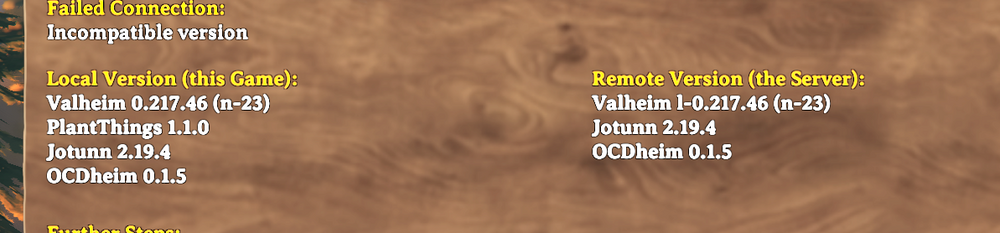
getting a weird issue where a version check is saying the server is a different version from the client. I am running modded, Tried to force update the container but for some reason its carring a 1- in front of it.. not sure that is actually what's breaking it but at this point it seems likely. Anyone got ideas?
-
My issue is identical to this. After a clean reboot, everything is fine for a while, anywhere up to a few days and then all the sudden I cannot resolve hostnames outside my local network. I can get to IP addresses fine, but hostnames are a bust. Containers work just fine through all of this. Nothing has changed in my network, and no other devices are having any DNS issues to speak of.
-
Any chance you are planning on making a container for the sequel to the forest. Son of the Forest?
-
Thanks. Answered all my questions. Yeah I fully expect mods to break upon a patch of the game. Just wasn't sure what maintenance was going to involve. Rebooting the container though, is easy enough. As far as determining which mod to enable, that's easy, V+. Thanks for clarifying that though, would have been stuck wondering why the container was not running properly lol.
-
Few Questions regarding the Valheim container. If I enable Valheim+, will that automatically update as well when releases are done? Or will I need to manually download new releases from Github for Valheim+ (Same thing for Beplnex) Thinking of the current situation where Valheim was updated, and that broke a number of mobs. I also see comments about issues when Valheim+ is enabled. It is mentioned that the mod comes with a version of Beplnex already. So should I only enable Valheim+ or should I keep them both set to true in the config for the container.
-
Trying to understand what just happend. Pushed an update to the container that popped up, and now the web UI is completely inaccessible even locally by going to my machines IP and port. Log is showing Critical: libusb_init failed after I try to restart. I will retract this because after about 5 minutes.. it suddenly started working again.. however I do not know why. I do not see any errors in the log other than random metadata errors about an unknown metadata type. so, if there is something I can provide that may illuminate what happened i would be more than happy to.
-
OK, So updating to 6.10 should be easy enough and it looks like they are up to 6.10.0-rc4 now in the "next" branch. I will definitely give that a shot. I will also need to enable NFS4 support on the Synology if I am going to go down this route. As far as potential network issues. Being that this NAS is old I am considering replacing it anyway. I am wondering if this is a sign of ware on that end? I have noticed some cases where windows will open a directory slowly or hang for a moment copying data. I have always attributed that to a Windows 11 thing but perhaps it is the same thing happening and just presenting itself a different way in how I see it occurring.
-
Looked in the syslog file. Timestamp of 7:50ish is where I see an error. And then you can see where I unmounted and remounted the drive. tower-diagnostics-20220323-1118.zip
-
Not sure what kind of log you would need to troubleshoot this. However, I notice several times a week, sometimes within hours, a NAS share that I have mapped losses connectivity in Unraid causing all sorts of problems for the containers that make use of this mapping. The NAS in question is a Synology DS1813+. I have it mapped as an NFS share. Generally my plex users will notice that suddenly they are unable to play back content and when I investigate I see in Unraid that I can no longer even browse the share and am forced to either reboot the unraid machine or unmount and remount the NFS share and then restart all the containers that have access to it. During this time, the NAS does not lose connection to anything else on the network. I access via SMB on my windows machines, and it maintains its connection to another remote NAS for ShareSync as well as a cloud provider for CloudSync. Originally I had the NAS mapped via SMB but had this same problem only more frequently and looking around I found another user suggestion NFS would work better which it seemed to for a time but now I am seeing the issue again. What logs if any would allow me to figure out what is happening here?


