BreakfastPurrito
Members
-
Joined
Everything posted by BreakfastPurrito
-
I don't know if I'm in the right place, but I have a question about luckybackup. Is there a way to make it delete files first in a backup task instead of at the end of it? I keep running into the problem that my backup drive runs out of space. Both the backup drive and array are the same size, but it keeps overflowing because it only deletes files at the end of the task.
-
Omg it works! Thanks so much!
-
I have no idea how to do that. Is there a tutorial somewhere?
-
The thing is, I only have this problem with Transmission. Every other service I can connect to through my VPN.
-
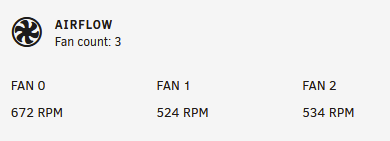
Is there a way to label these fans anything other than Fan X? I want to label them something like Case Fan, CPU Fan, etc.
-
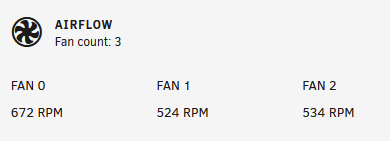
I would like to label these fans to something like CPU Fan, Case Fan, etc. How do I do that? I tried searching this forum but couldn't find anything.
-
WHITELIST: 192.168.1.207,192.168.1.205,192.168.1.211,10.8.0.3 The first 3 work, the last one does not.
-
Yeah all my other services work fine, but Transmission returns the message that I'm not on the whitelist, even though the IP is correct.
-
Isn't that for if you want transmission to use a VPN? I want to tunnel into my network and just checkup on my downloads.
-
I have set up transmission to use an IP whitelist and with internal IP addresses it works fine; 192.168.x.x etc. However when I connect with a VPN it won't let me access it. Wireguard gives me a 10.0.x.x address, and if I add that to the whitelist it still blocks me. Does this mean I don't actually have a 10.0.x.x address or am I doing something wrong?
-
I have set up transmission to use an IP whitelist and with internal IP addresses it works fine; 192.168.x.x etc. However when I connect with a VPN it won't let me access it. Wireguard gives me a 10.0.x.x address, and if I add that to the whitelist it still blocks me. Does this mean I don't actually have a 10.0.x.x address or am I doing something wrong?
-
I have set up transmission to use an IP whitelist and with internal IP addresses it works fine; 192.168.x.x etc. However when I connect with a VPN it won't let me access it. Wireguard gives me a 10.0.x.x address, and if I add that to the whitelist it still blocks me. Is this a known issue or am I doing something wrong?
-
I just installed Netdata, and I see there is a netfilter/firewall tab. Does that mean I can install a firewall on unraid somehow?
-
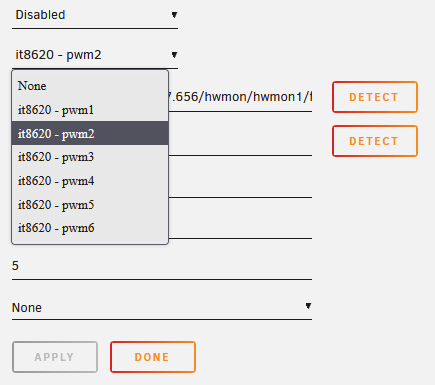
I have an ASUS Prime X370 Pro and I'm having trouble with the fan control. There are six fan headers on the board and only two are detected. I ran sensors-detect and got this: When running the command 'modprobe IT87' it does detect the CPU and MB temps correctly, and recognizes two of the fans, which I can also control. So what about the other four fans? When I go to the fan control settings it seems to recognize that there are indeed six fan headers: However, if I try to detect PWM3-6 I get this error: I'm stumped.
-
I'm really hoping it isn't.
-
Thank's for the tip, but it's connected to a Cyberpower 1500W sine wave UPS.
-
I am trying to fix a problem that's been plaguing my Unraid box for months now. It randomly shuts off. Not shuts down, just cuts power and shuts off. And I can't seem to fix it. It has so far already destroyed one hard drive and it starting to cost me real money. I have tried: - Different versions of Unraid - Different versions of drivers - Replacing the PSU - Replacing the GPU - Different versions of plex, home assistant or any other containers I'm running. I also can't find anything in the logs. For example, yesterday night it cut power somewhere after 6:26 and me powering it on at 10:13: Has anyone else experienced this problem? What can I do to fix it?
-
Alright thanks for all your help (and patience :P)!
-
I've changed the name to Seagate_Backup_6TB, ran luckybackup as root and the backup seems to be working fine now. I also tried chmod and that seems to have done the trick. Haven't tried chown yet, is that still necessary?
-
I am trying to secure Plex. I've made a user in Unraid that only has access to the media and appdata folders, and set the UID to that user in the Docker container settings. However, I can still access the folders in Plex that should now be restricted to that user. What am I doing wrong?
-
I am not. Is that necessary? It says "This is only needed if you want to create backups from your /boot drive or other directories that require root privileges". I'm not creating a backup of my boot drive to my knowledge. I also can't access the XFS formatted drive through SMB.
-
I have edited that setting and now I have a new error: Looks like I can't access my newly formatted drive. Why?

-
I am running Transmission and Plex in docker containers, and I would like to make sure Plex always has priority over Transmission. Is there a way to accomplish this?
-
I have indeed mounted it through Unassigned Devices. Where do I select read/write slave? Should that be on or off?
-
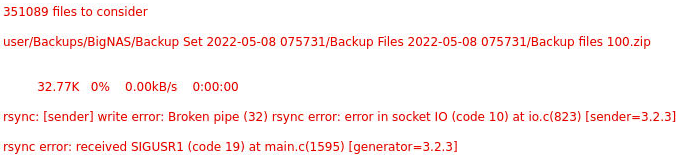
Ok I formatted the drive in XFS, but now I get this error: I made a screenshot because luckybackup won't copy paste the text.