





BreakfastPurrito
Members
-
Joined
Everything posted by BreakfastPurrito
-
Recently my instance of SearXNG stopped working. Every time it does a search, it changes the user to 977:977, which makes it impossible for SearXNG to access the files in the appdata folder. When I change it back to 99:100 I can do exactly one succesful search before it changes itself back to 977:977 again and it's unable to search. Someone suggested adding --user 977:977 to extra parameters of the docker container. I did, and now my docker container has disappeared. I can't even find it with Portainer. What is going on? How do I get my container back? And how can I make it function again without constantly switching users to 977?
-
What filesystem should I be reformatting? Just the cache or the array as well?
-
This is the output from the GUI: Scrub started: Sat May 23 22:14:24 2026 Status: aborted Duration: 0:06:14 Total to scrub: 2.71TiB Rate: 4.08GiB/s Error summary: no errors foundFollowed in the logs by: May 23 22:20:32 BigNAS kernel: BTRFS critical (device nvme0n1p1): unable to find chunk map for logical 6180170305658470400 length 16384 May 23 22:20:32 BigNAS kernel: BTRFS critical (device nvme0n1p1): unable to find chunk map for logical 6180170305658470400 length 16384 May 23 22:20:32 BigNAS kernel: BTRFS info (device nvme0n1p1): scrub: not finished on devid 4 with status: -5 May 23 22:20:38 BigNAS kernel: BTRFS critical (device nvme0n1p1): unable to find chunk map for logical 6180170305658470400 length 16384 May 23 22:20:38 BigNAS kernel: BTRFS critical (device nvme0n1p1): unable to find chunk map for logical 6180170305658470400 length 16384 May 23 22:20:38 BigNAS kernel: BTRFS info (device nvme0n1p1): scrub: not finished on devid 3 with status: -5
-
I have been pulling my hair out of my head over this for years now. For as long as Unraid has had a built-in VPN client, I have tried to use it. It has never worked properly for longer than a day. I am trying to use it on both a iphone and a laptop. Sometimes it works on the phone, then the next day it doesn't. Sometimes it works on the laptop, sometimes it doesn't. Things I've tried: reinstalling the app on my phone or my laptop removing all tunnels from unraid and starting from scratch changing any and all settings, in any combination. trying 0.0.0.0/0 as allowed IPs setting different IPs, different access modes, different devices, different networks, etc. letting my router do the NAT or not I've had it running reliably for a while on my laptop. Then I decided to try if I could get it running again on my phone. I deleted the tunnel, started over and then it worked on my phone for a few days and I could not get it running on my laptop again WITH THE EXACT SAME SETTINGS AS BEFORE I DELETED THE TUNNEL. Today I woke up and neither my phone nor my laptop complete a handshake anymore. This has been like this through any and all versions of Unraid. I'm so done with this. I just want it to work reliably with no fuss. How is it being this obtuse?
-
I ran Memtest86 and it passed with no errors.
-
I tried both solutions in this thread, neither work for me. I'm getting the exact same error: Error: EACCES: permission denied, open '/data/logs/redisinsight-errors-2026-05-21.log.0' Emitted 'error' event on FileStreamRotator instance at: at WriteStream.<anonymous> (/usr/src/app/redisinsight/api/node_modules/file-stream-rotator/lib/FileStreamRotator.js:177:45) at WriteStream.emit (node:events:519:28) at emitErrorNT (node:internal/streams/destroy:170:8) at emitErrorCloseNT (node:internal/streams/destroy:129:3) at process.processTicksAndRejections (node:internal/process/task_queues:90:21) { errno: -13, code: 'EACCES', syscall: 'open', path: '/data/logs/redisinsight-errors-2026-05-21.log.0' } Node.js v22.22.0
-
Is there a way I can change the default layout? I have a layout I like, but every time I open it in a new browser or new computer I have to spend a while setting up my preferred layout. It would be nice if I could just change the default on the server side.
-
After updating from 7.2.1 to 7.3.0 I get this message concerning my cache pool: Id Path Write errors Read errors Flush errors Corruption errors Generation errors -- -------------- ------------ ----------- ------------ ----------------- ----------------- 3 /dev/nvme0n1p1 0 0 0 255 0 4 /dev/nvme1n1p1 0 0 0 255 0I have been trying to find out what the specific errors are, but I can't find them anywhere. I would like to know which specific files or data is affected. Both devices successfully complete an extended SMART self test. But when I do a scrub, it aborts with these errors: May 18 18:01:52 BigNAS kernel: BTRFS critical (device nvme0n1p1): unable to find chunk map for logical 6180170305658470400 length 16384 May 18 18:01:52 BigNAS kernel: BTRFS critical (device nvme0n1p1): unable to find chunk map for logical 6180170305658470400 length 16384 May 18 18:01:52 BigNAS kernel: BTRFS info (device nvme0n1p1): scrub: not finished on devid 4 with status: -5 May 18 18:02:03 BigNAS kernel: BTRFS critical (device nvme0n1p1): unable to find chunk map for logical 6180170305658470400 length 16384 May 18 18:02:03 BigNAS kernel: BTRFS critical (device nvme0n1p1): unable to find chunk map for logical 6180170305658470400 length 16384 May 18 18:02:03 BigNAS kernel: BTRFS info (device nvme0n1p1): scrub: not finished on devid 3 with status: -5What can I do about this? And how do I get more detailed information? Edit: I've added the diagnostics. NAS-diagnostics-20260521-0909.zip
-
Looking at your screenshot, I see what I did wrong. I added the runtime=nvidia and gpus=all as variables instead of putting them under Extra Parameters. I changed it and it works!
-
I can't get my Nvidia GPU to be detected. The drivers are installed correctly though, because I can see the temps display correctly on the unraid dashboard. I've tried adding --gpus=all and --runtime=nvidia, but no dice. I'm running in privileged mode and can see and control other devices just fine. This is what I get in the logs: [2026-04-20T18:06:25Z INFO coolercontrold] Super-I/O hardware detection disabled by environment variable [2026-04-20T18:06:25Z INFO coolercontrold] Initializing Devices... [2026-04-20T18:06:25Z INFO coolercontrold] Liquidctl Integration is Disabled [2026-04-20T18:06:25Z INFO coolercontrold::repositories::service_plugin::service_plugin_repo] Initialized Service Plugin Devices: {} [2026-04-20T18:06:25Z INFO coolercontrold::repositories::gpu::gpu_repo] Initialized GPU Devices: {} [2026-04-20T18:06:25Z INFO coolercontrold::repositories::hwmon::devices] Could not read PCI ID database: pci.ids database not found at any known path, device name information will be limited
-
Thanks for the making the extractor. It's really handy. :) Is it possible for the extractor to remember the directory I extracted from last? Or to set a default directory? I'm usually extracting multiple files from my downloads folder and right now I have to start at / every time.
-
Is there a way to set a layout in a json file? I would like to have the same column-layout in every browser window. Right now I have to set that separately on every device.
-
Great plugin! Is there a way to set the default folder to something specific? I'd like to set it to my downloads folder.
-
Same behaviour. The docker terminal, -logvier, unraid terminal and -logviewer all behave the same.
-
I just tried it again in Windows and it doesn't happen there anymore. It still happens in Linux though. So I'm assuming this isn't a fault with Unraid but with my Linux OS? I've only been using Linux for a few weeks, so maybe it's something super obvious I've missed?
-
I understand that, but shouldn't I periodically check to see if any of the data on the backup has degraded? I remember with Synology Backup I had a task setup to periodically check the backup integrity.
-
I have no idea if this is the right place, but here goes. I'm using luckybackup and I just realised I've never run a backup verification. In other programs I always had to do that. I looked in the GUI and there's no such option. It's also not mentioned on the website of luckybackup or in the manual. Is it not a thing with luckybackup?
-
Since upgrading to 7.2.0 I have a peculiar problem. The font in the terminal window has become so large that I can't read the text anymore: Things I've tried: Another browser. Same thing. Another OS. Windows, Linux: makes no difference. Setting the font size for the terminal to small in Unraid. No change. Making the window bigger shows no more text. I just get more black screen. It happens in terminal windows for logs, docker containers and unraid itself. "Ctrl -" This makes the text in the terminal window smaller, but also makes the who GUI for Unraid smaller. I just want the terminal to be normal again. It doesn't happen when I SSH into Unraid from another computer with a local terminal. Anyone have any ideas?
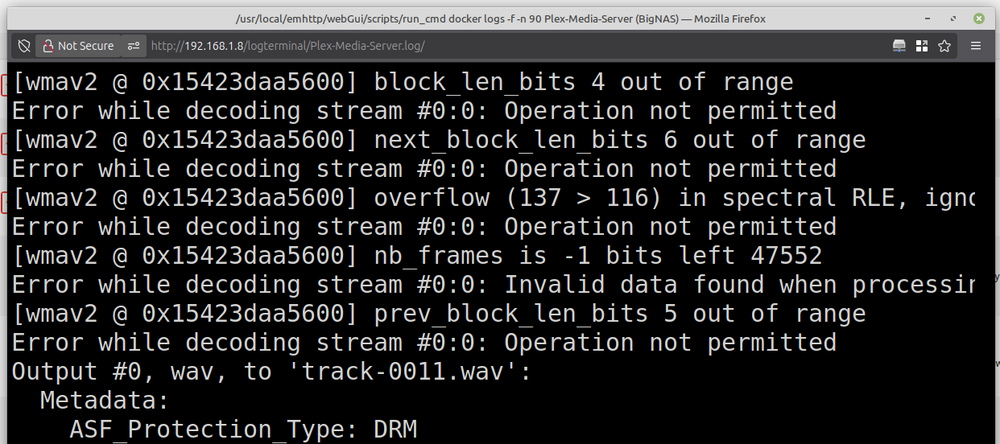
-
That one works fine. I meant all the other plugins from the OpenRGB website. I'll give it a try. Is it very different from the xml file I was using before? I'm on Unraid 7.2.0 btw. Yes. As long as I pass them through manually, I don't have problems making the devices show up. The plugins just don't work or even crash OpenRGB. I have not. Do you have a link?
-
I've tried every possible version of every plugin. None of them work.
-
I find that even with privileged flag and root user I need to pass through devices manually. OpenRGB got out of its bootloop/panic when I removed the Scheduler plugin. I'll leave that one for now. But Hardwaresync doesn't show up as an installed plugin at all? It's def in the plugin folder.
-
60-openrgb.rules The end goal is that I want to use an RGB fan connected to a Corsair Lighting Node to change colour depending on the CPU utilisation. In order to do that I need to accomplish two things: 1) I need the udev warning to go away. 2) I need to get the OpenRGB docker to accept plugins. It should, but it doesn't. However I'm focussing on the udev rules first. I have added the modprobe i2c lines This is one of the images I tried, to no avail. I have added the modprobe lines to the go-file. My motherboard shows up, but no devices. 60-openrgb.rules has been added to the correct directories. The diag.zip is quite large. Any specific part you are interested in? I followed the github info. I am on an AMD board: Asus Prime X370-Pro
-
After discussing the problem in this topic, I am making a new topic here. I am trying to get a docker container of OpenRGB to work and I'm running into some issues: it keeps giving me a warning that there are no udev rules installed for it. Things I've tried: Manually putting 60-openrgb.rules in the correct folders: /boot/config/udev/ and /etc/udev/rules.d We thought it might be because the rules are applied before docker is loaded, so I tried changing 60-openrgb.rules to 98-openrgb.rules to have it load later. That didn't help either. Manually reloading the udev rules after everything finished booting didn't help either using: udevadm control --reload-rules && udevadm trigger Trying another docker container. I've tried three, all of them give the same error: https://github.com/cajuncoding/OpenRGB-GUI-Unraid https://github.com/P3R-CO/openrgb-container https://github.com/swensorm/openrgb-docker Updating Unraid: 6.x.x, 7.1.4 and 7.2.0 all have the same problem. I'm currently running Unraid version 7.2.0 with all relevant containers up to date. I'm running linux on my desktop as well (Mint 22) and the error got solved immediately by adding 60-openrgb.rules to the correct folder. So I am surprised Unraid is giving me trouble. Anyone have any ideas?
-
Thanks man! This is so much smoother than what I was trying to bodge together. Question: do I still need to manually pass through i2c and hidraw devices? Also I seem to be having trouble with the udev rules. Even though they are in the correct directory. I've started a separate topic about it here too: https://forums.unraid.net/topic/194671-udev-rules-dont-work-for-me/ Edit: another question, my OpenRGB container seems to crash after I tried adding plugins to it. I just get this ad inifitum: [supervisor ] service 'app' exited (got signal SIGABRT). [supervisor ] restarting service 'app'. [supervisor ] starting service 'app'... [app ] 2025-10-31 20:23:44 [init-openrgb-plugins] Starting plugin initialization... [app ] 2025-10-31 20:23:44 [init-openrgb-plugins] Detected 1 plugin(s) to check. [app ] 2025-10-31 20:23:44 [init-openrgb-plugins] ⏩ Skipped (already present): OpenRGBEffectsPlugin_0.9_Bookworm_64_f1411e1.so [app ] 2025-10-31 20:23:44 [init-openrgb-plugins] All plugin checks complete. [app ] 2025-10-31 20:23:44 [init-openrgb-plugins] Summary: 0 installed, 1 skipped, 0 failed. [app ] 2025-10-31 20:23:44 [init-openrgb-plugins] ✅ Plugin initialization complete. [app ] Running standalone. [app ] Network connection thread started on port 6742 [app ] QApplication: invalid style override 'Adwaita-Dark' passed, ignoring it. [app ] Available styles: Windows, Fusion [app ] [OpenRGBEffectsPlugin] version 0.9 (f1411e178a0024e3da8d178bbd0f0b60425e35fd), build date 2023-07-11 14:10:26 +0200 [app ] [OpenRGBEffectsPlugin] 53 effects registered [app ] <h2>WARNING:</h2><p>The OpenRGB udev rules are not installed.</p><p>Most devices will not be available unless running OpenRGB as root.</p><p>If using AppImage, Flatpak, or self-compiled versions of OpenRGB you must install the udev rules manually</p><p>See <a href='https://openrgb.org/udev'>https://openrgb.org/udev</a> to install the udev rules manually</p> [app ] [OpenRGBSchedulerPlugin] Loading plugin API version. [app ] [OpenRGBSchedulerPlugin] Loading plugin info. [app ] [OpenRGBSchedulerPlugin] Time to free some memory. [app ] [OpenRGBSchedulerPlugin] Loading plugin API version. [app ] [OpenRGBSchedulerPlugin] Loading plugin. [app ] [OpenRGBSchedulerPlugin] Creating widget. [app ] [OpenRGBSchedulerPlugin] Creating tray menu. [app ] terminate called after throwing an instance of 'std::bad_alloc' [app ] what(): std::bad_alloc [supervisor ] service 'app' exited (got signal SIGABRT). [supervisor ] restarting service 'app'. [supervisor ] starting service 'app'... [app ] 2025-10-31 20:23:47 [init-openrgb-plugins] Starting plugin initialization... [app ] 2025-10-31 20:23:47 [init-openrgb-plugins] Detected 1 plugin(s) to check. [app ] 2025-10-31 20:23:47 [init-openrgb-plugins] ⏩ Skipped (already present): OpenRGBEffectsPlugin_0.9_Bookworm_64_f1411e1.so [app ] 2025-10-31 20:23:47 [init-openrgb-plugins] All plugin checks complete. [app ] 2025-10-31 20:23:47 [init-openrgb-plugins] Summary: 0 installed, 1 skipped, 0 failed. [app ] 2025-10-31 20:23:47 [init-openrgb-plugins] ✅ Plugin initialization complete. [app ] Running standalone. [app ] Network connection thread started on port 6742 [app ] QApplication: invalid style override 'Adwaita-Dark' passed, ignoring it. [app ] Available styles: Windows, Fusion [app ] [OpenRGBEffectsPlugin] version 0.9 (f1411e178a0024e3da8d178bbd0f0b60425e35fd), build date 2023-07-11 14:10:26 +0200 [app ] [OpenRGBEffectsPlugin] 53 effects registered [app ] <h2>WARNING:</h2><p>The OpenRGB udev rules are not installed.</p><p>Most devices will not be available unless running OpenRGB as root.</p><p>If using AppImage, Flatpak, or self-compiled versions of OpenRGB you must install the udev rules manually</p><p>See <a href='https://openrgb.org/udev'>https://openrgb.org/udev</a> to install the udev rules manually</p> [app ] [OpenRGBSchedulerPlugin] Loading plugin API version. [app ] [OpenRGBSchedulerPlugin] Loading plugin info. [app ] [OpenRGBSchedulerPlugin] Time to free some memory. [app ] [OpenRGBSchedulerPlugin] Loading plugin API version. [app ] [OpenRGBSchedulerPlugin] Loading plugin. [app ] [OpenRGBSchedulerPlugin] Creating widget. [app ] [OpenRGBSchedulerPlugin] Creating tray menu. [app ] terminate called after throwing an instance of 'std::bad_alloc' [app ] what(): std::bad_alloc [supervisor ] service 'app' exited (got signal SIGABRT). [supervisor ] restarting service 'app'. [supervisor ] starting service 'app'... [app ] 2025-10-31 20:23:50 [init-openrgb-plugins] Starting plugin initialization... [app ] 2025-10-31 20:23:50 [init-openrgb-plugins] Detected 1 plugin(s) to check. [app ] 2025-10-31 20:23:50 [init-openrgb-plugins] ⏩ Skipped (already present): OpenRGBEffectsPlugin_0.9_Bookworm_64_f1411e1.so [app ] 2025-10-31 20:23:50 [init-openrgb-plugins] All plugin checks complete. [app ] 2025-10-31 20:23:50 [init-openrgb-plugins] Summary: 0 installed, 1 skipped, 0 failed. [app ] 2025-10-31 20:23:50 [init-openrgb-plugins] ✅ Plugin initialization complete. [app ] Running standalone. [app ] Network connection thread started on port 6742 [app ] QApplication: invalid style override 'Adwaita-Dark' passed, ignoring it. [app ] Available styles: Windows, Fusion [app ] [OpenRGBEffectsPlugin] version 0.9 (f1411e178a0024e3da8d178bbd0f0b60425e35fd), build date 2023-07-11 14:10:26 +0200 [app ] [OpenRGBEffectsPlugin] 53 effects registered [app ] <h2>WARNING:</h2><p>The OpenRGB udev rules are not installed.</p><p>Most devices will not be available unless running OpenRGB as root.</p><p>If using AppImage, Flatpak, or self-compiled versions of OpenRGB you must install the udev rules manually</p><p>See <a href='https://openrgb.org/udev'>https://openrgb.org/udev</a> to install the udev rules manually</p> [app ] [OpenRGBSchedulerPlugin] Loading plugin API version. [app ] [OpenRGBSchedulerPlugin] Loading plugin info. [app ] [OpenRGBSchedulerPlugin] Time to free some memory. [app ] [OpenRGBSchedulerPlugin] Loading plugin API version. [app ] [OpenRGBSchedulerPlugin] Loading plugin. [app ] [OpenRGBSchedulerPlugin] Creating widget. [app ] [OpenRGBSchedulerPlugin] Creating tray menu. [app ] terminate called after throwing an instance of 'std::bad_alloc' [app ] what(): std::bad_alloc [supervisor ] service 'app' exited (got signal SIGABRT). [supervisor ] restarting service 'app'. [supervisor ] starting service 'app'... I tried removing the plugin, but that didn't seem to help.
-
Thanks for the explanation. I'm trying to get the udev rules for my OpenRGB container working. I just installed 7.2.0 that got released yesterday, which is able to handle custom udev rules. I followed the instructions and made the folder /boot/config/udev/ and put 60-openrgb.rules in it. I find that it indeed does put the 60-openrgb.rules file in /etc/udev/rules.d/, but for some reason the OpenRGB container still complains that there are no udev rules?


