





gfjardim
Community Developer
-
Joined
-
Last visited
Everything posted by gfjardim
-
The plugin is fully functional; there were problems during Unraid 6.8.1 update because the plugin wasn't updated for it, but it's working right now.
-
You added a preclearing drive to your array. Jan 11 15:25:12 - the existing plugin is installed. Jan 11 15:47:33 - start a preclear session to disk 2EG35HVJ Jan 11 15:47:47 - start a preclear session to disk 2EG3E52J Jan 11 15:47:55 - stopped the preclear session of disk 2EG35HVJ Jan 11 15:48:02 - stopped the preclear session of disk 2EG3E52J Jan 11 15:48:44 - installed plugin version 2020.01.11a Jan 11 15:49:11 - start a new preclear session to disk 2EG35HVJ Jan 11 15:49:20 - start a new preclear session to disk 2EG3E52J Jan 12 05:30:42 - you added a disk to the array, apparently 2EG35HVJ. At that moment the disk was between zero writing and MBR writing, and after that it began to post-read at 05:32:39. I see no more activity after that. You can see what's happening in the background by typing preclear at the web terminal.
-
To proper handle unsupported status, I'm thinking in display a message in the webui and disable the plugin functionality until proper support. What do you guys think?
-
Sometimes Limetech uses stripped versions of packages, for an example, ncurses doesn't have the correct terminal library (screen) for tmux, so or I change the terminal type or I overwrite the stock package. Libevent too. I've become strict about Unraid versioning because of these stock packages, but I'll implement a better way of dealing with those incompatibilities. By the way, 6.8.1 support is implemented.
-
Please note that every mounted device is exported there, even ISO or SMB shares. Since I didn't know your plans to integrate both plugins, I exported everything so you can choose which mountpoints you include in unBALANCE.
-
I've added a code to UD to export mounted devices information at /var/state/unassigned.devices/unassigned.devices.json . Will be available on the next UD update, I hope.
-
I have to create it. Which information you need there?
-
You were running script version 1.0.5 when your preclear failed. There were important bugfixes in the 1.0.6 version of the script, which you are running right now on another 10TB hard drive.
-
Post your diagnostics file, please.
-
Please update your plugin.
-
If you need some help, maybe a json or ini file pointing which disks are currently mounted by UD, I can help with that.
-
Thanks Dan for the heads up! I'll take a look soon!
-
Nothing strange on your logs, but I've experienced some slowness on some USB derives before. Which speeds are you seeing on those writes?
-
Please send your diagnostics log.
-
Usually you can do that unless there's a bug in the resume mechanism itself. With the last 2 updates it should be fine - in fact, just the first was a bugfix, the other corrected some information exported to the logs.
-
-
Ok, guys, @HeyBurt is right, apparently the formatting part got right but the verification doesn't. I've just updated the plugin to try to solve this. I've added more debug verbosity to help me fix it in case this update doesn't address the issue. For those that want to test it, there's a small trick to limit the preclear routine to the first 4Gib of the drive. In <server name> > Tools > Preclear, hit Help in the menu bar, than click Start preclear. In the dialog, at the bottom, you have to select Enable Testing (just for debugging). This will limit all read/write routines to the first 4Gib, and as the name say, speed up the debugging process. If it's successful, I still recommend a normal/full pass, even if the disk has been zeroed before. In case of issues with the new version, please send me the logs.
-
Guys, I'll take a look soon!
-
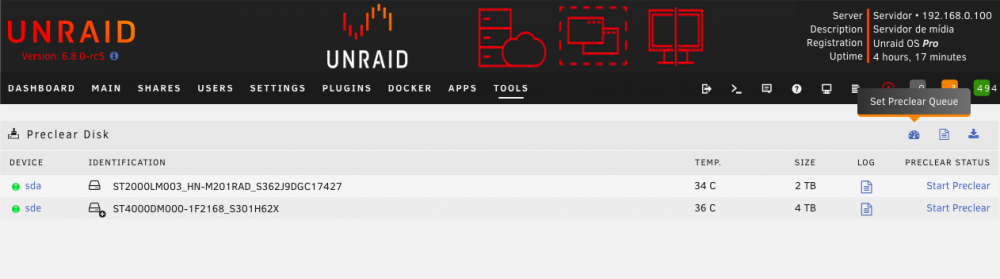
It's the fastest way, yes. You can start as many as you like and let the Preclear Queue handle it for you. Go to Server>Tools>Preclear and set the Queue Limit by pressing the correlated icon:
-
Hi, thanks for reporting here. Can you please send me the log files (please see the main OP).
-
Those syslog errors in the end of the preclear log are historical and are included there so the user can see what happened before, during and after the preclear session to the drive. It's possible that a media read/write error can be recovered by the drive's firmware and therefore won't impact the preclear operation, but it's always nice to see what happened. About the SMART info there, it's collected the last values and then exported to the log. Hope this helps.
-
Yep, saw those, but users failed to send proper logs. Maybe redirect logging to syslog could be a way to avoid this. I'm preclearing two drives right now on 6.8-rc4, let's see if I find some of those errors. PS. It's nice to be back, thanks!
-
Guys, I'm sorry I've been missing these past months, but if there are any problems to the plugin, please let me know as I have a few days of vacation left. Thanks.
-
Think I fixed your issue. Please try now.
-
Can you please send a screenshot of the missing icons?


