





gfjardim
Community Developer
-
Joined
-
Last visited
Everything posted by gfjardim
-
Please update your plugins and send me the Preclear Disk logs as shown below.
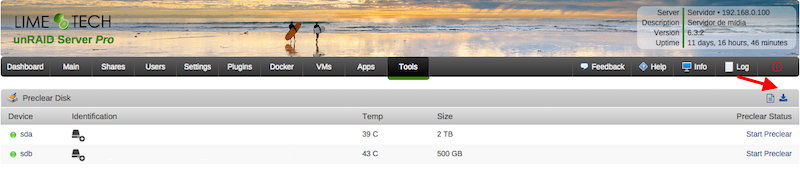
-
That's right. Which disk are you having problems with?
-
-
Fixed.
-
Will send you a MP.
-
[emoji106] Enviado de meu SM-G955F usando Tapatalk
-
It's an easy fix, will release it in the next 5 minutes. Thanks for reporting it.
-
Yep, seems so. Could you please send me the result of this command? php -v
-
Please follow the instructions above and send here the zip file.
-
I'm saying that because of the new diskinfo daemon; it's not tested for nvme support. Will MP you about this.
-
The NVME drive isn't handled by UD, right? Enviado de meu SM-G930F usando Tapatalk
-
Microsoft Azure probably.
-
Have you any Windows VM?
-
According to Help (toggle help on the Menu bar): net - hostname:port. Hostname is the IP address of the NIS server. The deafult port is 3551 So you have to put the port in front of the host ip.
-
You're quite welcome!
-
Maybe the installation script got too big. I've just split the script in two on version 2017.06.23b. Please update it again to see if it works now.
-
Probably not related to this plugin. Please open the page in another browser to confirm the bug.
-
Guys, to start I need a copy of your plugin logs and, if possible, the contents of /tmp/.preclear directory. Thanks a lot for your replies.
-
Any webui locks?
-
I've made some changes in the code. If you can, please cancel this preclear instance, upgrade the plugin and start a new one. Thanks a lot!
-
1) Just figured it is a much more complicated problem to deal. Sometimes dd saturates the disk's I/O to such a point where a simple S.M.A.R.T probing is taking as much as 1 minute to complete, and if multiple probings are launched at the same time, this period increases dramatically. I'll have to think in a workaround to this problem, since it envolves emhttp and Unassigned Devices too. 2) Already thought about that and it's in my TODO list; 3) I would prefer users to be alerted by any issues, but I'll think about it. Thanks a lot for your reply and your kind words!
-
Still having the issue, @aptalca? I could use your help to debug it.
-
The 2017.03.31 version removed the "Install Statistics" prompt every new update. A minor changes in code were made too, but no bugfixes.
-
Guys, I was too busy these last two months that I couldn't even read this topic. I see many are having troubles with my script, but I need sometime to compile all info to see if I can reproduce all the bugs. If someone could help me compiling all relevant info, I'll gladly appreciate. I need someone to share the development with me too. Those interested please send me a PM.
-
I took a look into the statistics spreadsheet for HGST 8TB hard drives. One of the benefits of having a statistics system
