





EdgarWallace
Members
-
Joined
-
Last visited
-
I just wanted to let you know what caused the problem. With a little help from the AI, I was able to pinpoint the error, and after deleting the parity-checks.log file, I found that the WebUI was working again.
-
A reboot solved the issue with the GUI. Restarted VM and Docker engine and everything is running well again. Again, thanks to all of you.
-
It might just be a display issue. I copied 2 out of 3 datasets (appdata and domains), and the subsequent check appears to show a 100 % match in the data. I'll be away for a bit, and I'll reboot the server tonight after the copies are complete and the data has been verified, and then I'll get back to you.
-
Here you are: tower-diagnostics-20260912-1150.zip
-
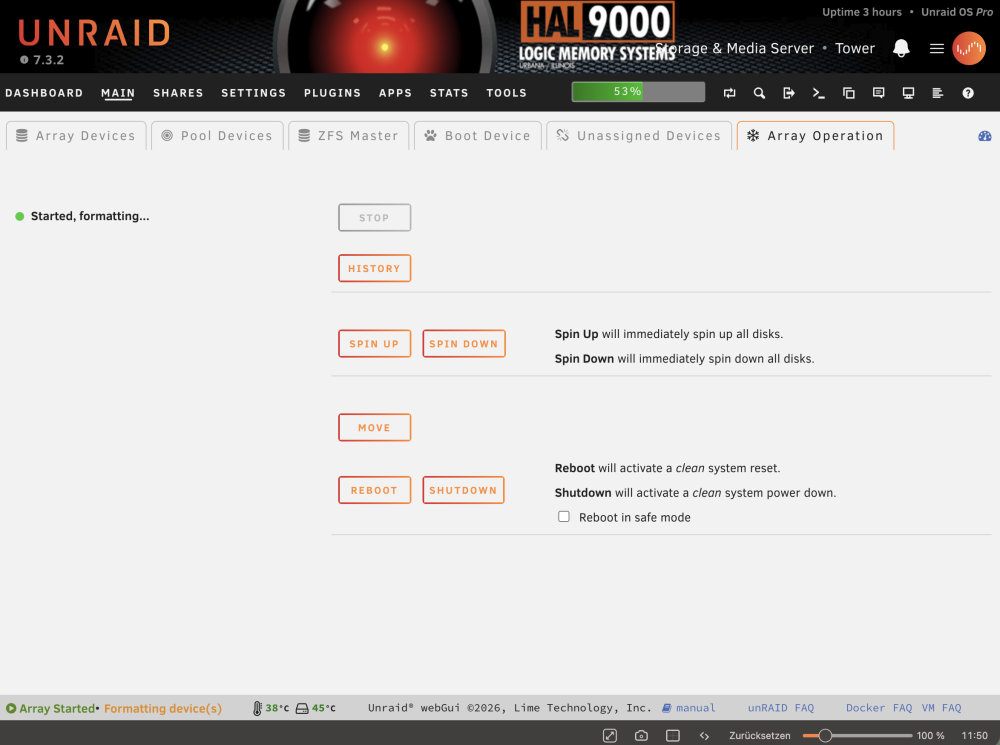
In the footer as well as on the main screen. Yes I refreshed the page and was trying a different browser. No change.
-
Thanks to all of you @itimpi @JorgeB @MowMdown I am going to recreate the pool with the backup that I am having. Remaining issue is the the message "Started, formatting..." is not going away. zfs pool status pool: cache state: ONLINE config: NAME STATE READ WRITE CKSUM cache ONLINE 0 0 0 mirror-0 ONLINE 0 0 0 /dev/nvme0n1p1 ONLINE 0 0 0 /dev/nvme1n1p1 ONLINE 0 0 0 errors: No known data errors zfs pool information NAME SIZE ALLOC FREE CKPOINT EXPANDSZ FRAG CAP DEDUP HEALTH ALTROOT cache 1.81T 1.95M 1.81T - - 0% 0% 1.00x ONLINE - mirror-0 1.81T 1.95M 1.81T - - 0% 0.00% - ONLINE - nvme0n1p1 1.82T - - - - - - - ONLINE - nvme1n1p1 1.82T - - - - - - - ONLINE - tower-diagnostics-20260912-1054.zip
-
root@Tower:~# zpool import pool: cache id: 16121631689107972322 state: UNAVAIL status: One or more devices contains corrupted data. action: The pool cannot be imported due to damaged devices or data. see: https://openzfs.github.io/openzfs-docs/msg/ZFS-8000-5E config: cache UNAVAIL insufficient replicas mirror-0 ONLINE nvme0n1p1 ONLINE nvme1n1p1 ONLINE mirror-1 UNAVAIL insufficient replicas sdb1 UNAVAIL 2689372608096457617 UNAVAIL
-
Sorry, forgot that. Posted below tower-diagnostics-20260912-0847.zip
-
I disabled both docker and VM services. I was able to start the array and the issue now is the following: Unmountable disk present: Cache • Samsung_SSD_990_PRO_with_Heatsink_2TB_S73HNJ0Y300354V (nvme0n1) Cache 2 • Samsung_SSD_990_PRO_with_Heatsink_2TB_S73HNJ0Y304753B (nvme1n1) Is there any way to prevent formatting? I am sure that nothing happened to the file system on any of the drives.
-
I had AppData, Domains, and System on the cache drive, and I hope the data is still there. Just in case, I do, of course, have a backup of the cache data.
-
Just checked - you are right there is /boot/config/shares/cache.cfg existing. So just deleting it?
-
Thanks @MowMdown There is no share with the name "cache" but both drives are showing up in Unassigned Devices.

-
Earlier, I accidentally assigned two SSDs to the existing cache pool. In oder to correct that and to remove the wrong SSDs I then went to “New Configuration” and left the array unchanged. I was able to define other pools (boot and temp), but when defining the cache pool, the following message appears: Do not use user-shared names What am I doing wrong? tower-diagnostics-20260911-2033.zip
-
Thank you very much for confirming my hunch @Michael_P I guess I'll just have to bite the bullet and buy some RAM at current prices ☹️
-
According to this guidance I would like to ask for help. Thanks a lot in advance. On a properly running server this error should never appear. Effectively, one process on your server requested to use some memory and it wasn't available so the OS killed off a low priority (or very infrequently used) process so that the higher priority process could keep running. The consequences of this error could either be unnoticeable or severe depending upon what process was killed off. You should create a new post in General Support and include your diagnostics. Ultimately your recourse to clear this error is a reboot, but the forum users will need to see the diagnostics before you reboot tower-diagnostics-20260825-1411.zip



