





spall
Members
-
Joined
-
Last visited
Everything posted by spall
-
@JonathanM Yeah, the settings aren't ideal. I had actually forgot about this issue (the server shutting down immediately). I had been dialing those settings lower and lower to try and test the issue and I must have left them at that when I got sidetracked some months ago. The battery could be EOL, but the unit (and battery) are less than a year old. My other servers each on their own same model UPS don't have this behavior. I should probably swap UPS and see if the problem moves with the unit itself. I'm guessing I could get a new battery under warranty. I could definitely test the method you described. It had never occurred to me to leave the data cable inline and have a dummy load on the UPS. Thank you, but yes, I don't normally have it set like this. My other two servers are on 10 minute timers. We tend to have a few ~5m outages every winter. I normally beat the servers to shutting down as I'm good about shutting off every computer in the house in an outage manually. This is actually how I discovered the instant shutdown issue on this box because I ran into an issue trying to shut the server down and it automated doing it simultaneously.
-
@itimpi Yeah. 100% nobody can get to the power button. However, after looking at stuff all day I discovered buried in spam (unusual, because the email is whitelisted) I had an UPS event that triggered the shutdown. We did not lose power, and none of my other servers freaked out. So that's weird. I have noticed that one a couple power outages in the past this server seems to jumps the gun on starting a shutdown on power loss. With all drives spun up the server pulls about 140W. I have it set to shutdown on 15% battery or 10 minutes of runtime. Currently it's pulling that 140W and has an estimated 56 minutes of runtime and 100% charge. Something is weird there. So I guess the mystery has changed. Also, I can't explain why the movie file stopped being readable the second time when the server was still up. As I have multiple servers, I really should look into setting up syslog server as you suggested. Thanks.
-
Hey all, I was watching a movie from my media server (unraid 6.11.5) via Kodi when the file suddenly stopped. I was getting an error from Kodi about an error reading file. Turns out my server had powered off. I have no idea why/how this happened, but what surprised me was that when I brought it back online it didn't start a parity check. Did it shut down cleanly for a mystery reason? Any tips on how to figure out what happened? Bonus: after resuming the film it stopped playing again and could not read the file. I expected that it had repeated itself, but the server did not shut off this time. It is possible the answer is gremlins. Thanks for any help,
-
all good! Thanks
-
I'm having issues, too. Mine is showing: plugin: updating: community.applications.plg Cleaning Up Old Versions Fixing pinned apps Setting up cron for background notifications plugin: downloading: https://raw.githubusercontent.com/Squidly271/community.applications/master/archive/community.applications-2023.02.25-x86_64-1.txz ... done plugin: bad file MD5: /boot/config/plugins/community.applications/community.applications-2023.02.25-x86_64-1.txz But the Apps tab is behaving as if I don't have CA installed at all.
-
So, uh.. it's been a long couple days of power outages. I completely missed the part about a _correcting_ scrub. All is well. I will mark as solved. Thanks again!
-
@JorgeBAwesome, thanks for the quick response! So, I followed the link, did the things, and even made the script to head this off in the future. However, stuff still seems not happy. btrfs dev stats before: [/dev/sdb1].write_io_errs 2591402 [/dev/sdb1].read_io_errs 62573 [/dev/sdb1].flush_io_errs 111764 [/dev/sdb1].corruption_errs 18 [/dev/sdb1].generation_errs 0 [/dev/sdc1].write_io_errs 0 [/dev/sdc1].read_io_errs 0 [/dev/sdc1].flush_io_errs 0 [/dev/sdc1].corruption_errs 0 [/dev/sdc1].generation_errs 0 btrfs dev stats after clear: [/dev/sdb1].write_io_errs 0 [/dev/sdb1].read_io_errs 0 [/dev/sdb1].flush_io_errs 0 [/dev/sdb1].corruption_errs 0 [/dev/sdb1].generation_errs 0 [/dev/sdc1].write_io_errs 0 [/dev/sdc1].read_io_errs 0 [/dev/sdc1].flush_io_errs 0 [/dev/sdc1].corruption_errs 0 [/dev/sdc1].generation_errs 0 btrfs dev stats after scrub: [/dev/sdb1].write_io_errs 0 [/dev/sdb1].read_io_errs 0 [/dev/sdb1].flush_io_errs 0 [/dev/sdb1].corruption_errs 35802 [/dev/sdb1].generation_errs 700 [/dev/sdc1].write_io_errs 0 [/dev/sdc1].read_io_errs 0 [/dev/sdc1].flush_io_errs 0 [/dev/sdc1].corruption_errs 0 [/dev/sdc1].generation_errs 0 and the log file is still angry when I try to add containers back in. Thanks!
-
Hi all, Had a power outage last night. While shutting the server down I noticed my log was full of btrfs errors. Power is back, brought the server online and after some searching and investigation I assumed my docker.img was corrupt. So I blew that out and when I added my first container back in the log shenanigans started back up. So here I am asking for guidance. Sample of log output: Feb 23 14:24:23 spock kernel: BTRFS error (device sdc1): parent transid verify failed on 1639137280 wanted 436518 found 430380 Feb 23 14:24:23 spock kernel: repair_io_failure: 186 callbacks suppressed Feb 23 14:24:23 spock kernel: BTRFS info (device sdc1): read error corrected: ino 0 off 1639137280 (dev /dev/sdb1 sector 3201440) Feb 23 14:24:23 spock kernel: BTRFS info (device sdc1): read error corrected: ino 0 off 1639141376 (dev /dev/sdb1 sector 3201448) Feb 23 14:24:23 spock kernel: BTRFS info (device sdc1): read error corrected: ino 0 off 1639145472 (dev /dev/sdb1 sector 3201456) Feb 23 14:24:23 spock kernel: BTRFS info (device sdc1): read error corrected: ino 0 off 1639149568 (dev /dev/sdb1 sector 3201464) Feb 23 14:24:23 spock kernel: BTRFS error (device sdc1): parent transid verify failed on 1618395136 wanted 436296 found 430364 Feb 23 14:24:23 spock kernel: BTRFS info (device sdc1): read error corrected: ino 0 off 1618395136 (dev /dev/sdb1 sector 3160928) Feb 23 14:24:23 spock kernel: BTRFS info (device sdc1): read error corrected: ino 0 off 1618399232 (dev /dev/sdb1 sector 3160936) Feb 23 14:24:23 spock kernel: BTRFS info (device sdc1): read error corrected: ino 0 off 1618403328 (dev /dev/sdb1 sector 3160944) Feb 23 14:24:23 spock kernel: BTRFS info (device sdc1): read error corrected: ino 0 off 1618407424 (dev /dev/sdb1 sector 3160952) Feb 23 14:24:23 spock kernel: BTRFS error (device sdc1): parent transid verify failed on 1620000768 wanted 436514 found 430365 Feb 23 14:24:23 spock kernel: BTRFS info (device sdc1): read error corrected: ino 0 off 1620000768 (dev /dev/sdb1 sector 3164064) Feb 23 14:24:23 spock kernel: BTRFS info (device sdc1): read error corrected: ino 0 off 1620004864 (dev /dev/sdb1 sector 3164072) Feb 23 14:24:23 spock kernel: BTRFS error (device sdc1): parent transid verify failed on 1172520960 wanted 432916 found 430993 Feb 23 14:24:23 spock kernel: BTRFS error (device sdc1): parent transid verify failed on 1130659840 wanted 432426 found 430772 Feb 23 14:24:23 spock kernel: BTRFS error (device sdc1): parent transid verify failed on 1176584192 wanted 431017 found 430995 Feb 23 14:24:23 spock kernel: BTRFS error (device sdc1): parent transid verify failed on 1158103040 wanted 436526 found 430856 Feb 23 14:24:23 spock kernel: BTRFS error (device sdc1): parent transid verify failed on 1529888768 wanted 436527 found 430299 Feb 23 14:24:23 spock kernel: BTRFS error (device sdc1): parent transid verify failed on 1876803584 wanted 434185 found 430562 Feb 23 14:24:23 spock kernel: BTRFS error (device sdc1): parent transid verify failed on 1669185536 wanted 436520 found 430402 Feb 23 14:24:28 spock kernel: verify_parent_transid: 52 callbacks suppressed Diagnostics attached. Any help appreciated. Thanks!
-
I had already put it back in the same bay, slot 7, and everything is fine (so far) after a data rebuild. I needed to minimize downtime, so I replaced everything feasible in the chain: the drive, the HBA, and the mini-SAS cable. I reseated all the molex connectors to the backplane. I'm going to test the removed components in my test server for a bit and see if anything crops up. I'll mark this as solved for now. I suppose if it happens again _and_ it's slot 7, I'll have to investigate somehow if the backplane or power distribution board is faulty. Thanks!
-
@JorgeB Thanks, can do.. but, for clarity, the cable in this case is a single SFF8087 mini-SAS cable going from my LSI 9211-8i to a 24 port backplane. I have spares of everything (except the backplane), so I could technically swap out most of the chain. I'm fairly new to expanders. My last backplane was direct attached. Does it make sense that 1 port in the expander would have toggled in this scenario? I guess I'm asking if it happens again, on the same port, do I need to consider the backplane is being fussy? But what really confuses me is why if the disk dropped offline for a moment would it have hosed the whole UI? And why the seg fault? Or is that just a happy coincidence? and if so, how do I determine? The way my brain works, I know if I swap stuff out and it seems fine, my brain is gonna say "intermittent problem" and not "solved". Heh. Thanks! EDIT: btw, is there a way for me to tell unRAID everything is fine, go ahead? Or am I forced into a disk rebuild anyway because the drive was disabled? I'm thinking I could swap the drive anyway instead of rebuilding over the data just for an extra layer of safety.
-
@dillpickle That seems unlikely given what I'm seeing here. I feel like it would be the drive or the backplane first. However, even if the drive or a port on the backplane took a dive, I don't know why the system would be presenting like it is right now. I've been looking at everything I can think of, and looking at the logs again it appears around 4:15am is when stuff started to go south: It looks like SMART tests were running and from what I can decipher, it seems that it took too long for drive 7, aborted the task, had some read/write errors, and then drive 7 behaved as if it had been unplugged or power cycled (?) and went from being sdu to sdac? So now drive 7 (sdu) is being emulated and the physical drive is showing as sdac in unassigned devices in an unmountable state. Where you would normally see the Mount/Unmount button is grayed out and says 'Array'. Again, I just don't understand why this would prevent me from stopping or shutting down the array (or some other things in the UI). I also don't understand what the seg fault in the log is from my first post, but it seems like maybe it's the web interface that is 30% hosed. I'm hesitant to shutdown from the command line until somebody with more experience gives me their blessing.
-
Hallo, unRAID version: 6.11.5 Hardware: see signature- Server 1. In addition, there are 3 SSDs in 2 cache pools, 1 unassigned device, and the flash drive Diagnostics attached. TL;DR Disk disabled, disk showing as both in array and unassigned devices, GUI half broken, can't shutdown from gui, need advice Woke up to an error email with: Alert [SPOCK] - Disk 7 in error state (disk dsbl) No big deal, it happens, so I decided to take a look at SMART and the logs before I swapped in a spare to rebuild. In the GUI the disk is showing with the red 'x'. If I try to run a short self test I get nothing, as if I didn't click the button. So I decided to disable autostart and reboot the system. Trying to disable autostart does nothing when I hit apply. At this point I look at the dashboard and my CPU activity is at various percentages for each core, but is not changing at all. However, network activity is still dynamically updating. My next step was to stop the array which also does nothing. Checking my log I see this: Stuff seems to be otherwise fine. I can access files in the array. I can run SMART on other devices. My Docker containers and VM are running (seemingly) normally. At this point I decided to grab diagnostics and check in here instead of a hard reboot and make life more difficult. So it is sitting in this state pending suggestions/advice. Any help greatly appreciated. Thanks!
-
Working fine. Thanks!
-
Awesome! Glad I found a temporary workaround and a clue to the resolution! @binhex and thanks for everything you do.
-
I am having this issue as well (including the "fatal server error: Unrecognized option: -" I tried changing the "WEBPAGE_TITLE" variable, as mine had a " - " in the title. Removing the whitespace on either side of the "-" solved the issue for me. I don't know what is happening in the underbelly there that is causing that to parse weirdly. Anyway, check your WEBPAGE_TITLE variable.. maybe especially if your log is showing that same error?
-
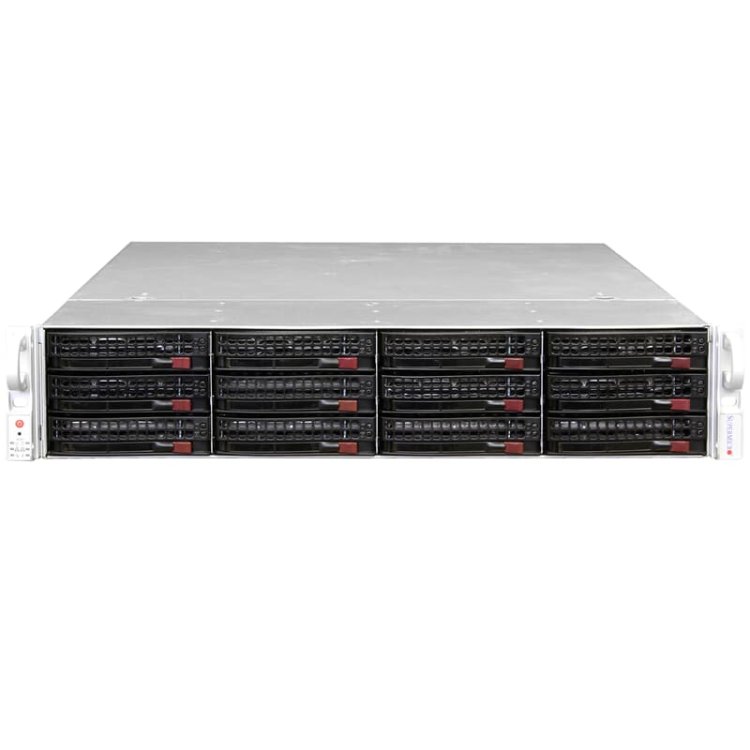
Thanks for all the work here! When stuff settles down, any chance of getting a Supermicro 826 to go along with the rest of the Supermicro icons? Thanks!
-
I will do this when my new chassis arrives. My test system cannot hold the entire array. Well, actually, the two wettest drives were my two 14TB parity drives. Does that change this suggestion? Does it make sense to pull them and instead of running non-correcting parity, replace them and build new? <- I realize this doesn't help me. A classic case of speaking before thinking. Thanks!
-
Took me a while, things have been crazy over here.. 1) Assembled a test system from spare parts. 2) Backed up my USB unRAID drive 3) Disabled autostart on the array 4) Inserted one drive at a time and ran a short SMART test. With the exception of 1 drive, they all passed without errors. The odd drive is a SSD that I use in a cache pool. It just seems to start the SMART test and then stops after 10% and reports completed without error. For a moment I thought I had two drives that were failing to power up, but it turns out those were white label WDs shucked from EasyStores and it was the 3.3v pin issue. Molex to SATA spun them up. Did I get extremely lucky here? At least from a data perspective? Should I be running extended SMART tests on these?
-
btw, if it helps, the drives that took the hit were: 2x WD140EDGZ (tho honestly one of these had like 3 water drops on it, I think it was "wet adjacent") 3x WD40EFRX 1x WD80EFAX
-
@Frank1940@JonathanM Thanks guys.. this gives me some stuff to think about. I'm not sure how I'd regulate and control an environment at 50C. Dipping them in a sous vide bath seems counter-productive. Heh. This all happened last Wednesday, May 11. I had them sitting out in my breezeway in around 80F temps for 48 hours with a fan blowing across everything. Unfortunately we had some high humidity roll in and they've been back in my basement since then. The ambient down there is probably only 68F, stiil dry and with air moving across. To be completely accurate, none of the drives were submerged. It's just those 5 or 6 that were wet with visible water droplets. One of them was fairly wet. I believe that was Parity 2. The SATA and power connectors were facing down and didn't get hit with water. So it was a cascade across the top and sides. The drive sleds were fairly tight on the circuit board side, I think the path of least resistance was down the label side. They were the most wet. I do have enough spare equipment I could piece together a system to test with. I had actually just upgraded the internals on this server a few months ago, so I still have my old server board laying around. I'll pop it in a chassis, do to the voodoo with the unRAID boot drive, and see where I'm at. I do have two 14TB and three 4TB drive spares laying around, so copying off some data or replacing whole drives outright is fairly achievable up to that limit without much more expenditure. I have a replacement chassis on the way. I still have some hope that my motherboard might be salvageable.. but. Ok. So, I'll backup the USB drive, then boot the array and turn of autostart, then start testing each drive one at at time. If any drive seems iffy, I'll try to copy off any data I can, and then report back with where I am. Anyway, I really appreciate the suggestions. I will start working on checking the drives first, and worry about the motherboard and HBAs later. @Frank1940 That PSU went in the trash first thing, but thanks for the suggestion. It was soaked.
-
Yeah. Whole server was up and running. I have no idea (yet) what is salvageable.. if anything. Server was mounted face up on a vertical bracket. Water streamed down past about 5 drives and right into the PSU. I was doing stuff with the server when it suddenly stopped responding. All the other water in the chassis was from my fans throwing droplets everywhere. My plan is to go over every inch of the mobo and my HBAs and scrub any hard water deposits I see with 99% iso, and then test. It's all just been sitting with a fan on the individual components for a few days. But the drives.. I'm pretty sure the remaining 18 or so didn't get any water. So unless something electrical fried them, I have some hope there.
-
Hallo all, I lost my main server (23 disks in the array) to a broken water pipe. About 5 of my drives had water stream right past them. The remaining ones were dry. I have ordered a new server chassis, but my question is this: What is the best way to verify each drive is still functional and, if I got lucky, doing this in a way that doesn't invalidate the array? And for each drive that is functional, is there any kind of stress testing I can/should do? However, I am expecting some loss of data here. I'm not generally that lucky. I'm just not sure on the best way to try and salvage and rebuild here. The drives in question were 3 data drives and both my parity drives. Any insights are greatly appreciated.
-
@JorgeB Thanks so much! I just ordered a chassis with the BPN-SAS2-846EL1 expander backplane. I'll give it a whirl. Based on what you said, it sounds like for my normal usage I'm only gonna maybe see perf hit on parity checks/rebuilds.
-
So.. my main server took a hit from a water pipe I didn't know existed. I have no idea what (if anything) lived through the ordeal, but I'm thinking it's a good time to get away from my Norco 4224 anyway. Looking at Supermicro chassis, I see I have a backplane option of direct attached or expander. I understand that using an expander will divide up available bandwidth amongst the drives, but the crux of my question is this: Does it split that bandwidth when drives are inactive? Since I'm often only using a couple drives at any given moment (aside from parity checks) would I even notice? Or is it always bandwidth/#connected drives no matter what they're doing? This seems especially critical for the cache drives. Thanks
-
@neilster In the proxy section of Sonarr there's a field labeled Ignored Addresses. Put the IP of your download client(s) there.




