spall
Members
-
Joined
-
Last visited
Everything posted by spall
-
@DigitalDivideYes. I'm a little different because my proxy is on my other server. If you're running it all on the same box with one NIC then yeah, your IP will be the same for them. I _think_ all you're doing with that setting is telling Sonarr to not use the proxy for the connection to your indexer/download client.. which should be fine since it's all on your network. I never had to use it before the IP leak fix that Binhex put in his containers that use VPN. Glad you got it working.
-
@DigitalDivide if you're running your proxy through DelugeVPN, then use the IP you have in Sonarr for your proxy in your web browser. Each browser is set up differently, and I use Firefox. In Firefox it's Tools->Options->Network Settings->Manual Proxy Configuration. You'd have to look up how for another browser. The point here is to see if your proxy is actually working. So I'd Google "what is my IP" before and after you enable the proxy in your browser. If they're different (and, really, if you can get anywhere after you enable it) then you know the proxy is working. If it's not working, then that's likely the source of your problem. I'm honestly surprised that telling Sonarr to ignore the IP address of your Jacket (which looks to be 192.168.1.139) isn't doing the trick for you. Also, you don't really need to install PrivoxyVPN like I have if you're routing through DelugeVPN. I believe Binhex's DelugeVPN has Privoxy in the container already. If you look in your log file you posted you'll see Privoxy mentioned in there. You might consider posting in the support thread for DelugeVPN, since the problem you're having seems to be related to passing through that. Maybe Binhex will have some ideas.
-
@DigitalDivide Privoxy is a web proxy. I use Binhex's PrivoxyVPN container as an https proxy. So my stuff like Sonarr, etc use the IP:port of that container for proxy stuff. So in my case, and what I was hoping would work for you, I had to tell Sonarr to ignore the address of my downloader (NZBGet in my case) after a recent update to some of the VPN stuff to account for an IP leakage issue. You mentioned DelugeVPN.. which makes me think you might be using Binhex's DelugeVPN container. If that's the case, you inherited some of the same changes to address that bug. This is why I asked if the problem actually showed up with Sonarr v3 or just seemed like it might have. If that's the case (Binhex's DelugeVPN is your proxy), you might try telling Sonarr to ignore the IP address of your Jacket container. If you're using something else as your proxy, I'm not sure what would have changed just moving to v3. You might otherwise verify that the IP address/creds of your proxy didn't change somehow. You could try pointing your web browser to your proxy to see if you actually have connections passing through it. I'm not sure what else to suggest, so hopefully someone else can chime in here if we're stalled trying to solve your issue.
-
@DigitalDivide I may have made an assumption to what your problem is. Is DelugeVPN your proxy? Are you running the other containers through that? In my case, I'm using Binhex's PrivoxyVPN to achieve this. After some changes that were made recently to fix some IP leakage, I had to set Sonarr (when using a proxy) to ignore the address of my download client (in my case NZBGet). If you're just using Sonarr with torrents, I'm assuming Jacket is in the path as your Indexer and Deluge is your download client. I'm not sure if what I'm saying will help. I am not set up like that.. but fiddling with that ignore field seems to be helping various people. Did this _actually_ just start with Sonarr v3? Is there a chance you didn't notice there was an issue (based on how often you're grabbing TV shows, how often you update your containers, and how often you look at the Sonarr UI) prior to this? My problem reared its head the last week of Feb. @turnipisum Are you also just using Deluge and Jacket with Sonarr?
-
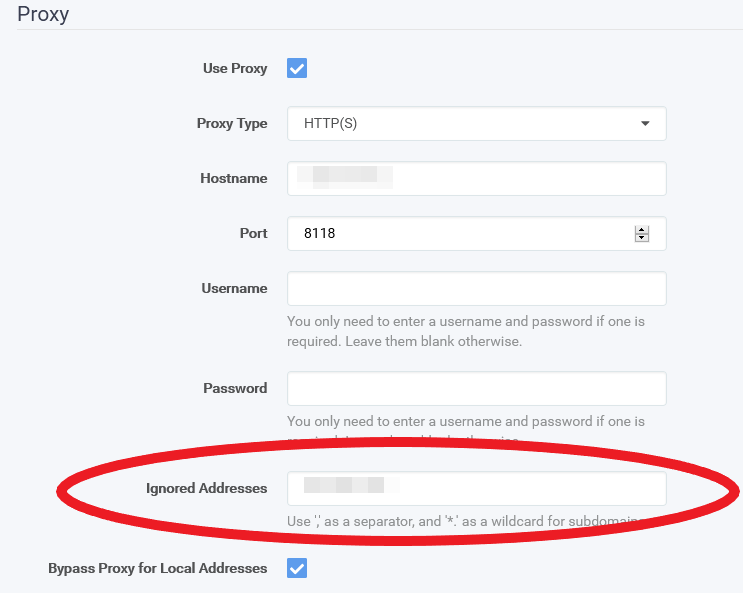
@DigitalDivide If you're running Sonarr's proxy through DelugeVPN, try telling your proxy to ignore the IP of your download client.
-
@neilster Check your proxy settings (see my post up near the top of this page), especially if you're running through Privoxy like I am.. you may need to tell Sonarr/Radarr to ignore the IP of your download clients.
-
Awesome! Glad I could help.
-
@eranwolf I had this same problem last night but with NZBGet.. I run Sonarr through Binhex's PrivoxyVPN, and have been having some issues with a change he made in the last 48 hours. Telling Sonarr to ignore the IP where NZBGet is got it working for me. If you're using a similar setup, you might look there.
-
So.. turns out it's /foundry/data/Config/options.json.lock/ <-- this folder is getting hit every 5 seconds 24/7. Andrew (the FVTT dev) isn't sure anything can be done about that. I'm trying to think of the best way to try and work around it.
-
Thanks for taking a look. I upgraded to the beta 0.7.3 as a friend suggested the changes with WebRTC could be the culprit. That didn't turn out to be the cause. I'll contact the developer to find out what file(s) he's smacking around a lot when the server is otherwise inactive.
-
Have a great session
-
Are you saying you think FoundryVTT is hitting the disk fairly frequently even when nobody is connected to it?
-
Hallo, First up.. thanks for doing this. Installed the other day and came up first try. That said: I have my /foundry/data folder mapped to a share that I've assigned a single drive to and using cache (/foundry/fvtt is with the rest of appdata on the cache drive). When this container is running it prevents the drive in the share from spinning down. Is anyone else seeing this behavior? Thanks!
-
@ledfortr I _think_ you can edit the config.xml in the sonarr dir in appdata to have: <AuthenticationMethod>None</AuthenticationMethod> and restart the container.
-
@amb5014 Yes. If you're using a SOCKS proxy, try switching to HTTPS or running without and see if that solves your issue. That's what did it for me.
-
@lordvaderxiii I think you might have been. I switched over to using privoxy that's passing through Binhex's DelugeVPN docker container since I already had that running. 100% CPU problem has been gone for over a week.
-
@lordvaderxiii I am. Are you on to something?
-
I get this all the time. I've asked in various threads about it, but I've always come up empty. It seems to only affect some people. In my case, it's caused by NzbDrone.exe running a ton of threads. I limited mine to 2 cores because it makes my CPU temps go crazy otherwise. Restarting the Sonarr docker will temporarily solve the issue. I have a script running every couple hours to restart the container. It's bandaid, but I haven't figured out how to stop it from happening.
-
No change. Reverted back. I'm still seeing this problem several times a day. Restarting the docker seems to be the only (temporary) fix.
-
Hey, was that directed at me? I certainly can do that, if so.
-
Hi all, Reposting this from another thread as I have switched dockers to see if it solved my issue. It did not. --- Has anyone had an issue with Sonarr hammering your CPU (regardless of any pinning settings) at 100%? This has been happening for a while to me. Looking at top, I get: /usr/bin/mono --debug /usr/lib/sonarr/NzbDrone.exe -nobrowser -data=/config I have around 16 or so lines of that in top with each one using 10-20% CPU. Restarting Sonarr solves it until it (seemingly) randomly starts again. I've gotten to the point where I have a script restarting Sonarr every few hours, but lately I've still had to check it manually and see if it is out of control. Anyone seeing this or have any ideas? Thanks!
-
Hey all, Has anyone had an issue with Sonarr hammering your CPU (regardless of any pinning settings) at 100%? This has been happening for a while to me. Looking at top, I get: /usr/bin/mono --debug /usr/lib/sonarr/NzbDrone.exe -nobrowser -data=/config I have around 16 or so lines of that in top with each one using 10-20% CPU. Restarting Sonarr solves it until it (seemingly) randomly starts again. I've gotten to the point where I have a script restarting Sonarr every few hours, but lately I've still had to check it manually and see if it is out of control. Anyone seeing this or have any ideas? Thanks!
-
Hallo, I too am suddenly seeing Used value showing up red when the drive has a ton of free space left. Any thoughts on this? Thanks for this plugin! -Dave

-
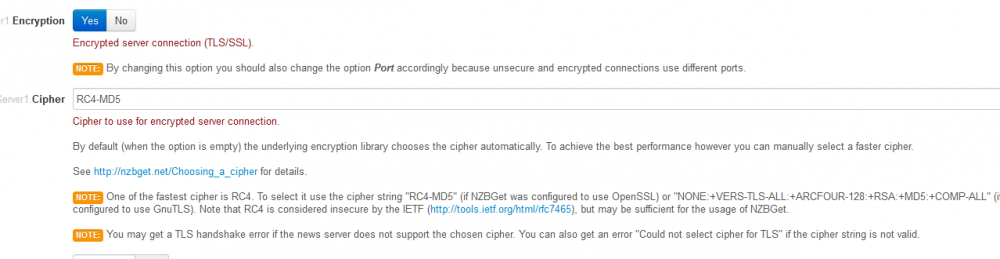
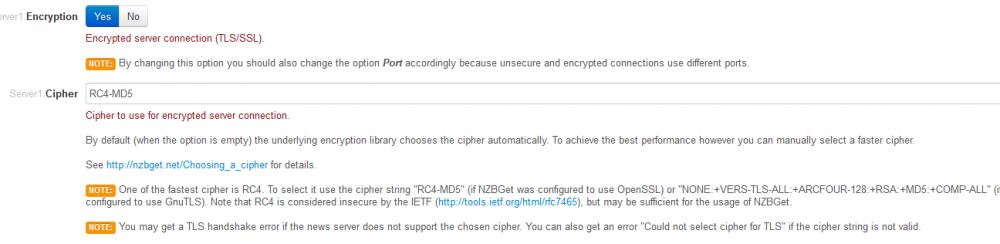
@binhex You were spot on. That never occurred to me. For reference, anyone having a similar problem, I did the following: 1) SSH into unRAID 2) docker exec -it <container-id> bash 3) openssl ciphers -v That will show you a list of the ciphers openssl supports. RC4-MD5 is indeed gone in openssl 1.1. Just need to match one up with your usenet provider (or blank works as binhex mentioned). I went with AES128-SHA and noticed no speed difference from before. Although there was a TLS handshake error right when nzbget starts, it resolves itself in a matter of seconds. Thanks binhex! Sorry you had to drop a bit of cash. Much appreciated.
-
@binhex As requested. Port is the same in both cases, as well. Latest: 18.0-1-01: Error when running Latest: