bonustreats
Members
-
Joined
-
Last visited
-
Ah, gotcha - I added the line to each of the boot options. Thanks very much!
-
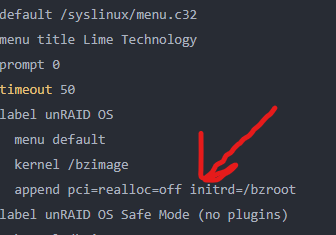
Again, apologies for the delay, but I got a chance to try that fix and wonder of wonders, it worked! One thing of note, in case anyone runs into the same issue: the command append pci=realloc=off initrd=/bzroot apparently needs to be under the "label Unraid OS" header for it to work. At first, I put it at the end of the file and that did not fix the problem @JorgeB - you're the man, thanks so much for the help!
-
Well, I spoke WAY too soon. Apparently, my NEW .conf died as well, so the wg1 network was inactive. I made a new .conf file, made the new network, and everything seems to be running again. Apologies for any hassle and thanks! (I'll edit the title to closed)
-
Hi Everyone, Not sure exactly where everything went wrong, but both Sab and Deluge WebUIs aren't loading at the moment. Here's what happened: A while ago, I followed SIO's video about routing docker containers through wireguard here. Every 30-60 days, the connection seems to lose connection/crap out/get reset/whatever. When that happens, I just download a new .conf file for a new exit location, set up wg1 (instead of wg0), then switch all the containers to the new wg1 network. This has worked pretty well in the past until last night. I got a couple of errors when trying to get the new config file from SIO's PIA Generator docker, but eventually got one that worked. I performed the same steps and the downloads that were stalled began. However, it showed an error saying that "Connection was lost to Sab/Deluge" so I refreshed the page and...nothing. I poked around the forums and saw a couple others have a similar issue, so I restarted the server and double checked that there were no port conflictions. The logs don't seem to be showing any egregious error (to my untrained eye), but they're attached below. All other dockers that use this network seem to be affected - they start, but the WebUI doesn't load. Anyone run into this before? Thanks very much for your time! Deluge_Logs.txt SAB_Logs.txt
-
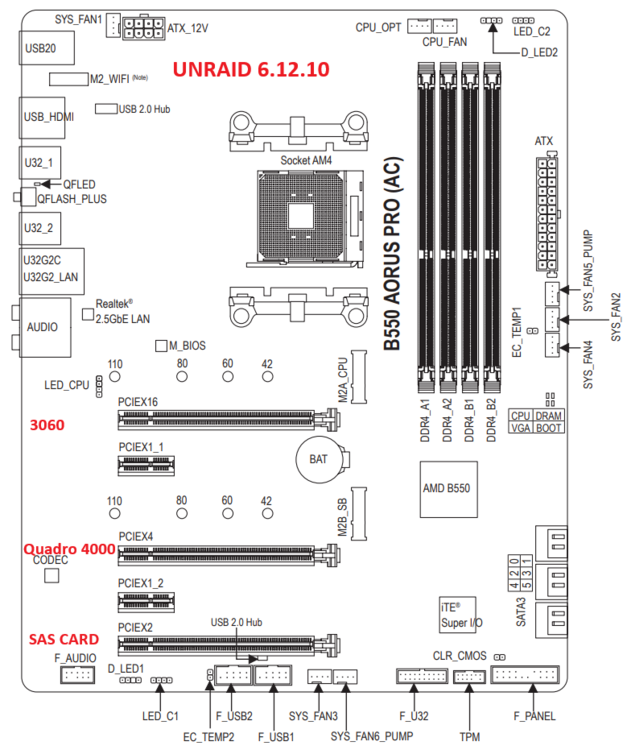
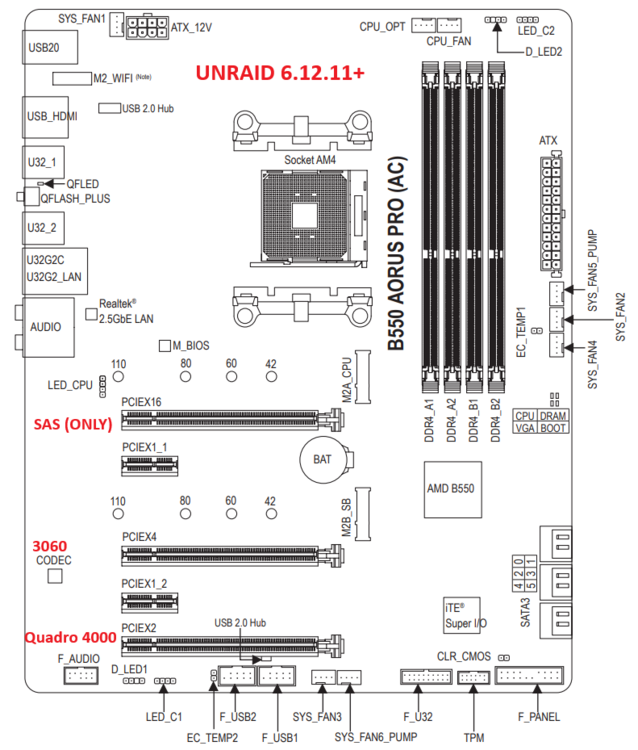
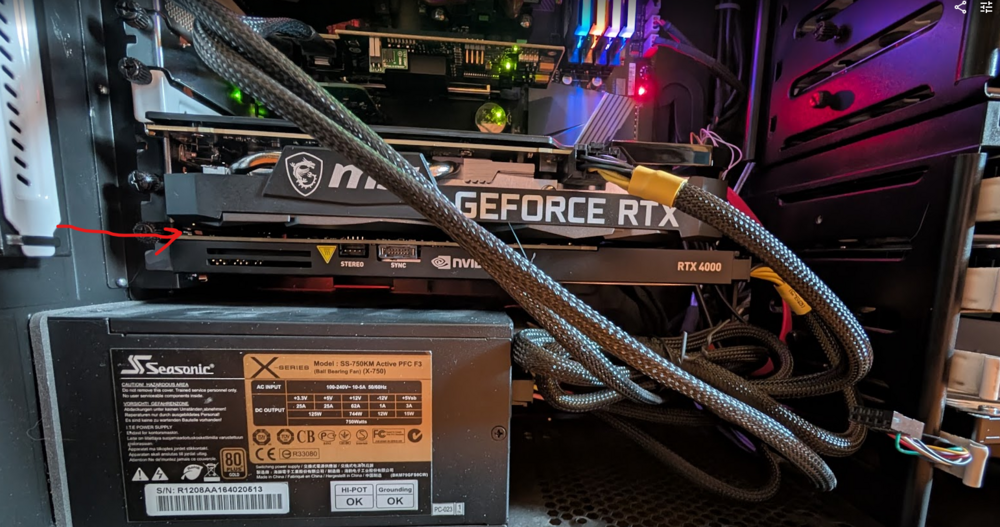
Well, I finally had some time to try to diagnose this issue (a year later!). I've upgraded the BIOS to the latest version to see if that would help things. It seems like it hasn't made a difference. Attached are maps of my MOBO with the config pre- and post-upgrade beyond 6.12.10. On 6.12.10, everything worked well with these devices in these slots: 3060 (x16), Quadro 4000 (x4), and SAS (x2). However, after the OS upgrade the SAS card will ONLY work in the x16 slot. Rearranging things made space a little tight (the 3060 is RIGHT up against the Quadro 4000 (please see attached image), and I lost the front USB ports as the 4000 can't fit with the cable in place), which is the only thing making me a bit nervous. Diagnostics are attached (if desired) radagast-diagnostics-20260221-1155.zip My questions are: 1. What changed with UNRAID after 6.12.10 to force this? Is it something that I can change or is this the only path forward with all these parameters? Certainly willing to live with this, if needed, but -> The amount of space between the 3060 and 4000 seems WAY too close to me - is this potentially dangerous? Thanks very much for your time! Jeff
-
Thanks so much for this - you saved my bacon! In case anyone with the same issue as me sees this: I was upgrading my AORUS B550 Pro BIOS (to try to get unraid 7 to work) and it refused to boot from the flash drive. Removing the " - " allowed it to boot properly. Really appreciate it - thanks!
-
Thanks very much for the info! I definitely see some BIOS updates, but I'll try swap PCIe slots the next chance I get. Will probably be later this week!
-
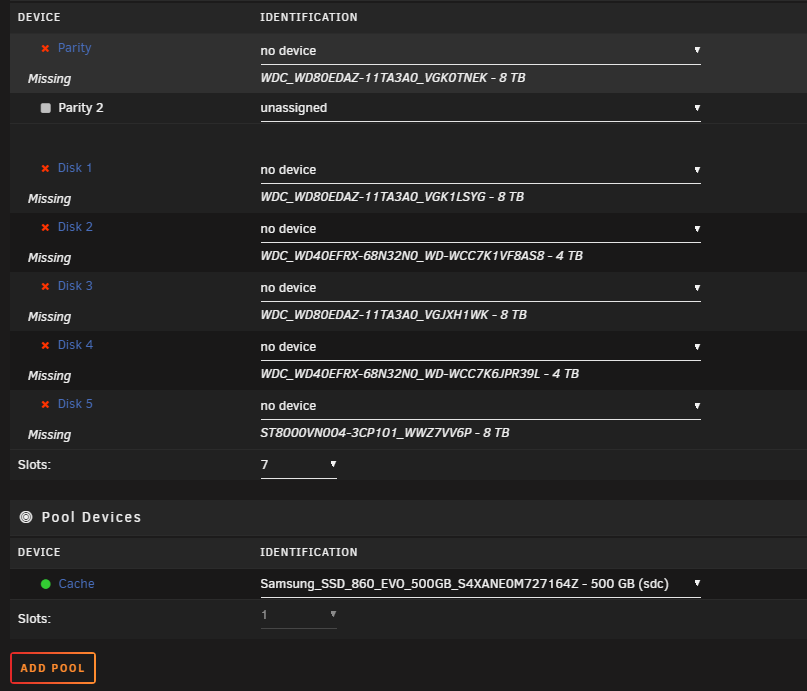
Finally able to get everything - sorry for the delay! Screenshot: Diagnostics attached. Thanks so much for taking a look! radagast-diagnostics-20250208-0620.zip radagast-diagnostics-20250208-0636.zip
-
Will do! Might be a little bit - I installed a new drive and and it's currently rebuilding. Apologies for the delay
-
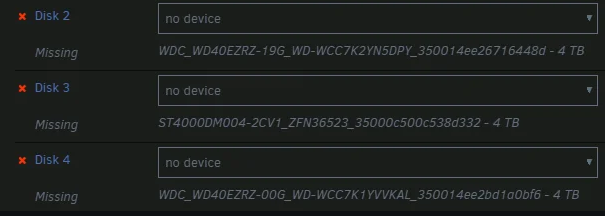
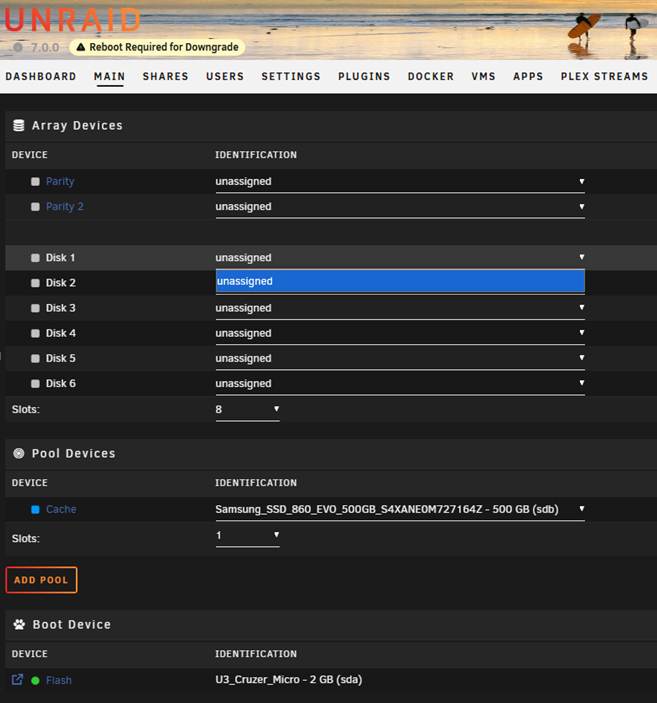
Hi Everyone, After attempting the upgrade from 6.12.10 -> 7.0.0, all the hard disks in my array went missing. I'm sorry, I didn't grab a screen shot of my personal config, but it looked just like this: I attempted to set a new config, but the only device that was found was my cache drive (which is plugged directly into the MB). Based on the cache being available, I'm guessing my SAS card might have something to do with it. I thought I'd downloaded the diagnostics while in 7.0.0, but it seems not to have saved - so sorry about that! I've already rolled back to 6.12.10 and things are working just fine again, but I'd be glad to try again, if you want the diagnostics. Also, this happened before when trying to upgrade from 6.12.10 -> 6.12.13, but I just dismissed it as a fluke and figured it would be worked out before another update. Anyone else have this issue or happen to know what's up? Thanks very much!
-
Hooooly crap, you're right! I added github.com to the whitelist, but that didn't make any difference, so I just disabled pihole and github loaded right up. WOW, that didn't even cross my mind. I disabled it and installed the plugin. Thanks so much for the answer AND the quick turnaround - it's most appreciated!

-
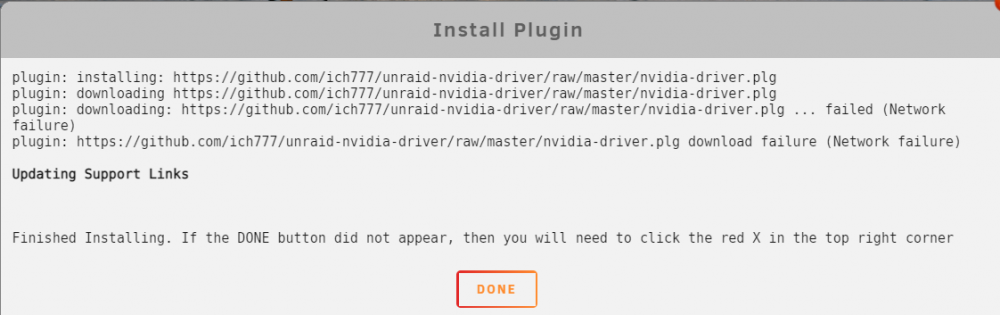
Hi @ich777, After all the help to get stuff setup on 6.8.3 (thanks again), I updated to 6.9 stable and ran into an issue (I'm very sorry). I removed all the extra parameters/variables from the Plex container after upgrading and started to follow the directions in the first post. However, I ran into this error trying to install the NVIDIA driver: I just assumed something was wrong with my system, so I tried these things: - pinged the server (success) - removed the previous unraid-kernal helper plugin (success) and tried redownloading the NVIDIA drivers (failure) - tried to install manually via the plugin page/link (failure) - downloaded another docker - your unraid kernel helper (success) - streaming via Plex both on and off the network (success) I'm not quite sure why it won't download, but I'm just wondering if maybe I missed turning off a setting or something. Diagnostics are attached in case they're needed. Thanks very much! radagast-diagnostics-20210303-1701.zip
-
I don't think the fan speed was higher, but honestly can't remember. If it happens again, I'll make sure to take a look to compare. I didn't know that about the docker page, but I do have (and have had preivously) kept it in basic view - thanks for the info! I'll keep my eye on CPU usage when I go to the dashboard page, but I don't think I'll be visiting as frequently until it's resolved. Thanks again!
-
Thanks for the link! Apologies - I didn't mean for you to have to Google something for me; just thought it might have been a prominent issue or something. I was looking into persistence mode and found this - it seems like pulling the GPU out of P8 (deep sleep) may invoke some RAM usage. However, does forcing it out of deep sleep cause any extra 'wear' on the card? Maybe just increases the likelihood of fan failure? Sorry, these aren't direct questions (unless you know the answer, haha), so I'll keep digging. Maybe this is related to the CPU load increasing? While googling that error, I came across someone in a previous thread mentioning something very similar to what I was seeing with the CPU issue. They seemed to think it was related to @b3rs3rk's plug-in, but there's no direct proof of that. Sorry - bad phrasing. I just meant that the CPU load increased to 4-7% and stayed there for no apparent reason until I started/stopped the Plex stream; everything else behaved normally (GUI/system was fully responsive, though I didn't do any sort of testing for all functionality). All that to say, I haven't seen this happen again, so maybe it was just a fluke? Edit - and I'm not seeing any other problems; sorry, forgot to answer
-
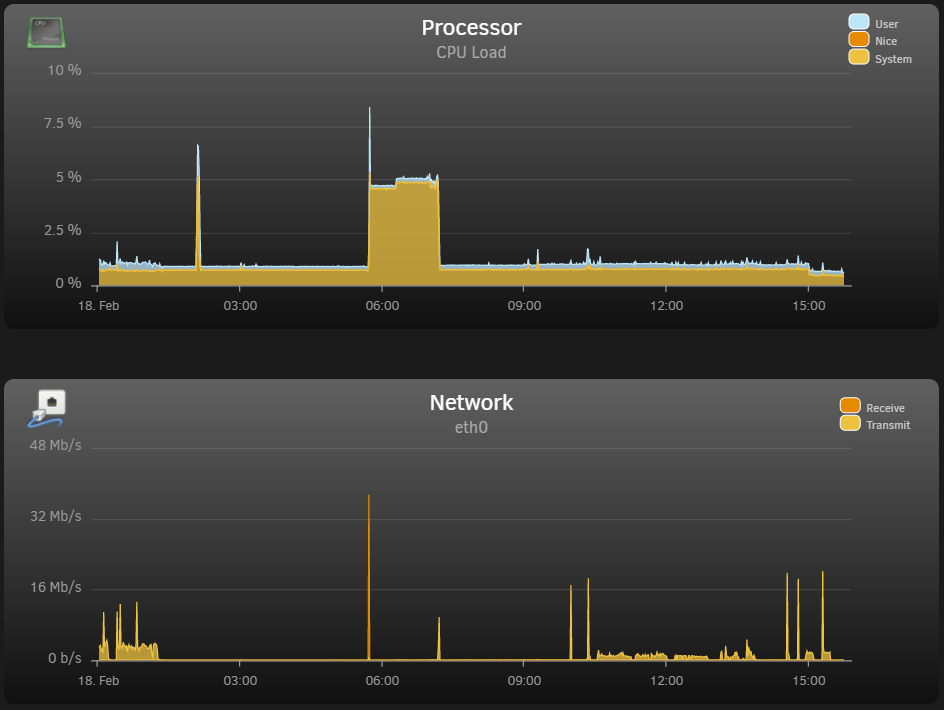
Just wanted to follow up with some (slightly) odd behavior, though I'm not quite sure where the issue may be coming from. I've noticed my CPU spooling up to 4-7% usage and just kind of hanging out there while nothing's going on - no Plex stream or VM running. At the same time, my GPU comes out of P8 (idle) to P0 and also just kind of hangs out for a while. I then initiate a transcoded Plex stream and terminate it after a few minutes and the system returns to normal (1-2% CPU load). This morning, I was able to catch the cycle: I checked to make sure my dockers were running and updated Plex. The CPU/GPU load stayed elevated until I started, then terminated a Plex transcode and it went back to 'normal.' I don't think I've seen this behavior (at least with the CPU) before upgrading, but I honestly can't say that for certain. Image of the CPU load and ethernet traffic is attached, as well as the diagnostics file. I was looking through the system log and saw this repeated a couple thousand times: Feb 18 05:43:11 Radagast kernel: resource sanity check: requesting [mem 0x000c0000-0x000fffff], which spans more than PCI Bus 0000:00 [mem 0x000c0000-0x000dffff window] Feb 18 05:43:11 Radagast kernel: caller _nv000709rm+0x1af/0x200 [nvidia] mapping multiple BARs And thought maybe my GPU got stuck in a loop or something? Wasn't sure if I should post here, so if it isn't related to the plug-ins, I'd be glad to start a separate thread. Thanks very much! Edit: just wanted to further point out the CPU and network spikes at ~05:45 (that was me downloading Plex update) and the other at ~07:30 initiating the Plex transcode. radagast-diagnostics-20210218-1559.zip