





RockDawg
Members
-
Joined
-
Last visited
Everything posted by RockDawg
-
I did try Splashtop and it acts the same except the mouse trails on it and not VNC. Neither one gives me a smooth quick experience.
-
I posted about this issue a few pages back. I have no problem getting MacOS up and running with this VM but is always slow and choppy. Text lags behind my typing and everything seems choppy. App windows open a bit choppy, web pages load slowly and are also a bit choppy. It doesn't matter if I try 1, 4 or 8 cores or 4, 8 or 16 GB of RAM. I doesn't get any better. I've tried the SSD my Win10 VM runs on (cache drive) and another SSD via unassigned devices. Again, no difference. Is there a tip or something on how to get it to run smooth and quickly via VNC? I'm just looking for a simple VM. No hardware passthrough or anything. I have a Win10 VM setup with the same cores and RAM and it runs great. I notice a lot of people in this thread are passing through video cards. Is that required for a good experience? Does anybody have a quick and smooth running experience via VNC?
-
I've been playing with this a bit and I have Catalina up and running but it is very slow and laggy. I set the domains share as cache only and my cache drive is a SSD. I haven;t passed through any hardware and I just use VNC to access it. I have a Win 10 VM that I've been using for a couple years now with no speed issues. It is setup the same way (no hardware passthourgh and accessed via VNC). The only difference is that it was setup with a share named VM which has the domains folder in it. So the path to it's virtual disk it cache/VM/domains/Windows 10/vdisk1.img Here is my xml. Any idea what is causing the issue? <?xml version='1.0' encoding='UTF-8'?> <domain type='kvm' id='2' xmlns:qemu='http://libvirt.org/schemas/domain/qemu/1.0'> <name>MacinaboxCatalina</name> <uuid>11ef4cfb-e787-4029-9198-4d3d5f0f6175</uuid> <description>MacOS Catalina</description> <metadata> <vmtemplate xmlns="unraid" name="Windows 10" icon="/mnt/user/domains/MacinaboxCatalina/icon/catalina.png" os="Catalina"/> </metadata> <memory unit='KiB'>8388608</memory> <currentMemory unit='KiB'>8388608</currentMemory> <memoryBacking> <nosharepages/> </memoryBacking> <vcpu placement='static'>8</vcpu> <cputune> <vcpupin vcpu='0' cpuset='8'/> <vcpupin vcpu='1' cpuset='24'/> <vcpupin vcpu='2' cpuset='10'/> <vcpupin vcpu='3' cpuset='26'/> <vcpupin vcpu='4' cpuset='12'/> <vcpupin vcpu='5' cpuset='28'/> <vcpupin vcpu='6' cpuset='14'/> <vcpupin vcpu='7' cpuset='30'/> </cputune> <resource> <partition>/machine</partition> </resource> <os> <type arch='x86_64' machine='pc-q35-3.1'>hvm</type> <loader readonly='yes' type='pflash'>/mnt/user/domains/MacinaboxCatalina/ovmf/OVMF_CODE.fd</loader> <nvram>/mnt/user/domains/MacinaboxCatalina/ovmf/OVMF_VARS.fd</nvram> </os> <features> <acpi/> <apic/> </features> <cpu mode='host-passthrough' check='none'> <topology sockets='1' cores='4' threads='2'/> </cpu> <clock offset='utc'> <timer name='rtc' tickpolicy='catchup'/> <timer name='pit' tickpolicy='delay'/> <timer name='hpet' present='no'/> </clock> <on_poweroff>destroy</on_poweroff> <on_reboot>restart</on_reboot> <on_crash>restart</on_crash> <devices> <emulator>/usr/local/sbin/qemu</emulator> <disk type='file' device='disk'> <driver name='qemu' type='qcow2' cache='writeback'/> <source file='/mnt/user/domains/MacinaboxCatalina/Clover.qcow2' index='3'/> <backingStore/> <target dev='hdc' bus='sata'/> <boot order='1'/> <alias name='sata0-0-2'/> <address type='drive' controller='0' bus='0' target='0' unit='2'/> </disk> <disk type='file' device='disk'> <driver name='qemu' type='raw' cache='writeback'/> <source file='/mnt/user/domains/MacinaboxCatalina/Catalina-install.img' index='2'/> <backingStore/> <target dev='hdd' bus='sata'/> <alias name='sata0-0-3'/> <address type='drive' controller='0' bus='0' target='0' unit='3'/> </disk> <disk type='file' device='disk'> <driver name='qemu' type='raw' cache='writeback'/> <source file='/mnt/user/domains/MacinaboxCatalina/macos_disk.img' index='1'/> <backingStore/> <target dev='hde' bus='sata'/> <alias name='sata0-0-4'/> <address type='drive' controller='0' bus='0' target='0' unit='4'/> </disk> <controller type='sata' index='0'> <alias name='ide'/> <address type='pci' domain='0x0000' bus='0x00' slot='0x1f' function='0x2'/> </controller> <controller type='pci' index='0' model='pcie-root'> <alias name='pcie.0'/> </controller> <controller type='pci' index='1' model='pcie-root-port'> <model name='pcie-root-port'/> <target chassis='1' port='0x10'/> <alias name='pci.1'/> <address type='pci' domain='0x0000' bus='0x00' slot='0x02' function='0x0' multifunction='on'/> </controller> <controller type='pci' index='2' model='pcie-root-port'> <model name='pcie-root-port'/> <target chassis='2' port='0x11'/> <alias name='pci.2'/> <address type='pci' domain='0x0000' bus='0x00' slot='0x02' function='0x1'/> </controller> <controller type='pci' index='3' model='pcie-root-port'> <model name='pcie-root-port'/> <target chassis='3' port='0x12'/> <alias name='pci.3'/> <address type='pci' domain='0x0000' bus='0x00' slot='0x02' function='0x2'/> </controller> <controller type='pci' index='4' model='pcie-root-port'> <model name='pcie-root-port'/> <target chassis='4' port='0x13'/> <alias name='pci.4'/> <address type='pci' domain='0x0000' bus='0x00' slot='0x02' function='0x3'/> </controller> <controller type='virtio-serial' index='0'> <alias name='virtio-serial0'/> <address type='pci' domain='0x0000' bus='0x02' slot='0x00' function='0x0'/> </controller> <controller type='usb' index='0' model='ich9-ehci1'> <alias name='usb'/> <address type='pci' domain='0x0000' bus='0x00' slot='0x07' function='0x7'/> </controller> <controller type='usb' index='0' model='ich9-uhci1'> <alias name='usb'/> <master startport='0'/> <address type='pci' domain='0x0000' bus='0x00' slot='0x07' function='0x0' multifunction='on'/> </controller> <controller type='usb' index='0' model='ich9-uhci2'> <alias name='usb'/> <master startport='2'/> <address type='pci' domain='0x0000' bus='0x00' slot='0x07' function='0x1'/> </controller> <controller type='usb' index='0' model='ich9-uhci3'> <alias name='usb'/> <master startport='4'/> <address type='pci' domain='0x0000' bus='0x00' slot='0x07' function='0x2'/> </controller> <interface type='bridge'> <mac address='52:54:00:e5:b3:92'/> <source bridge='br0'/> <target dev='vnet1'/> <model type='e1000-82545em'/> <alias name='net0'/> <address type='pci' domain='0x0000' bus='0x01' slot='0x00' function='0x0'/> </interface> <serial type='pty'> <source path='/dev/pts/1'/> <target type='isa-serial' port='0'> <model name='isa-serial'/> </target> <alias name='serial0'/> </serial> <console type='pty' tty='/dev/pts/1'> <source path='/dev/pts/1'/> <target type='serial' port='0'/> <alias name='serial0'/> </console> <channel type='unix'> <source mode='bind' path='/var/lib/libvirt/qemu/channel/target/domain-2-MacinaboxCatalina/org.qemu.guest_agent.0'/> <target type='virtio' name='org.qemu.guest_agent.0' state='connected'/> <alias name='channel0'/> <address type='virtio-serial' controller='0' bus='0' port='1'/> </channel> <input type='tablet' bus='usb'> <alias name='input0'/> <address type='usb' bus='0' port='1'/> </input> <input type='mouse' bus='ps2'> <alias name='input1'/> </input> <input type='keyboard' bus='ps2'> <alias name='input2'/> </input> <graphics type='vnc' port='5901' autoport='yes' websocket='5701' listen='0.0.0.0' keymap='en-us'> <listen type='address' address='0.0.0.0'/> </graphics> <video> <model type='qxl' ram='65536' vram='65536' vgamem='16384' heads='1' primary='yes'/> <alias name='video0'/> <address type='pci' domain='0x0000' bus='0x00' slot='0x01' function='0x0'/> </video> <memballoon model='virtio'> <alias name='balloon0'/> <address type='pci' domain='0x0000' bus='0x03' slot='0x00' function='0x0'/> </memballoon> </devices> <seclabel type='dynamic' model='dac' relabel='yes'> <label>+0:+100</label> <imagelabel>+0:+100</imagelabel> </seclabel> <qemu:commandline> <qemu:arg value='-usb'/> <qemu:arg value='-device'/> <qemu:arg value='usb-kbd,bus=usb-bus.0'/> <qemu:arg value='-device'/> <qemu:arg value='************************'/> <qemu:arg value='-smbios'/> <qemu:arg value='type=2'/> <qemu:arg value='-cpu'/> <qemu:arg value='Penryn,kvm=on,vendor=GenuineIntel,+invtsc,vmware-cpuid-freq=on,+pcid,+ssse3,+sse4.2,+popcnt,+avx,+aes,+xsave,+xsaveopt,check'/> </qemu:commandline> </domain>
-
Yes I can use the IP address. And I know I can create a link to the IP address but that doesn't help inside programs. I really wish this would just work like it's supposed to and Tower would show up in Network. Then it's easily accessible from programs or anywhere in Windows without the need for shortcuts and mapping a bunch of shares and stuff.
-
I'm on Win Home 1909. This has been going on for a while cant say exactly when. I've just been dealing with it and finally decided to look into fixing the issue.
-
Well the host file solution was very short lived. It worked fine for 5-6 tries but now it says: \\tower is not accessible... The network path was not found. What a mess this is! EDIT: the entry I put in the host file is now missing? What the heck?
-
It is enabled in Unraid.
-
I have been trying to fix my issue for some time with no luck. I can navigate to unraid via IP address fine, but //tower doesn't work and it doesn't show under Network. I can map Unraid locations but you can't map the root and I don't want more than a dozen mapped locations. For years \\tower worked just fine. I've read many threads on here and tried their various solutions: enable SMB v1, enable guest access in SMB v2, add 192.168.1.42 tower to the host file, checked for and deleted any references to unraid in Windows credentials, ensured Unraid is the local master and even renamed the Unraid server. All with no luck. If I type in \\tower in Windows file explorer it pops up a window saying Windows cannot access //tower - error code 0x80004005. I would love to get this working again. Can anyone offer any further suggestions? EDIT: I had a typo in my host file and now I can type \\tower and it works, but it still won;t show up under Network if I scan.
-
I am using the Linuxserver one now. The extension opens up much faster now. The extensions don't sync unless I logout and back in but maybe it's always been that way and I never noticed before.
-
Here it is: #BITWARDEN # make sure that your domain has dns has a cname or a record set for the subdomain bitwarden # This config file will work as is when using a custom docker network the same as letesencrypt (proxynet). # However the container name is expected to be "bitwardenrs" as it is by default the template as this name is used to resolve. # If you are not using the custom docker network for this container then change the line "server bitwardenrs:80;" to "server [YOUR_SERVER_IP]:8086;" Also remove line 7 resolver 127.0.0.11 valid=30s; upstream bitwarden { server bitwardenrs:80; } server { listen 443 ssl; server_name bitwarden.*; include /config/nginx/ssl.conf; client_max_body_size 128M; location / { proxy_pass http://bitwarden; proxy_set_header Host $host; proxy_set_header X-Real-IP $remote_addr; proxy_set_header X-Forwarded-For $proxy_add_x_forwarded_for; proxy_set_header X-Forwarded-Proto $scheme; } location /notifications/hub { proxy_pass http://bitwarden; proxy_set_header Upgrade $http_upgrade; proxy_set_header Connection "upgrade"; } location /notifications/hub/negotiate { proxy_pass http://bitwarden; } }
-
I have attached the log. Also a screenshot. On the left it shows the Chrome extension on my computer here at work. The left shows me remotely connected to my home computer and you can see it's Chrome extension shows fewer logins saves. log.txt
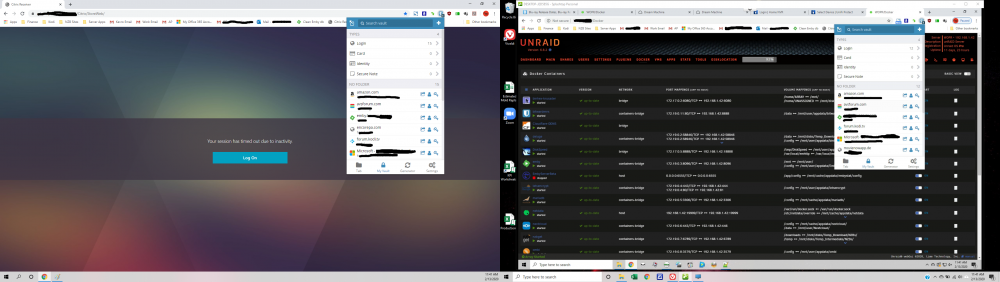
-
This isn't working as well for me as the old container/install. I use the Chrome extension most often and there is a 2-3 second delay when I click on the Bitwarden extension icon and it opening. Also If I add a login on one computer it doesn't show up on in the Chrome extension on another computer unless I logout and log back in. I never had either of those issues before.
-
No backup. Nothing in the ciphers table although all my icons are stiil in their folder. Definitely will from here on out. Did manage to get my user account set up and working. No psswords saved though. Time to reset and resave them all.
-
I tried viewing db.sqlie3 in sqlite browser and there isn't much of any data in it. Does this mean all my passwords may be gone?
-
Here is what was in it. log,txt
-
I managed to remember my password for Unraid so I am back in there. Indeed the new Bitwarden docker is pointing to the old bitwarden appdata folder. Still can;t get anything working on it though.
-
I have the new BitwardenRS app installed. My old Mprasil install is now gone. I'm pretty sure the new one is pointing to the old appdata folder. I can get in to the admin page (the old install didn't have that). If I try to login in to the Chrome extension that I usually use with my old username and password, it says incorrect user or password.
-
I think it is pointed to the old appdata. I have no way to check as I can't login to Unraid now with Bitwarden down.
-
Yes, but when I accidentally renamed this new container the same as the old one. The old one disappeared from the docker screen so I can't check the variables. EDIT: And because Bitwarden is down for me I can't even log back into unraid.
-
I'm in the admin panel and can't get it it to send me an email invite. My email is gmail and I've tried numerous settings but I never get an email.
-
I am trying to set this up with no luck. I've had the mprasil version working for quite some time. Tonight I stupidly renamed thhis container the same as as the old one and now it's gone so I can't even go back to it for a working install. So I now have no way to access my passwords. I would love some help. Should the ADMIN_TOKEN be the same as the master password? what about the admin email? One of the posts mentions a config.json file but I don't haver one in my appdata folder.
-
-
Turns out the problem was that I use CloudFlare for DDNS and they have proxy turned on by default. The IP address that was showing in ping was their proxy for my my IP. I disabled the proxy on that particular CNAME and WireGuard works fine now with my DDNS url. Thanks for the ping suggestion nuhll!
-
Just saw that Googling too. Thanks! What is the IP address the ping command shows? It is not the same as my WAN?
-
It pings fine. Now how do I stop the ping? LOL I'm used to WIndows where its stops after 3 times.


