





RockDawg
Members
-
Joined
-
Last visited
Everything posted by RockDawg
-
I am running unRAID 6.2 rc4 and run an Emby docker container from Emby's repository. My problem is that the nfo and artwork files it creates on the array can't be deleted via my Windows computer. When I try, I get an error that says: "you require permission from Unix User\1000 to make changes to this file" How do I make it change permissions so that I can easily delete or modify files from my Windows computer? I have other docker containers that add files to my unRAID array and I have no problem doing anything with their files and I didn't set up any permission in those containers so I'm not sure why this one is different.
-
VERY interesting. It would be very interesting if you would: (a) Post your system's hardware configuration details; and (b) download the new v2.2 of Paul's script and run it ... posting the results here. [it will also find your optimal value even better, since it looks "downward" for those systems that have their best performance at the low end of these values] I finally had a chance to run v2.2 an got similar results. Each test returns pretty much the same speed except for a few which jump up to ~101. All the others extremely consistent. Tunables Report from unRAID Tunables Tester v2.2 by Pauven NOTE: Use the smallest set of values that produce good results. Larger values increase server memory use, and may cause stability issues with unRAID, especially if you have any add-ons or plug-ins installed. Test | num_stripes | write_limit | sync_window | Speed --- FULLY AUTOMATIC TEST PASS 1 (Rough - 20 Sample Points @ 3min Duration)--- 1 | 1408 | 768 | 512 | 89.7 MB/s 2 | 1536 | 768 | 640 | 87.1 MB/s 3 | 1664 | 768 | 768 | 90.8 MB/s 4 | 1920 | 896 | 896 | 91.3 MB/s 5 | 2176 | 1024 | 1024 | 62.5 MB/s 6 | 2560 | 1152 | 1152 | 101.6 MB/s 7 | 2816 | 1280 | 1280 | 101.8 MB/s 8 | 3072 | 1408 | 1408 | 101.2 MB/s 9 | 3328 | 1536 | 1536 | 94.0 MB/s 10 | 3584 | 1664 | 1664 | 91.9 MB/s 11 | 3968 | 1792 | 1792 | 91.7 MB/s 12 | 4224 | 1920 | 1920 | 91.7 MB/s 13 | 4480 | 2048 | 2048 | 90.8 MB/s 14 | 4736 | 2176 | 2176 | 91.6 MB/s 15 | 5120 | 2304 | 2304 | 91.7 MB/s 16 | 5376 | 2432 | 2432 | 91.7 MB/s 17 | 5632 | 2560 | 2560 | 91.7 MB/s 18 | 5888 | 2688 | 2688 | 91.7 MB/s 19 | 6144 | 2816 | 2816 | 91.7 MB/s 20 | 6528 | 2944 | 2944 | 91.7 MB/s --- Targeting Fastest Result of md_sync_window 1280 bytes for Final Pass --- --- FULLY AUTOMATIC TEST PASS 2 (Final - 16 Sample Points @ 4min Duration)--- 21 | 2576 | 1160 | 1160 | 91.5 MB/s 22 | 2592 | 1168 | 1168 | 91.5 MB/s 23 | 2608 | 1176 | 1176 | 91.4 MB/s 24 | 2624 | 1184 | 1184 | 91.7 MB/s 25 | 2648 | 1192 | 1192 | 91.5 MB/s 26 | 2664 | 1200 | 1200 | 91.5 MB/s 27 | 2680 | 1208 | 1208 | 91.7 MB/s 28 | 2696 | 1216 | 1216 | 91.6 MB/s 29 | 2720 | 1224 | 1224 | 91.6 MB/s 30 | 2736 | 1232 | 1232 | 91.7 MB/s 31 | 2752 | 1240 | 1240 | 91.6 MB/s 32 | 2768 | 1248 | 1248 | 91.7 MB/s 33 | 2784 | 1256 | 1256 | 91.6 MB/s 34 | 2808 | 1264 | 1264 | 91.6 MB/s 35 | 2824 | 1272 | 1272 | 91.6 MB/s 36 | 2840 | 1280 | 1280 | 91.6 MB/s Completed: 2 Hrs 10 Min 54 Sec. Best Bang for the Buck: Test 1 with a speed of 89.7 MB/s Tunable (md_num_stripes): 1408 Tunable (md_write_limit): 768 Tunable (md_sync_window): 512 These settings will consume 66MB of RAM on your hardware. Unthrottled values for your server came from Test 24 with a speed of 91.7 MB/s Tunable (md_num_stripes): 2624 Tunable (md_write_limit): 1184 Tunable (md_sync_window): 1184 These settings will consume 123MB of RAM on your hardware. This is 57MB more than your current utilization of 66MB. NOTE: Adding additional drives will increase memory consumption. In unRAID, go to Settings > Disk Settings to set your chosen parameter values. After the initial run I changed the settings to the "Bang for the Buck" setting that it showed at 101 MB/sec and then ran a parity check, but it stayed at my usual 89 MB/sec. So no change in performance with those new settings.
-
Yes, I have 2 M1015's passed through.
-
I'll try v2.2 tomorrow. I'm running unRAID as a VM in ESXi with 1 CPU and 3MB RAM.
-
Thanks so much for this script! Just tried it and the lowest was the fastest for me also: Tunables Report from unRAID Tunables Tester v2.0 by Pauven NOTE: Use the smallest set of values that produce good results. Larger values increase server memory use, and may cause stability issues with unRAID, especially if you have any add-ons or plug-ins installed. Test | num_stripes | write_limit | sync_window | Speed --- FULLY AUTOMATIC TEST PASS 1 (Rough - 20 Sample Points @ 3min Duration)--- 1 | 1408 | 768 | 512 | 101.9 MB/s 2 | 1536 | 768 | 640 | 101.9 MB/s 3 | 1664 | 768 | 768 | 95.8 MB/s 4 | 1920 | 896 | 896 | 92.1 MB/s 5 | 2176 | 1024 | 1024 | 91.7 MB/s 6 | 2560 | 1152 | 1152 | 91.7 MB/s 7 | 2816 | 1280 | 1280 | 91.7 MB/s 8 | 3072 | 1408 | 1408 | 91.7 MB/s 9 | 3328 | 1536 | 1536 | 91.7 MB/s 10 | 3584 | 1664 | 1664 | 91.7 MB/s 11 | 3968 | 1792 | 1792 | 91.7 MB/s 12 | 4224 | 1920 | 1920 | 91.7 MB/s 13 | 4480 | 2048 | 2048 | 91.6 MB/s 14 | 4736 | 2176 | 2176 | 91.7 MB/s 15 | 5120 | 2304 | 2304 | 91.7 MB/s 16 | 5376 | 2432 | 2432 | 91.7 MB/s 17 | 5632 | 2560 | 2560 | 91.7 MB/s 18 | 5888 | 2688 | 2688 | 91.7 MB/s 19 | 6144 | 2816 | 2816 | 91.7 MB/s 20 | 6528 | 2944 | 2944 | 91.7 MB/s --- Targeting Fastest Result of md_sync_window 512 bytes for Medium Pass --- --- FULLY AUTOMATIC TEST PASS 2 (Final - 16 Sample Points @ 4min Duration)--- 21 | 1288 | 768 | 392 | 91.6 MB/s 22 | 1296 | 768 | 400 | 91.7 MB/s 23 | 1304 | 768 | 408 | 91.7 MB/s 24 | 1312 | 768 | 416 | 91.6 MB/s 25 | 1320 | 768 | 424 | 91.3 MB/s 26 | 1328 | 768 | 432 | 91.6 MB/s 27 | 1336 | 768 | 440 | 91.7 MB/s 28 | 1344 | 768 | 448 | 91.6 MB/s 29 | 1360 | 768 | 456 | 91.6 MB/s 30 | 1368 | 768 | 464 | 91.7 MB/s 31 | 1376 | 768 | 472 | 91.6 MB/s 32 | 1384 | 768 | 480 | 91.3 MB/s 33 | 1392 | 768 | 488 | 91.7 MB/s 34 | 1400 | 768 | 496 | 91.6 MB/s 35 | 1408 | 768 | 504 | 91.7 MB/s 36 | 1416 | 768 | 512 | 91.6 MB/s Completed: 2 Hrs 9 Min 48 Sec. Best Bang for the Buck: Test 1 with a speed of 101.9 MB/s Tunable (md_num_stripes): 1408 Tunable (md_write_limit): 768 Tunable (md_sync_window): 512 These settings will consume 66MB of RAM on your hardware. Unthrottled values for your server came from Test 22 with a speed of 91.7 MB/s Tunable (md_num_stripes): 1296 Tunable (md_write_limit): 768 Tunable (md_sync_window): 400 These settings will consume 60MB of RAM on your hardware. This is -36MB less than your current utilization of 96MB. NOTE: Adding additional drives will increase memory consumption. In unRAID, go to Settings > Disk Settings to set your chosen parameter values.
-
I just noticed a problem with the new WebGUI and Chrome. When I try to print the Main page, it only shows the flash drive and no other drives. Here is a photo of what I'm talking about: Untitled by rockdawg2232, on Flickr IE doesn't do this and the old WebGUI used to print fine with Chrome.
-
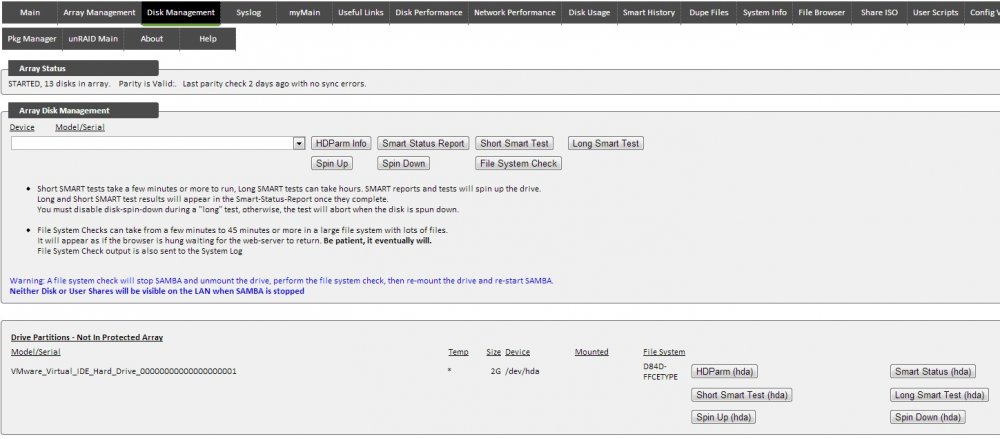
If I add "force user = root" to smb-extra.conf then I can write to the share. That's the only way I've found so far. I created my own VMDK with WinImage. Not sure why mine only works with /dev/hda, but I don't suppose it matters much. BobPhoenix - Thanks so much for this tip! Definitely useful.
-
BobPhoenix - I tired your method and I can't get it completely working. First I had to use /dev/hda. When I tried /dev/hda1, the boothdd share was empty. Using /dev/hda, the boothdd share shows the expected contents, but whenever I try to write something it says I need permission. When viewing the drive in unMenu, it only shows the hda, it doesn't show a hda1 below the hda like your screen shot does. Any ideas?
-
Thanks a ton. This will be really helpful!
-
Thanks. I overlooked the bus speed difference. What do you mean by suports larger hard drives? According to the first page, both now support 3TB with the right unRaid version. Are you saying the BR10i won't support anything larger?
-
For the purposes of unRaid is there any functional differences between the M1015 and the BR10i? I'm guessing that once we flash these to just be HBAs, they all pretty much perform the same. Is that correct? The M1015 seems to be going for $70-80 on ebay and the BR10i can be had for as little as $40. Not being real familiar with this kind of tech I'm wondering if there any reason to spend the extra money on the M1015.
-
OK now they I can finally get into the configuration, when I set Boot Support to "disabled" it disables the card altogether. The other options are, enabled BIOS only, enables IS only and enabled BIOS & IS only. EDIT: It turns out that the drives show up in unRaid even though I get the message "adapter disabled by user" during boot. I guess that just means the RAID controller is disabled.
-
Boy do I feel stupid. Thanks.
-
I finally go into my board's BIOS config. Removing another SATA controller card I had installed and disabling all onboard HDD controllers didn't fix it either. It wasn't until I removed the flash drive that I was finally able to get in. Anyhow, now I'm a little uncertain because my config screen looks nothing like that one in the OP. It has a Boot Order field, but not a Boot Support field. How do I set this up properly? Here's a pic: IMAG0006 by rockdawg2232, on Flickr
-
Thanks. I'll try both of those when my server is finished with a parity check.
-
Anyone have any ideas on how I can get into the config for the card? Would it have anything to do with not having a drive connected? I did the same thing before I flashed the card. I was hoping that might fix the problem. Could this be a sign of a defective card?
-
Thanks for the tip, but unfortunately, it didn't work for me. It just went into the BIOS setting and I never got the LSI configuration utility.
-
Thanks. I did the same and it seemed to work. I do have a problem where I can't get into the configuration. When it boots, I hit ctrl+C when prompted and it says it's loading the configuration utility, then it says configuration will launch after initialization. Then a line pops up for a split second and, as best I can tell, it says something about boot ROM successfully loaded and then the computer continues booting. The configuration utility never opens. I've tried many times. I don't have any drives connected if that matters (I'm waiting for my cable to arrive).
-
I bought a IBM ServeRAID M1015 from Ebay and the sticker on it says SAS9220-8i. I've searched, but I don't see that one mentioned in this thread. Which flash procedure should I follow with this card? And what is the difference between the P10 and P11 files?
-
That's what I figured, but since I've never owned one before, I wasn't sure. What do you mean by this?
-
I am looking to get the Norco unit, but while looking at them, I notice the Norco site only mentions SATA I & II drives, while the Icy Dock site specifically states SATA III and 3TB support. Is that something the drive bay needs to support or is there nothing in them that would limit speed or size compatibility?
-
Thanks. Yah, I need updated it and unmenu. Which reminds me, thanks for your great contributions to unraid!
-
I just ran a preclear cycle on a drive that's been in my array for ~18 months. I did this because it showed disabled in my array after a power outage. Here are the results: =========================================================================== = unRAID server Pre-Clear disk /dev/sdi = cycle 1 of 1 = Disk Pre-Clear-Read completed DONE = Step 1 of 10 - Copying zeros to first 2048k bytes DONE = Step 2 of 10 - Copying zeros to remainder of disk to clear it DONE = Step 3 of 10 - Disk is now cleared from MBR onward. DONE = Step 4 of 10 - Clearing MBR bytes for partition 2,3 & 4 DONE = Step 5 of 10 - Clearing MBR code area DONE = Step 6 of 10 - Setting MBR signature bytes DONE = Step 7 of 10 - Setting partition 1 to precleared state DONE = Step 8 of 10 - Notifying kernel we changed the partitioning DONE = Step 9 of 10 - Creating the /dev/disk/by* entries DONE = Step 10 of 10 - Testing if the clear has been successful. DONE = Disk Post-Clear-Read completed DONE Elapsed Time: 14:46:22 ============================================================================ == == Disk /dev/sdi has been successfully precleared == ============================================================================ S.M.A.R.T. error count differences detected after pre-clear note, some 'raw' values may change, but not be an indication of a problem 50c50 < 1 Raw_Read_Error_Rate 0x000f 103 093 006 Pre-fail Always - 55633165 --- > 1 Raw_Read_Error_Rate 0x000f 103 093 006 Pre-fail Always - 0 54c54 < 7 Seek_Error_Rate 0x000f 081 060 030 Pre-fail Always - 136059092 --- > 7 Seek_Error_Rate 0x000f 081 060 030 Pre-fail Always - 140644518 58,60c58,60 < 189 High_Fly_Writes 0x003a 001 001 000 Old_age Always - 15391 < 190 Airflow_Temperature_Cel 0x0022 076 051 045 Old_age Always - 24 (Lifetime Min/Max 21/24) < 195 Hardware_ECC_Recovered 0x001a 056 052 000 Old_age Always --- > 189 High_Fly_Writes 0x003a 001 001 000 Old_age Always - 22207 > 190 Airflow_Temperature_Cel 0x0022 070 051 045 Old_age Always - 30 (Lifetime Min/Max 21/31) > 195 Hardware_ECC_Recovered 0x001a 070 052 000 Old_age Always ============================================================================ Anything to be worried about there?

