





RockDawg
Members
-
Joined
-
Last visited
Everything posted by RockDawg
-
@aptalca - I noticed that none of the configs that contained the following line would work: resolver 127.0.0.11 valid=30s; I realized I never created the custom network fr Docker. So I did that and set all the containers to use it an now the built-in Ombi config works. But the Android app still won't connect.
-
@aptalca - I tried that originally (and just tried it again) and it doesn't work for me at all. In Ombi I have the base url set to /ombi and I removed the .sample from the end so it's just ombi.subfolder.conf, but when I try to go to myserver.com/ombi I get a nginx 500 Internal Server Error page.
-
@CHBMB - I ran that and indeed it's there. I assume then that it's and internal path. I also took your config and replaced my default file with it (changing the IPs to mine) and I get the following error: nginx: [emerg] a duplicate default server for 0.0.0.0:443 in /config/nginx/site-confs/default:3 I assume it's telling the error exists on line 3 of the default file which is: listen 443 ssl default_server; I'm new to nginx and this stuff so maybe I was supposed to change something else too?
-
That path doesn't exist on my system. I only have /config/nginx/ (appdata/letsencrypt/nginx/) and there is no fastcgi_parms in it.
-
I just tried that myself and it doesn't work. It can't connect to Ombi on my server. I have the same problem with Emby apps. Web page works fine but the apps don't connect to the server. @chbmb - do you have anything different at all in your config?
-
@CHBMB - My apologies I butchered that post on a couple different fronts. I edited it to contain the server block for Ombi. I am able to get in via a browser without issue but the Android app just opens and never loads anything. When i go into the menu and test connection it says it couldn't connect to Ombi.
-
My \nginx\site-cons\default: ## Version 2018/04/20 - Changelog: https://github.com/linuxserver/docker-letsencrypt/commits/master/root/defaults/default # listening on port 80 disabled by default, remove the "#" signs to enable # redirect all traffic to https #server { # listen 80; # server_name _; # return 301 https://$host$request_uri; #} # main server block server { listen 443 ssl default_server; root /config/www; index index.html index.htm index.php; server_name _; # enable subfolder method reverse proxy confs include /config/nginx/proxy-confs/*.subfolder.conf; # all ssl related config moved to ssl.conf include /config/nginx/ssl.conf; client_max_body_size 0; location / { try_files $uri $uri/ /index.html /index.php?$args =404; } location ~ \.php$ { fastcgi_split_path_info ^(.+\.php)(/.+)$; # With php7-cgi alone: fastcgi_pass 192.168.1.42:9000; # With php7-fpm: #fastcgi_pass unix:/var/run/php7-fpm.sock; fastcgi_index index.php; include /etc/nginx/fastcgi_params; } # sample reverse proxy config for password protected couchpotato running at IP 192.168.1.50 port 5050 with base url "cp" # notice this is within the same server block as the base # don't forget to generate the .htpasswd file as described on docker hub # location ^~ /cp { # auth_basic "Restricted"; # auth_basic_user_file /config/nginx/.htpasswd; # include /config/nginx/proxy.conf; # proxy_pass http://192.168.1.50:5050/cp; # } } # sample reverse proxy config without url base, but as a subdomain "cp", ip and port same as above # notice this is a new server block, you need a new server block for each subdomain #server { # listen 443 ssl; # # root /config/www; # index index.html index.htm index.php; # # server_name cp.*; # # include /config/nginx/ssl.conf; # # client_max_body_size 0; # # location / { # auth_basic "Restricted"; # auth_basic_user_file /config/nginx/.htpasswd; # include /config/nginx/proxy.conf; # proxy_pass http://192.168.1.50:5050; # } #} # enable subdomain method reverse proxy confs include /config/nginx/proxy-confs/*.subdomain.conf; My \nginx\proxy-confs\ombi.subfolder.conf: # replace HOSTIP below with the IP address of your emby server # to enable password access, uncomment the two auth_basic lines location /ombi { # auth_basic "Restricted"; # auth_basic_user_file /config/nginx/.htpasswd; include /config/nginx/proxy.conf; proxy_pass http://192.168.1.42:3579; proxy_set_header Range $http_range; proxy_set_header If-Range $http_if_range; proxy_set_header Upgrade $http_upgrade; proxy_set_header Connection $http_connection; }
-
I've tried it just won;t connect to my server. My family all use Roku to connect to my Emby server and their's won't work either unless I leave the port forwarded.
-
Additionally, there is usually a 30-40 second delay when accessing the apps. After typing the address and hitting enter it just sits there for 30-40 seconds and the the page will usually load quickly like it should. Sometimes it never loads the page and it will just say request timed out. Once the page is loaded I can usually try that one again or some of the others and they will load just fine. If I try again later, I will either get the delay or the timeout. Any ideas what could be going on?
-
Thanks. Everything is mostly working now but one thing I notice is the if I type myserver.com/app or www.myserver.com/app inside my network, both are redircted to HTTPS and show the secure symbol. Outside my network (cell phone on cellular network), myserver.com/app connects without being redirected to HTTPS and, obviously, doesn't show the secure symbol. On the the other hand, www.myserver.com/app doesn't connect at all. How do I fix that?
-
I just recently setup Letsencrypt with nginx and things work when accessing the web GUI, but the Android app doesn't work now. Does something else need to be done to get that working again?
-
Now it appears that I've played around with things too much and my duckdns domain has been given too many certificates and now it won't validate! What the heck do I do now?! One step forward. Two steps back.
-
I do have another question. I decided get a domain (myserver.com) from namecheap.comrather than use the one I have at duckdns. I have it set up to to work with my dynamic IP and it knows my current IP. So I edit the Letsencrypt container simply changing the Domain Name field from mydomain.duckdns.org to myserver.com. Now the log shows the following error: Failed authorization procedure. www.myserver.com (http-01): urn:ietf:params:acme:error:connection :: The server could not connect to the client to verify the domain :: Fetching http://www.myserver.com/.well-known/acme-challenge/frBvtzHSCyTZlFDxm6HDnxMdRiFCKLCCF8fzciyZfP4: Error getting validation data and Error getting validation data If I simply change the domain back to my duckdns one it gives no error and it gets certs. So it's not a port issue. Any idea why I can't get certs for me new domain?
-
Well I managed to fix my issues. Unfortunately, I don't know what fixed it. I just started from scratch, reinstalled the container and reconfigured. I could swear I did everything the same but this time it worked. I hate that because you don't learn anything that way. Glad it's working though. Thanks for the guide @Fma965!
-
So then my issue has to be with nginx configuration then, right? Then I don't understand what's wrong because I took your default fie and changed all you IP references mine and saved it.
-
Still trying to work this out. @Fma965 - I'm looking at the default file contents you lined to and I have a question about the first few lines: upstream backend { server 192.168.1.3:19999; keepalive 64; } I know you say to change the IP to our unriad IP and I did that, but what about that port 19999? Should that stay? What's it for?
-
Since I am getting the nginx 404 page, doesn't that mean that the request is getting through to the Letsencrypt container and therefore my port forwarding is working correctly?
-
Here are a few screenshots showing my settings. I showed the NAt ans rule reated for HTTP. The HTTPS entries are the same except 443 forwarded to 444.
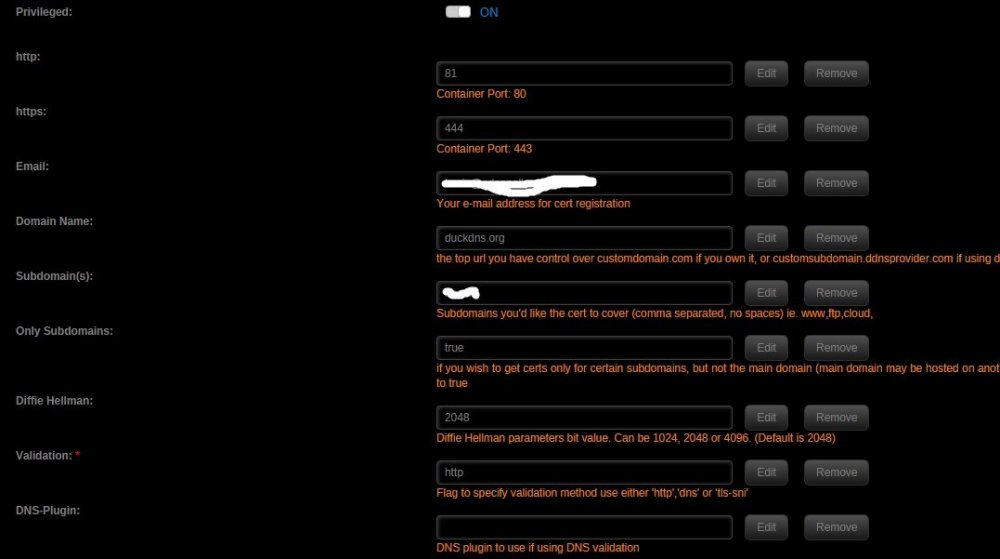
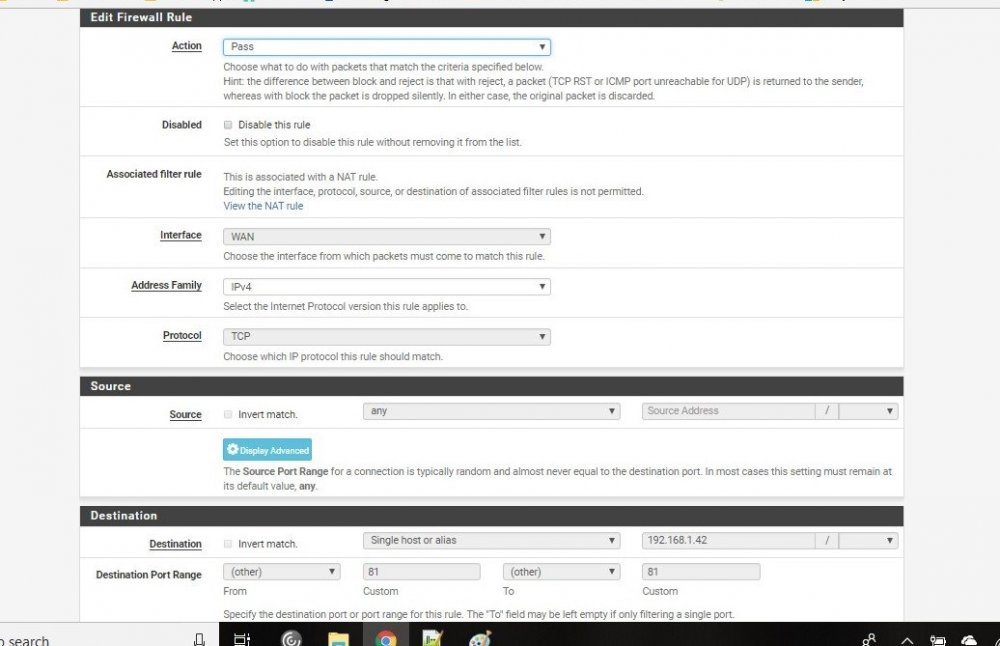
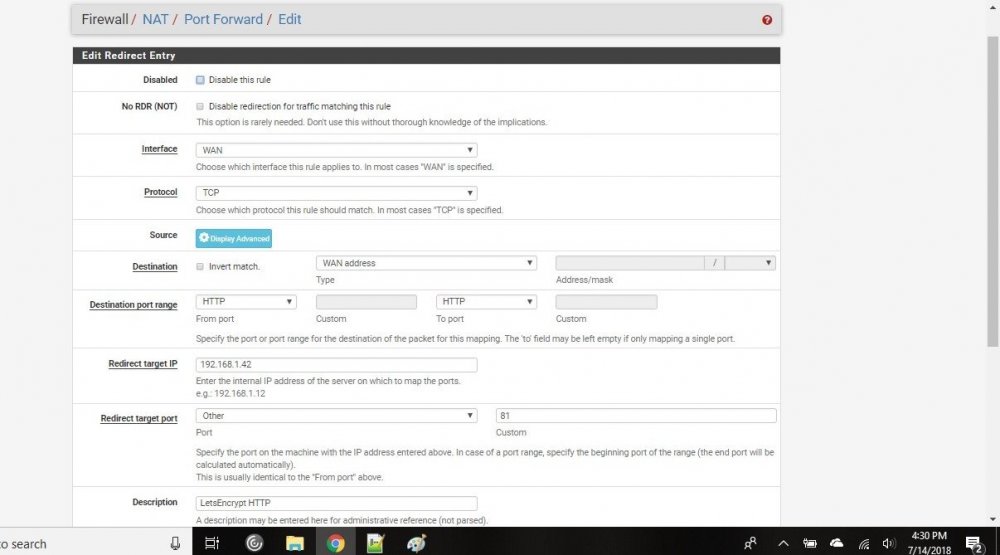
-
I was doing that because step 4 of your guide says: So I was doing the same to test functionality. I went ahead and downloaded your nginx file and substituted my server's IP for yours. I don't use most of the apps you have configured in it but I do use Sonarr at the default port of 8989 the same as in your file so I figured that should work. I deleted the original default file and replaced it with yours. I restarted both the Letsencrypt and Sonarr containers and went to mysubdomain.duckdna.org/sonarr. Chrome changed the address to HTTPS://mysubdomain.duckdns.org/sonarr but the HTTPS is crossed out and says Not Secure. The page loaded is an nginx page saying 404 Not Found.
-
That seems to have fixed the error in the log but 192.168.1.42:81 still does not take me to the nginx default page.
-
I went into to pfsense and forwarded port 80 to 192.168.1.42:81 and 443 to 192.168.1.42:444. When I type 192.168.1.81 I still get the "Site can't be reached" page. If I type mysubdomain.duckdns,org I get a Chrome "not secure" page and if I click proceed I get a pfsense error page that says "Potential DNS Rebind attack detected". I also get this in my Letsencryot container log: tls-sni validation is selected Generating new certificate Saving debug log to /var/log/letsencrypt/letsencrypt.log Plugins selected: Authenticator standalone, Installer None Obtaining a new certificate Performing the following challenges: Client with the currently selected authenticator does not support any combination of challenges that will satisfy the CA. Client with the currently selected authenticator does not support any combination of challenges that will satisfy the CA. ERROR: Cert does not exist! Please see the validation error above. The issue may be due to incorrect dns or port forwarding settings. Please fix your settings and recreate the container I'm sure I have something stupid wrong but I can;t figure out what.
-
I am trying to follow the guide and I got through step 4 in setting up the Letsencrypt container but when I type 192.168.1.42:81 (unraidip:81) in my browser it just takes me to a page that says "This page can't be reached" instead of the nginx home page. 192.168.1.42 is my internal IP for unraid HTTP set to 81 HTTPS set to 444 No ports forwarded yet since this is only internal at this point What could I be doing wrong?
-
Awesome! Love them! Thanks a ton.
-
If anyone is up to making a custom banner I would love one for WOPR. The super computer from the 80s movie War Games.
-
I've been trying do get this working for some time now without any luck. I have followed the tutorial froma scratch a few times. I'm sure I am doing something wrong but I can't figure out what for the life of me. MariaDB, Letsencrypt and Nextcloud containers are up and running but clicking on wbeui button for the Nextcloud container just yields a screen that says "404 Not Found nginx/1.12.2". Doing the same for the letsencrypt container just yields the generic Chrome window saying "this site can't be reached".


