





archedraft
Community Developer
-
Joined
-
Last visited
Everything posted by archedraft
-
Those are the raw values reported by the Docker engine, and on quick tests from du'ing into an image they were roughly the same. There's complaints all over the net about the hard drive usage of docker as a whole, and I believe that its related to the COW features and unused sub-images that aren't reported or deleted by containers. It's also why I don't think I'm going to add in deletion of log files, as realistically they are not the prime suspect in the disk usage. At least if nothing else, if you've properly set up your appdata, its no problems to kill the image and re-download the apps Very true. You're right, it is best for the user to just delete the file and re-download it from your templates.
-
Sort of along the same topic, would it be possible to add notifications like how parity checks work ie ("FIP has started checking the integrity of your files" and "FIP has finished checking all disks and has found XX file modifications and XX file corruptions")?
-
Way to go with the new resource monitor updates! It's interesting that on the dashboard it shows my 10GB docker image at 50% used but CA shows only ~3 GBs used. I am guessing there is extra crap in my docker image that never got removed?
-
I thought about that (and for the appdata), but realistically the only way of doing it is to exec into the container and issue a du command. Not an issue by itself, however the time that it takes to run could however be significant during which nothing else can happen on the system. Log files I didn't think about. Guess I'll have to read the threads to see if there are any caveats (or if you have to actually think about what you're doing at any point) Hmmm, I know I read about it somewhere. I'll hunt it down tomorrow.
-
I like the new resource monitor tab. As I was looking at each containers info I thought it would be nice to also see how much space each container is taking up on the docker.img. It would also be nice if there was a way to clean up log files with a click of button to free up the docker.img space (I am thinking of the couchpotato log that likes to fill up). Not sure if this is possible or even desired but just thought I would throw it out there.
-
Guess we can stop sharpening our pitchforks and stoking the fires then archedraft? Was quite looking forward to that... Indeed... I suppose if 6.2 is released this month my prediction will have been wrong. As far as the uprisings, it would seem that this forum has become a little more classier than the 6.0 beta days.
-
Woot! 6.2 is Final Stretch[emoji769]! [emoji13]
-
This GIF sums up everything!
-
Very nice! I will definitely be using this feature in the future.
-
It's out of beta, so I reinstalled. Still see two versions in my 'Installed Apps' list. Any cache clearing to be done? Edit: By the way, I updated CA before reinstalling. I don't live next to the computer gfjardim is now blacklisted and will not appear within CA. Had to do a minor update to CA to get rid of it still showing gfjardim within the installed / previous. If gfjardim is installed, then uninstalled, if you go to previous apps and reinstall unassigned devices from there, it will pull dlandon's version Didn't realize CA could manage user instances (Didn't know we could have instances either) (Yeah I know out of context...) Don't mess with Squid, he isn't afraid to type /ban from the command console!
-
What happens if I upgrade but don't have the mount points in the disks folder? Will it try and remap them?
-
You can count on it. Yes. And all the support issues when someone does it wrong. What if by default you make it /mnt/disks but if the user goes into settings and turns on "advanced mounting" they then have the option to use /mnt/ but it still forces the user to use /mnt/ (that way if someone does pick "extra" as there share name it would force it to /mnt/extra) That should prevent most issues.
-
Not that I am aware of, you could just pass through the usb device however.
-
I actually don't map any network drives, I just browse to my unRAID network share from the side menu. I feel like it is slightly more secure if some sort of virus tries to infect my computer. There is a chance it might only look for attached network drives...
-
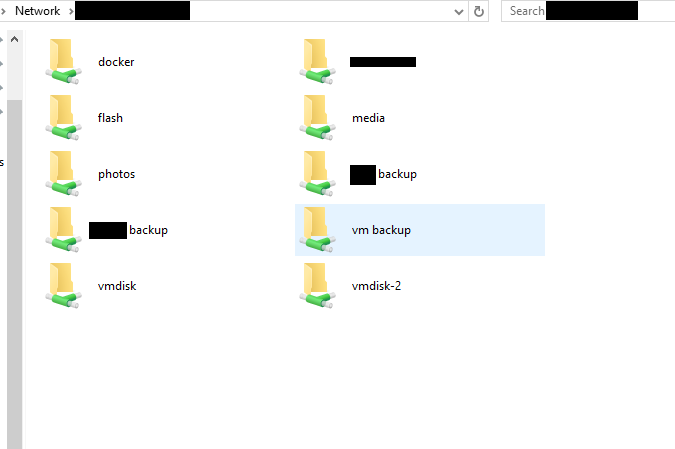
FWIW, I mount my 2 disks to /mnt/vmdisk and /mnt/vmdisk-2. I prefer not to have to go into the mnt/disks/ folder to access my shares. If you do decide to change the renaming feature, it would be nice to not be limited to only using the /mnt/disk folder. just my 2 cents Why do you feel the need to do that? 1. Because I am difficult 2. Because it is less mouse clicks and looks nice when browsing to my unRAID network shares (see photo).
-
FWIW, I mount my 2 disks to /mnt/vmdisk and /mnt/vmdisk-2. I prefer not to have to go into the mnt/disks/ folder to access my shares. If you do decide to change the renaming feature, it would be nice to not be limited to only using the /mnt/disk folder. just my 2 cents
-
When a disk is not mounted it is now showing as spun down, when you unmount a disk does this plugin tell the drive to spin down then? Also when unRAID gets started up from a powerdown state I am assuming the hard drive that is unmounted is spun up at the very beginning, so does unRAID spin down disks by default that are unassigned after a period of time? The spin down status is a little misleading now because one of my drives is currently pre clearing but shows as being spun down, when it clearly is spun up.
-
I would be so excited! I am imagining the look my wife would give me... lol
-
Wait, I just assumed LT swore you to secrecy and you already knew all the new stuff?? I know nothing, just rumours ;) Well jeez, if you're not even on the "list"; I don't even stand a chance Note the ;) I was wondering after I posted about those... I think of few of us need to take bonienl out for a few beers
-
Wait, I just assumed LT swore you to secrecy and you already knew all the new stuff?? I know nothing, just rumours ;) Well jeez, if you're not even on the "list"; I don't even stand a chance
-
Wait, I just assumed LT swore you to secrecy and you already knew all the new stuff??
-
I completely agree.
-
Hmmm interesting, I just updated the Plex docker on my production server and it is working just fine. I wonder why my test server is throwing a fit Anyways, thanks for looking into this. I'll report back if when I require it out...
-
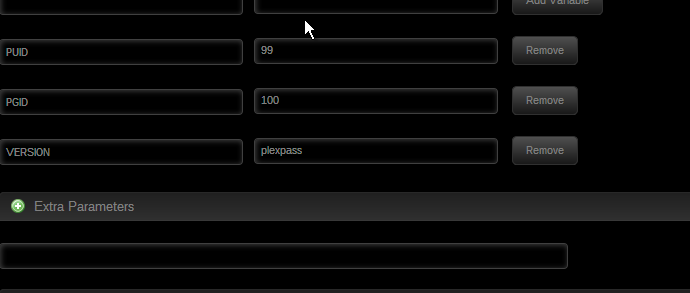
Changed it back to plexpass but no change, still will not download. EDIT: I removed the docker and container and then re-added the docker. No change, both plexpass or latest in version refuses to download the correct plex version. For some reason the version isn't getting translated correctly.
-
I just updated to your latest version of Plex and now it seems that Plex gets stucks trying to update to the latest version. I have plexpass in the version line. Log from unRAID Using version: from Plexpass latest Upgrading from version: 0.9.14.6.1620-e0b7243 to version: Log from Docker HTTP request sent, awaiting response... 404 Not Found 2016-01-19 07:47:32 ERROR 404: Not Found. --2016-01-19 07:47:32-- https://downloads.plex.tv/plex-media-server//plexmediaserver__amd64.deb Resolving downloads.plex.tv (downloads.plex.tv)... IP_ADDRESS, IP_ADDRESS Connecting to downloads.plex.tv (downloads.plex.tv)|IP-ADDRESS|:PORT... connected. I can ping downloads.plex.tv from my unRAID box... Any ideas why it cannot download the latest version? EDIT: If I hardcode the version 0.9.15.1.1639-26325ea into the docker it downloads just fine. Did the version: plexpass change?

