





rukiddin
Members
-
Joined
-
Last visited
-
I was still never able to get this to work. The disk format type as far as I can tell was set the same way. I'm sure I'm missing something simple. If anyone has a lot of experience with migrating VMs from one server to another, I'd be happy to compensate you for your time. Please DM me. Thanks! Mike
-
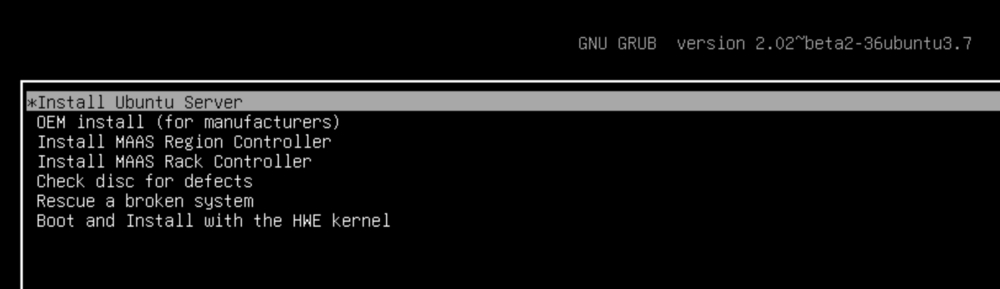
Thanks for the reply. I'd tried that in the past, but went ahead and tried again, using the same version, same ISO, all the same settings. Copied the file into the domains directory, even changed the owner to match, and added the +x via chmod so that it matched perfectly. When i start the Ubuntu VM, it doesn't seem to recognize the vdisk1.img file, and takes me to a GRUB setup screen (Attached).
-
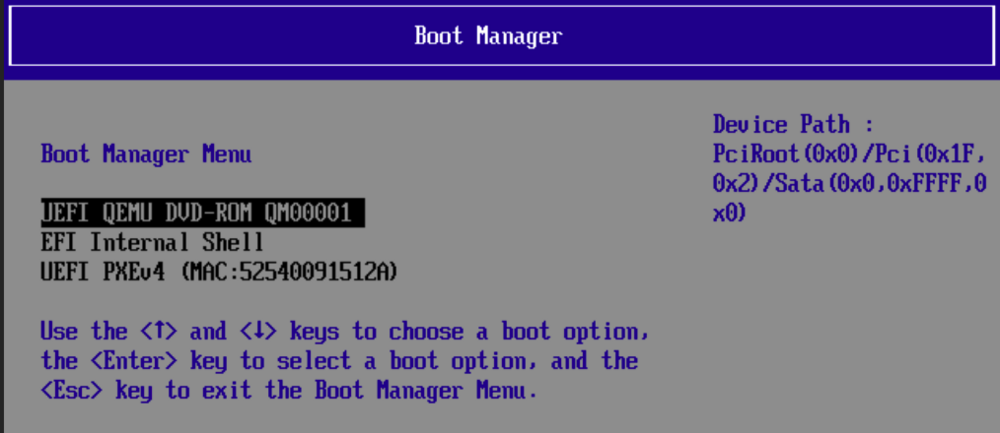
This is something I've wanted to do for years, and have tried several times, but have failed, but now it's imperative. I basically run an older UNRAID server for only one purpose, and that's to host a web tool that I wrote and developed 20 years ago. I'm actually shocked it's still useful, but it does what's needed, (it takes some scraped data and generates a nicely formatted report from it). Anyhow, like I said, it's old, but the server is on its last legs, and I need to migrate the VM to a new machine. I thought it would have been easy, to simply copy over the VDISK.img and create a new VM instance on the new server that I already have up and running. However, it's just not working at all. When I try the above scenario (copying the VDISK.IMG file over to the new server and creating a new instance). The VDISK moves over no problem, but when the Ubuntu template the I drop it in to fires up, it doesn't see the VDISK at all. So I can't even get to step 2 (which I'm sure will be getting the network card to be recognized). I'm sure I'm missing a basic step. I'm hoping someone can help. That report is due on Monday and of course, I'm down to the wire. The attached screenshot show that the partition with the Ubuntu VM on it is not showing up. (Unfortunately I can't show you what it looked like on the old machine as it's not running now, but it had a partition showing on the boot manager) Thanks Mike
-
I had a problem like this once, it turned out to be the power supply. Just that 1 extra drive, and things didn't work right. Beefed up the power supply and I was able to move on. Good luck
-
I've been using Nextcloud on my Unraid server uneventfully for the last couple of years. I recently realized it wasn't working. I get the following screen message when I try to access it locally: Internal Server Error The server encountered an internal error and was unable to complete your request. Please contact the server administrator if this error reappears multiple times, please include the technical details below in your report. More details can be found in the server log. If I run the command sudo -u abc php /config/www/nextcloud/console.php file:scan --all I get the following: An unhandled exception has been thrown: Doctrine\DBAL\Exception: Failed to connect to the database: An exception occurred while executing a query: SQLSTATE[HY000]: General error: 14 unable to open database file in /config/www/nextcloud/lib/private/DB/Connection.php:87 Stack trace: #0 /config/www/nextcloud/3rdparty/doctrine/dbal/src/Connection.php(1519): OC\DB\Connection->connect() #1 /config/www/nextcloud/3rdparty/doctrine/dbal/src/Connection.php(1041): Doctrine\DBAL\Connection->getWrappedConnection() #2 /config/www/nextcloud/lib/private/DB/Connection.php(236): Doctrine\DBAL\Connection->executeQuery() #3 /config/www/nextcloud/3rdparty/doctrine/dbal/src/Query/QueryBuilder.php(345): OC\DB\Connection->executeQuery() #4 /config/www/nextcloud/lib/private/DB/QueryBuilder/QueryBuilder.php(287): Doctrine\DBAL\Query\QueryBuilder->execute() #5 /config/www/nextcloud/lib/private/AppConfig.php(344): OC\DB\QueryBuilder\QueryBuilder->execute() #6 /config/www/nextcloud/lib/private/AppConfig.php(109): OC\AppConfig->loadConfigValues() #7 /config/www/nextcloud/lib/private/AppConfig.php(300): OC\AppConfig->getApps() #8 /config/www/nextcloud/lib/private/legacy/OC_App.php(971): OC\AppConfig->getValues() #9 /config/www/nextcloud/lib/private/Server.php(687): OC_App::getAppVersions() #10 /config/www/nextcloud/lib/private/AppFramework/Utility/SimpleContainer.php(160): OC\Server->OC\{closure}() #11 /config/www/nextcloud/3rdparty/pimple/pimple/src/Pimple/Container.php(118): OC\AppFramework\Utility\SimpleContainer->OC\AppFramework\Utility\{closure}() #12 /config/www/nextcloud/lib/private/AppFramework/Utility/SimpleContainer.php(127): Pimple\Container->offsetGet() #13 /config/www/nextcloud/lib/private/ServerContainer.php(136): OC\AppFramework\Utility\SimpleContainer->query() #14 /config/www/nextcloud/lib/private/AppFramework/Utility/SimpleContainer.php(56): OC\ServerContainer->query() #15 /config/www/nextcloud/lib/private/AppFramework/Utility/SimpleContainer.php(182): OC\AppFramework\Utility\SimpleContainer->get() #16 /config/www/nextcloud/lib/private/AppFramework/Utility/SimpleContainer.php(160): OC\AppFramework\Utility\SimpleContainer->OC\AppFramework\Utility\{closure}() #17 /config/www/nextcloud/3rdparty/pimple/pimple/src/Pimple/Container.php(114): OC\AppFramework\Utility\SimpleContainer->OC\AppFramework\Utility\{closure}() #18 /config/www/nextcloud/lib/private/AppFramework/Utility/SimpleContainer.php(127): Pimple\Container->offsetGet() #19 /config/www/nextcloud/lib/private/ServerContainer.php(136): OC\AppFramework\Utility\SimpleContainer->query() #20 /config/www/nextcloud/lib/private/AppFramework/Utility/SimpleContainer.php(56): OC\ServerContainer->query() #21 /config/www/nextcloud/lib/private/Server.php(1064): OC\AppFramework\Utility\SimpleContainer->get() #22 /config/www/nextcloud/lib/private/AppFramework/Utility/SimpleContainer.php(160): OC\Server->OC\{closure}() #23 /config/www/nextcloud/3rdparty/pimple/pimple/src/Pimple/Container.php(118): OC\AppFramework\Utility\SimpleContainer->OC\AppFramework\Utility\{closure}() #24 /config/www/nextcloud/lib/private/AppFramework/Utility/SimpleContainer.php(127): Pimple\Container->offsetGet() #25 /config/www/nextcloud/lib/private/ServerContainer.php(136): OC\AppFramework\Utility\SimpleContainer->query() #26 /config/www/nextcloud/lib/private/AppFramework/Utility/SimpleContainer.php(56): OC\ServerContainer->query() #27 /config/www/nextcloud/lib/private/Server.php(2024): OC\AppFramework\Utility\SimpleContainer->get() #28 /config/www/nextcloud/lib/private/Files/View.php(118): OC\Server->getLockingProvider() #29 /config/www/nextcloud/lib/private/Server.php(435): OC\Files\View->__construct() #30 /config/www/nextcloud/lib/private/AppFramework/Utility/SimpleContainer.php(160): OC\Server->OC\{closure}() #31 /config/www/nextcloud/3rdparty/pimple/pimple/src/Pimple/Container.php(118): OC\AppFramework\Utility\SimpleContainer->OC\AppFramework\Utility\{closure}() #32 /config/www/nextcloud/lib/private/AppFramework/Utility/SimpleContainer.php(127): Pimple\Container->offsetGet() #33 /config/www/nextcloud/lib/private/ServerContainer.php(136): OC\AppFramework\Utility\SimpleContainer->query() #34 /config/www/nextcloud/lib/private/AppFramework/Utility/SimpleContainer.php(56): OC\ServerContainer->query() #35 /config/www/nextcloud/lib/private/Server.php(1387): OC\AppFramework\Utility\SimpleContainer->get() #36 /config/www/nextcloud/lib/base.php(594): OC\Server->boot() #37 /config/www/nextcloud/lib/base.php(1089): OC::init() #38 /config/www/nextcloud/console.php(48): require_once('/config/www/nex...') #39 {main}root@ed996750eaf9:/# cd /config/www/nextcloud Can someone point me in the direction of what I can do to fix this? My MySQL skill is somewhat lacking. I'm hoping it might be a simple permission error. Thanks Mike
-
I'm also getting this error. I'm still runing UNRAID 6.9.2, I'm running the 9-22-2021 version of the plugin, the error displays at the bottom of every screen. I'm using the firefox in the GUI for Unraid, it's version is 73.0.1. I'll message you the diagnostics. Hope this helps. Love your plugin. Mike
-
Seems like the image clip needs to back up a bit before sending the image. I didn't want to choke my cellular by sending so many false positives.. Also, has anyone found a way to eliminate light effect? The biggest movement I get is when a car drives by and it's headlights light up my front door area (the light is the only movement). Causes false triggers all night long. Mike
-
Is anyone else having any success with getting the motion detection to work reliably? I get lots of notifications of motion, but there is rarely anything in the images that are sent to me. Also, when I deliberately stand in front of the camera and move around, I almost never get anything. thanks Mike
-
I'm having the same issue. The camera seems to work, and I've got it set to record when motion is detected. I get email notifications regarding motion, but nothing is saved to disk or included in the email. When I look at the config file it appears to have many locations to store various things (like logs), that should be stored in APPDATA but they aren't. Is this container completely functioning? Mike
-
I'm getting the same error message on my terminal after updating.

