d3m3zs
Members
-
Joined
Everything posted by d3m3zs
-
Thank you, updated and it seems working, unassigned ZFS disks do not spin up anymore. 🤝
-
Thanks, by the way, BTRFS has the same features, but never spin up (I have also BTRFS on unassigned disks)
-
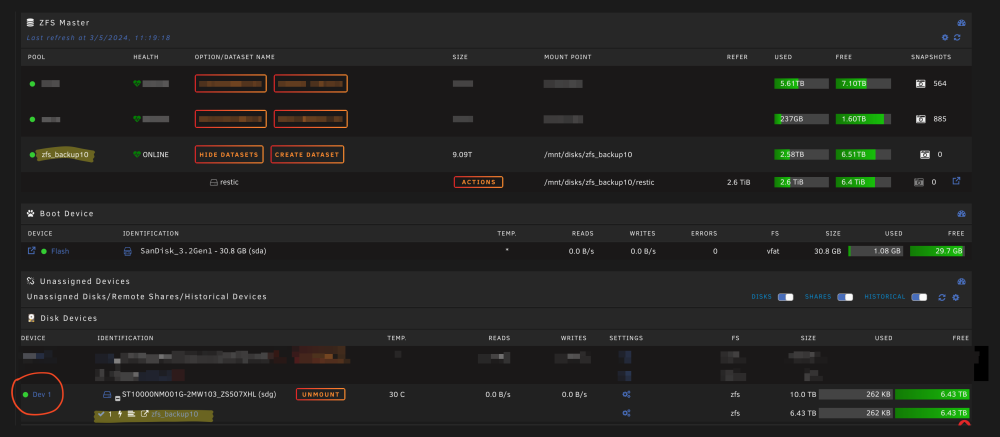
Hi! I already posted my question to ZFS plugin, but author told me it is issue of Unassigned device plugin. How can I fix it? Unassigned ZFS disks automatically spin up when I open Main tab on Unraid, all other ZFS disks (in array) continue sleeping.
-
1. Yes, in pool I have one ZFS drive and it is sleeping. 2. No. 3. No. And disk spin up only when I open Unraid Main tab. I can manually spin down disk on Main tab and in few seconds it will spin up again.
-
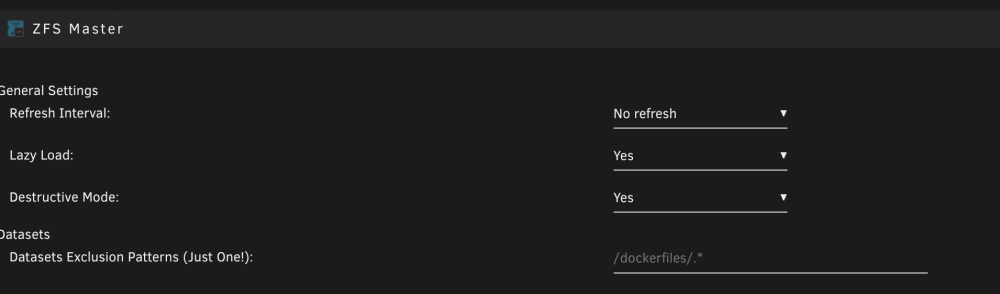
Can anyone tell me why when I have ZFS drive in Unassigned Devices - this drive will never spin down.
-
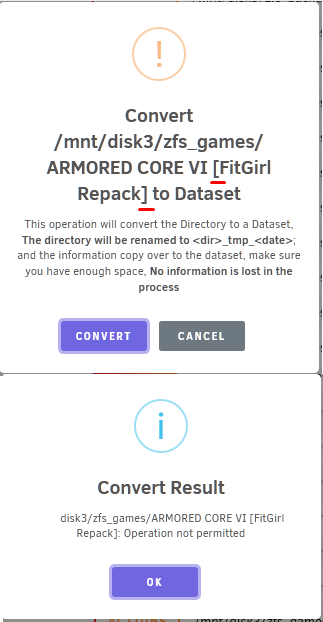
Found one more issue - invalid character '[' in name Need to remove such symbol first find . -depth -type d -name '*\[*\]*' -execdir bash -c 'mv -- "$1" "${1//[\[\]]/}"' bash {} \;
-
Thank you! That is exactly what we need to this feature. All other - agree and understood.
-
This is great update! Thank you! But also would be great to automatically remove tmp folders after rsync command done. For example, I selected folder, decided to convert it, dialog was appeared with progress and then was closed, I checked only 20GB was copied to new dataset (should be 80GB), ok, after 10-20 minutes I checked again and see that new dataset ha all 80GB of data and all tmp folder is also 80GB of data. So, as user I don`t understand if rsync job successfully finished or not and I don`t understand why I still have tmp folder. So, I need now execute one more rsync command manually with dryrun to be sure that everything was transfered.
-
Did you mean this https://docs.oracle.com/cd/E18752_01/html/819-5461/gbchx.html ?
-
Thank you. It seems best way to backup is - do not create child dataset, just use usual folders or write such script that will be sending all child one by one.
-
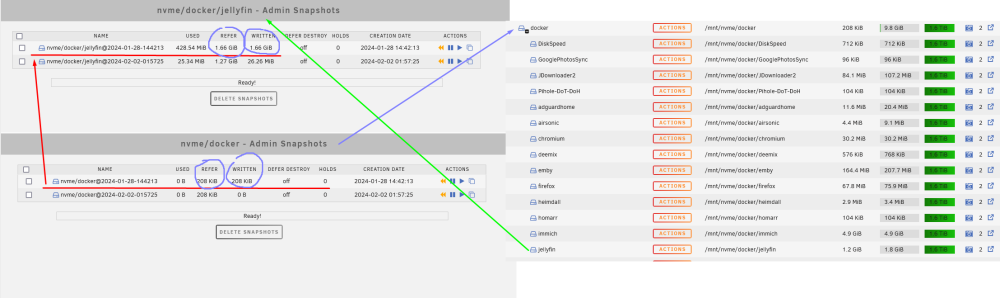
I have a question, maybe I don`t understand how should I work with plugin, but I expected that when I create snapshot of dataset - it should have all datasets inside, instead of this I can see that when I created (in my case) snapshot of docker dataset - it takes 0 space and all folders will be empty, but each dataset that inside docker - created. Doesn`t matter did I checked "Recursively create snapshots of all descendent datasets" or not, nvme/docker Snapshot will be empty each time. Because I executed command zfs send nvme/docker@{my_snapshot} | zfs recv disk3/zfs_backups/dockers and noticed that all folders in "disk3/zfs_backups/dockers" are empty and started my investigation.
-
None of them, but maybe after reboot I will be able to remove.
-
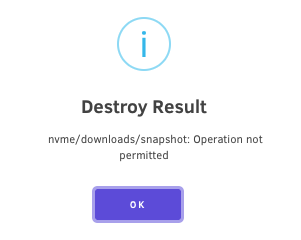
1. Yes it has, but from some tutorial with your plugin I saw this "scrub" button and don`t see where it was removed according to last change log. 2. Thank you, activated, but after destroying see 3. No refresh works only for array disks, I don`t know why, but unassignedd will never spin down.
-
Thanks, got that. Also, I have a few questions: 1. I see no button "scrub" in plugin, it was removed or some setting should activate it? I use 2023.12.08.48 version 2. Is it possible to remove dataset via plugin? For example it is easy to create, but for removing I have to do that in CLI. BTW: "No Refresh" doen`t affect Unassigned disks, so I just formatted them to btrfs and xfs.

-
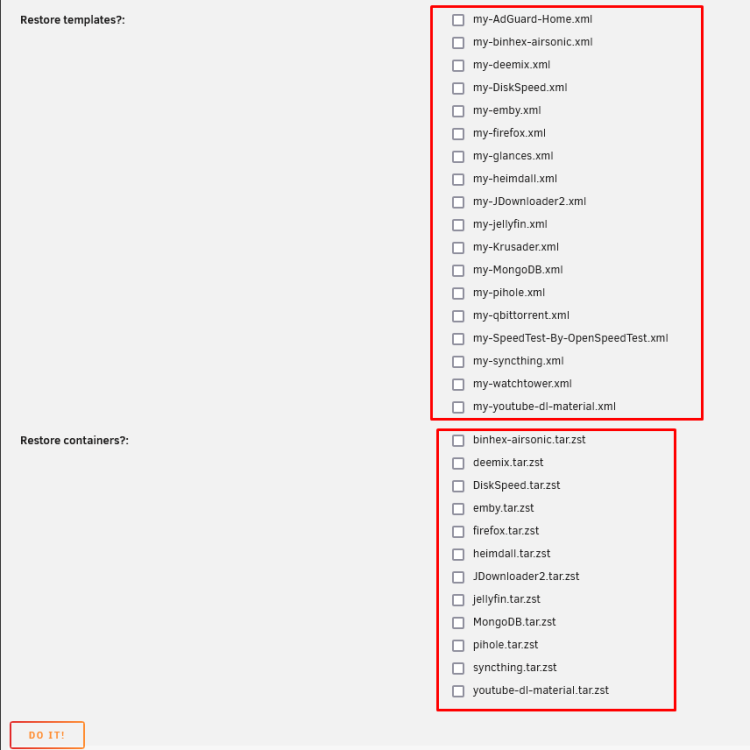
I would like to restore a few containers, but I don`t see them in list, bbut can see in templates, for example qbittorent. Checked last 4 backup files and did not find.
-
And one more question, maybe I did not get. How can I manually open snapshot? I removed a few folders by mistakes, would like to restore.

-
I found weird behavior: if I have Unassigned Devices formatted in ZFS they will never spindown. It seems this setting 'no refresh' works only for array ZFS drive.

-
Found issue - increased docker timeout from 10s to 45s and issue gone.
-
Could someone help me to resolve the same issue: I upgraded and saw "Reboot" link. After reboot I see this message: And now began Parity checking for few days... And this is not first time, almost each reboot or shutdown - parity check, I don`t want to have it each time, because in winter server could be turned on-off each days, because of issue with our electricity infrastructure. Which log and from where I have to check?
-
 Does anybody know why animated banners don`t work? When upload animated banner I can see that image animated, but after saving - I can see static image in header.
 -
-
I have pool 2TB from two 1 TB nvme drives, raid0 and formatted as ZFS. Just simple question: Is it possible to add one more 2TB nvme drive and recreate raid0 4TB (1+1+2) and format as ZFS? I understand that I lose all data from current pool (I will make backup), but main question - does software raid0 in unraid has no restriction aout size? Because if unraid build pool as raidz0 - all drives should be the same size. I see that probably unraid first of all create usual mdadm and the format ZFS, am I right? pool: nvme state: ONLINE scan: scrub repaired 0B in 00:03:40 with 0 errors on Sat Nov 4 03:03:41 2023 config: NAME STATE READ WRITE CKSUM nvme ONLINE 0 0 0 /dev/nvme2n1p1 ONLINE 0 0 0 /dev/nvme1n1p1 ONLINE 0 0 0 errors: No known data errors
-
Any news? Oh, I see, beta.
-
Ok, problem solved: executed xfs_repair -L /dev/sdf1 repair successfully finished and disk is empty formatted drive to BTRFS and forgot about XFS on non-Array device.
-
I have one 18TB drive in XFS format as backup and from time to time I run rsync command to backup important data from my array. Today I can not mount this drive, each time I see In syslog Nov 4 22:16:03 BlackBox unassigned.devices: Mounting partition 'sdf1' at mountpoint '/mnt/disks/backup'... Nov 4 22:16:03 BlackBox unassigned.devices: Mount cmd: /sbin/mount -t 'xfs' -o rw,relatime '/dev/sdf1' '/mnt/disks/backup' Nov 4 22:16:03 BlackBox kernel: XFS (sdf1): Mounting V5 Filesystem Nov 4 22:16:03 BlackBox kernel: XFS (sdf1): Log inconsistent (didn't find previous header) Nov 4 22:16:03 BlackBox kernel: XFS (sdf1): failed to find log head Nov 4 22:16:03 BlackBox kernel: XFS (sdf1): log mount/recovery failed: error -117 Nov 4 22:16:03 BlackBox kernel: XFS (sdf1): log mount failed Nov 4 22:16:05 BlackBox unassigned.devices: Mount of 'sdf1' failed: 'mount: /mnt/disks/backup: mount(2) system call failed: Structure needs cleaning. dmesg(1) may have more information after failed mount system call. ' Nov 4 22:16:05 BlackBox unassigned.devices: Partition 'backup' cannot be mounted. I have tried manually run next command: xfs_repair - n /dev/sdf1 and then xfs_repair /dev/sdf1 Output Phase 1 - find and verify superblock... Phase 2 - using internal log - zero log... Log inconsistent (didn't find previous header) failed to find log head zero_log: cannot find log head/tail (xlog_find_tail=5) ERROR: The log head and/or tail cannot be discovered. Attempt to mount the filesystem to replay the log or use the -L option to destroy the log and attempt a repair. What should I do and how to solve it? And why did it happen? Maybe easiest would be - just format this drive and create FS from scratch? How would unraid works with EXT4? Because honestly on EXT4 I did not have such issues.
-
I can see these information there Is it possible to add possibility for adding this to notification? Maybe simple checkbox on UI and just regex for log output for filter "Installing..." and build one notification?