d3m3zs
Members
-
Joined
Everything posted by d3m3zs
-
Thanks one more time! Is it possible to provide more information in notification? For example which containers were updated? Now I got something like this: Would be great to have some similar to watchtower if any containers were updated: Or at least:
-
Thank you a lot!
-
Hi! Can someone help me to understand what this setting does Because I am little bit confused and even created topic
-
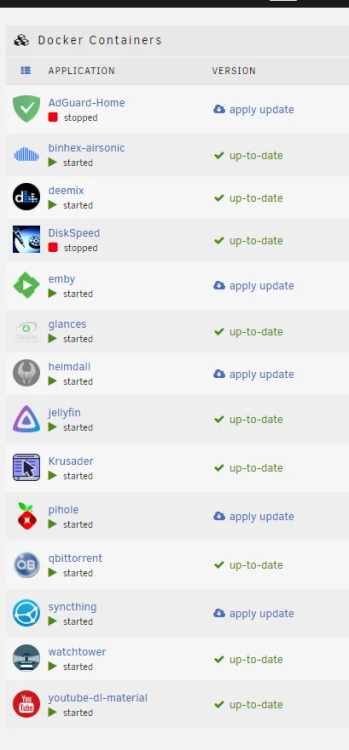
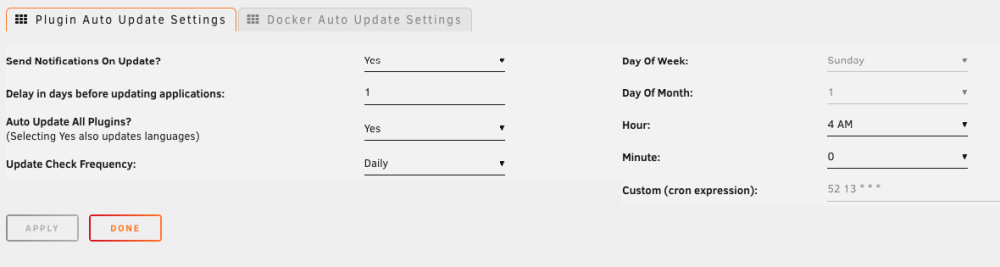
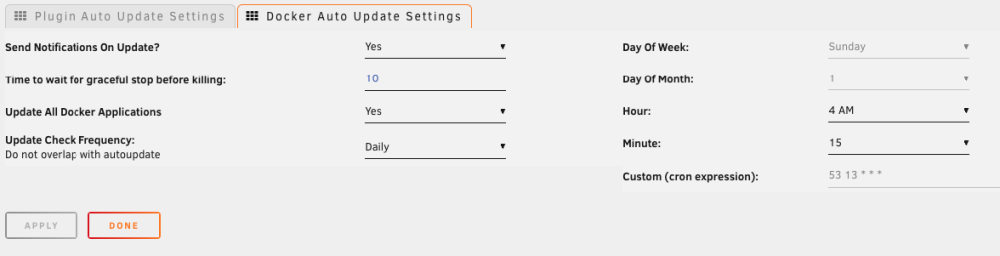
Previously on OMV I updated my containers with Watchtower container. It works and on Unraid, but I found that even after successfully updated containers Found new lscr.io/linuxserver/qbittorrent:latest image (ac570e5f1f88) Found new pihole/pihole:latest image (1fd7e7caffbd) Found new lscr.io/linuxserver/emby:latest image (6698f4832eb1) Found new lscr.io/linuxserver/heimdall:latest image (533f10d4c5b0) Found new lscr.io/linuxserver/syncthing:latest image (8241c8a8aa2a) Found new adguard/adguardhome:latest image (266c7764c9e5) Creating /AdGuard-Home Stopping /syncthing (36caa611625c) with SIGTERM Creating /syncthing Stopping /heimdall (4f7e04df7794) with SIGTERM Creating /heimdall Stopping /emby (626bfd491587) with SIGTERM Creating /emby Stopping /pihole (3049f7ae1ad9) with SIGTERM Creating /pihole Stopping /qbittorrent (ad6ef837b8e1) with SIGTERM Creating /qbittorrent Removing image f100cff01637 Removing image 5a4facdbacf1 Removing image 8dba1be023f4 Removing image 2c8a4159522a Removing image 80b60b9f5da8 Removing image 566a5a3d4773 Unraid UI will be without change To remove this label "apply update" I have to manually press "Update" button after that nothing will be updated and label will disappear: IMAGE ID [722532594]: Pulling from adguard/adguardhome. Status: Image is up to date for adguard/adguardhome:latest TOTAL DATA PULLED: 0 B I found plugin CA Auto Update Applications it works great, already checked and turned off my watchtower container, decided to use this plugin. Decided to schedule at 4:00 update plugins and at 4:15 docker containers: After that I found one more plugin Appdata Backup it looks very useful, has item "Update containers after backup?" - YES and also has own schedule for running backup, but what I do not understand - how these both will be working together? One person on reddit told me that But it is Appdata Backup plugin, not CA Appdata Backup, also I did not find any information that Appdata Backup will execute CA Auto Update Applications plugin. Now I am confused: Appdata Backup - I setup run at 3:00 and selected Update containers after backup? - YES CA Auto Update Applications - I setup update plugin at 4:00, update docker at 4:15, already checked works good. How together both will work? Options: Appdata Backup at 3:00 starts, making backup and automatically running - CA Auto Update Applications? They will be working independently: Appdata Backup at 3:00 starts, making backup and then at 4:00 and 4:15 - CA Auto Update Applications will update all?
-
Got it, thanks, no I prepared all configs and will be only copy from boot each reboot and nothing write back.
-
but with such softlink I will be exactly reading from boot area each time and you just mentioned that I have to minimize reading/writing to the boot flash drive. So, that looks like no difference if I just copy FROM boot to another folder or your option with creating softlink, I just read once per session and your approach - read many times.
-
I am not sure how ln -s will be working in my case? It will be working only with telegramCodeHTML.sh ncdu HDSentinel But settings for mc, btop, htop anyway should be copied. Or I am wrong?
-
And unfortunately all these lines dont update settings, first need to execute each tool and then copy config. yes | cp -rf "$source_dir"mc/* "/root/.config/mc/" & yes | cp -rf "$source_dir"htop/* "/root/.config/htop/" & yes | cp -rf "$source_dir"btop_settings/* "/root/.config/btop/" & So, updated to: #!/bin/bash source_dir="/boot/config/my_custom_scripts/" yes | cp -rf "$source_dir"telegramCodeHTML.sh "/usr/local/bin/" & yes | cp -rf "$source_dir"ncdu "/usr/local/bin/" & yes | cp -rf "$source_dir"btop "/usr/local/bin/" & yes | cp -rf "$source_dir"HDSentinel "/usr/local/bin/" & wait chmod +x /usr/local/bin/btop # execute mc & btop & htop & # just in case sleep 5 # close pkill mc pkill btop pkill htop yes | cp -rf "$source_dir"mc/* "/root/.config/mc/" & yes | cp -rf "$source_dir"htop/* "/root/.config/htop/" & yes | cp -rf "$source_dir"btop_settings/* "/root/.config/btop/" & wait echo "🎉 scripts are copied" chmod +x /usr/local/bin/telegramCodeHTML.sh chmod +x /usr/local/bin/ncdu chmod +x /usr/local/bin/HDSentinel telegramCodeHTML.sh "✅ my_configs➡️ system "
-
#!/bin/bash source_dir="/boot/config/my_custom_scripts/" yes | cp -rf "$source_dir"telegramCodeHTML.sh "/usr/local/bin/" & yes | cp -rf "$source_dir"ncdu "/usr/local/bin/" & yes | cp -rf "$source_dir"btop "/usr/local/bin/" & yes | cp -rf "$source_dir"HDSentinel "/usr/local/bin/" & yes | cp -rf "$source_dir"mc/* "/root/.config/mc/" & yes | cp -rf "$source_dir"htop/* "/root/.config/htop/" & yes | cp -rf "$source_dir"btop_settings/* "/root/.config/btop/" & wait echo "🎉 scripts are copied" chmod +x /usr/local/bin/telegramCodeHTML.sh chmod +x /usr/local/bin/ncdu chmod +x /usr/local/bin/btop chmod +x /usr/local/bin/HDSentinel telegramCodeHTML.sh "✅ Scripts" Wrote such script and scheduled "At Startup of Array". Checked - works. Hope /boot/config/my_custom_scripts/ is ok place. Will add one more and schedule "At Stopping Array"

-
I did not find answer, probably is only my issue and nobody cares about this logic. Is it possible to somehow reach devs or create a ticket for such useful and easy feature, maybe create a plugin to store your folders between reboots?
-
It is interesting, because I pasted in root/.ssh/ my file 'authorized_keys' from previous server and it is successfully saved after each reboot. Ah, probably because I found the same file in path /boot/config/ssh/root/ So, the question is - what is the best place where I have to store my files and copy after each start? And also I don`t understand why even .bash_history and other very useful files don`t stored somewhere as default behavior? In my point of view it would be a good practice.
-
Do we have plugin for this? Which folders are RAM folders? I see probably 1 option - write script that will copy all my files and settings to RAM folders after each reboot.
-
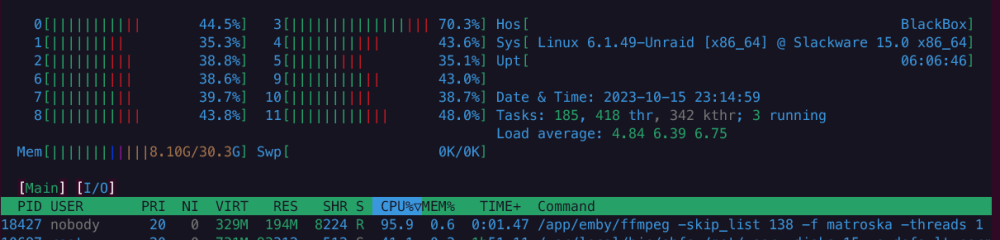
Hi! I switched from OMV to Unraid, continue setup process and did not get a few things: 1. Why after each reboot my mc and htop looks like default, all previous settings just disappeared. And if for mc I can see that settings present in path before reboot /root/.config/mc/ (probably I have to copy them to somewhere), but for htop folder /root/.config/htop/ is empty. For example I setup everything in htop But it looks like stored somewhere else. 2. I pasted a few files (for fast access from console) in folder /usr/local/bin/ But again after reboot they disappear. All these manipulations I made as root. Thanks in advance.
-
No, I run in docker container on my local NAS server.
-
Hi! Thank you! Unfortunately, nothing changes, I can send a letter in few hours with debug log. DiskSpeed - Disk Diagnostics & Reporting tool Version: 2.10.2 Scanning Hardware 14:47:19 Spinning up hard drives 14:47:19 Scanning system storage 14:47:19 Scanning USB Bus 14:47:20 Scanning hard drives 14:47:20 Scanning storage controllers 14:47:20 Scanning USB hubs & devices 14:47:20 Drive sda was added to the Host after this DiskSpeed Docker was started (restart if so) or is an empty card reader. 14:47:20 Drive sdb was added to the Host after this DiskSpeed Docker was started (restart if so) or is an empty card reader. 14:47:20 Drive sdc was added to the Host after this DiskSpeed Docker was started (restart if so) or is an empty card reader. 14:47:20 Drive sdd was added to the Host after this DiskSpeed Docker was started (restart if so) or is an empty card reader. 14:47:20 Drive sde was added to the Host after this DiskSpeed Docker was started (restart if so) or is an empty card reader. 14:47:20 Scanning motherboard resources Lucee 5.3.10.97 Error (application) Message Error invoking external process Detail /dev/mem: No such file or directory Stacktrace The Error Occurred in /var/www/ScanControllers.cfm: line 1413
-
Hi! Thanks! I am from Ukraine and bought it locally for 3$, probably shop forgot to update price. I was skeptical about quality but it works good and two ssd (sata+nvme) in the same time. And now I fell uncomfortable that you have to buy something for testing if log will be not enough.
-
Adapter MAIWO KT015 https://www.joom.com/en/products/5d26d76d8b2c3701019b550d Debug file created and will send to your email soon.
-
Hi, everyone! I added pci-e adapter (sata ssd + nvme ssd) and when I am trying to open DiskSpeed UI - can see next error: DiskSpeed - Disk Diagnostics & Reporting tool Version: 2.10.1 Scanning Hardware - A change was detected on the drive configuration. 18:10:42 Spinning up hard drives 18:10:42 Scanning system storage 18:10:43 Scanning USB Bus 18:10:43 Scanning hard drives Lucee 5.3.10.97 Error (application) Message Error invoking external process Detail /dev/nvme0n1: No such file or directory Send an Identify Namespace command to the given device, returns properties of the specified namespace in either human-readable or binary format. Can also return binary vendor-specific namespace attributes. [ --namespace-id=<NUM>, -n <NUM> ] --- identifier of desired namespace [ --force, -f ] --- Return this namespace, even if not attaced (1.2 devices only) [ --vendor-specific, -v ] --- dump binary vendor fields [ --raw-binary, -b ] --- show identify in binary format [ --output-format=<FMT>, -o <FMT> ] --- Output format: normal|json|binary [ --human-readable, -H ] --- show identify in readable format Stacktrace The Error Occurred in /var/www/ScanControllers.cfm: line 923 921: <CFFILE action="write" file="#PersistDir#/#exe()#_nvme_id-ns_#ListLast(DiskInfo.Node[CF],'/')#_exec.txt" output="/usr/sbin/nvme id-ns #DiskInfo.Node[CF]#" addnewline="NO" mode="666"> 922: <CFIF URL.Debug NEQ "FOOBAR"><cfmodule template="cf_flushfs.cfm"></CFIF> 923: <CFEXECUTE name="/usr/sbin/nvme" arguments="id-ns #DiskInfo.Node[CF]#" timeout="300" variable="Info" /> 924: <CFFILE action="write" file="#PersistDir#/#exe()#_nvme_id-ns_#ListLast(DiskInfo.Node[CF],'/')#.txt" output="#Info#" addnewline="NO" mode="666"> 925: <CFSET Info=ColumnsToStruct(Info)> called from /var/www/ScanControllers.cfm: line 884 882: </CFLOOP> 883: </CFIF> 884: </CFLOOP> 885: 886: <!--- Get drive information for NVME drives using nvmi-cli ---> Java Stacktrace lucee.runtime.exp.ApplicationException: Error invoking external process at lucee.runtime.tag.Execute.doEndTag(Execute.java:266) at scancontrollers_cfm$cf.call_000138(/ScanControllers.cfm:923) at scancontrollers_cfm$cf.call(/ScanControllers.cfm:884) at lucee.runtime.PageContextImpl._doInclude(PageContextImpl.java:1056) at lucee.runtime.PageContextImpl._doInclude(PageContextImpl.java:948) at lucee.runtime.listener.ClassicAppListener._onRequest(ClassicAppListener.java:65) at lucee.runtime.listener.MixedAppListener.onRequest(MixedAppListener.java:45) at lucee.runtime.PageContextImpl.execute(PageContextImpl.java:2493) at lucee.runtime.PageContextImpl._execute(PageContextImpl.java:2478) at lucee.runtime.PageContextImpl.executeCFML(PageContextImpl.java:2449) at lucee.runtime.engine.Request.exe(Request.java:45) at lucee.runtime.engine.CFMLEngineImpl._service(CFMLEngineImpl.java:1216) at lucee.runtime.engine.CFMLEngineImpl.serviceCFML(CFMLEngineImpl.java:1162) at lucee.loader.engine.CFMLEngineWrapper.serviceCFML(CFMLEngineWrapper.java:97) at lucee.loader.servlet.CFMLServlet.service(CFMLServlet.java:51) at javax.servlet.http.HttpServlet.service(HttpServlet.java:764) at org.apache.catalina.core.ApplicationFilterChain.internalDoFilter(ApplicationFilterChain.java:227) at org.apache.catalina.core.ApplicationFilterChain.doFilter(ApplicationFilterChain.java:162) at org.apache.tomcat.websocket.server.WsFilter.doFilter(WsFilter.java:53) at org.apache.catalina.core.ApplicationFilterChain.internalDoFilter(ApplicationFilterChain.java:189) at org.apache.catalina.core.ApplicationFilterChain.doFilter(ApplicationFilterChain.java:162) at org.apache.catalina.core.StandardWrapperValve.invoke(StandardWrapperValve.java:197) at org.apache.catalina.core.StandardContextValve.invoke(StandardContextValve.java:97) at org.apache.catalina.authenticator.AuthenticatorBase.invoke(AuthenticatorBase.java:541) at org.apache.catalina.core.StandardHostValve.invoke(StandardHostValve.java:135) at org.apache.catalina.valves.ErrorReportValve.invoke(ErrorReportValve.java:92) at org.apache.catalina.valves.AbstractAccessLogValve.invoke(AbstractAccessLogValve.java:687) at org.apache.catalina.valves.RemoteIpValve.invoke(RemoteIpValve.java:769) at org.apache.catalina.core.StandardEngineValve.invoke(StandardEngineValve.java:78) at org.apache.catalina.connector.CoyoteAdapter.service(CoyoteAdapter.java:360) at org.apache.coyote.http11.Http11Processor.service(Http11Processor.java:399) at org.apache.coyote.AbstractProcessorLight.process(AbstractProcessorLight.java:65) at org.apache.coyote.AbstractProtocol$ConnectionHandler.process(AbstractProtocol.java:890) at org.apache.tomcat.util.net.NioEndpoint$SocketProcessor.doRun(NioEndpoint.java:1789) at org.apache.tomcat.util.net.SocketProcessorBase.run(SocketProcessorBase.java:49) at org.apache.tomcat.util.threads.ThreadPoolExecutor.runWorker(ThreadPoolExecutor.java:1191) at org.apache.tomcat.util.threads.ThreadPoolExecutor$Worker.run(ThreadPoolExecutor.java:659) at org.apache.tomcat.util.threads.TaskThread$WrappingRunnable.run(TaskThread.java:61) at java.base/java.lang.Thread.run(Thread.java:829) Where /dev/nvme0n1 - is my nvme disk installed in adapter. Is it possible to solve it? Thanks!