





malaki86
Members
-
Joined
-
Last visited
Everything posted by malaki86
-
Because this pool is both the Array write cache, AND a "work" space, I'm thinking about switching to 2.5" spinning drives, mainly due to the NZBs, which creates a lot of files.
-
TeamGroup, I think.
-
The 2 SSDs are connected to one of the ports of my HBA controller, an LSI IT-mode 9207-8i, with the 2nd port connected to my EMC KTN-STL3 JBOD 15-bay shelf.
-
I created a 2x1Tb 2.5" SSD pool from 2 new drives last May. It's been fantastic until a week or two ago. Now, I have VERY slow read/write speeds. It's so slow that my 240mbps download speed is faster than the pool can write. I originally had it formatted as a BTRFS, but rebuilt it as a ZFS pool this past weekend. It seemed to be running much.better, but last night the speeds bottomed out again. Restarting the Dockers, array and the server itself did nothing to help. Neither of the drives have any errors in the logs, SMART reports, or the scrubs. They're just almost unusably slow. If the SSDs are wearing out, shouldn't I be seeing actual errors?
-
Nope - Tdarr destroys the IO when it's transcoding.... I was planning on adding 2 more drives to the Work pool. What I might do is create a separate 2x Transcode pool, instead.
-
I'm still not sure on the WHY, but I *think* I fixed the issue. I changed the Work pools filesystem from a BTRFS Raid 0 to ZFS Raid 0. So far, the speeds are looking much more consistent. I haven't restarted Tdarr back up yet, so I don't know with absolute certainty that the problem has been solved or not.
-
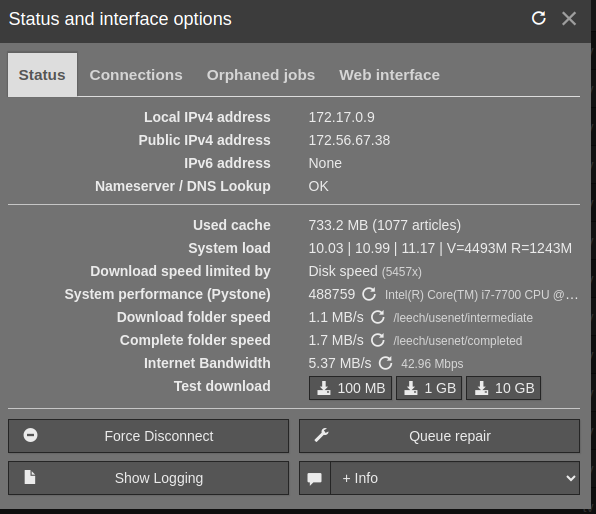
I set up a 2x 1Tb 2.5" SSD cache to use as a "work" space. The 2 drives are connected to a single port from my 6GB/s HBA card, with the 2nd port feeding my drive shelf. This cache is the write cache for the data array, plus the storage space for downloads/processing from Sabnzbd. I was also using this space as a transcode location for Tdarr to use. Everything was working fantastic until a couple of days ago when I started having issues with the download speed from Sab, with it being a roller-coaster ride, from sub-1MB/s to the normal of 24MB/s, which is what I have it set to use as the max speed. The peaks and valleys were very consistent. I initially thought that it was my internet connection, of course, especially since it's cellular (T-Mobile Home Internet). Multiple reboots of the modem with no change. Through a lot of troubleshooting, everything came down to the write speeds of the Work cache, with the folder speed-tests in Sab being in the same speeds as the download speeds, which means that the bottleneck is the Work cache itself. I noticed that when I paused the Tdarr transcodes, the Work speeds were back to normal. Ok, easy fix - change Tdarr to use the ramdisk for transcoding. I verified that Tdarr is in fact using the ramdisk, but when Tdarr is running, the Work cache is still running slow. I ran the hdparm utility on the 2 drives that make up the Work cache and this is the results: root@Neo:/tmp/TdarrCache# hdparm -tT /dev/sdc /dev/sdc: Timing cached reads: 13192 MB in 1.99 seconds = 6627.77 MB/sec Timing buffered disk reads: 480 MB in 3.01 seconds = 159.52 MB/sec root@Neo:/tmp/TdarrCache# hdparm -tT /dev/sdd /dev/sdd: Timing cached reads: 17142 MB in 1.99 seconds = 8619.70 MB/sec Timing buffered disk reads: 736 MB in 3.01 seconds = 244.60 MB/sec This is driving me nuts, especially since I don't know what's causing the bottleneck now. Neither of the 2 drives have any Smart or Scrub errors whatsoever. All I know is that a 2x Raid-0 should be infinitely faster than a sub-Gbit download.
-
So, just uninstall the original and install this one?
-
I finally got it working. I had to use a blank translator, with the Docker volumes pointing to the same locations. Below is my complete config for it. Unraid: Shared folders: /rootshare : /mnt/user (this is the root location of the media files) /ramdriveshare : /tmp (this is the location of the Tdarr transcode cache) Tdarr server volumes for Docker: /mnt/user : /media /tmp/tdarr : /temp Ubuntu: Fstab: //192.168.1.5/rootshare /mnt/media cifs guest,uid=1000 0 0 //192.168.1.5/ramdriveshare/tdarr /mnt/tmp cifs guest,uid=1000 0 0 Tdarr node volumes for Docker: /mnt/media : /media /mnt/tmp : /temp Tdarr_Node_Config.json: { "nodeID": "pc-node", "nodeName": "pc-node", "serverIP": "192.168.1.5", "serverPort": "8266", "handbrakePath": "", "ffmpegPath": "", "mkvpropeditPath": "", "pathTranslators": [ { "server": "", "node": "" } ], "logLevel": "INFO", "priority": -1, "cronPluginUpdate": "" }
-
I've also tried using the UNC node paths, as well, with the same result. \\\\192.168.1.5\\rootshare
-
Yes - I've tested both shares have full permissions. I already have a node on the server itself. The new pc (Ubuntu) has an iGPU, so I want to put it to work, too.
-
I'm ripping what's left of my hair out on this. Tdarr server is running on Unraid, and I just set up a new Ubuntu pc that I'm wanting to install a Tdarr node as a Docker container. I'm stuck at the path translator section. Here are my paths for the Tdarr server in Unraid: Server physical paths: media: /mnt/user/ (shared as rootshare) transcode: /tmp (shared as ramdriveshare) Tdarr server docker container paths Docker <--> Physical media path: /mnt/media/ <--> /mnt/user/ transcode path: /temp/ <--> /tmp/tdarr Here are my paths for the Tdarr node in Ubuntu: Ubuntu fstab entries: //192.168.1.5/rootshare /mnt/media cifs guest,uid=1000 0 0 //192.168.1.5/ramdriveshare /mnt/tmp cifs guest,uid=1000 0 0 Ubuntu Tdarr node Docker paths: volumes: - /containers/tdarr_node/server:/app/server - /containers/tdarr_node/config:/app/configs - /containers/tdarr/logs:/app/logs - /mnt/media:/media - /mnt/tmp/tdarr:/temp This is in the logs at startup of the Tdarr node: Starting Tdarr_Node { environment: 'production', execDir: '/app/Tdarr_Node', appsDir: '/app' [2024-04-21T12:10:47.068] [INFO] Tdarr_Node - /app/configs/Tdarr_Node_Config.json [2024-04-21T12:10:47.078] [INFO] Tdarr_Node - { nodeID: 'pPo0fqzrf', nodeName: 'pc-node', serverIP: '192.168.1.5', serverPort: '8266', handbrakePath: '', ffmpegPath: '', mkvpropeditPath: '', pathTranslators: [ { server: '/mnt/media', node: '/mnt/media' }, { server: '/temp', node: '/mnt/tmp/tdarr' } logLevel: 'INFO', ], priority: -1, platform_arch_isdocker: 'linux_x64_docker_true', cronPluginUpdate: '' processPid: 206, } [2024-04-21T12:10:47.083] [INFO] Tdarr_Node - Config validation passed [2024-04-21T12:10:47.160] [INFO] Tdarr_Node - version: 2.17.01 [2024-04-21T12:10:47.160] [INFO] Tdarr_Node - platform_arch_isdocker: linux_x64_docker_true [2024-04-21T12:10:47.160] [INFO] Tdarr_Node - Starting Tdarr_Node [2024-04-21T12:10:47.160] [INFO] Tdarr_Node - Preparing environment [2024-04-21T12:10:47.161] [INFO] Tdarr_Node - Path translator: Checking Node path: /mnt/media [2024-04-21T12:10:47.174] [ERROR] Tdarr_Node - Path translator: Error: Node path cannot be accessed: /mnt/media [2024-04-21T12:10:47.174] [INFO] Tdarr_Node - Path translator: Checking Node path: /mnt/tmp/tdarr [2024-04-21T12:10:47.180] [ERROR] Tdarr_Node - Path translator: Error: Node path cannot be accessed: /mnt/tmp/tdarr [2024-04-21T12:10:47.432] [INFO] Tdarr_Node - ---------------Binary tests start---------------- [2024-04-21T12:10:47.433] [INFO] Tdarr_Node - handbrakePath:HandBrakeCLI [2024-04-21T12:10:47.433] [INFO] Tdarr_Node - ffmpegPath:tdarr-ffmpeg [2024-04-21T12:10:47.433] [INFO] Tdarr_Node - mkvpropedit:mkvpropedit [2024-04-21T12:10:47.433] [INFO] Tdarr_Node - Binary test 2: ffmpegPath working [2024-04-21T12:10:47.433] [INFO] Tdarr_Node - Binary test 1: handbrakePath working [2024-04-21T12:10:47.433] [INFO] Tdarr_Node - Binary test 3: mkvpropeditPath working [2024-04-21T12:10:47.433] [INFO] Tdarr_Node - ---------------Binary tests end------------------- [2024-04-21T12:10:47.468] [INFO] Tdarr_Node - Node connected & registered [2024-04-21T12:10:47.474] [INFO] Tdarr_Node - Downloading plugins from server [2024-04-21T12:10:47.623] [INFO] Tdarr_Node - Finished downloading plugins from server When I attempt to use the node, whether it's for healthchecks or transcoding, it throws file not found errors. I hope you can help me out with this before I'm 100% bald LOL
-
I found your video early this morning on how to do it. I'm building the physical to virtual now. Next will be converting the virtual to physical next. When I set up the new VM (Windows 11) from the now-creating vdisk, other than using the manual setting to select the img file, is there anything else special that I need to do?
-
I just received a new pc with Windows 11 installed on it. I'm going to install Ubuntu onto that pc, but wanted to be able to use it as a VM "just in case". Qemu-img is currently building the .img file, so I'm good there. What I'm not sure about is what all settings do I need to modify to create a VM in Unraid, pointing at the .img file. Actually, I know how/where to set THAT part. I'm wondering about everything else. I Googled it, but really didn't find much info, especially for W11.
-
That did the trick: sudo apt update sudo apt install samba
-
I completely forgot that Samba wasn't pre-installed in Ubuntu. Hopefully once it installs I can access it.
-
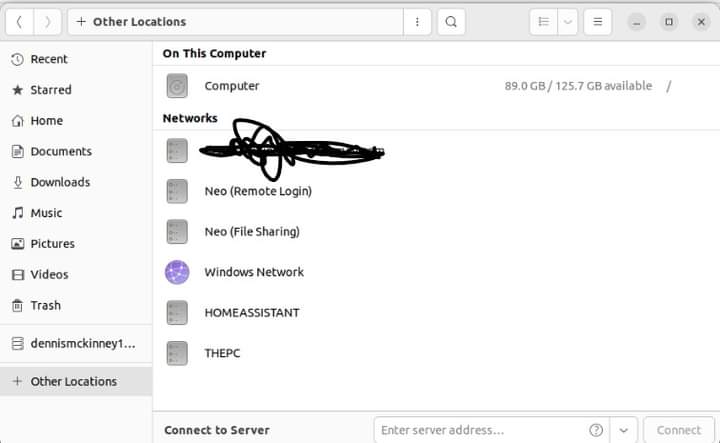
I have Ubuntu installed as a VM. I have internet access, and can see everything on my network, but I cannot connect to any shares (SMB). When I supply the username & password, I get a error pop-up. This happens with the Unraid shares (same physical machine), as well as a Windows PC. In the Unraid network settings, Bridging is enabled. For the VM, the Network Source is br0, Network Model is virtio-net I also set the VM with /mnt/user/ as shared in the VM configuration, but not seeing it, either. Any clues?


-
I have a new PC on the way, but want to get started with building the system in a VM. I'm going to install Ubuntu 22.04.4 on it, along with Docker, Tdarr (node), etc etc etc. Basically, what I want to do when the new pc arrives is to connect it's hard drive to the server via a USB adapter, copy/clone the VM to that drive, then install the drive in the PC. I have Ubuntu installing now, but just wanted to see what has to be done for the clone/copy when the time comes.
-
I currently have 2 parity drives, a 10tb and a 12tb, and ordered a 12tb to replace the 10tb one. When I install the new drive, should I wait to move the original 10tb to the array, or go ahead and put it in the array at the same time as I replace it with the new 12tb?
-
Writing to confirm that 2024.03.06c works perfectly. Thanks for the quick fix and that the PHP log entry led you to the bug. Just don't let it ever happen again 😁
-
I'm here for the same reason. I did find an error that it's throwing in PHP. [06-Mar-2024 06:27:07 America/New_York] PHP Fatal error: Uncaught TypeError: array_column(): Argument #1 ($array) must be of type array, null given in /usr/local/emhttp/plugins/disklocation/pages/functions.php:600 Stack trace: #0 /usr/local/emhttp/plugins/disklocation/pages/functions.php(600): array_column(NULL, 'serial') #1 /usr/local/emhttp/plugins/disklocation/pages/functions.php(613): zfs_node('000000000000010...', NULL) #2 /usr/local/emhttp/plugins/disklocation/pages/devices.php(536): zfs_disk('000000000000010...', NULL, NULL, 1) #3 /usr/local/emhttp/plugins/dynamix/include/DefaultPageLayout.php(715) : eval()'d code(25): require_once('/usr/local/emht...') #4 /usr/local/emhttp/plugins/dynamix/include/DefaultPageLayout.php(715): eval() #5 /usr/local/emhttp/plugins/dynamix/template.php(82): require_once('/usr/local/emht...') #6 {main} thrown in /usr/local/emhttp/plugins/disklocation/pages/functions.php on line 600
-
Nothing?
-
I currently have two pools configured. Pool 1 is the "system" drive, storing appdata, domains, etc. This is a 2x512Gb NVME btrfs raid 1. This pool is working great for me. Pool 2 is my "work" drive. It's the write cache for the array, as well as storage for downloads/processing files. Right now, this is a 2x1Tb SSD btrfs raid 1. I'm looking at options for expanding pool 2, with it's primary job to remain as a "work drive", so I need a combination of speed & size, but maintaining at least some level of redundancy. The raid1 level that I'm currently using takes away 50% of the space, and gives no beneficial speed benefits. I can easily add 4 more 1Tb SSD's to that pool, but probably not all at once. I'm not sure what filesystem would be the best in this use case, and I only know that ZFS exists, but I've never used it. So, what would be the best filesystem in this use case? Because it's only storing data temporarily, I'm not as worried about being able to expand the pool as I add more drives, but I'd like to get started on it now, with the 2 drives I currently have, so that I can start getting used to it. Or, if it's best to leave it as-is until I add at least 2 more drives, I have no problem with that, but I'd still like to hear what suggestions everyone has.
-
I did Most Free to try to get it to work properly and haven't switched back yet
-
Better yet would be a new plugin which basically does the "Unsplit" thing for you. It would go through the folders, one by one, looking for files spread out across mualtiple drives and physically move the files that are smaller than the largest to the physical folder with the largest file
