SpartanXXX
Members
-
Joined
-
Correct, bifurcation settings are per PCIE interface. So in relation to my setup, I have the Asus Hyper m.2 at x4x4x4x4, the GPU at x16, a SAS HBA at x8 and a USB 3.0 at x8.
-
I have a Dell R730xd as well and I purchased the Asus Hyper M.2 expansion card. I currently have 4xM.2 NVME drives running in a 4x4x4x4 bifurcation and it is running great. I also have a GTX 1660 hooked up on the second x16 PCIE slot for transcoding and tensorrt. No problems here. In your case, I might be worried about the size of both of those on the inside of the machine. If you're comfortable with it, you can run a riser cable through one of the back slots and have your GPU sitting externally. I would make sure to measure the internal tolerances but compatibility wise, you should be fine if you can connect it up.
-
I have a fairly irregular schedule and I need to use the same server for specific workloads when I'm home. So I end up not getting to totally be hands-off. That plus the recent upgrade to 6.12 was causing a little bit of a nightmare in terms of running into issues.
-
Yeah I can confirm that it was trying to do a Partiy Check and I do my automated checks in pieces with the Tuning Assistant
-
I'm seeing some spam in my var/log/syslog: Jun 22 11:37:18 Edge crond[4773]: exit status 255 from user root /usr/local/emhttp/plugins/parity.check.tuning/parity.check.tuning.php "monitor" &>/dev/null Jun 22 11:38:24 Edge crond[4773]: exit status 255 from user root /usr/local/emhttp/plugins/parity.check.tuning/parity.check.tuning.php "monitor" &>/dev/null Jun 22 11:39:24 Edge crond[4773]: exit status 255 from user root /usr/local/emhttp/plugins/parity.check.tuning/parity.check.tuning.php "monitor" &>/dev/null Jun 22 11:40:42 Edge crond[4773]: exit status 255 from user root /usr/local/emhttp/plugins/parity.check.tuning/parity.check.tuning.php "monitor" &>/dev/null And this is from /var/log/phplog: [22-Jun-2023 11:50:44 America/Denver] PHP Fatal error: Uncaught Error: Undefined constant "parityTuningProgressSave" in /usr/local/emhttp/plugins/parity.check.tuning/parity.check.tuning.php:217 Stack trace: #0 {main} thrown in /usr/local/emhttp/plugins/parity.check.tuning/parity.check.tuning.php on line 217 I can't seem to find where "parityTuningProgressSave" is defined in the php file mentioned - is this a bug?
-
Total zfs newbie here, but would there be any reason not to convert any btrfs/xfs pools to zfs? From what I understand zfs has a better featureset but I am very unfamiliar about the pros and cons. I have multiple pools ranging from small and fast cache pools to large media pools in btfrs raid1 and I am debating on converting to raidz1 or raidz2. I'm currently doing some research on the topics but any personal anecdotes are welcome!
-
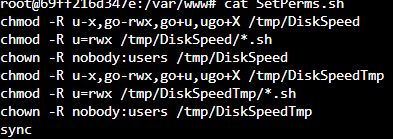
I opened my Docker container and cat the SetPerms.sh file and there is a trailing command of 'sync' which is what my system was getting hung up on. I removed the line from the file and was able to run the benchmark without issue. Otherwise, I would get the same timeout as the other person was.