





Toady001
Members
-
Joined
-
Last visited
-
Hi all, So took my server down to install some fans. After botting up again I noticed my frigate and plex containers weren't starting and further digging it was due to no gpu's being detected by the system. What I have done is removed the nvidia plugin > rebooted > reinstalled plugin but still nothing. I have also installed the open source version btu still nothing.ut still get the same message in the plugin: Installed GPU(s): NVIDIA-SMI has failed because it couldn't communicate with the NVIDIA driver. Make sure that the latest NVIDIA driver is installed and running. GPU's show up in my devices (Quadro P1000 and GTX 1060). Attached is my diagnostics file homelab-diagnostics-20251222-1819.zip Edit: Solved. The two gpu's apparently need 580.x legacy drivers
-
Thanks. I assumed it was due to the custom kernel. I have reverted back to official kernel. Thanks for the feedback.
-
I had a previous thread in the VM section regarding passing through a newly installed 9060XT AMD GPU for Windows 10 here: https://forums.unraid.net/topic/192068-solved-gpu-passthrough-windows-10-vm/ The solution given which pointed to this reddit post indicated to update the unRAID Kernel and running a user script. I recently noticed my frigate and plex containers are not starting due to my nvidia gpu (Quadro P1000) not being detected. Confirmed this is the case and also noticed that the nVidia Driver plugin is no longer installed. When trying to reinstall the nvidia driver plugin i get the following error: -----ERROR - ERROR - ERROR - ERROR - ERROR - ERROR - ERROR - ERROR - ERROR------ ---Can't get latest Nvidia driver version and found no installed local driver--- Removing package: nvidia-driver-2025.03.25 plugin: run failed: '/bin/bash' returned 1 Executing hook script: post_plugin_checksI'm assuming that the kernel update has something to do with this (or perhaps the PCIe ACS Overide) but is there a workaround that does not involve going back to the old kernel, which will likely then bring me back to my original problem which is passing the amdgpu through without the VM freezing? homelab-diagnostics-20250718-2302.zip
-
Evening, I had a previous thread in the VM section regarding passing through a newly installed 9060XT AMD GPU for Windows 10 here: https://forums.unraid.net/topic/192068-solved-gpu-passthrough-windows-10-vm/ The solution given which pointed to this reddit post indicated to update the unRAID Kernel and running a user script. I recently noticed my frigate and plex containers are not starting due to my nvidia gpu (Quadro P1000) not being detected. Confirmed this is the case and also noticed that the nVidia Driver plugin is no longer installed. When trying to reinstall the nvidia driver plugin i get the following error: -----ERROR - ERROR - ERROR - ERROR - ERROR - ERROR - ERROR - ERROR - ERROR------ ---Can't get latest Nvidia driver version and found no installed local driver--- Removing package: nvidia-driver-2025.03.25 plugin: run failed: '/bin/bash' returned 1 Executing hook script: post_plugin_checksI'm assuming that the kernel update has something to do with this (or perhaps the PCIe ACS Overide) but is there a workaround that does not involve going back to the old kernel, which will likely then bring me back to my original problem which is passing the amdgpu through without the VM freezing? EDIT: Seems like the Coral TPU driver also cannot be installed. Same error. Attached diagnostics homelab-diagnostics-20250718-2302.zip
-
@Kilrah Many thanks for the link. Took a bit of reading the thread but it had a link to the actual fix which is here: https://www.reddit.com/r/unRAID/comments/1j52fkc/unable_to_pass_through_amd_rx_9070_xt/
-
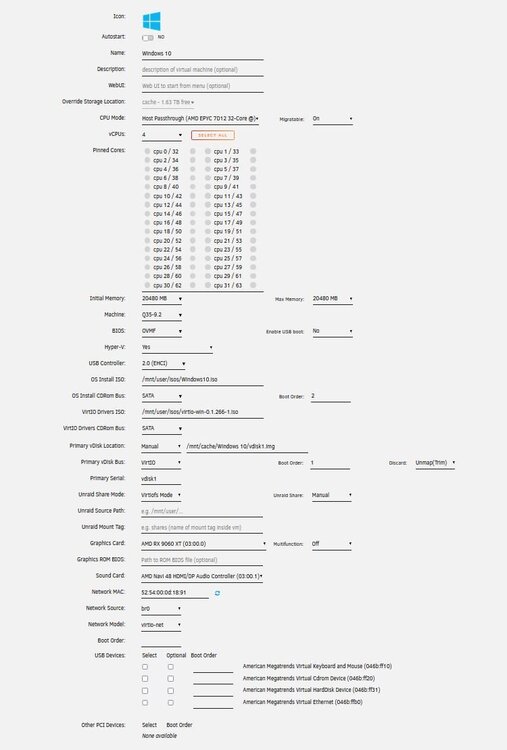
Hi all, Apologies in advance if this has been repeated, which it likely has but I have followed all the relevant threads I can find but my unRaid system still freezes up. So trying to pass through an AMD 9060 gpu the steps I took as follows: Setup Windows 10 VM with VNC first to setup and install a remote desktop system. Once installed I shut down the VM. Change Graphics card to the AMD Device (it is on it's own IOMMU) - Multifunction is off. I have also set PCIe ACS Override to both. Audio device i set to the AMD device that shows up. The VM takes a while to start but eventually status changes to started but the remote desktop never goes online (which it does immediately once the log in screen loads) I then try force shutdown and this is where the system hangs. Forcing me to hard reset which I can't keep doing to avoid data corruption. Either one cannot go the route of setting up the system via VNC first and just changing over or I am missing something here? If there is any specific data needed I can share. iommu grouping.txt xml form.txt
-
A bit of a necro but relevant. With regards to the quoted post, is this still relevant? Currently I have the app installed to pass a Quadro GPU to my docker containers. I am now exploring setting up a VM for game streaming using a second nvidia gpu (to get rid of the bulky game pc). Will having the app installed cause a problem?
-
I ended up installing on a paid vps instead. Problem I had is the log screen is not open long enough to see the errors and not sure how to go about looking for the log files (which I understand are in the docker.img file)
-
Hi, Just starting to setup this but seem to have issues with the container, specifically if I try view logs or enter console, the popup window shows for a split second and then closes. There is also no cpu/memory load showing. config file is present, changing server_url and the base_url.
-
Problem sorted. Was using the wrong BIOS. Prox uses SeaBIOS.
-
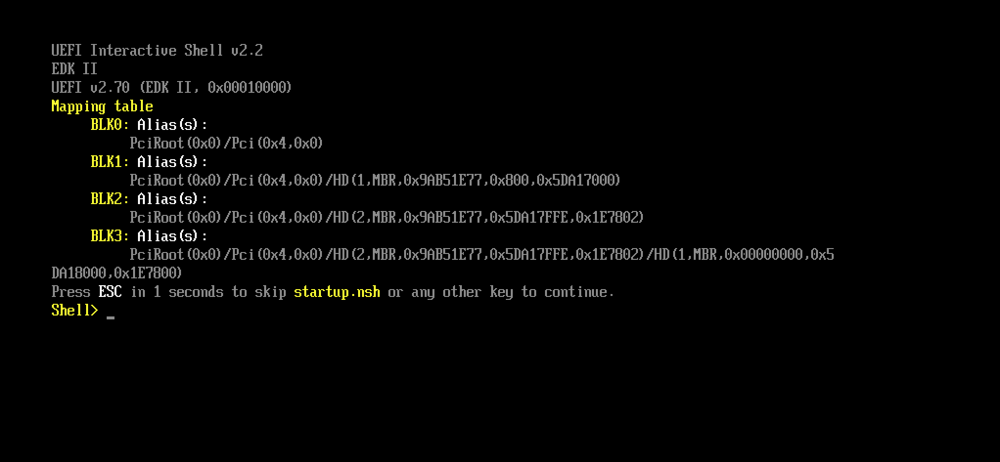
Bumping this as this does not seem to work for me. created a .vma backup on prox. Extracted as per second poster. Created VM in unraid with manual drive and selecting the renamed .raw file. Started VM only to be met with the Shell console. Someone maybe mind sharing a screen of their unraid vm settings or something else in the settings I am supposed to change?
-
Problem is the config won't map the drives correctly as I am going from a PERC700 raid controller to no raid controller so the drive identities will almost certainly change. The only drive that will likely migrate correctly is my cache drive as that is via a pci-e to M.2. Hence why running 2 instances, replicating the old to new and then just migrating the key over. Will back everything up and try just move the usb over first and see. Just trying to prepare myself for when it's ready to move
-
Thanks. The card doesn't support IT mode. Related to the SAS2108 chip. I expected worst case anyways so will be planning on new drives for the setup and restoring from backups. Edit: Just a second query, could i run a trial on the new server, copy everything over and then migrate the license from the old USB to new USB?
-
Bit of a thread necro but to follow onto the video posted, Spaceinvader's example, wrt harddrives, seems to only involve standard sata migration. How would HDD migration work if going from a PERC700 HW Raid to non-HWRaid since the identification would most certainly change.
-
Had a closer look at the pci-e expansion card. Only 1 slot is pci-e to m.2. The other slot is Sata to m.2. Anyways, got another pci-e slot so will just look for another card


