





Toady001
Members
-
Joined
-
Last visited
Everything posted by Toady001
-
Hi all, So took my server down to install some fans. After botting up again I noticed my frigate and plex containers weren't starting and further digging it was due to no gpu's being detected by the system. What I have done is removed the nvidia plugin > rebooted > reinstalled plugin but still nothing. I have also installed the open source version btu still nothing.ut still get the same message in the plugin: Installed GPU(s): NVIDIA-SMI has failed because it couldn't communicate with the NVIDIA driver. Make sure that the latest NVIDIA driver is installed and running. GPU's show up in my devices (Quadro P1000 and GTX 1060). Attached is my diagnostics file homelab-diagnostics-20251222-1819.zip Edit: Solved. The two gpu's apparently need 580.x legacy drivers
-
Thanks. I assumed it was due to the custom kernel. I have reverted back to official kernel. Thanks for the feedback.
-
I had a previous thread in the VM section regarding passing through a newly installed 9060XT AMD GPU for Windows 10 here: https://forums.unraid.net/topic/192068-solved-gpu-passthrough-windows-10-vm/ The solution given which pointed to this reddit post indicated to update the unRAID Kernel and running a user script. I recently noticed my frigate and plex containers are not starting due to my nvidia gpu (Quadro P1000) not being detected. Confirmed this is the case and also noticed that the nVidia Driver plugin is no longer installed. When trying to reinstall the nvidia driver plugin i get the following error: -----ERROR - ERROR - ERROR - ERROR - ERROR - ERROR - ERROR - ERROR - ERROR------ ---Can't get latest Nvidia driver version and found no installed local driver--- Removing package: nvidia-driver-2025.03.25 plugin: run failed: '/bin/bash' returned 1 Executing hook script: post_plugin_checksI'm assuming that the kernel update has something to do with this (or perhaps the PCIe ACS Overide) but is there a workaround that does not involve going back to the old kernel, which will likely then bring me back to my original problem which is passing the amdgpu through without the VM freezing? homelab-diagnostics-20250718-2302.zip
-
Evening, I had a previous thread in the VM section regarding passing through a newly installed 9060XT AMD GPU for Windows 10 here: https://forums.unraid.net/topic/192068-solved-gpu-passthrough-windows-10-vm/ The solution given which pointed to this reddit post indicated to update the unRAID Kernel and running a user script. I recently noticed my frigate and plex containers are not starting due to my nvidia gpu (Quadro P1000) not being detected. Confirmed this is the case and also noticed that the nVidia Driver plugin is no longer installed. When trying to reinstall the nvidia driver plugin i get the following error: -----ERROR - ERROR - ERROR - ERROR - ERROR - ERROR - ERROR - ERROR - ERROR------ ---Can't get latest Nvidia driver version and found no installed local driver--- Removing package: nvidia-driver-2025.03.25 plugin: run failed: '/bin/bash' returned 1 Executing hook script: post_plugin_checksI'm assuming that the kernel update has something to do with this (or perhaps the PCIe ACS Overide) but is there a workaround that does not involve going back to the old kernel, which will likely then bring me back to my original problem which is passing the amdgpu through without the VM freezing? EDIT: Seems like the Coral TPU driver also cannot be installed. Same error. Attached diagnostics homelab-diagnostics-20250718-2302.zip
-
@Kilrah Many thanks for the link. Took a bit of reading the thread but it had a link to the actual fix which is here: https://www.reddit.com/r/unRAID/comments/1j52fkc/unable_to_pass_through_amd_rx_9070_xt/
-
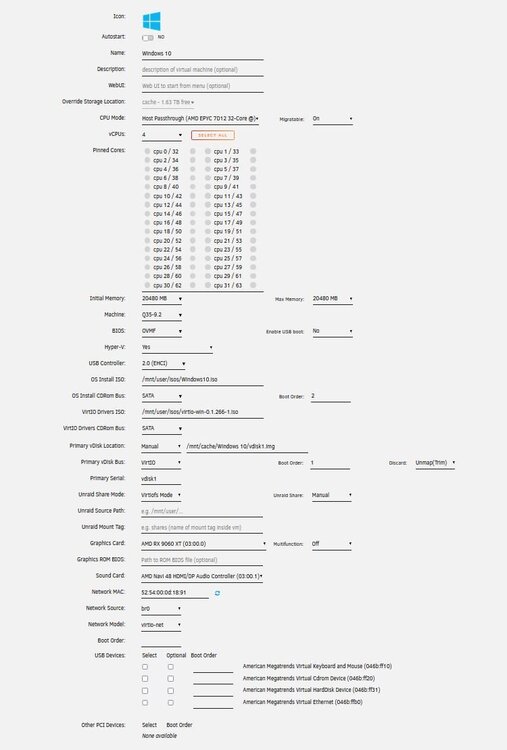
Hi all, Apologies in advance if this has been repeated, which it likely has but I have followed all the relevant threads I can find but my unRaid system still freezes up. So trying to pass through an AMD 9060 gpu the steps I took as follows: Setup Windows 10 VM with VNC first to setup and install a remote desktop system. Once installed I shut down the VM. Change Graphics card to the AMD Device (it is on it's own IOMMU) - Multifunction is off. I have also set PCIe ACS Override to both. Audio device i set to the AMD device that shows up. The VM takes a while to start but eventually status changes to started but the remote desktop never goes online (which it does immediately once the log in screen loads) I then try force shutdown and this is where the system hangs. Forcing me to hard reset which I can't keep doing to avoid data corruption. Either one cannot go the route of setting up the system via VNC first and just changing over or I am missing something here? If there is any specific data needed I can share. iommu grouping.txt xml form.txt
-
A bit of a necro but relevant. With regards to the quoted post, is this still relevant? Currently I have the app installed to pass a Quadro GPU to my docker containers. I am now exploring setting up a VM for game streaming using a second nvidia gpu (to get rid of the bulky game pc). Will having the app installed cause a problem?
-
I ended up installing on a paid vps instead. Problem I had is the log screen is not open long enough to see the errors and not sure how to go about looking for the log files (which I understand are in the docker.img file)
-
Hi, Just starting to setup this but seem to have issues with the container, specifically if I try view logs or enter console, the popup window shows for a split second and then closes. There is also no cpu/memory load showing. config file is present, changing server_url and the base_url.
-
Problem sorted. Was using the wrong BIOS. Prox uses SeaBIOS.
-
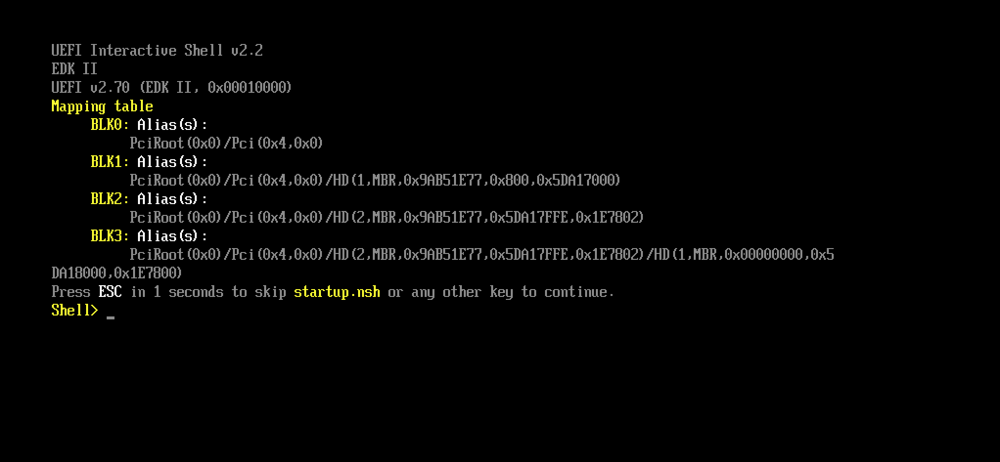
Bumping this as this does not seem to work for me. created a .vma backup on prox. Extracted as per second poster. Created VM in unraid with manual drive and selecting the renamed .raw file. Started VM only to be met with the Shell console. Someone maybe mind sharing a screen of their unraid vm settings or something else in the settings I am supposed to change?
-
Problem is the config won't map the drives correctly as I am going from a PERC700 raid controller to no raid controller so the drive identities will almost certainly change. The only drive that will likely migrate correctly is my cache drive as that is via a pci-e to M.2. Hence why running 2 instances, replicating the old to new and then just migrating the key over. Will back everything up and try just move the usb over first and see. Just trying to prepare myself for when it's ready to move
-
Thanks. The card doesn't support IT mode. Related to the SAS2108 chip. I expected worst case anyways so will be planning on new drives for the setup and restoring from backups. Edit: Just a second query, could i run a trial on the new server, copy everything over and then migrate the license from the old USB to new USB?
-
Bit of a thread necro but to follow onto the video posted, Spaceinvader's example, wrt harddrives, seems to only involve standard sata migration. How would HDD migration work if going from a PERC700 HW Raid to non-HWRaid since the identification would most certainly change.
-
Had a closer look at the pci-e expansion card. Only 1 slot is pci-e to m.2. The other slot is Sata to m.2. Anyways, got another pci-e slot so will just look for another card
-
Hi guys, Didn't really find a topic that might indicate a possible answer so apologies if this has been repeated. Just got a Google Coral M.2 B+M Key. I've got a PCI-E to M.2 adaptor in the machine. One of the ports has a WD NVMe in it and inserted the coral tpu into the second slot. NVMe is detected fine in system devices but I can't seem to see the coral device. Am i perhaps missing something here? Thanks,
-
Sorry if this has been asked but wrt upgrading Legacy licenses, is there a deadline when this must happen before it's no longer possible to upgrade?
-
Trying to pass my Quadro GPU to the VM machine. Followed the steps in the OP but after rebooting my frigate docker no longer starts which also has the quadro passed. Is this intended? i.e. can you only pass through to either docker or VM and not both? GUI also freezes after passing and starting up the Windows VM with the Quadro gpu.
-
Hi guys, Honestly I don't know where this should be but it seems to be the most fitting. There appears to be no external forum / discord for the acestream app either. So the container is failing to start due top permissions. 2023-08-30 10:35:26,735|MainThread|acestream|failed to init app: PermissionError(13, 'Permission denied') Traceback (most recent call last): File "core/Core.pyx", line 402, in File "core/src/CoreApp.pyx", line 1390, in File "core/src/CoreApp.pyx", line 1377, in File "ACEStream/Core/Session.py", line 139, in __init__ File "/usr/local/lib/python3.8/os.py", line 223, in makedirs mkdir(name, mode) PermissionError: [Errno 13] Permission denied: '/srv/ace/.ACEStream/collected_torrent_files' That in itself is easy to understand and looking at the dockerfile there is a user being added called "ace" which I feel may be the culprit. FROM python:3.8 SHELL ["/bin/bash", "-o", "pipefail", "-c"] ENV BASE_URL="https://download.acestream.media/linux" ENV ACE_VERSION="3.1.75rc4_ubuntu_18.04_x86_64_py3.8" RUN useradd --shell /bin/bash --home-dir /srv/ace --create-home ace USER ace WORKDIR /srv/ace RUN curl --progress-bar $BASE_URL/acestream_$ACE_VERSION.tar.gz | tar xzf -;\ pip install --no-cache-dir --upgrade --requirement requirements.txt CMD mkdir /dev/shm/.ACEStream; \ ln -s /dev/shm/.ACEStream .ACEStream; \ ./start-engine \ --client-console \ --live-cache-type memory The thing is though, if the user is added surely they have the right privs inside the container, unless permissions are extending to outside the container. Perhaps anyone else that has successfuly run this container that can give some assistance?
-
Solved. Did a restart, and the server no longer picked up the USB stick. Not sure if that is related, but got everything booted up again and managed to log in.
-
For some reason the GUI was reporting an incorrect login details. Stupidly I carried on thinking I was typing it wrong and now I am locked out. Is there a timeout period for the GUI or is there a way via cli to unblock the account (somehow my ssh session is still open) Thanks
-
Thanks, busy restoring previous version via GUI. So I take it the fix before updating is backup data on the drive, format to xfs (same as other drives) and then update?
-
After updating to 6.12. One of my drives is no longer mountable. All other drives in the array are fine which is running on XFS system. The cherry on the top is that I now noticed my flash backup didn't download correctly so restoring is no longer possible now. Attached diagnbostics. toadcreek-diagnostics-20230619-1015.zip
-
Just to add onto the above. Have issues with one drive with btrfs fs. Jun 19 09:46:08 ToadCreek emhttpd: Mounting disks... Jun 19 09:46:08 ToadCreek emhttpd: mounting /mnt/disk1 Jun 19 09:46:08 ToadCreek emhttpd: shcmd (38): mkdir -p /mnt/disk1 Jun 19 09:46:08 ToadCreek emhttpd: /sbin/btrfs filesystem show /dev/md1p1 2>&1 Jun 19 09:46:08 ToadCreek emhttpd: ERROR: cannot scan /dev/sde1: Input/output error Jun 19 09:46:08 ToadCreek emhttpd: Label: none uuid: ece161a0-e7e9-4078-9161-9b73bbc1597a Jun 19 09:46:08 ToadCreek emhttpd: Total devices 1 FS bytes used 1.64TiB Jun 19 09:46:08 ToadCreek emhttpd: devid 1 size 3.64TiB used 1.71TiB path /dev/md1p1 Jun 19 09:46:08 ToadCreek emhttpd: /mnt/disk1: no btrfs Jun 19 09:46:08 ToadCreek emhttpd: /mnt/disk1 mount error: Unsupported or no file system Jun 19 09:46:08 ToadCreek emhttpd: shcmd (39): rmdir /mnt/disk1 Deleted the file in /sbin/btrfs with no positive result. Question though, if i had to reformat the drive, will the parity rebuild it? Don;t want to lose any data.
-
Update: Potential Problem Found So since the above, I have disabled hardware transcoding for plex and server is still fine after 4 days. The GPU is still transcoding frigate so seems unrelated to GPU and more related to the plex container / gpu passthrough / hardware transcoding that is causing the server to bug out.


