





Bremsklotz
Members
-
Joined
-
Last visited
-
@grtgbln sent you a message
-
Thanks, will have a look at it when I have time.
-
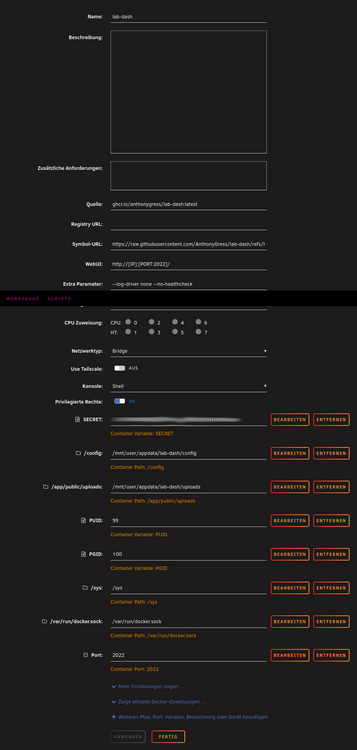
I think lab-dash is a nice dashboard, see lab-dash Here's how I installed it: Create the folder "lab-dash" under appdate. Create the folders "config" and "uploads" inside the lab-dash folder. Set the owner of the folders to "nobody". Navigate to docker tab, scroll down and click add container and use this for the template: Turn on "extended view" Name: lab-dash Quelle: ghcr.io/anthonygress/lab-dash:latest Symbol-URL: https://raw.githubusercontent.com/AnthonyGress/lab-dash/refs/heads/main/frontend/src/assets/gradient_logo.png WebUI: http://[IP]:[PORT:2022]/ Netzwerktyp: Bridge Privilegierte Rechte: off optional: use privileged: true and network_mode: host for monitoring network usage stats. Add the following paths/variables/port: SECRET: use "openssl rand -base64 32" to create a key /config: /mnt/user/appdata/lab-dash/config /app/public/uploads: /mnt/user/appdata/lab-dash/uploads /sys: /sys /var/run/docker.sock: /var/run/docker.sock Port: 2022 I'm not a pro but this is how I got it working for me. Edit: Priviliged off, added "optional", changed icon source
-
Just updated Dashy container. Had to change the port from 80 to 8080 and /app/public/conf.yml changed to /app/user-data/conf.yml --> see https://github.com/Lissy93/dashy/discussions/1529 The linked config in the description doesn't exist anymore. I think it is now https://github.com/Lissy93/dashy/blob/3.0.0/user-data/conf.yml
-
I had the same problem. After a couple days my ram became full and I had to restart the server. Otherwise the system was unresponsive. I used Netdata to find the cause: there was something like memory-dhcp which used a lot of ram. I think it was a network misconfig. I solved it like this: settings --> network --> ip adress assign for ipv4 and ipv6 from automatic to static settings --> docker --> advanced view --> deactivate custom ipv4 and ipv6 network on br0 No problems since I changed that.
-
What does these warn and error messages mean? and
-
Hey guys, I just created a custom banner for my Unraid. Looks pretty nice - at least for my taste and skills. But it would look even better if the "Unraid version 6.11.5 i" on the left and the "uptime" and "Unraid Basic OS" and "Homeserver name" on the right side of the header could be removed. Is that possible and how?
-
Danke, das Plugin habe ich schon in Benutzung. Aber wie du schreibst, mir fehlen die Scriptkenntnisse. Dann probiere ich es im englischsprachigen Forum.
-
Ich hänge mich mal hier an. Gibt es eine Möglichkeit, das "UNRAID + Versionsnummer" aus dem Header zu entfernen? Das "Betriebszeit 1 Tag 19 Stunden 46 Minuten + Unraid OS" würde ich auch gerne los werden
-
Ok, finally I figured out how to do it: Open the console and navigate to: /mnt/user/appdata# type in: chmod -R 777 /mnt/user/appdata/yacy that changes the permissions from drwxr-xr-x 1 root root 0 Mar 15 23:57 yacy/ to drwxrwxrwx 1 root root 0 Mar 15 23:57 yacy/ Now YaCy works for me.
-
I encounter the same problem but I can't exactly follow your solution. When log in to unraid I open the console and navigate to /mnt/user/appdata and run rm -rf yacy. That erases the yacy directory. Then I install the yacy docker again but the problem still exists. I would really appreciate it if you could help me with that. Thanks


