





Tomo82
Members
-
Joined
-
Last visited
Everything posted by Tomo82
-
Hi @JorgeB - thanks for the suggestion, I did what you said plus copied some other old configs and works! I think something got messed up when upgrading as the network screen is now different. Thanks!
-
@JorgeB Can you help here?
-
In the Unraid settings in VM Manager section, are there any related errors in the VFIO Logs? Did you Bind it to VFIO in the Tools> System Devices page?
-
Small update - I was wrong about the DHCP not working - it IS working. In Unraid on the VM stats I see that there is traffic coming in (RX) but nothing is transmitted (TX), but inside the VM it says it's transmitting, but nothing is coming received. Anyone have an idea?
-
Do you know how the app calculates the HWID? If you know how, then it's probably alot easier to find a way to lock those details. In the VM settings there is a Randomize MAC setting for the network interface, is that enabled? If so, disable it and see if that helps.
-
Anyone?
-
Yes I also have the dashboard not updating some times. I see in the next 7.1 release notes there are some changes that should make it more stable. We will see! Do you know if it's just the VNC display that's not working - is the VM alive and working? Can you ping it?
-
If nothing changed on Unraid then it's probably a Windows update/change. Do you have any backups on the VM that you can restore? You said that the issue still happened when you passed through a GPU? Any display problem differences at all? Can you RDP to the VM to see if it still happens? Did you try to change any of the GPU options on the VM in Unraid?
-
Hi All, Hope someone can help me... After upgrading to v.7 I have a bunch of problems with networking. Docker containers are working now, but VMs not. Things I tried: Deleting the libvirt.img Make new VM(s) Try different bridges (virbr0, br0, br0.4000) Tried diffenent NIC types (e1000, virtio-net, virtio) Removed my LACP Bond. Tried windows and Ubuntu, both get no packets and no DHCP offers. Unraid can ping router interface on VLAN. On the networking page, the route is always removed for the VLAN interface but maybe this doesn't matter as VM cannot even communicate on br0, which has a route entry. Kind of out of ideas. I read quite a few threads of people having same problem, but their solutions don't seem to fit my problem... attaching my diagnostics, hopefully it helps. Any help appreciated! ungb-diagnostics-20250501-0128.zip
-
I am still having problems with my docker containers on a VLAN not being accessible outside of the unraid. I have a VM on the same VLAN which works fine from outside Unraid and which can talk to docker containers on Unraid in the same VLAN. I am still using macvlan but made changes as described here: https://docs.unraid.net/unraid-os/release-notes/6.12.4/#fix-for-macvlan-call-traces. But still nothing. I also saw that if you don't use correct CIDR on the DHCP Pool it would break, but 172.16.16.128/25 should be correct, right? Anyone have any ideas?
-
Worked for me too! Thanks :)
-
Thanks @JorgeB, Chrome worked. Brave, Edge and Firefox not. I am wondering why it suddenly stopped working? I tried clearing the cookies for unraid web gui, but no effect. What changed?
-
Hi All, Having some problems with the web gui after updating from 6.12.10 to 6.12.11. I downgraded again but it's still broken. Problem: Parts of the web gui are broken - the Main tab with CPU/RAM/Network stats is not functional. Also, when I open the Terminal via web gui it's blank and just closes after a while. Or if go to community apps and try to update - it says it's updating, and I think it does, but there is no status updates about what is being updated/downloaded etc. I saw someone report something vaguely similar and they said restarting nginx is a fix - but I can't do that as I don't have local console access and the web gui terminal doesn't work, so I'm not sure what to try.... anyone have any ideas? I can download the syslog but the diagnostics zip does not download at all...
-
I hope it's not too off-topic, it's kind of related to licensing: When can we get rid of USB Key requirement!?!?!?! I hate it, it's the weakest, most annoying part of Unraid for me.
-
Thanks for trying to help @Vr2Io 👍
-
Fixed: I stopped array, went to Network Settings and changed the vlans, applied, then changed them back - now it works. No changes to VMs or switches etc. Unraid networking seems so flakey to me, dissapointed.
-
Hi Vr2lo, Thanks for your reply, I remember the VLAN numbers go above 4000 (it's been some years since I did my CCNA course yikes) - I will try a lower number VLAN later (I can't shut down pfsense to change Unraid network settings at the moment). I made a diagram of the setup I am using, please see attached.
.thumb.png.7284a7c5a347f3afcb1cc7f6a1d91bcc.png)
-
Hi All, Hope someone can help... (I searched both the Legacy and new Docs and there was not a single entry for VLAN ☹️) I have a pfsense VM and a Windows 10 VM, both on same Unraid host, sharing same VLAN 4000. Pfsense is set to use br0 (with VLAN4000 configured to use LAN) and the Win10 has br0.4000. I have tried assigning both VM dedicated interfaces in Unraid and making sure they are both on the same bridge - but Win10 still refuses to grab a valid IP. And also Win10 on br0 and setting vlan inside - nothing is ever received. I am fairly sure it's not a pfsense config issue, as I have a Unifi docker with a Guest Wifi VLAN, and clients are pulling DHCP and internet through the VLAN 100 from pfsense with no problems. Also in a packet capture I see the unraid docker bridge talking the pfsense VLAN 4000 interface IP. In the Unraid network settings I have just the VLAN 4000 configured...should I remove it? But then I lose the ability to give the win10 VM a VLAN nic directly. Any help appreciated 🙂 ungb-diagnostics-20230907-1746.zip
-
Old thread - but still relevant! This is totally stupid - @JorgeB (et all) Why is this the case? To have to stop all VMs and Dockers just to change a share is riduculous.
-
Thanks Jorge, deleting network-rules.cfg fixed the weird behaviour.
-
Hi All, I've got a weird issue that I can't resolve, hope someone can point me in the right direction. TL;DR: My networking is messed up - how do I reset it? I tried deleting the network.cfg - but ETH0 remains (with no NIC) and is messed up. What I would like: Just use the add-in card ports for Unraid, VMs, Docker etc. Unraid Version: 6.12.3 History: I have an onboard NIC and a dual port PCIe add in card. I added a PCIe VDSL modem card that I wanted to passthrough to a VM. Networking settings said that there were ETH0,1,2,3. MACs were messed up but number of NICs was correct. I had problems with passing through this card, so I removed it and also disabled the onboard NIC, but ETH0 remains and doesn't seem refer to a physical NIC. I would just like ETH0 & ETH1 to refer to the physical ports on the add in NIC card. Thanks for any help 🙂 ungb-diagnostics-20230824-2012.zip
-
Hi All, I am having some trouble acheiving my desired network config. Problems I have right now: No internet Connection for Trial Key to start Array Static IPv4 assigned to Br1 (Bond of eth1 & 2), appears to come from MAC address on eth0 I would like to achieve this: Onboard NIC > Unraid WebGUI Only Static IPv4 Dual port NIC > LACP Bond0 > Br1 & Br1.4000 VLAN Br1: static IPv4 with default bridge for Docker Containers & VMs Br1.4000: static IPv4 bridge for apps that should use a VPN At the moment I am on a Trial Key and the webgui says there is no internet connection - I think it has something to do with me changing the Default GW metric on Bond0. I am not sure how to change the default docker interface for the bridge. Is that possible? This is what I have so far (and I also attached the diagnostics): ungb-diagnostics-20230419-1737.zip

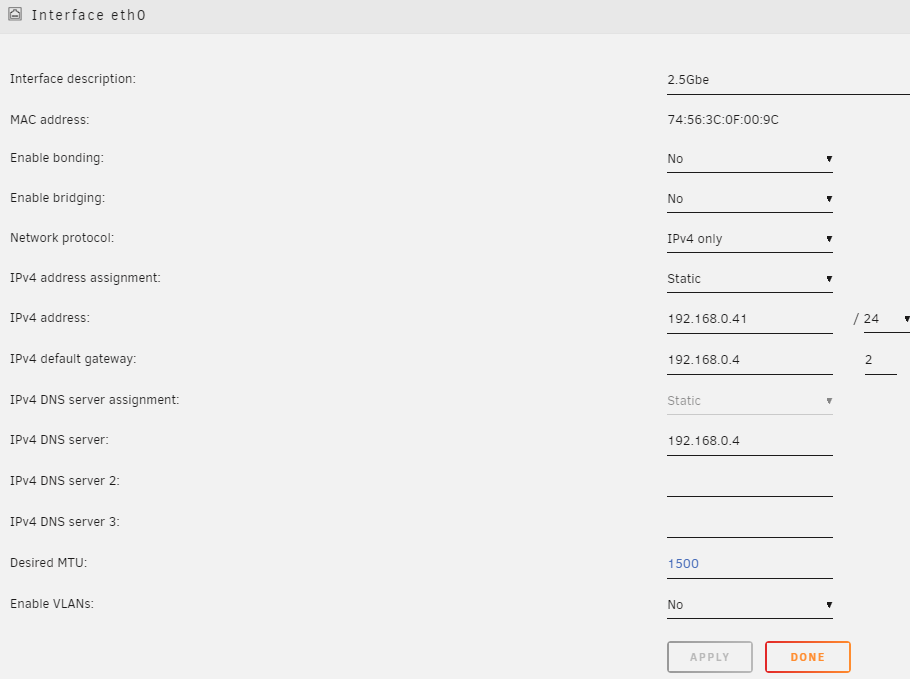
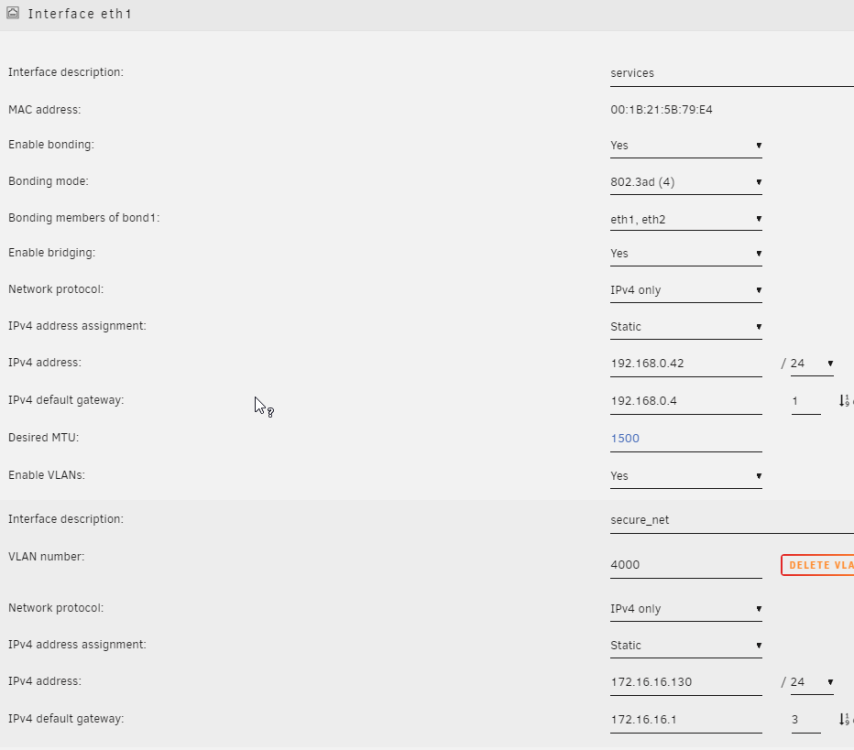
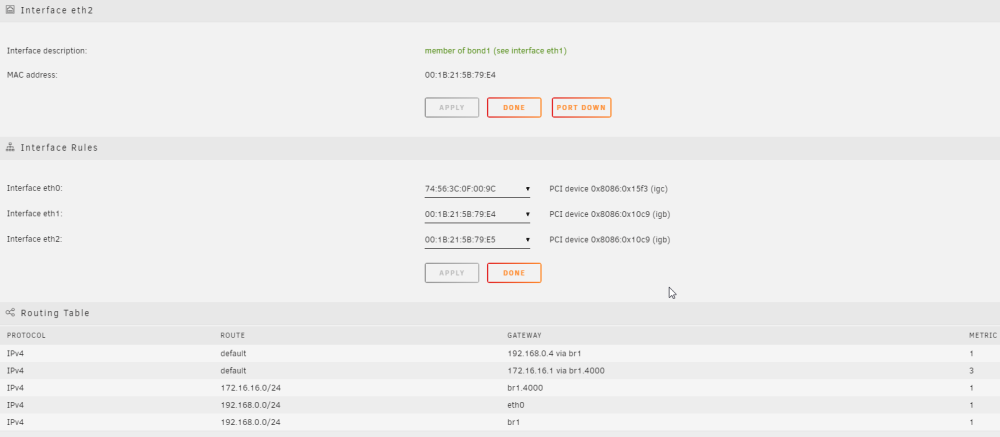
-
Hmm ok, does that new HP card work in another computer? Try BIOS update? Any logs on the Unraid side?
-
What motherboard do you have? Is there a BIOS Update for it? What was the old NIC that worked? Any other NICs working?
-
@JorgeB Thanks for the info, on that note; I have a quick question - Is it better to roll back to the latest stable release and use the ZFS Plugin(s)? Would I have any problems importing/mounting a 2x4 wide RAIDZ1 pool with metadata and log special vdevs with some of the datasets encrypted?

.png.7fdf8fa73b78c64495736e8065201ff3.png)


