






Querzion
Members
-
Joined
-
Last visited
Everything posted by Querzion
-
Sorry about that. nika-diagnostics-20241114-1507.zip
-
This is the newest log I have on the flash. nika-diagnostics-20241101-1504.zip
-
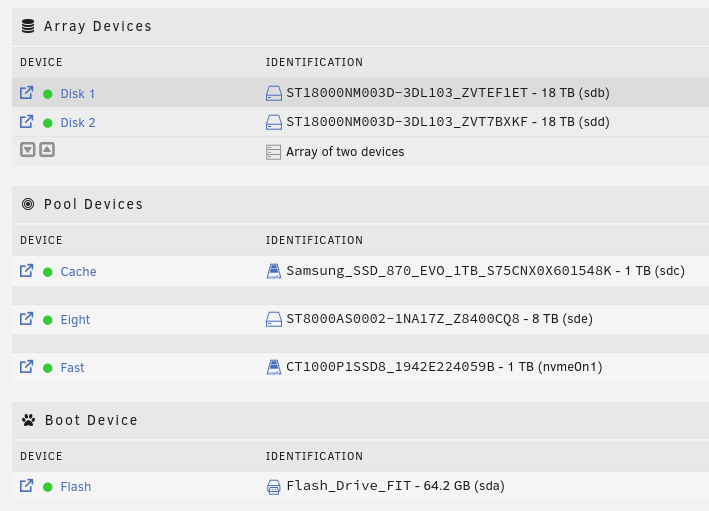
I set up my disks like this, I have yet to get some parity disks, the plan is that the next one is a parity disk. The problem here is that the cache gets filled, and I have told it to send the info over to the array, but it still won't move the files, I have also tried to move the 8tb files to the array, so that I can take out that disk from the computer, but I don't get it to work. I must have set it up wrong, how do I fix it?
-
I switched to a bigger chassi today, put in a cache disk and another 18TB disk and then i started unraid, nothing noticable other then it wanted me to update some stuff and that vfio had once again ditched some hardware so that i had to add the soundcard again. I pre formatted the drives with xfs and then I addded them to the array and a cache pool. Before doing that I updated all dockers, then all plugins, and fired up my windows vm. After sitting with it a while I noticed that the sound didnt work properly, so i added the sound card, thats when I saw that there was a new update too, so I thought, I'm going to update from beta 2 to beta 3................................................................ Yeah, first off, the start page didn't open, so i can't log in, and I can't gain access to the flash backup that I did because it's on the array. I'm going to try to gain access with a live iso. I get an error stating it's noticed changes to two folders. usr/ on loop1 and another on loop0 and it won't go beyond that. I have tried reflashing the usb multiple times with 7b3, now I'm testing to do that with 7b2, if this doeesn't work then its a live cd next.
-
It's the CPU, I didn't have enough money for that GPU. I have the 6700 XT GPU. I have spent years upon years sitting and using virtual machines and when I learned about unRAID, I thought that I could save money by building a VM to use 24/7 for gaming, work, school, entertainment etc, and a NAS is really expensive, to make my computer into a NAS kind of made the whole thing with using unRAID a lot more interesting, and I can reboot and not have the bots die on me, and I can switch between multiple vms and always have access to my files without external devices, so unRAID have become my multi purpose operating system, but I'm thinking of building a new computer that can act as a media server, and then just install Linux and have a windows VM as I did before, the big problem here is that I can't switch and test out things on bare metal, I don't know if my computer is actually meeting up to it's full potential or not.
-
That much I gather, I have a 7900X right now, but I don't think I'm using it to it's potential, and all I actually have is basically a couple vm's one for the bots, and this one, and then around 20 dockers, that handle media files basically.
-
I'm thinking that It's been really nice using my main computer as a NAS, and VM Host, while also passing through the hardware, but I'm actually having lots of issues, that's been stacking up on me over time, I bought a better computer, but I have still not used all of it since I bought it 3 years ago, and As of a couple days ago, I actually bought a bigger version of the same chassi, so I'm thinking impulsively, if it's a good idea to perhaps just build a second computer and use unRAID for that, but if I do that I'm probably not going to be using it as actively that I have been in recent years. Maybe it's better to just spend money on setting up a full Array, and a cache disk. ATM I only have one drive in the array. What kind of computer can I buy in order to use it as a nas and docker runner?
-
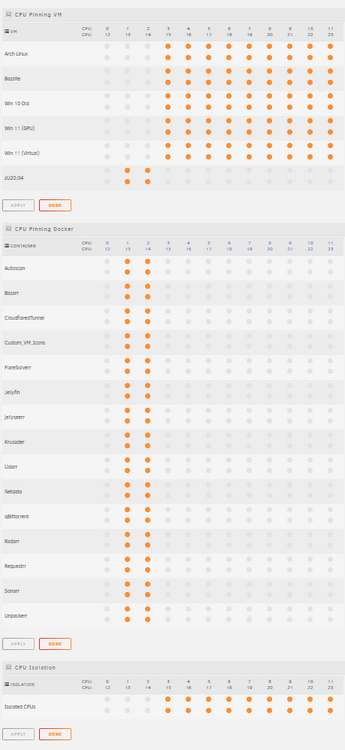
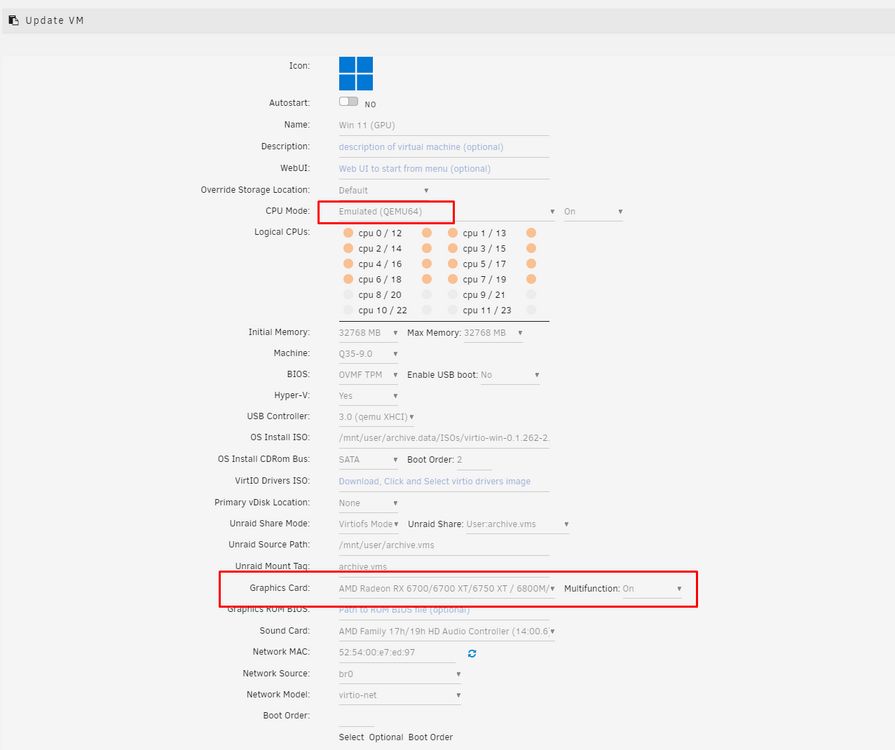
My solution; 1. Pin the cpu cores, don't use the first pair (AMD Ryzen 9 7900X at least) for anything else then unRAID and processing overhang. 2. Create a new VM or change your Win 10/11 VM's CPU from the normal to "Emulated (QEMU64)", that got Windows VM's to work for me again, but It does not have the same performance as with the other setting. So playing games and such might be a bit off-limit.
-
I thought I solved it, but not really. To use the emulated cpu is a whole lot slower, my Windows VM tends to slow down from time to time, and lag like crazy. That's not acceptable. My CPU goes up to about 100% often! So I really need a more permanent fix, that doesn't emulate the CPU.
-
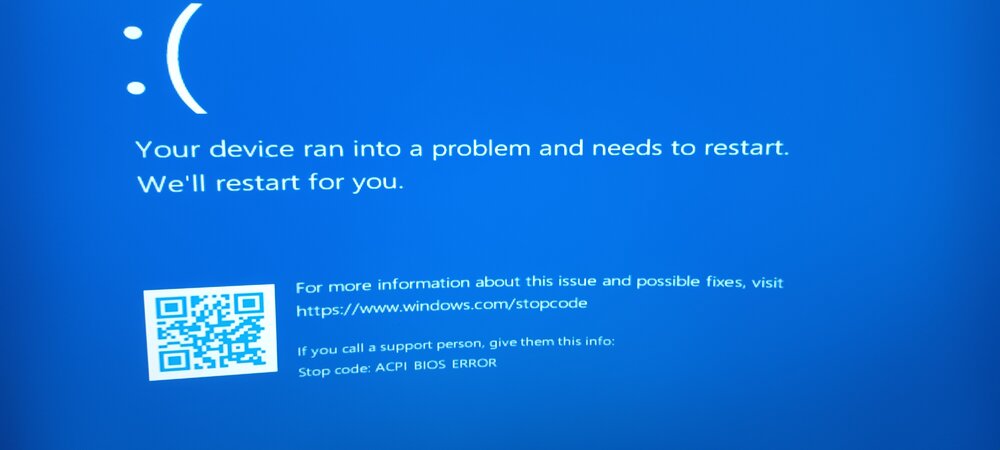
My Win 11 VM that uses virtual graphics works, while my Win 10 & 11 VM's with the GPU attached doesn't work. I have tried to fix it, but I'm not capable of doing this myself. I use unRAID v7b2. Here's the Win 10 XML https://pastebin.com/02dQmrDU Here's the Win 11 XML https://pastebin.com/WVv8eGwf
-
CTRL+ALT+DELETE & Spam ESC. Got it.
-
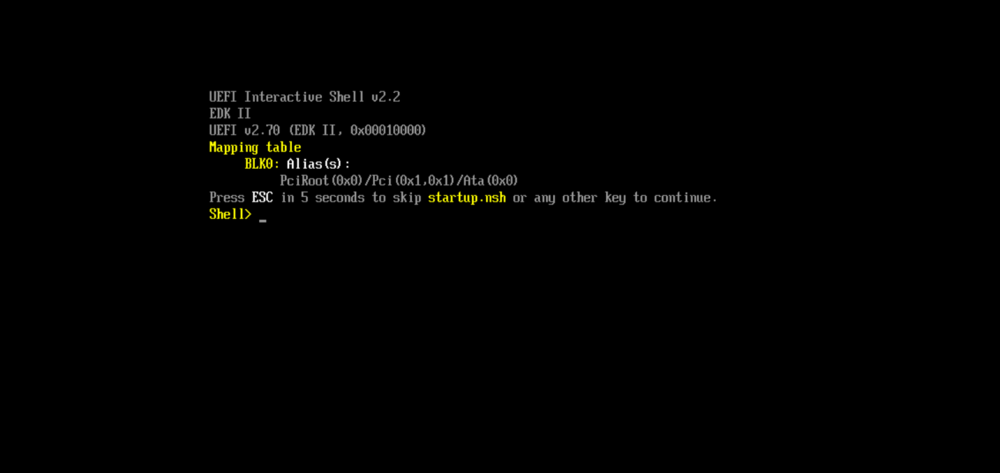
So I have 2 Win 11 VM's, and 1 Win 10. I have another thread for the Win 11 one that is incapable of starting. This Win 11 is the new I installed, and it's incapable of starting like the others if I add the GPU, so I got tired and deleted it and added a new but with the vDisk1 in use. It started and worked fine, but now this is what I get to. I am helpless to say that I have no idea how to get past this, without deleting it and adding it again. So how do I enter the bios and tell the stupid VM to use the vDisk1 and stop bugging me?
-
Is it supposed to just delete random files while moving a file? Because while moving a VM vDisk1 from Disk1 to Fast, it vanished, and not only that, ALL my ISO's vanished. Should I worry about other things missing too? Because the Mover is the most stupid software I have been in contact with, you choose one file to move, and it ends up moving every file in the folder, if you chose one folder all folders are moved it's totally broken, and now when I moved the vDisk, it vanished. Is this a bug or feature? EDIT! Not deleted, just moved far from where I actually told it to be moved.
-
Will it work to test older versions of the machine? Should I test i440fx?
-
What does that mean exactly? All three XML files have 35 separate pci-root per file I don't know what pci-root is or what it does. With more context It might be easier. So you mean to say it's a bug? What is it I'm supposed to remove from the xml. . . I'm just going to. . . Did you have a link to that post you were thinking of? Or is that this?
-
I have read it, AND I do not comprehend why that was sent in the first place, it has nothing to do with my problems, I don't have faulty vdisk1 files, never have. All my VM's worked fine in v6, even when I updated to v7b2. They started having problems on the new server. My Ubuntu vdisk1 works fine, it's up and running since month's back, but windows is down, I can create a new VM, and start it with virtual, and it works fine, if I add the GPU, it won't start, when I take away the GPU and go back to virtual, it shows the same problems as with the GPU added. Bazzite that I'm using now is installed on a 256GB m.2 stick in an external usb shell, and Win 11 OLD, was installed on a 2TB m.2, which means I can just reboot the computer and start one of them and use them that way, the problem is I'm using unRAID for more then VM's, it's as a NAS, and Media Playback and lots of dockers, and also A vm that is always up and running that has a bunch of discord bots installed on it, because I got tired of installing 10 different bots every time I installed the computer, so I created a qcow2 VM long before unRAID was something I had on my mind to use. That works flawlessly, but if I start to use Windows on it's own, in order to do school work, I'm not going to be able to use the nas, dockers, vm's or anything. Which means I will have to start up unRAID and copy files to a USB, and then reboot into Windows again.
-
Win 10 OLD <?xml version='1.0' encoding='UTF-8'?> <domain type='kvm'> <name>Win 10 Old</name> <uuid>01092db1-cc51-7ca0-365c-12e5b79ddb8d</uuid> <description>Coding VM</description> <metadata> <vmtemplate xmlns="unraid" name="Windows 10" icon="windows.png" os="windows10" webui="" storage="default"/> </metadata> <memory unit='KiB'>16777216</memory> <currentMemory unit='KiB'>16777216</currentMemory> <memoryBacking> <nosharepages/> <source type='memfd'/> <access mode='shared'/> </memoryBacking> <vcpu placement='static'>16</vcpu> <cputune> <vcpupin vcpu='0' cpuset='0'/> <vcpupin vcpu='1' cpuset='12'/> <vcpupin vcpu='2' cpuset='1'/> <vcpupin vcpu='3' cpuset='13'/> <vcpupin vcpu='4' cpuset='2'/> <vcpupin vcpu='5' cpuset='14'/> <vcpupin vcpu='6' cpuset='3'/> <vcpupin vcpu='7' cpuset='15'/> <vcpupin vcpu='8' cpuset='4'/> <vcpupin vcpu='9' cpuset='16'/> <vcpupin vcpu='10' cpuset='5'/> <vcpupin vcpu='11' cpuset='17'/> <vcpupin vcpu='12' cpuset='6'/> <vcpupin vcpu='13' cpuset='18'/> <vcpupin vcpu='14' cpuset='7'/> <vcpupin vcpu='15' cpuset='19'/> </cputune> <os> <type arch='x86_64' machine='pc-q35-9.0'>hvm</type> <loader readonly='yes' type='pflash'>/usr/share/qemu/ovmf-x64/OVMF_CODE-pure-efi.fd</loader> <nvram>/etc/libvirt/qemu/nvram/01092db1-cc51-7ca0-365c-12e5b79ddb8d_VARS-pure-efi.fd</nvram> </os> <features> <acpi/> <apic/> <hyperv mode='custom'> <relaxed state='on'/> <vapic state='on'/> <spinlocks state='on' retries='8191'/> <vpindex state='on'/> <synic state='on'/> <stimer state='on'/> <vendor_id state='on' value='none'/> </hyperv> </features> <cpu mode='host-passthrough' check='none' migratable='off'> <topology sockets='1' dies='1' clusters='1' cores='8' threads='2'/> <cache mode='passthrough'/> <feature policy='require' name='topoext'/> </cpu> <clock offset='localtime'> <timer name='hpet' present='no'/> <timer name='hypervclock' present='yes'/> </clock> <on_poweroff>destroy</on_poweroff> <on_reboot>restart</on_reboot> <on_crash>restart</on_crash> <devices> <emulator>/usr/local/sbin/qemu</emulator> <disk type='file' device='disk'> <driver name='qemu' type='raw' cache='writeback'/> <source file='/mnt/fast/archive.vms/Win10/vdisk1.img'/> <target dev='hdc' bus='virtio'/> <serial>vdisk1</serial> <boot order='1'/> <address type='pci' domain='0x0000' bus='0x04' slot='0x00' function='0x0'/> </disk> <disk type='file' device='cdrom'> <driver name='qemu' type='raw'/> <source file='/mnt/user/archive.data/ISOs/virtio-win-0.1.262-2.iso'/> <target dev='hdb' bus='sata'/> <readonly/> <address type='drive' controller='0' bus='0' target='0' unit='1'/> </disk> <controller type='usb' index='0' model='qemu-xhci' ports='15'> <address type='pci' domain='0x0000' bus='0x00' slot='0x07' function='0x0'/> </controller> <controller type='sata' index='0'> <address type='pci' domain='0x0000' bus='0x00' slot='0x1f' function='0x2'/> </controller> <controller type='pci' index='0' model='pcie-root'/> <controller type='pci' index='1' model='pcie-root-port'> <model name='pcie-root-port'/> <target chassis='1' port='0x8'/> <address type='pci' domain='0x0000' bus='0x00' slot='0x01' function='0x0' multifunction='on'/> </controller> <controller type='pci' index='2' model='pcie-root-port'> <model name='pcie-root-port'/> <target chassis='2' port='0x9'/> <address type='pci' domain='0x0000' bus='0x00' slot='0x01' function='0x1'/> </controller> <controller type='pci' index='3' model='pcie-root-port'> <model name='pcie-root-port'/> <target chassis='3' port='0xa'/> <address type='pci' domain='0x0000' bus='0x00' slot='0x01' function='0x2'/> </controller> <controller type='pci' index='4' model='pcie-root-port'> <model name='pcie-root-port'/> <target chassis='4' port='0xb'/> <address type='pci' domain='0x0000' bus='0x00' slot='0x01' function='0x3'/> </controller> <controller type='pci' index='5' model='pcie-root-port'> <model name='pcie-root-port'/> <target chassis='5' port='0xc'/> <address type='pci' domain='0x0000' bus='0x00' slot='0x01' function='0x4'/> </controller> <controller type='pci' index='6' model='pcie-root-port'> <model name='pcie-root-port'/> <target chassis='6' port='0xd'/> <address type='pci' domain='0x0000' bus='0x00' slot='0x01' function='0x5'/> </controller> <controller type='pci' index='7' model='pcie-root-port'> <model name='pcie-root-port'/> <target chassis='7' port='0xe'/> <address type='pci' domain='0x0000' bus='0x00' slot='0x01' function='0x6'/> </controller> <controller type='pci' index='8' model='pcie-root-port'> <model name='pcie-root-port'/> <target chassis='8' port='0xf'/> <address type='pci' domain='0x0000' bus='0x00' slot='0x01' function='0x7'/> </controller> <controller type='pci' index='9' model='pcie-root-port'> <model name='pcie-root-port'/> <target chassis='9' port='0x10'/> <address type='pci' domain='0x0000' bus='0x00' slot='0x02' function='0x0' multifunction='on'/> </controller> <controller type='pci' index='10' model='pcie-root-port'> <model name='pcie-root-port'/> <target chassis='10' port='0x11'/> <address type='pci' domain='0x0000' bus='0x00' slot='0x02' function='0x1'/> </controller> <controller type='pci' index='11' model='pcie-root-port'> <model name='pcie-root-port'/> <target chassis='11' port='0x12'/> <address type='pci' domain='0x0000' bus='0x00' slot='0x02' function='0x2'/> </controller> <controller type='pci' index='12' model='pcie-root-port'> <model name='pcie-root-port'/> <target chassis='12' port='0x13'/> <address type='pci' domain='0x0000' bus='0x00' slot='0x02' function='0x3'/> </controller> <controller type='pci' index='13' model='pcie-root-port'> <model name='pcie-root-port'/> <target chassis='13' port='0x14'/> <address type='pci' domain='0x0000' bus='0x00' slot='0x02' function='0x4'/> </controller> <controller type='pci' index='14' model='pcie-root-port'> <model name='pcie-root-port'/> <target chassis='14' port='0x15'/> <address type='pci' domain='0x0000' bus='0x00' slot='0x02' function='0x5'/> </controller> <controller type='pci' index='15' model='pcie-root-port'> <model name='pcie-root-port'/> <target chassis='15' port='0x16'/> <address type='pci' domain='0x0000' bus='0x00' slot='0x02' function='0x6'/> </controller> <controller type='pci' index='16' model='pcie-root-port'> <model name='pcie-root-port'/> <target chassis='16' port='0x17'/> <address type='pci' domain='0x0000' bus='0x00' slot='0x02' function='0x7'/> </controller> <controller type='pci' index='17' model='pcie-root-port'> <model name='pcie-root-port'/> <target chassis='17' port='0x18'/> <address type='pci' domain='0x0000' bus='0x00' slot='0x03' function='0x0' multifunction='on'/> </controller> <controller type='pci' index='18' model='pcie-root-port'> <model name='pcie-root-port'/> <target chassis='18' port='0x19'/> <address type='pci' domain='0x0000' bus='0x00' slot='0x03' function='0x1'/> </controller> <controller type='pci' index='19' model='pcie-root-port'> <model name='pcie-root-port'/> <target chassis='19' port='0x1a'/> <address type='pci' domain='0x0000' bus='0x00' slot='0x03' function='0x2'/> </controller> <controller type='pci' index='20' model='pcie-root-port'> <model name='pcie-root-port'/> <target chassis='20' port='0x1b'/> <address type='pci' domain='0x0000' bus='0x00' slot='0x03' function='0x3'/> </controller> <controller type='pci' index='21' model='pcie-root-port'> <model name='pcie-root-port'/> <target chassis='21' port='0x1c'/> <address type='pci' domain='0x0000' bus='0x00' slot='0x03' function='0x4'/> </controller> <controller type='pci' index='22' model='pcie-root-port'> <model name='pcie-root-port'/> <target chassis='22' port='0x1d'/> <address type='pci' domain='0x0000' bus='0x00' slot='0x03' function='0x5'/> </controller> <controller type='pci' index='23' model='pcie-root-port'> <model name='pcie-root-port'/> <target chassis='23' port='0x1e'/> <address type='pci' domain='0x0000' bus='0x00' slot='0x03' function='0x6'/> </controller> <controller type='pci' index='24' model='pcie-root-port'> <model name='pcie-root-port'/> <target chassis='24' port='0x1f'/> <address type='pci' domain='0x0000' bus='0x00' slot='0x03' function='0x7'/> </controller> <controller type='pci' index='25' model='pcie-root-port'> <model name='pcie-root-port'/> <target chassis='25' port='0x20'/> <address type='pci' domain='0x0000' bus='0x00' slot='0x04' function='0x0' multifunction='on'/> </controller> <controller type='pci' index='26' model='pcie-root-port'> <model name='pcie-root-port'/> <target chassis='26' port='0x21'/> <address type='pci' domain='0x0000' bus='0x00' slot='0x04' function='0x1'/> </controller> <controller type='pci' index='27' model='pcie-root-port'> <model name='pcie-root-port'/> <target chassis='27' port='0x22'/> <address type='pci' domain='0x0000' bus='0x00' slot='0x04' function='0x2'/> </controller> <controller type='pci' index='28' model='pcie-root-port'> <model name='pcie-root-port'/> <target chassis='28' port='0x23'/> <address type='pci' domain='0x0000' bus='0x00' slot='0x04' function='0x3'/> </controller> <controller type='pci' index='29' model='pcie-root-port'> <model name='pcie-root-port'/> <target chassis='29' port='0x24'/> <address type='pci' domain='0x0000' bus='0x00' slot='0x04' function='0x4'/> </controller> <controller type='pci' index='30' model='pcie-root-port'> <model name='pcie-root-port'/> <target chassis='30' port='0x25'/> <address type='pci' domain='0x0000' bus='0x00' slot='0x04' function='0x5'/> </controller> <controller type='pci' index='31' model='pcie-root-port'> <model name='pcie-root-port'/> <target chassis='31' port='0x26'/> <address type='pci' domain='0x0000' bus='0x00' slot='0x04' function='0x6'/> </controller> <controller type='pci' index='32' model='pcie-root-port'> <model name='pcie-root-port'/> <target chassis='32' port='0x27'/> <address type='pci' domain='0x0000' bus='0x00' slot='0x04' function='0x7'/> </controller> <controller type='pci' index='33' model='pcie-root-port'> <model name='pcie-root-port'/> <target chassis='33' port='0x28'/> <address type='pci' domain='0x0000' bus='0x00' slot='0x05' function='0x0' multifunction='on'/> </controller> <controller type='pci' index='34' model='pcie-root-port'> <model name='pcie-root-port'/> <target chassis='34' port='0x29'/> <address type='pci' domain='0x0000' bus='0x00' slot='0x05' function='0x1'/> </controller> <controller type='pci' index='35' model='pcie-root-port'> <model name='pcie-root-port'/> <target chassis='35' port='0x2a'/> <address type='pci' domain='0x0000' bus='0x00' slot='0x05' function='0x2'/> </controller> <controller type='virtio-serial' index='0'> <address type='pci' domain='0x0000' bus='0x03' slot='0x00' function='0x0'/> </controller> <filesystem type='mount' accessmode='passthrough'> <driver type='virtiofs' queue='1024'/> <binary path='/usr/libexec/virtiofsd' xattr='on'> <cache mode='always'/> <sandbox mode='chroot'/> </binary> <source dir='/mnt/user/archive.vms'/> <target dir='archive.vms'/> <address type='pci' domain='0x0000' bus='0x01' slot='0x00' function='0x0'/> </filesystem> <interface type='bridge'> <mac address='52:54:00:df:f3:15'/> <source bridge='br0'/> <model type='virtio-net'/> <address type='pci' domain='0x0000' bus='0x02' slot='0x00' function='0x0'/> </interface> <serial type='pty'> <target type='isa-serial' port='0'> <model name='isa-serial'/> </target> </serial> <console type='pty'> <target type='serial' port='0'/> </console> <channel type='unix'> <target type='virtio' name='org.qemu.guest_agent.0'/> <address type='virtio-serial' controller='0' bus='0' port='1'/> </channel> <input type='mouse' bus='ps2'/> <input type='keyboard' bus='ps2'/> <audio id='1' type='none'/> <hostdev mode='subsystem' type='pci' managed='yes'> <driver name='vfio'/> <source> <address domain='0x0000' bus='0x03' slot='0x00' function='0x0'/> </source> <address type='pci' domain='0x0000' bus='0x23' slot='0x00' function='0x0' multifunction='on'/> </hostdev> <hostdev mode='subsystem' type='pci' managed='yes'> <driver name='vfio'/> <source> <address domain='0x0000' bus='0x6d' slot='0x00' function='0x6'/> </source> <address type='pci' domain='0x0000' bus='0x05' slot='0x00' function='0x0'/> </hostdev> <hostdev mode='subsystem' type='pci' managed='yes'> <driver name='vfio'/> <source> <address domain='0x0000' bus='0x62' slot='0x00' function='0x0'/> </source> <address type='pci' domain='0x0000' bus='0x06' slot='0x00' function='0x0'/> </hostdev> <hostdev mode='subsystem' type='usb' managed='no'> <source> <vendor id='0x13d3'/> <product id='0x3571'/> </source> <address type='usb' bus='0' port='1'/> </hostdev> <hostdev mode='subsystem' type='usb' managed='no'> <source> <vendor id='0x18f8'/> <product id='0x0f99'/> </source> <address type='usb' bus='0' port='2'/> </hostdev> <watchdog model='itco' action='reset'/> <memballoon model='none'/> </devices> </domain> Win 11 OLD <?xml version='1.0' encoding='UTF-8'?> <domain type='kvm'> <name>Win 11 Old</name> <uuid>05eba578-7779-440a-891a-53223922e1e5</uuid> <description>Coding VM (2TB m.2)</description> <metadata> <vmtemplate xmlns="unraid" name="Windows 11" icon="windows11.png" os="windowstpm" webui="" storage="default"/> </metadata> <memory unit='KiB'>16777216</memory> <currentMemory unit='KiB'>16777216</currentMemory> <memoryBacking> <nosharepages/> <source type='memfd'/> <access mode='shared'/> </memoryBacking> <vcpu placement='static'>16</vcpu> <cputune> <vcpupin vcpu='0' cpuset='0'/> <vcpupin vcpu='1' cpuset='12'/> <vcpupin vcpu='2' cpuset='1'/> <vcpupin vcpu='3' cpuset='13'/> <vcpupin vcpu='4' cpuset='2'/> <vcpupin vcpu='5' cpuset='14'/> <vcpupin vcpu='6' cpuset='3'/> <vcpupin vcpu='7' cpuset='15'/> <vcpupin vcpu='8' cpuset='4'/> <vcpupin vcpu='9' cpuset='16'/> <vcpupin vcpu='10' cpuset='5'/> <vcpupin vcpu='11' cpuset='17'/> <vcpupin vcpu='12' cpuset='6'/> <vcpupin vcpu='13' cpuset='18'/> <vcpupin vcpu='14' cpuset='7'/> <vcpupin vcpu='15' cpuset='19'/> </cputune> <os> <type arch='x86_64' machine='pc-q35-9.0'>hvm</type> <loader readonly='yes' type='pflash'>/usr/share/qemu/ovmf-x64/OVMF_CODE-pure-efi-tpm.fd</loader> <nvram>/etc/libvirt/qemu/nvram/05eba578-7779-440a-891a-53223922e1e5_VARS-pure-efi-tpm.fd</nvram> <boot dev='hd'/> </os> <features> <acpi/> <apic/> <hyperv mode='custom'> <relaxed state='on'/> <vapic state='on'/> <spinlocks state='on' retries='8191'/> <vpindex state='on'/> <synic state='on'/> <stimer state='on'/> <vendor_id state='on' value='none'/> </hyperv> </features> <cpu mode='host-passthrough' check='none' migratable='off'> <topology sockets='1' dies='1' clusters='1' cores='8' threads='2'/> <cache mode='passthrough'/> <feature policy='require' name='topoext'/> </cpu> <clock offset='localtime'> <timer name='hpet' present='no'/> <timer name='hypervclock' present='yes'/> </clock> <on_poweroff>destroy</on_poweroff> <on_reboot>restart</on_reboot> <on_crash>restart</on_crash> <devices> <emulator>/usr/local/sbin/qemu</emulator> <disk type='file' device='cdrom'> <driver name='qemu' type='raw'/> <source file='/mnt/user/archive.data/ISOs/virtio-win-0.1.262-2.iso'/> <target dev='hdb' bus='sata'/> <readonly/> <address type='drive' controller='0' bus='0' target='0' unit='1'/> </disk> <controller type='usb' index='0' model='qemu-xhci' ports='15'> <address type='pci' domain='0x0000' bus='0x00' slot='0x07' function='0x0'/> </controller> <controller type='pci' index='0' model='pcie-root'/> <controller type='pci' index='1' model='pcie-root-port'> <model name='pcie-root-port'/> <target chassis='1' port='0x8'/> <address type='pci' domain='0x0000' bus='0x00' slot='0x01' function='0x0' multifunction='on'/> </controller> <controller type='pci' index='2' model='pcie-root-port'> <model name='pcie-root-port'/> <target chassis='2' port='0x9'/> <address type='pci' domain='0x0000' bus='0x00' slot='0x01' function='0x1'/> </controller> <controller type='pci' index='3' model='pcie-root-port'> <model name='pcie-root-port'/> <target chassis='3' port='0xa'/> <address type='pci' domain='0x0000' bus='0x00' slot='0x01' function='0x2'/> </controller> <controller type='pci' index='4' model='pcie-root-port'> <model name='pcie-root-port'/> <target chassis='4' port='0xb'/> <address type='pci' domain='0x0000' bus='0x00' slot='0x01' function='0x3'/> </controller> <controller type='pci' index='5' model='pcie-root-port'> <model name='pcie-root-port'/> <target chassis='5' port='0xc'/> <address type='pci' domain='0x0000' bus='0x00' slot='0x01' function='0x4'/> </controller> <controller type='pci' index='6' model='pcie-root-port'> <model name='pcie-root-port'/> <target chassis='6' port='0xd'/> <address type='pci' domain='0x0000' bus='0x00' slot='0x01' function='0x5'/> </controller> <controller type='pci' index='7' model='pcie-root-port'> <model name='pcie-root-port'/> <target chassis='7' port='0xe'/> <address type='pci' domain='0x0000' bus='0x00' slot='0x01' function='0x6'/> </controller> <controller type='pci' index='8' model='pcie-root-port'> <model name='pcie-root-port'/> <target chassis='8' port='0xf'/> <address type='pci' domain='0x0000' bus='0x00' slot='0x01' function='0x7'/> </controller> <controller type='pci' index='9' model='pcie-root-port'> <model name='pcie-root-port'/> <target chassis='9' port='0x10'/> <address type='pci' domain='0x0000' bus='0x00' slot='0x02' function='0x0' multifunction='on'/> </controller> <controller type='pci' index='10' model='pcie-root-port'> <model name='pcie-root-port'/> <target chassis='10' port='0x11'/> <address type='pci' domain='0x0000' bus='0x00' slot='0x02' function='0x1'/> </controller> <controller type='pci' index='11' model='pcie-root-port'> <model name='pcie-root-port'/> <target chassis='11' port='0x12'/> <address type='pci' domain='0x0000' bus='0x00' slot='0x02' function='0x2'/> </controller> <controller type='pci' index='12' model='pcie-root-port'> <model name='pcie-root-port'/> <target chassis='12' port='0x13'/> <address type='pci' domain='0x0000' bus='0x00' slot='0x02' function='0x3'/> </controller> <controller type='pci' index='13' model='pcie-root-port'> <model name='pcie-root-port'/> <target chassis='13' port='0x14'/> <address type='pci' domain='0x0000' bus='0x00' slot='0x02' function='0x4'/> </controller> <controller type='pci' index='14' model='pcie-root-port'> <model name='pcie-root-port'/> <target chassis='14' port='0x15'/> <address type='pci' domain='0x0000' bus='0x00' slot='0x02' function='0x5'/> </controller> <controller type='pci' index='15' model='pcie-root-port'> <model name='pcie-root-port'/> <target chassis='15' port='0x16'/> <address type='pci' domain='0x0000' bus='0x00' slot='0x02' function='0x6'/> </controller> <controller type='pci' index='16' model='pcie-root-port'> <model name='pcie-root-port'/> <target chassis='16' port='0x17'/> <address type='pci' domain='0x0000' bus='0x00' slot='0x02' function='0x7'/> </controller> <controller type='pci' index='17' model='pcie-root-port'> <model name='pcie-root-port'/> <target chassis='17' port='0x18'/> <address type='pci' domain='0x0000' bus='0x00' slot='0x03' function='0x0' multifunction='on'/> </controller> <controller type='pci' index='18' model='pcie-root-port'> <model name='pcie-root-port'/> <target chassis='18' port='0x19'/> <address type='pci' domain='0x0000' bus='0x00' slot='0x03' function='0x1'/> </controller> <controller type='pci' index='19' model='pcie-root-port'> <model name='pcie-root-port'/> <target chassis='19' port='0x1a'/> <address type='pci' domain='0x0000' bus='0x00' slot='0x03' function='0x2'/> </controller> <controller type='pci' index='20' model='pcie-root-port'> <model name='pcie-root-port'/> <target chassis='20' port='0x1b'/> <address type='pci' domain='0x0000' bus='0x00' slot='0x03' function='0x3'/> </controller> <controller type='pci' index='21' model='pcie-root-port'> <model name='pcie-root-port'/> <target chassis='21' port='0x1c'/> <address type='pci' domain='0x0000' bus='0x00' slot='0x03' function='0x4'/> </controller> <controller type='pci' index='22' model='pcie-root-port'> <model name='pcie-root-port'/> <target chassis='22' port='0x1d'/> <address type='pci' domain='0x0000' bus='0x00' slot='0x03' function='0x5'/> </controller> <controller type='pci' index='23' model='pcie-root-port'> <model name='pcie-root-port'/> <target chassis='23' port='0x1e'/> <address type='pci' domain='0x0000' bus='0x00' slot='0x03' function='0x6'/> </controller> <controller type='pci' index='24' model='pcie-root-port'> <model name='pcie-root-port'/> <target chassis='24' port='0x1f'/> <address type='pci' domain='0x0000' bus='0x00' slot='0x03' function='0x7'/> </controller> <controller type='pci' index='25' model='pcie-root-port'> <model name='pcie-root-port'/> <target chassis='25' port='0x20'/> <address type='pci' domain='0x0000' bus='0x00' slot='0x04' function='0x0' multifunction='on'/> </controller> <controller type='pci' index='26' model='pcie-root-port'> <model name='pcie-root-port'/> <target chassis='26' port='0x21'/> <address type='pci' domain='0x0000' bus='0x00' slot='0x04' function='0x1'/> </controller> <controller type='pci' index='27' model='pcie-root-port'> <model name='pcie-root-port'/> <target chassis='27' port='0x22'/> <address type='pci' domain='0x0000' bus='0x00' slot='0x04' function='0x2'/> </controller> <controller type='pci' index='28' model='pcie-root-port'> <model name='pcie-root-port'/> <target chassis='28' port='0x23'/> <address type='pci' domain='0x0000' bus='0x00' slot='0x04' function='0x3'/> </controller> <controller type='pci' index='29' model='pcie-root-port'> <model name='pcie-root-port'/> <target chassis='29' port='0x24'/> <address type='pci' domain='0x0000' bus='0x00' slot='0x04' function='0x4'/> </controller> <controller type='pci' index='30' model='pcie-root-port'> <model name='pcie-root-port'/> <target chassis='30' port='0x25'/> <address type='pci' domain='0x0000' bus='0x00' slot='0x04' function='0x5'/> </controller> <controller type='pci' index='31' model='pcie-root-port'> <model name='pcie-root-port'/> <target chassis='31' port='0x26'/> <address type='pci' domain='0x0000' bus='0x00' slot='0x04' function='0x6'/> </controller> <controller type='pci' index='32' model='pcie-root-port'> <model name='pcie-root-port'/> <target chassis='32' port='0x27'/> <address type='pci' domain='0x0000' bus='0x00' slot='0x04' function='0x7'/> </controller> <controller type='pci' index='33' model='pcie-root-port'> <model name='pcie-root-port'/> <target chassis='33' port='0x28'/> <address type='pci' domain='0x0000' bus='0x00' slot='0x05' function='0x0' multifunction='on'/> </controller> <controller type='pci' index='34' model='pcie-root-port'> <model name='pcie-root-port'/> <target chassis='34' port='0x29'/> <address type='pci' domain='0x0000' bus='0x00' slot='0x05' function='0x1'/> </controller> <controller type='pci' index='35' model='pcie-root-port'> <model name='pcie-root-port'/> <target chassis='35' port='0x2a'/> <address type='pci' domain='0x0000' bus='0x00' slot='0x05' function='0x2'/> </controller> <controller type='virtio-serial' index='0'> <address type='pci' domain='0x0000' bus='0x03' slot='0x00' function='0x0'/> </controller> <controller type='sata' index='0'> <address type='pci' domain='0x0000' bus='0x00' slot='0x1f' function='0x2'/> </controller> <filesystem type='mount' accessmode='passthrough'> <driver type='virtiofs' queue='1024'/> <binary path='/usr/libexec/virtiofsd' xattr='on'> <cache mode='always'/> <sandbox mode='chroot'/> </binary> <source dir='/mnt/user/archive.vms'/> <target dir='archive.vms'/> <address type='pci' domain='0x0000' bus='0x01' slot='0x00' function='0x0'/> </filesystem> <interface type='bridge'> <mac address='52:54:00:87:5c:b7'/> <source bridge='br0'/> <model type='virtio-net'/> <address type='pci' domain='0x0000' bus='0x02' slot='0x00' function='0x0'/> </interface> <serial type='pty'> <target type='isa-serial' port='0'> <model name='isa-serial'/> </target> </serial> <console type='pty'> <target type='serial' port='0'/> </console> <channel type='unix'> <target type='virtio' name='org.qemu.guest_agent.0'/> <address type='virtio-serial' controller='0' bus='0' port='1'/> </channel> <input type='mouse' bus='ps2'/> <input type='keyboard' bus='ps2'/> <tpm model='tpm-tis'> <backend type='emulator' version='2.0' persistent_state='yes'/> </tpm> <audio id='1' type='none'/> <hostdev mode='subsystem' type='pci' managed='yes'> <driver name='vfio'/> <source> <address domain='0x0000' bus='0x03' slot='0x00' function='0x0'/> </source> <address type='pci' domain='0x0000' bus='0x23' slot='0x00' function='0x0' multifunction='on'/> </hostdev> <hostdev mode='subsystem' type='pci' managed='yes'> <driver name='vfio'/> <source> <address domain='0x0000' bus='0x6d' slot='0x00' function='0x6'/> </source> <address type='pci' domain='0x0000' bus='0x04' slot='0x00' function='0x0'/> </hostdev> <hostdev mode='subsystem' type='pci' managed='yes'> <driver name='vfio'/> <source> <address domain='0x0000' bus='0x62' slot='0x00' function='0x0'/> </source> <address type='pci' domain='0x0000' bus='0x05' slot='0x00' function='0x0'/> </hostdev> <hostdev mode='subsystem' type='pci' managed='yes'> <driver name='vfio'/> <source> <address domain='0x0000' bus='0x04' slot='0x00' function='0x0'/> </source> <address type='pci' domain='0x0000' bus='0x06' slot='0x00' function='0x0'/> </hostdev> <hostdev mode='subsystem' type='usb' managed='no'> <source> <vendor id='0x13d3'/> <product id='0x3571'/> </source> <address type='usb' bus='0' port='1'/> </hostdev> <hostdev mode='subsystem' type='usb' managed='no'> <source> <vendor id='0x18f8'/> <product id='0x0f99'/> </source> <address type='usb' bus='0' port='2'/> </hostdev> <watchdog model='itco' action='reset'/> <memballoon model='none'/> </devices> </domain> Win 11 NEW (Worked with virtual, doesn't work anymore.) <?xml version='1.0' encoding='UTF-8'?> <domain type='kvm'> <name>Win 11 New</name> <uuid>ed274ac4-8793-2065-530b-d0ac1e95a47c</uuid> <description>Coding VM (vDisk1)</description> <metadata> <vmtemplate xmlns="unraid" name="Windows 11" icon="windows11.png" os="windowstpm" webui="" storage="default"/> </metadata> <memory unit='KiB'>16777216</memory> <currentMemory unit='KiB'>16777216</currentMemory> <memoryBacking> <nosharepages/> <source type='memfd'/> <access mode='shared'/> </memoryBacking> <vcpu placement='static'>16</vcpu> <cputune> <vcpupin vcpu='0' cpuset='0'/> <vcpupin vcpu='1' cpuset='12'/> <vcpupin vcpu='2' cpuset='1'/> <vcpupin vcpu='3' cpuset='13'/> <vcpupin vcpu='4' cpuset='2'/> <vcpupin vcpu='5' cpuset='14'/> <vcpupin vcpu='6' cpuset='3'/> <vcpupin vcpu='7' cpuset='15'/> <vcpupin vcpu='8' cpuset='4'/> <vcpupin vcpu='9' cpuset='16'/> <vcpupin vcpu='10' cpuset='5'/> <vcpupin vcpu='11' cpuset='17'/> <vcpupin vcpu='12' cpuset='6'/> <vcpupin vcpu='13' cpuset='18'/> <vcpupin vcpu='14' cpuset='7'/> <vcpupin vcpu='15' cpuset='19'/> </cputune> <os> <type arch='x86_64' machine='pc-q35-9.0'>hvm</type> <loader readonly='yes' type='pflash'>/usr/share/qemu/ovmf-x64/OVMF_CODE-pure-efi-tpm.fd</loader> <nvram>/etc/libvirt/qemu/nvram/ed274ac4-8793-2065-530b-d0ac1e95a47c_VARS-pure-efi-tpm.fd</nvram> </os> <features> <acpi/> <apic/> <hyperv mode='custom'> <relaxed state='on'/> <vapic state='on'/> <spinlocks state='on' retries='8191'/> <vpindex state='on'/> <synic state='on'/> <stimer state='on'/> <vendor_id state='on' value='none'/> </hyperv> </features> <cpu mode='host-passthrough' check='none' migratable='off'> <topology sockets='1' dies='1' clusters='1' cores='8' threads='2'/> <cache mode='passthrough'/> <feature policy='require' name='topoext'/> </cpu> <clock offset='localtime'> <timer name='hpet' present='no'/> <timer name='hypervclock' present='yes'/> </clock> <on_poweroff>destroy</on_poweroff> <on_reboot>restart</on_reboot> <on_crash>restart</on_crash> <devices> <emulator>/usr/local/sbin/qemu</emulator> <disk type='file' device='disk'> <driver name='qemu' type='raw' cache='writeback'/> <source file='/mnt/disk1/archive.data/VMs/Win 11 New/vdisk1.img'/> <target dev='hdc' bus='virtio'/> <serial>vdisk1</serial> <boot order='1'/> <address type='pci' domain='0x0000' bus='0x04' slot='0x00' function='0x0'/> </disk> <disk type='file' device='cdrom'> <driver name='qemu' type='raw'/> <source file='/mnt/disk1/archive.data/ISOs/virtio-win-0.1.262-2.iso'/> <target dev='hda' bus='sata'/> <readonly/> <boot order='2'/> <address type='drive' controller='0' bus='0' target='0' unit='0'/> </disk> <controller type='usb' index='0' model='qemu-xhci' ports='15'> <address type='pci' domain='0x0000' bus='0x00' slot='0x07' function='0x0'/> </controller> <controller type='pci' index='0' model='pcie-root'/> <controller type='pci' index='1' model='pcie-root-port'> <model name='pcie-root-port'/> <target chassis='1' port='0x8'/> <address type='pci' domain='0x0000' bus='0x00' slot='0x01' function='0x0' multifunction='on'/> </controller> <controller type='pci' index='2' model='pcie-root-port'> <model name='pcie-root-port'/> <target chassis='2' port='0x9'/> <address type='pci' domain='0x0000' bus='0x00' slot='0x01' function='0x1'/> </controller> <controller type='pci' index='3' model='pcie-root-port'> <model name='pcie-root-port'/> <target chassis='3' port='0xa'/> <address type='pci' domain='0x0000' bus='0x00' slot='0x01' function='0x2'/> </controller> <controller type='pci' index='4' model='pcie-root-port'> <model name='pcie-root-port'/> <target chassis='4' port='0xb'/> <address type='pci' domain='0x0000' bus='0x00' slot='0x01' function='0x3'/> </controller> <controller type='pci' index='5' model='pcie-root-port'> <model name='pcie-root-port'/> <target chassis='5' port='0xc'/> <address type='pci' domain='0x0000' bus='0x00' slot='0x01' function='0x4'/> </controller> <controller type='pci' index='6' model='pcie-root-port'> <model name='pcie-root-port'/> <target chassis='6' port='0xd'/> <address type='pci' domain='0x0000' bus='0x00' slot='0x01' function='0x5'/> </controller> <controller type='pci' index='7' model='pcie-root-port'> <model name='pcie-root-port'/> <target chassis='7' port='0xe'/> <address type='pci' domain='0x0000' bus='0x00' slot='0x01' function='0x6'/> </controller> <controller type='pci' index='8' model='pcie-root-port'> <model name='pcie-root-port'/> <target chassis='8' port='0xf'/> <address type='pci' domain='0x0000' bus='0x00' slot='0x01' function='0x7'/> </controller> <controller type='pci' index='9' model='pcie-root-port'> <model name='pcie-root-port'/> <target chassis='9' port='0x10'/> <address type='pci' domain='0x0000' bus='0x00' slot='0x02' function='0x0' multifunction='on'/> </controller> <controller type='pci' index='10' model='pcie-root-port'> <model name='pcie-root-port'/> <target chassis='10' port='0x11'/> <address type='pci' domain='0x0000' bus='0x00' slot='0x02' function='0x1'/> </controller> <controller type='pci' index='11' model='pcie-root-port'> <model name='pcie-root-port'/> <target chassis='11' port='0x12'/> <address type='pci' domain='0x0000' bus='0x00' slot='0x02' function='0x2'/> </controller> <controller type='pci' index='12' model='pcie-root-port'> <model name='pcie-root-port'/> <target chassis='12' port='0x13'/> <address type='pci' domain='0x0000' bus='0x00' slot='0x02' function='0x3'/> </controller> <controller type='pci' index='13' model='pcie-root-port'> <model name='pcie-root-port'/> <target chassis='13' port='0x14'/> <address type='pci' domain='0x0000' bus='0x00' slot='0x02' function='0x4'/> </controller> <controller type='pci' index='14' model='pcie-root-port'> <model name='pcie-root-port'/> <target chassis='14' port='0x15'/> <address type='pci' domain='0x0000' bus='0x00' slot='0x02' function='0x5'/> </controller> <controller type='pci' index='15' model='pcie-root-port'> <model name='pcie-root-port'/> <target chassis='15' port='0x16'/> <address type='pci' domain='0x0000' bus='0x00' slot='0x02' function='0x6'/> </controller> <controller type='pci' index='16' model='pcie-root-port'> <model name='pcie-root-port'/> <target chassis='16' port='0x17'/> <address type='pci' domain='0x0000' bus='0x00' slot='0x02' function='0x7'/> </controller> <controller type='pci' index='17' model='pcie-root-port'> <model name='pcie-root-port'/> <target chassis='17' port='0x18'/> <address type='pci' domain='0x0000' bus='0x00' slot='0x03' function='0x0' multifunction='on'/> </controller> <controller type='pci' index='18' model='pcie-root-port'> <model name='pcie-root-port'/> <target chassis='18' port='0x19'/> <address type='pci' domain='0x0000' bus='0x00' slot='0x03' function='0x1'/> </controller> <controller type='pci' index='19' model='pcie-root-port'> <model name='pcie-root-port'/> <target chassis='19' port='0x1a'/> <address type='pci' domain='0x0000' bus='0x00' slot='0x03' function='0x2'/> </controller> <controller type='pci' index='20' model='pcie-root-port'> <model name='pcie-root-port'/> <target chassis='20' port='0x1b'/> <address type='pci' domain='0x0000' bus='0x00' slot='0x03' function='0x3'/> </controller> <controller type='pci' index='21' model='pcie-root-port'> <model name='pcie-root-port'/> <target chassis='21' port='0x1c'/> <address type='pci' domain='0x0000' bus='0x00' slot='0x03' function='0x4'/> </controller> <controller type='pci' index='22' model='pcie-root-port'> <model name='pcie-root-port'/> <target chassis='22' port='0x1d'/> <address type='pci' domain='0x0000' bus='0x00' slot='0x03' function='0x5'/> </controller> <controller type='pci' index='23' model='pcie-root-port'> <model name='pcie-root-port'/> <target chassis='23' port='0x1e'/> <address type='pci' domain='0x0000' bus='0x00' slot='0x03' function='0x6'/> </controller> <controller type='pci' index='24' model='pcie-root-port'> <model name='pcie-root-port'/> <target chassis='24' port='0x1f'/> <address type='pci' domain='0x0000' bus='0x00' slot='0x03' function='0x7'/> </controller> <controller type='pci' index='25' model='pcie-root-port'> <model name='pcie-root-port'/> <target chassis='25' port='0x20'/> <address type='pci' domain='0x0000' bus='0x00' slot='0x04' function='0x0' multifunction='on'/> </controller> <controller type='pci' index='26' model='pcie-root-port'> <model name='pcie-root-port'/> <target chassis='26' port='0x21'/> <address type='pci' domain='0x0000' bus='0x00' slot='0x04' function='0x1'/> </controller> <controller type='pci' index='27' model='pcie-root-port'> <model name='pcie-root-port'/> <target chassis='27' port='0x22'/> <address type='pci' domain='0x0000' bus='0x00' slot='0x04' function='0x2'/> </controller> <controller type='pci' index='28' model='pcie-root-port'> <model name='pcie-root-port'/> <target chassis='28' port='0x23'/> <address type='pci' domain='0x0000' bus='0x00' slot='0x04' function='0x3'/> </controller> <controller type='pci' index='29' model='pcie-root-port'> <model name='pcie-root-port'/> <target chassis='29' port='0x24'/> <address type='pci' domain='0x0000' bus='0x00' slot='0x04' function='0x4'/> </controller> <controller type='pci' index='30' model='pcie-root-port'> <model name='pcie-root-port'/> <target chassis='30' port='0x25'/> <address type='pci' domain='0x0000' bus='0x00' slot='0x04' function='0x5'/> </controller> <controller type='pci' index='31' model='pcie-root-port'> <model name='pcie-root-port'/> <target chassis='31' port='0x26'/> <address type='pci' domain='0x0000' bus='0x00' slot='0x04' function='0x6'/> </controller> <controller type='pci' index='32' model='pcie-root-port'> <model name='pcie-root-port'/> <target chassis='32' port='0x27'/> <address type='pci' domain='0x0000' bus='0x00' slot='0x04' function='0x7'/> </controller> <controller type='pci' index='33' model='pcie-root-port'> <model name='pcie-root-port'/> <target chassis='33' port='0x28'/> <address type='pci' domain='0x0000' bus='0x00' slot='0x05' function='0x0' multifunction='on'/> </controller> <controller type='pci' index='34' model='pcie-root-port'> <model name='pcie-root-port'/> <target chassis='34' port='0x29'/> <address type='pci' domain='0x0000' bus='0x00' slot='0x05' function='0x1'/> </controller> <controller type='pci' index='35' model='pcie-root-port'> <model name='pcie-root-port'/> <target chassis='35' port='0x2a'/> <address type='pci' domain='0x0000' bus='0x00' slot='0x05' function='0x2'/> </controller> <controller type='virtio-serial' index='0'> <address type='pci' domain='0x0000' bus='0x03' slot='0x00' function='0x0'/> </controller> <controller type='sata' index='0'> <address type='pci' domain='0x0000' bus='0x00' slot='0x1f' function='0x2'/> </controller> <filesystem type='mount' accessmode='passthrough'> <driver type='virtiofs' queue='1024'/> <binary path='/usr/libexec/virtiofsd' xattr='on'> <cache mode='always'/> <sandbox mode='chroot'/> </binary> <source dir='/mnt/user/archive.vms'/> <target dir='archive.vms'/> <address type='pci' domain='0x0000' bus='0x01' slot='0x00' function='0x0'/> </filesystem> <interface type='bridge'> <mac address='52:54:00:e7:ed:97'/> <source bridge='br0'/> <model type='virtio-net'/> <address type='pci' domain='0x0000' bus='0x02' slot='0x00' function='0x0'/> </interface> <serial type='pty'> <target type='isa-serial' port='0'> <model name='isa-serial'/> </target> </serial> <console type='pty'> <target type='serial' port='0'/> </console> <channel type='unix'> <target type='virtio' name='org.qemu.guest_agent.0'/> <address type='virtio-serial' controller='0' bus='0' port='1'/> </channel> <input type='tablet' bus='usb'> <address type='usb' bus='0' port='1'/> </input> <input type='mouse' bus='ps2'/> <input type='keyboard' bus='ps2'/> <tpm model='tpm-tis'> <backend type='emulator' version='2.0' persistent_state='yes'/> </tpm> <graphics type='vnc' port='-1' autoport='yes' websocket='-1' listen='0.0.0.0' sharePolicy='ignore'> <listen type='address' address='0.0.0.0'/> </graphics> <audio id='1' type='none'/> <video> <model type='qxl' ram='65536' vram='65536' vgamem='16384' heads='1' primary='yes'/> <address type='pci' domain='0x0000' bus='0x00' slot='0x1e' function='0x0'/> </video> <watchdog model='itco' action='reset'/> <memballoon model='virtio'> <address type='pci' domain='0x0000' bus='0x05' slot='0x00' function='0x0'/> </memballoon> </devices> </domain>
-
I will look it over, but I don't very much comprehend where some text is supposed to be added. I am currently in Bazzite, using my GPU, with the same settings I have been using for earlier Win VM's, and it's working without a hitch. At the moment my Win11 VM that was working is no longer working, so I'm a bit stressed about that, since I have school work to fix with and it took the better of 8 hours to set it up, it's almost 2am here. I really appreciate the help I get, but I don't even comprehend why these problems exist in the first place, when they are nowhere to be seen in a normal linux using QEMU, and gpu passthrough.
-
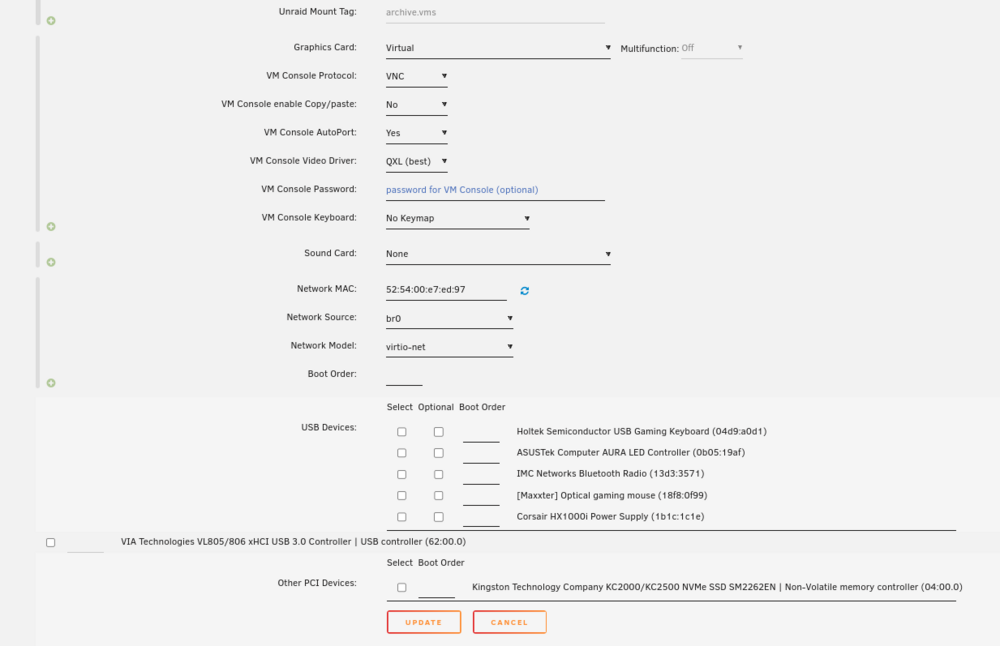
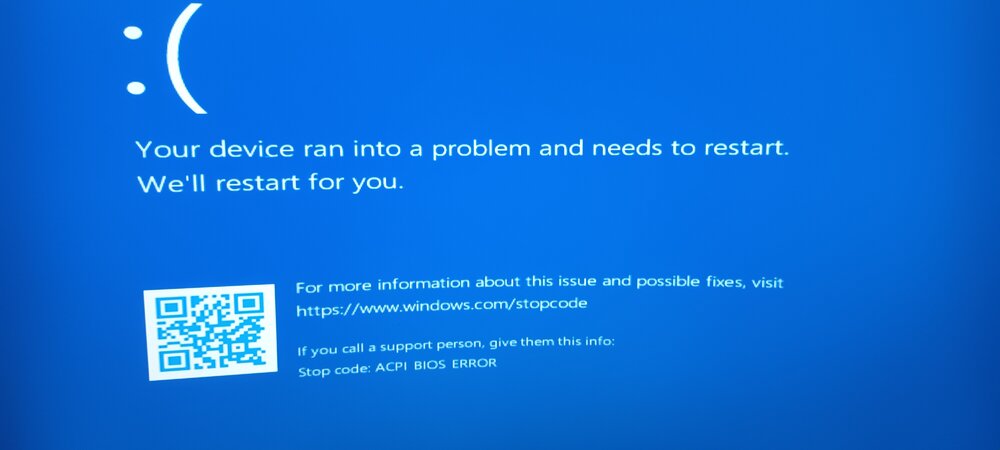
I should perhaps have added, that I had to go through a lot of hoops to get Windows working to begin with on my old unRAID server, I recently bought a new stick, created a whole new, and set it up, and the only things that doesn't work now is Windows, I can make 4000 different Win10/11 VM's and they will not start, it's the same error. I use these settings for Linux, and ALL Linux VM's just work. It's the same computer and hardware, the only things going on now, is that I have not made the xml changes that I can't remember what I did on the old unRAID server. The people that helped me last time was on the unRAID community discord server, but they kicked and banned me because I asked a thing 4 times and it took 8 hours to get an answer and they kicked me because I didn't have the patience, and it's a community server not support server, but it was the darn SUPPORT channel I asked in, this was a couple months ago, and I always have a tendency to get on people's nerves just by existing. "/ The help I got from there, was over 1½ years ago, I should have written down the stuff, but I didn't. "/ I think I have a pastebin with the settings I used on the Win11 VM, but I only had two and I kept using the same two VM's, but when I installed a new server, they just started giving these problems, I don't know if I missed to make a change in the bios on the last update or if it's something that I needed to add to the XML in order to get them running. This VM worked before I chose to change it to use the GPU. Now it gives the same 'bios error'.
-
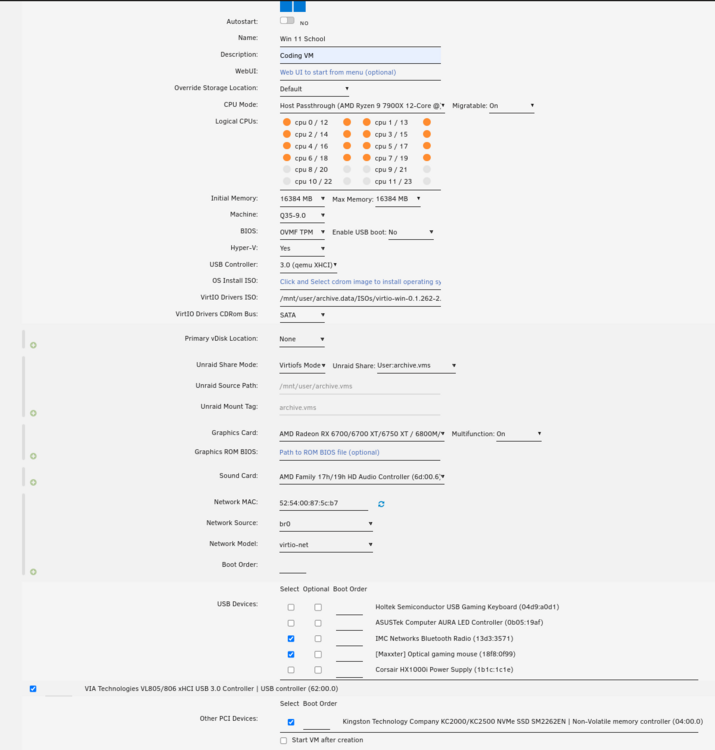
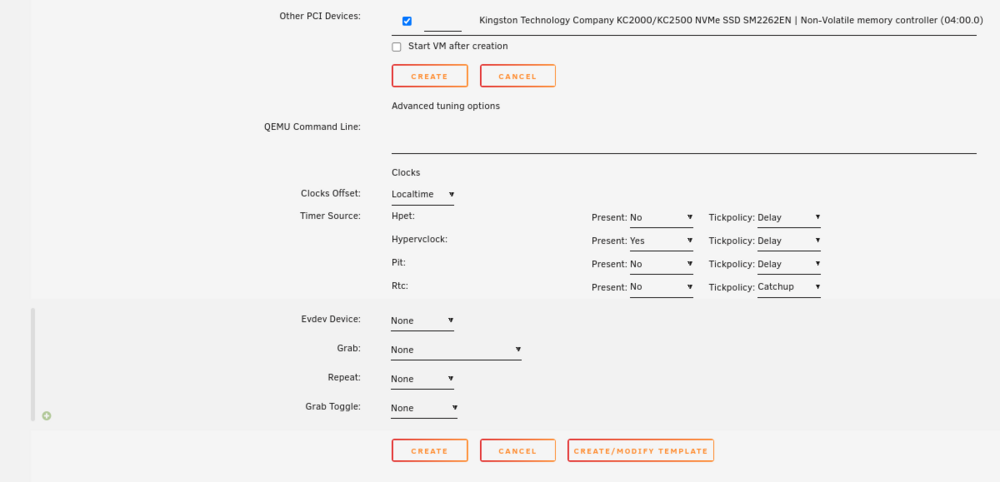
I created a VM, it worked fine, I added the GPU, and USB card, shut down the Linux VM that was using the GPU, and this is what happens. It's been doing this with my old Win 10 and 11 VM's, so I have been a bit distraught. I need windows to work for school work, since Visual Studio doesn't work in Linux. "/ I have tried to enable and disable "Global C-states" in the bios and that had no impact on the problem, I'm starting to be stressed now because my VM that worked stopped working after I passed through the GPU, and even if I take it away it won't start. It only gives the same error that the other two. Is this i a BIOS problem, unRAID problem or QEMU problem?
-
No, I will test that. Edit: I pointed it to the 'cd'/iso, and now it uses another display driver. Thanks.
-
Hey, The old Win10 & 11 VM's died on me, and gives out an error when I start them, so I created a new VM, but that's stuck on the resolution "1280x800", and I have installed "virtio-win-0.1.262", thinking that, that would be enough, but it's still stuck on that resolution. I haven't passed the GPU through yet either, because I'm currently using it in a Linux Bazzite VM, but I really need to fix this asap, since I'm starting a school course on Monday that stated I had to use Win 10/11. "/ It's probably because of Microsoft Visual Studio. "/
-
I can search for the file type and it finds a big amount of them, and I feel it's the fastest way to reset something after one has made massive changes, instead of going from folder to folder. I tried to let the VM do it, but it kind of lost connection with the server while trying to do it, and other times it couldn't. So I have been manually deleting a big amount of them. I thought; maybe someone knows of a plugin for such a task. Or something else.
-
Well It is my personal computer that I have unRAID on, I sit next to it, so I can react to most stuff, but overheating is something that I might not be able to check on, since my chip isn't supported in linux.
-
I'm moving 500+ GB's to the 8TB right now, I don't know if I'm doing it right though, pushed on the disk1 and move and then eight, which is the name on the extra pool I created, since the 8TB is 5400rpm, and the 4TB is 7200rpm, I separated them into two different pools, and I don't really need that much space atm, have a lot of things I have to watch etc. and the VM's I'm going to move after I have moved the backups to the 8 TB, the dockers are now situated on the fast pool, which is a m.2, but I'm seeing a lot of reads and wonder how long it's going to hold up before I have to to get a new one, and I'm thinking of having 2 x 2 TB, and have one as redundancy, and then put in another 2TB ssd to act as a cache, perhaps even 2x2 TB SSD's just for that purpose, but I don't know how the cache works, does it make a sequential move often or less often? If it breaks and I lose hours or even weeks of work it's not really going to be a good fit to only have one. The main pool is only one 18TB atm, but I'm planning to buy another asap and put it in as a parity, and the month after, buy another 18 TB to add to the pool. when I have a pool of 2x18 TB plus a parity, I'm going to start focusing on cache, and move out the 8 & 4 TB drives from the case entirely. I just need to by the XL version of my case though. "/ Because the AIO cooler is too big, so I can't change over to the NAS configuration, meaning I can only place about 6 drives in the case for the time being. I really wanted to have two gpu's in there too, but if I'm to have more drives, I'm going to need to get myself an sas/sata card. It's to the extent that I'm starting to wonder if it wouldn't be better to buy a rack and put in a drive rack and and have a separate PC configuration in there too, but the cost was about 400€ for that case and it could only hold a 360 AIO, which means the AIO I have (420) is once again too big. "/


