






Gex2501
Members
-
Joined
-
Last visited
Everything posted by Gex2501
-
Any reason this doesn't seem to work correctly with Unraid 7.1.4? It shows swag but not tsdproxy, and any changes I try to make are not being saved. I have attached my diagnostics.zip. I hope someone can help? aorus-diagnostics-20260619-1352.zip
-
@BrandedTamarasu OMG! So awesome! I will definitely help test and get back to you on my results. I've got four servers on different versions of unraid I'll happily give feedback on!
-
This is fantastic! Thanks for this! If you're feeling ambitious I know a lot of people would appreciate some kind of adaption of the Theme Park themes since the plugin no longer works in 7.2+. I like to use a different theme for each server I work on. Help keep them distinct. I've tried to adapt them myself but my CSS-fu is not so good. https://docs.theme-park.dev/theme-options/
-
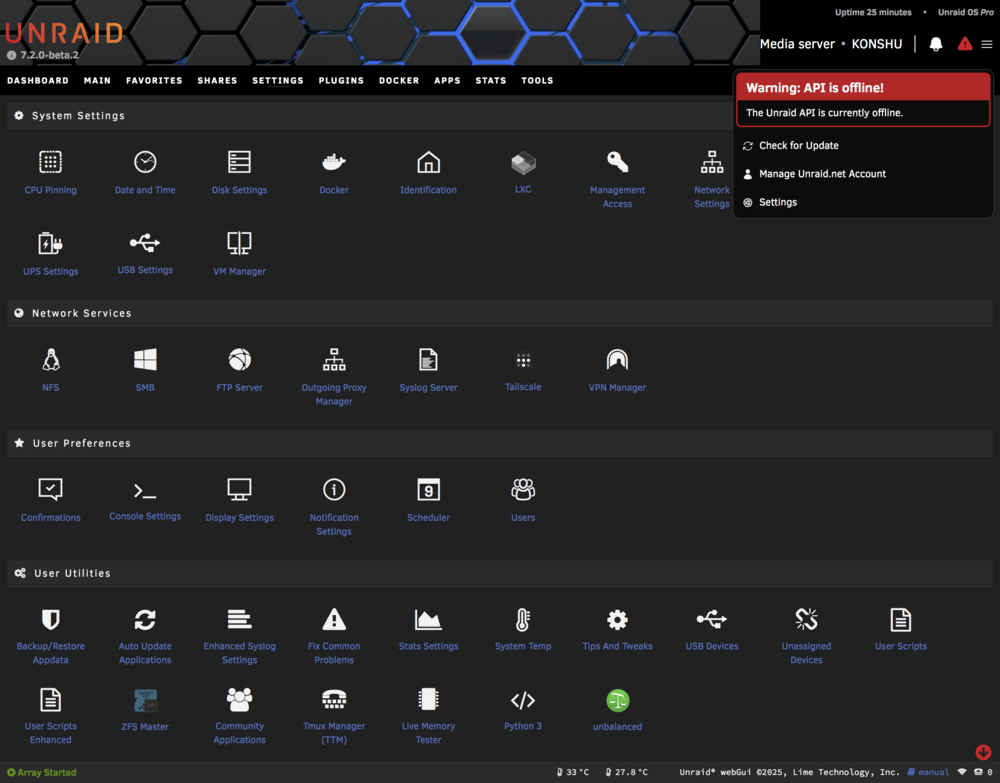
I'm seeing this after every reboot. I had this same problem with the connect plugin under 7.1.x I can start the API manually using either unraid-api restart or pm2 start /usr/local/unraid-api/ecosystem.config.json --update-env and it seems fine, but I have to do this after every reboot... also, FYI: pm2 is aliased to '/usr/local/unraid-api/node_modules/pm2/bin/pm2' I have attached a screenshot and logs files. konshu-diagnostics-20250901-1625.zip logs.gtar
-
I love this! Makes configuring SWAG auto-proxy so much easier! And I can see which containers to setup to proxy too! Thank you!
-
Here are diagnotics from another server I have. Same issue... Also, I have to manually start the API every time, which I've posted about in another thread https://forums.unraid.net/topic/186583-red-triangle-with-new-version-202502062108/ tower-diagnostics-20250407-2302.zip
-
I have to do this too! With every...single...update...on both of my servers! Here are diagnostics if it helps but unless it's a plugin conflict I'm not so sure the issue is on my end. aorus-diagnostics-20250406-1613.zip konshu-diagnostics-20250406-1613.zip
-
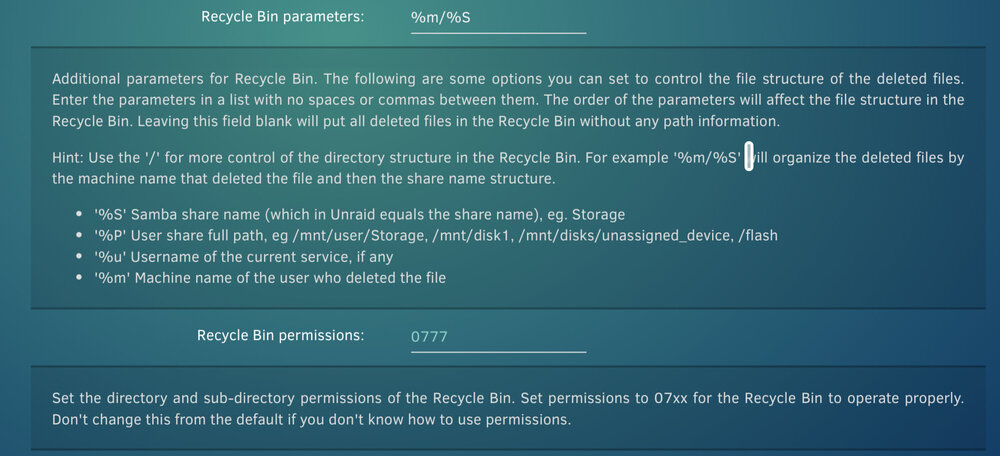
Thanks for fixing this! Things seem to be working correctly again. However I'm trying to use the parameters and permissions feature and it doesn't seem to work. Files moved to the recycle bin just keep the same permissions and don't have the specified folder structure... Am I doing something wrong? I never used these features before so I'm not sure if they were working...
-
Is it possible for the docker containers to be restarted in the same order they have in the docker tab, instead of alphabetically? I ran into an issue today where redis and authelia were updated at the same time, but authelia failed to start because redis wasn't running first. Also, in searching the thread I've seen reference to a CA manual way back in 2017 (see below). I suppose I could utilize this to work around my specific issue but perhaps restarting in the user defined order on the docker tab would be better... Is there a place where the rest of this CA Manual exists? I can't seem to find it...
-
I also see the github repo was archived...is this plugin abandoned?
-
I have this same issue. Seems if I turn of "Log Deleted Files" it doesn't happen. Still, my recycle bin isn't working either and shows '?' for size. No shares listed or logs. Running Unraid 7.0.1 and version recycle.bin-2025.03.06.tgz
-
I'm curious about doing this myself. Did you have any luck with it?
-
Maybe try this path for pm2. I haven't tried 7.0.1 yet but maybe this will work... /usr/local/unraid-api/node_modules/pm2/bin/pm2
-
I just added this to my go file. # Restore custom sshd_config cp --update=all /boot/config/ssh/sshd_config /etc/ssh/sshd_config /etc/rc.d/rc.sshd restart But my vote would be adopt the use of customization files in an /etc/ssh/ssh.d directory. Seems to be more of a linux standard.
-
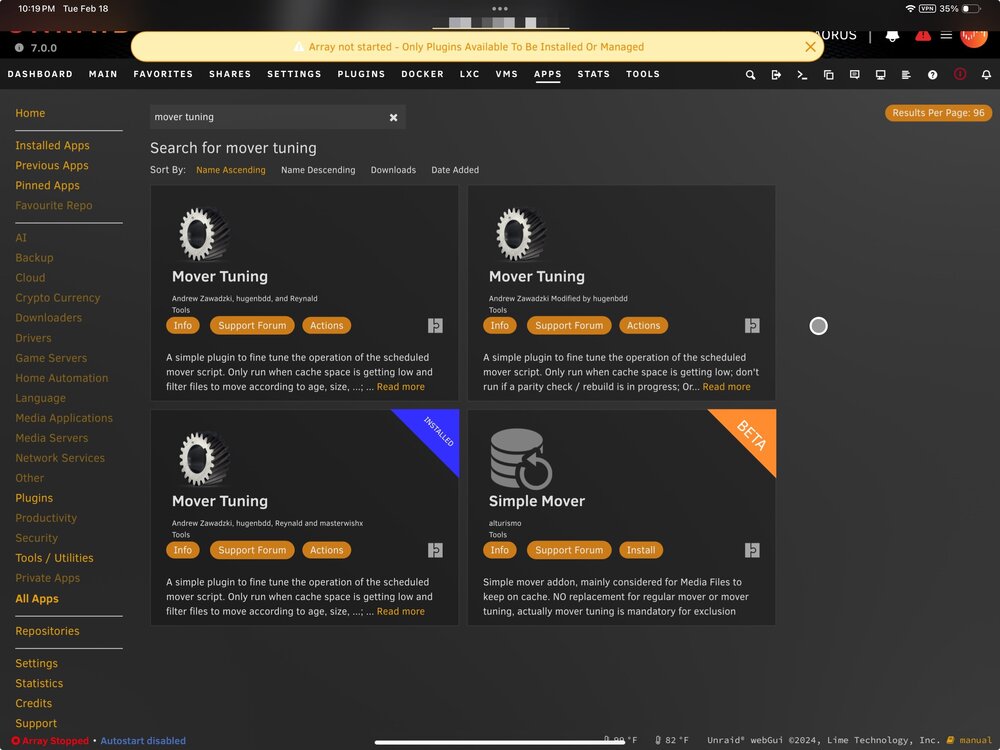
Seems there are three versions of this plugin in the CA apps. I assume we should use the latest one but perhaps the other two need to be removed?
-
I actually disabled the auth since I use it with a reverse proxy. But, after making any settings changes, I made a backup of the database.db file, stopped the container and restore the database.db, and start up again. Only way it seemed to make the settings "stick."
-
I'm surprised we have seen any temporary fix or solution for this problem yet. Seems like a significant issue the devs need to address. Also still getting this sent to me every day: warning: Potentially dangerous mode on unraid-api: 0666 error: Ignoring unraid-api because it is writable by group or others. error: found error in file unraid-api, skipping warning: Potentially dangerous mode on unraid-api.patch: 0666 error: Ignoring unraid-api.patch because it is writable by group or others. error: found error in file unraid-api.patch, skippin I know it's harmless, but it's a bug and it's annoying. I think this will fix it until the next reboot at least. root@AORUS:~# chmod 644 /etc/logrotate.d/unraid-api*
-
If it helps... This is my /boot/config/go file: root@AORUS:~# cat /boot/config/go #!/bin/bash runlevel=$(runlevel | awk '{print $2}') uptime=$(awk '{print $1}' /proc/uptime) if [ "${uptime%.*}" -gt 600 ]; then echo "Uptime greater than 10 minutes. Exiting..." exit fi cd /root echo "$runlevel" > go_runlevel echo "$uptime" > go_uptime env > go_env # Start the Management Utility /usr/local/sbin/emhttp # Heatbeat Monitor heartbeat_monitor() { while true; do curl -s https://cronitor.link/p/d87c0160848f49899bf7be1433b692a5/AORUS sleep 60 done } heartbeat_monitor & # Needed for ElasticSearch sysctl -w vm.max_map_count=262144 # Needed for Redis sysctl vm.overcommit_memory=1 # Force iptable mangle module to load (required for *vpn dockers) /sbin/modprobe iptable_mangle # Restore customizations tar xzf /boot/config/root_env.tgz -C / # Themepark css for WebUI ln -sf /boot/themepark/css /usr/local/emhttp/ cat << 'EOF' >> /root/.bash_profile ################################################# ### Custom .bash_profile by Gex2501 ### ################################################# if [[ -f ~/.bashrc && $- == *i* ]]; then source ~/.bashrc fi EOF #TODO: Create .go_complete file to signal that the go file ran successfully. touch .go_complete # Create a RAMDisk #mkdir /tmp/ramdisk && chmod 777 /tmp/ramdisk && chown 99:100 /tmp/ramdisk #mount -t tmpfs -o size=128G myramdisk /tmp/ramdisk root@AORUS:~# Also, my PATH: root@AORUS:~# echo $PATH /root/bin:/usr/local/node/bin:/usr/local/sbin:/usr/sbin:/sbin:/usr/local/bin:/usr/bin:/bin:/root/.hishtory root@AORUS:~# And my /boot/config/stop file for anyone intersted: root@AORUS:~# cat /boot/config/stop #!/bin/bash #TODO: check for .go_complete file and do not process if not present get_status() { case "$1" in 0) echo "SHUTDOWN" ;; 6) echo "REBOOT" ;; *) echo "UNKNOWN" ;; esac } echo "Backing up environment to /boot/config/root_env.tgz" # Backup customizations tar czf /boot/config/root_env.tgz \ --sort=name \ /root/.bash_history \ /root/.bashrc \ /root/.config \ /root/.ctop \ /root/.easyclip \ /root/.gitconfig \ /root/.hishtory \ /root/.local \ /root/.tmux \ /root/.tmux.conf \ /root/.vim \ /root/.vimrc \ /root/.zshrc \ /root/bin \ /usr/local/bin/croc \ /usr/local/bin/ctop \ /usr/share/terminfo/t/tmux-256color \ /etc/rsyslog.d/99-filter.conf \ /etc/logrotate.d/boot_syslog &> /dev/null echo "Done." runlevel=$(runlevel | awk '{print $2}') if [[ ! "$runlevel" =~ ^(0|6)$ ]]; then echo "Script is not running at shutdown or reboot. Exiting." exit 0 fi msg="Server going down. STOP script running. RUNLEVEL: $(get_status $runlevel)" curl -s -F "token=au3nm7dhfaokxxeshiqdpbswykafr8" \ -F "user=EgU49ajaQwmw46S7ad5h0D7gFrXtTg" \ -F "title=$(hostname)" \ -F "message=$msg" https://api.pushover.net/1/messages.json &> /dev/null root@AORUS:~#
-
I would suggest using the Torrent IP Checker. To verify that deluge is using your VPN. If you are routing other containers through the delugevpn I would think you could open a console for the container you want to check and run the command... curl ifconfig.io from inside the container the result should match your public IP address from the VPN.
-
@m33ts4k0z So what is accomplished by having the GUI automatically login? I don't understand the benefit versus just using a password manager/autofill.
-
Strange, I don't see a file called ".login.php" at that path. Maybe because I'm on Unraid 7.0.0? root@AORUS:/var/local/overlay/usr/local/emhttp/plugins/dynamix/include# ls -la total 148K drwxr-xr-x 2 root root 220 Feb 10 12:50 ./ drwxr-xr-x 6 root root 220 Feb 10 12:50 ../ -rw-r--r-- 1 root root 51K Feb 10 12:50 DefaultPageLayout.php -rw-r--r-- 1 root root 53K Feb 10 09:56 DefaultPageLayout.php- -rw-rw-rw- 1 root root 3.4K Feb 10 12:50 DefaultPageLayout.php.patch -rw-r--r-- 1 root root 3.3K Feb 10 09:56 FileTree.php -rw-rw-rw- 1 root root 3.4K Feb 10 09:56 ProvisionCert.php -rw-r--r-- 1 root root 3.1K Feb 10 09:56 ProvisionCert.php- -rw-r--r-- 1 root root 13K Feb 10 09:56 ShareList.php -rw-r--r-- 1 root root 633 Feb 6 13:08 UpdateDNS.php -rw-r--r-- 1 root root 819 Mar 22 2024 UpdateDNS.php- root@AORUS:/var/local/overlay/usr/local/emhttp/plugins/dynamix/include#
-
Just to add more info, the output of the command to get the api going again. root@AORUS:~# /usr/local/unraid-api/node_modules/.bin/pm2 start /usr/local/unraid-api/ecosystem.config.json --update-env [PM2][WARN] Applications unraid-api not running, starting... [PM2][WARN] App unraid-api has option 'wait_ready' set, waiting for app to be ready... [PM2] App [unraid-api] launched (1 instances) ┌────┬────────────────────┬──────────┬──────┬───────────┬──────────┬──────────┐ │ id │ name │ mode │ ↺ │ status │ cpu │ memory │ ├────┼────────────────────┼──────────┼──────┼───────────┼──────────┼──────────┤ │ 0 │ unraid-api │ fork │ 0 │ online │ 0% │ 174.5mb │ └────┴────────────────────┴──────────┴──────┴───────────┴──────────┴──────────┘ root@AORUS:~#
-
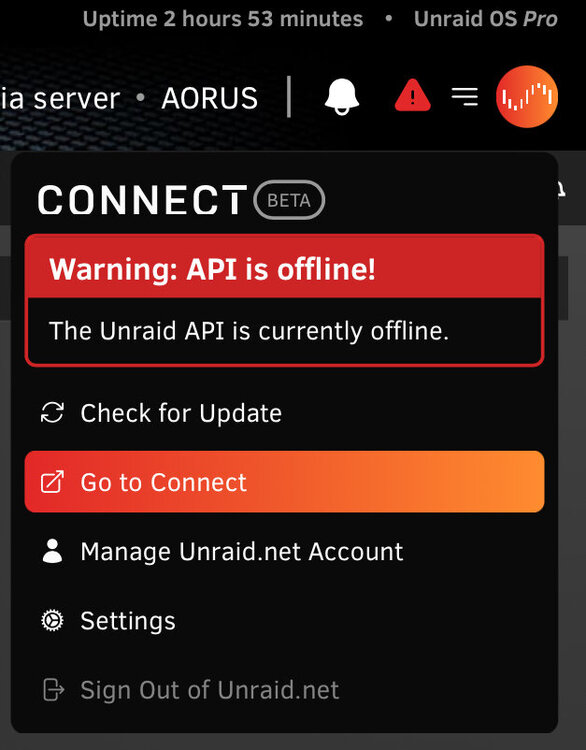
I modified my .bashrc with this at the top to ensure it only runs things when I'm on an interactive shell. if ! [[ $- == *i* ]]; then exit fi It seems to have taken care of those particular errors but I'm still seeing the API offline warning. I execute this from a terminal to get it going again. /usr/local/unraid-api/node_modules/.bin/pm2 start /usr/local/unraid-api/ecosystem.config.json --update-env But eventually it stops again.
-
I'm seeing the same line "/tmp/inline.sh: line 3: NOT_DELETE.plg: command not found" I'm guessing it's somehow related to the file /boot/config/plugins/AAA-UnraidPatch-BootLoader-DO_NOT_DELETE.plg I uninstalled the mover tuning plugin as well but that didn't affect it...not that I expected it to...
-
I tried to reload nginx which seemed to be fine. I then did a restart and got this... root@AORUS:~# /etc/rc.d/rc.nginx restart rc.nginx: Restarting Nginx server daemon... rc.nginx: Checking configuration for correct syntax and then trying to open files referenced in configuration... rc.nginx: Stopping Nginx server daemon gracefully... ┌────┬────────────────────┬──────────┬──────┬───────────┬──────────┬──────────┐ │ id │ name │ mode │ ↺ │ status │ cpu │ memory │ └────┴────────────────────┴──────────┴──────┴───────────┴──────────┴──────────┘ rc.nginx: Nginx server daemon... Stopped. rc.nginx: Starting Nginx server daemon... Starting the Unraid API ExecaError: Command failed with exit code 127: /usr/local/unraid-api/node_modules/.bin/pm2 start /usr/local/unraid-api/ecosystem.config.json --update-env /root/.bashrc: line 22: bind: warning: line editing not enabled /root/.hishtory/config.sh: line 9: hishtory: command not found /root/.hishtory/config.sh: line 75: hishtory: command not found /usr/bin/env: 'node': No such file or directoryrc.nginx: Nginx server daemon... Started. root@AORUS:~# The lines regarding .bashrc and .hishtory are probably not related. Then again, my line 22 is: bind -s 'set completion-ignore-case on' Not sure why that's suddenly a problem, but it doesn't give this or the other errors when I login... 🤷♂️






