jtaz16
Members
-
Joined
-
Last visited
-
I have been trying to inject the drivers manually so there was much less information before. ~# dmesg | grep xe [ 0.000000] Command line: BOOT_IMAGE=/bzimage initrd=/bzroot xe.force_probe=e223 i915.force_probe=!e223 [ 0.000000] NX (Execute Disable) protection: active [ 0.000605] MTRR map: 6 entries (3 fixed + 3 variable; max 23), built from 10 variable MTRRs [ 0.084545] Kernel command line: BOOT_IMAGE=/bzimage initrd=/bzroot xe.force_probe=e223 i915.force_probe=!e223 [ 0.178346] ... fixed-purpose events: 4 [ 0.007288] ... fixed-purpose events: 3 [ 0.360304] pci 0000:00:1f.4: BAR 4 [io 0xefa0-0xefbf] [ 33.572134] RAPL PMU: API unit is 2^-32 Joules, 2 fixed counters, 655360 ms ovfl timer [ 34.912059] Bluetooth: hci0: Fseq executed: 00.00.02.41 [ 542.264034] filemap_add_folio+0x69/0xe0 [ 542.264065] btrfs_readahead+0xe0/0x140 [ 542.264102] kthread+0xec/0x100 [ 545.242486] filemap_add_folio+0x69/0xe0 [ 545.242517] btrfs_readahead+0xe0/0x140 [ 545.242555] kthread+0xec/0x100 [ 556.644924] filemap_add_folio+0x69/0xe0 [ 556.644955] btrfs_readahead+0xe0/0x140 [ 556.645000] kthread+0xec/0x100 [ 557.518624] filemap_add_folio+0x69/0xe0 [ 557.518655] btrfs_readahead+0xe0/0x140 [ 557.518692] kthread+0xec/0x100 [ 561.956079] filemap_add_folio+0x69/0xe0 [ 561.956110] btrfs_readahead+0xe0/0x140 [ 561.956138] kthread+0xec/0x100
-
Removed, saved and added the GPUs back. No change. Here is lspci: Server:~# lspci -v -s 03:00.0 03:00.0 VGA compatible controller: Intel Corporation Battlemage G31 [Intel Graphics] (prog-if 00 [VGA controller]) Subsystem: Intel Corporation Device 1701 Flags: bus master, fast devsel, latency 0, IOMMU group 23 Memory at 7004000000 (64-bit, prefetchable) [size=16M] Memory at 6000000000 (64-bit, prefetchable) [size=32G] Expansion ROM at 84600000 [disabled] [size=2M] Capabilities: [40] Vendor Specific Information: Intel Capabilities v1 CapA: Peg60Dis- Peg12Dis- Peg11Dis- Peg10Dis- PeLWUDis- DmiWidth=x4 EccDis- ForceEccEn- VTdDis- DmiG2Dis- PegG2Dis- DDRMaxSize=Unlimited 1NDis- CDDis- DDPCDis- X2APICEn- PDCDis- IGDis- CDID=0 CRID=0 DDROCCAP+ OCEn- DDRWrtVrefEn+ DDR3LEn+ CapB: ImguDis- OCbySSKUCap- OCbySSKUEn- SMTCap- CacheSzCap 0x0 SoftBinCap- DDR3MaxFreqWithRef100=Disabled PegG3Dis- PkgTyp- AddGfxEn- AddGfxCap- PegX16Dis- DmiG3Dis- GmmDis- DDR3MaxFreq=2932MHz LPDDR3En- Capabilities: [70] Express Endpoint, IntMsgNum 0 Capabilities: [ac] MSI: Enable- Count=1/1 Maskable+ 64bit+ Capabilities: [d0] Power Management version 3 Capabilities: [100] Alternative Routing-ID Interpretation (ARI) Capabilities: [110] Null Capabilities: [200] Address Translation Service (ATS) Capabilities: [420] Physical Resizable BAR Capabilities: [220] Virtual Resizable BAR Capabilities: [320] Single Root I/O Virtualization (SR-IOV) Capabilities: [400] Latency Tolerance Reporting lspci -k: 03:00.0 VGA compatible controller: Intel Corporation Battlemage G31 [Intel Graphics] Subsystem: Intel Corporation Device 1701
-
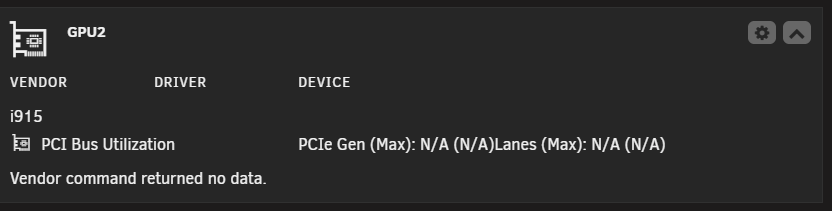
I adjusted my xe drivers. Seems it is still not init on the B70 Pro.. Performed restart. Also now running on 7.2.4 I do also have a igpu. Do i need to specify that igpu for i915 as well?

-
Thanks for the info. I have those drivers set now, waiting 17hrs after my party check. My cache drives reached read only status and locked up. Had to perform new config...
-
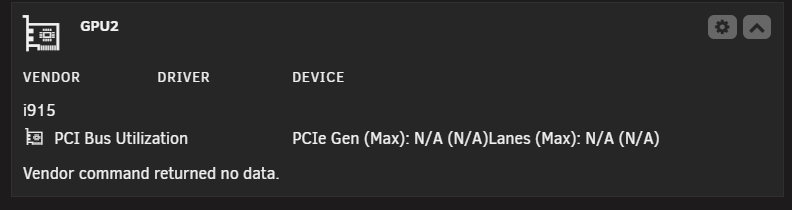
Agreed, Just installed B70 Pro. Waiting for an update. Thanks! Here is a breakdown of my hardware and what I am seeing: Unraid 7.2.2 GPU: Intel Arc Pro B70 (Battlemage G31) Motherboard: ASUS TUF Gaming Z690-Plus WIFI PCI ID: 03:00.0 Dashboard Error: "Vendor command returned no data." Seems it is loading i915 drivers vs XE? unraid-server-diagnostics-20260419-1636.zip
-
Agreed, Just installed a B70 Pro. Waiting for an update. Thanks!
-
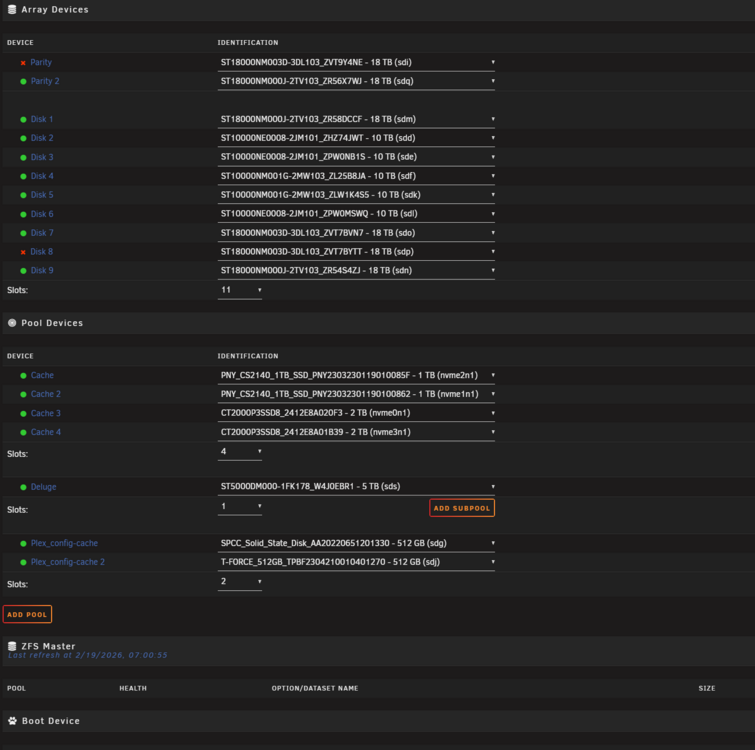
Sorry to boot this back up as an issue. I am having issues with my Broadcom LSI 9305-24i. I recently went to a new PC case with 24 drive bays. The transition worked without issue while using the new LSI card. Today as I try and update to 7.2.2>7.2.3. I boot in and my Array shows 2 missing devices(It selects the 2 drives missing without me needing to). One Parity and one Disk. I do not know what the serial numbers were for them as it is not telling me they are missing.. like what happens when I normally remove a drive. Would the method you mentioned work? "Unassign all pool members, start array, stop array, re-assign all pool members, start array and you're done." Unassign all pool member: You are just choosing no device on all parts of the array? Then just adding the array back? Or does your method only work with pool devices and not array devices?
-
I also love the plugin. Would it be possible to have a "Previous Year" metric too? I missed the turn over and didn't get to see what I made it up to... Thanks again! I did just find the report section where I can see the data(March to 2026 I only made it to 129TiBs 😉), but still would love to see previous year on dashboard.
-
FYI I was having connection issues to the rsync servers. It seems only Asia is ping-able. I had to disable region(Router) blocking to get the update to proceed on my network. I could not contact Europe or America on cell or home network. Just posting in case someone has the same issue. I got lucky enough to pull the logs before it kept force closing. It was not updating the log file. The Wishlist is now fixed with the update. Thanks a lot for your work! 2025-09-03 01:44:38.012589 [info] Host is running unRAID 2025-09-03 01:44:41.381686 [info] System information: Linux e9c058e6a3cd 6.12.24-Unraid #1 SMP PREEMPT_DYNAMIC Sat M 2025-09-03 01:44:41.400203 [info] Application name: 'overseerr' 2025-09-03 01:44:41.417243 [info] PUID/PGID: '99'/'100' -- '2025082902' 2025-09-03 01:44:41.440686 [info] Output image release tag: '1.34.0-1-03' 2025-09-03 01:44:41.541130 [info] PUID defined as '99' 2025-09-03 01:44:41.570094 [info] PGID defined as '100' 2025-09-03 01:44:41.619068 [info] UMASK defined as '000' 2025-09-03 01:44:41.642998 [info] Permissions already set for '/config' 2025-09-03 01:44:41.675307 [info] Deleting files in /tmp (non recursive)... looking for conflicting packages... resolving dependencies... looking for conflicting packages... Packages (1) rsync-3.4.1-2 Total Download Size: 0.35 MiB Total Installed Size: 0.68 MiB :: Proceed with installation? [Y/n] :: Retrieving packages... error: failed retrieving file 'rsync-3.4.1-2-x86_64.pkg.tar.zst' from europe.archive.pkgbuild.com : Connection timed out after 10002 milliseconds error: failed retrieving file 'rsync-3.4.1-2-x86_64.pkg.tar.zst' from america.archive.pkgbuild.com : Connection timed out after 10001 milliseconds error: failed retrieving file 'rsync-3.4.1-2-x86_64.pkg.tar.zst' from asia.archive.pkgbuild.com : Connection timed out after 10001 milliseconds warning: failed to retrieve some files error: failed to commit transaction (failed to retrieve some files) Errors occurred, no packages were upgraded.
-
Thanks this worked for my issues of "Wrong pool state" -invalid expression. Upgrading from 6.12.10 > 7.0.0-rc.2
-
Thanks for the help, just did not compute that you would not want to change the port in the ini.
-
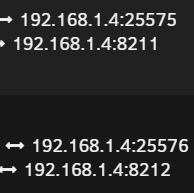
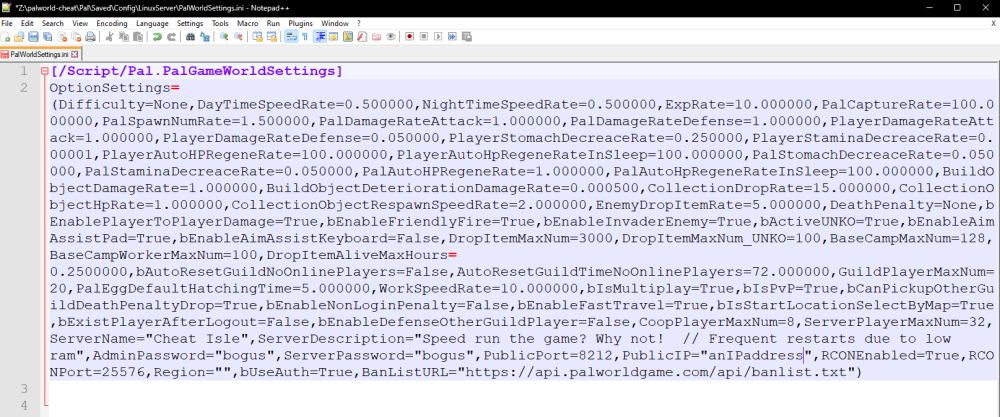
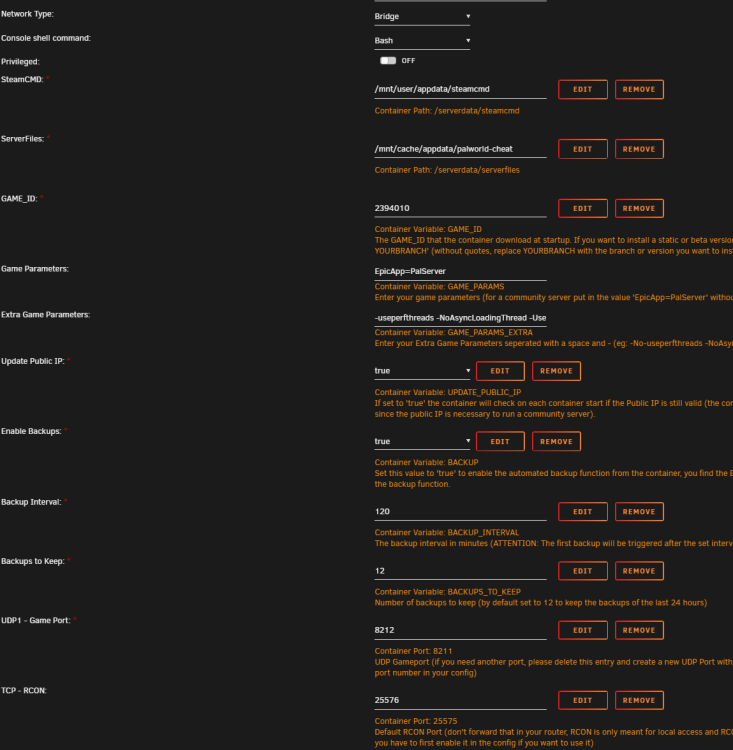
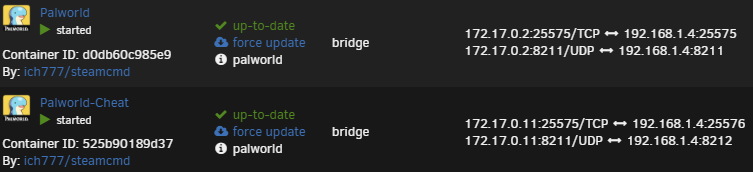
Got it to work: The first server is default everything except enabling RCON in the palworldsettings.ini . Second server Set the port from 25575 > 22576 during container config. Then Changed the palworldsettings.ini from what I thought was correct 25576 > 25575 and it all worked out. I can see both in RCON and the script worked for both using 25575 in the palworldsettings.ini and script. Only thing that needed a different port in the beginning was the setting for RCON during docker creation "TCP - RCON".
-
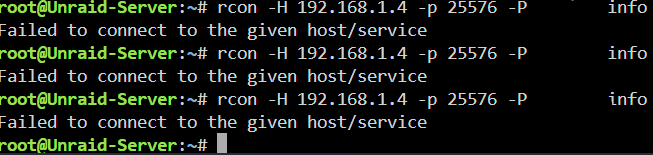
I did not have RCON enabled on the first/original one, apparently it was not completely off when I made the change the first time. It is now viewable. The second is still not working. I triple checked that it is enabled.
-
Screenshots are from my second one. (Palworld-Cheat) Extra parameters for the docker : --restart=unless-stopped --memory=10G Is there forwarding I need to perform on the unraid app side? I would get it if the 25575 on the app side is conflicting but I would think changing the port during setup would fix that. I only changed Server file location and Ip/backups to True. And the port assignments by 1
-
Yes I have it enabled on both my Palworlds 22575/6. Both fail to connect to host. I have restarted both dockers. I have a 9 digit password with 3 numbers. I just tried it without the numbers as the linked discussion said issues with password input.