





Juscuz17
Members
-
Joined
-
Last visited
Everything posted by Juscuz17
-
@03:00 my UDM PRO updated software, then rebooted. I am at a loss, I can't find anything wrong. I even went back to one of my older 6. back ups and it does the same thing.
-
syslog-previous syslog
-
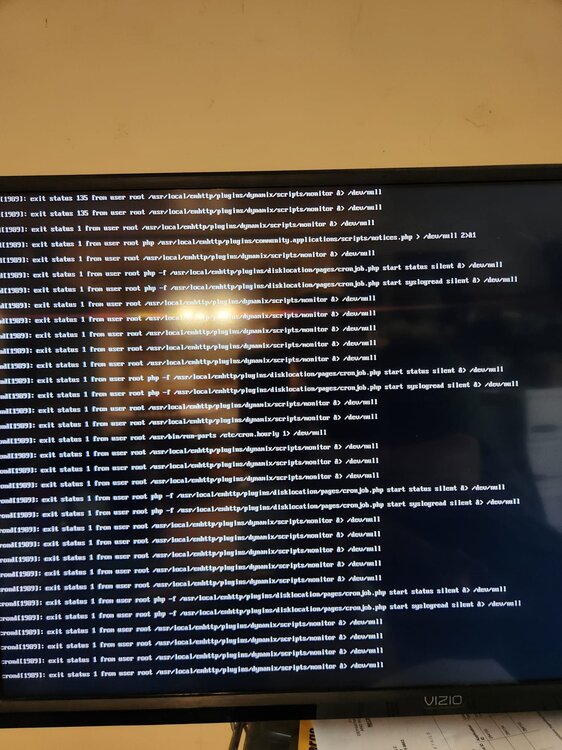
My server will suddenly just stop responding. Sometimes it runs for days, sometimes just an hour. I checked all internal connections, installed new memory, and swapped to a new USB drive. I also attached a picture of what's on the screen when its locked up. Thanks in advance! Running 7.0 schmittnas-diagnostics-20250522-2129.zip
-
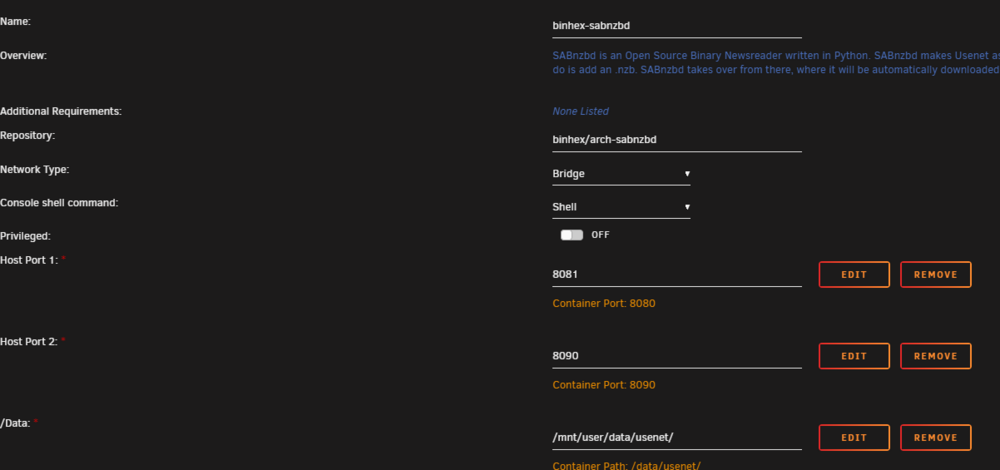
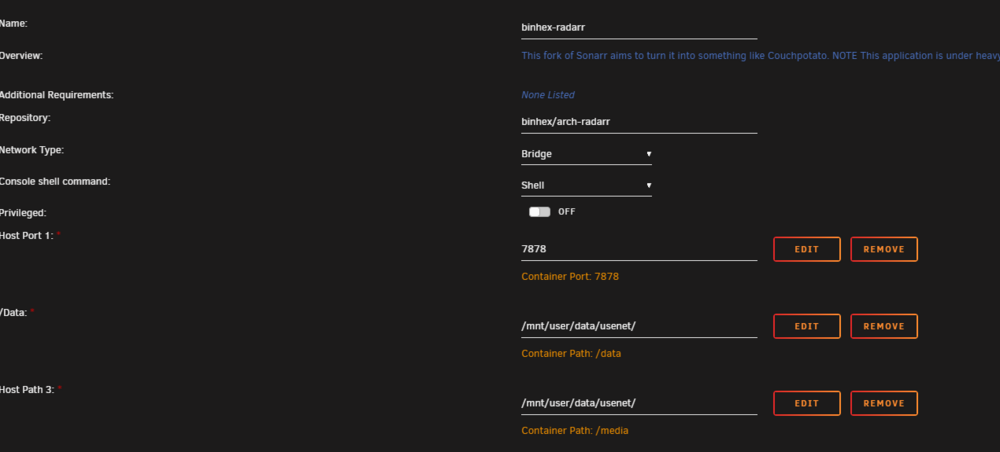
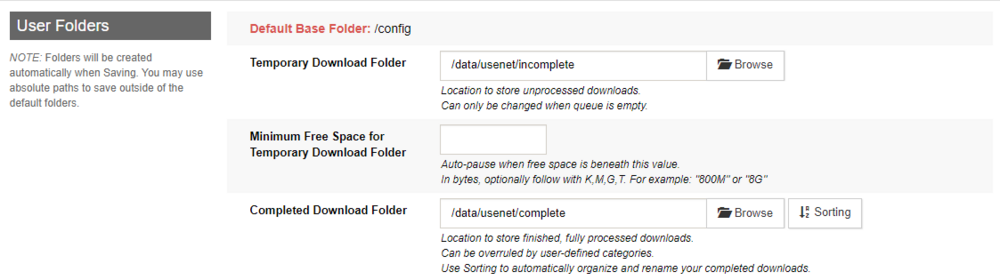
I had it all set up and working, then I swapped out the raid card and bricked my cache drives losing all my appdata. I have everything setup, but I am struggling with the mapping. I have no idea what I am doing wrong.... You are using docker; download client SABnzbd places downloads in /data/usenet/complete/data/usenet/complete/data but this directory does not appear to exist inside the container. Review your remote path mappings and container volume settings. I don't know why it has the path doubled... SAB works, the files are downloaded, Radarr knows they are downloaded, but has no clue where they are. SAB Radarr
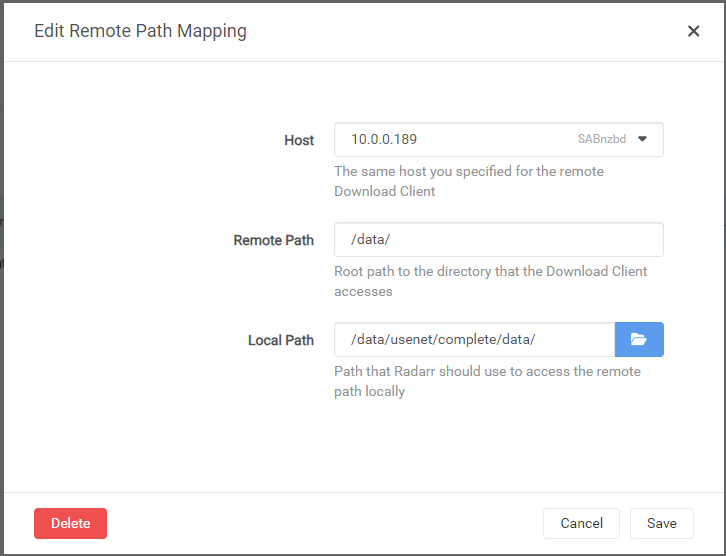
-
EDIT: Corrupt DB rolled back to last back up and let PLEX rebuild. All is good. Any help with this would be appreciated. Everything has been running fine, no changes to the server or updates that I know of. The library will not update and I get this error. 2023-11-26 02:14:35,830 DEBG 'plexmediaserver' stderr output: ****** PLEX MEDIA SCANNER CRASHED, CRASH REPORT WRITTEN: /config/Plex Media Server/Crash Reports/1.32.7.7621-871adbd44/PLEX MEDIA SCANNER/b6a0bd04-7c62-42d5-2c0bfca1-74dfd278.dmp Log file attached b6a0bd04-7c62-42d5-2c0bfca1-74dfd278.dmp.log
-
Can you install an update to an existing docker? I am running brettm357s Repository of Unifi version 7.2.92 There is a newer version released 7.2.97 and even newer 8.0.7 , but no updates via the Docker page.
-
Can we get the docker updated? Unifi is on 8. now.
-
Why is it so hard to find the instructions for a same disk rebuild. I can find replace the disk rebuild, but not same disk rebuild. I found 1 link for it and its broken.
-
I haven't looked that up yet. I am running an extended smart test on it right now.
-
I did shut it down and move the tower last night. When I saw the error today, I shut it down and unplugged and plugged all the drive power and data cables restarted it and downloaded the diagnostics file. Is this a cable issue, or a drive issue? schmittnas-diagnostics-20231106-1806.zip
-
Just in case my post helps someone later. I got lucky because my drive was still working. I was able to put the array back the way it was, mount the new bigger parity and let parity do its thing. So far so good. in 17 hours I will know if it worked.
-
SOOO, the disk I was replacing had a read error that unraid took it offline for. I put all the drives back in where they were and started the array with parity turned off. All drives are showing healthy. Should I mount the new parity drive and let it update the parity? The drive is reading fine right now. or should I try and copy the failing drive to the old parity drive then mount the parity disk? What would be less stress on a questionable drive, coping files off it, or mount the parity drive and let it update. Any input at all guys???
-
I was following the directions for a failed disk parity swap and the server was saying too many wrong disks no matter what I did. Pulled failed disk. Added new bigger parity. Put parity in the failed slot. Too many wrong disk errors. Ran new config.. I did a new config to get the disks to cooperate and now I don't have the option to copy the old parody to the new one. Did I screw everything up?. Do I start the Array? Do I have to start from scratch? (I hope not) EDIT: I am going to start the array with no parity and see what it does. I have the failed disk and it is still readable in UD. I am hoping I can start the array, and copy the contents to the old parity disk. OR do I take the old parity disk out and add a new disk in its place then copy the data over and let it update parity???
-
Yep, maybe I will just build a smaller Unraid server as a back up.... This is addicting...
-
My case has space for 8 3.5, and 2 SSD, I can add 3 drives in the 2 5.25 slots. I guess I just need to start upgrading my drives to bigger ones. Current setup is 6x 6TB data 1x 6TB parity 1x 1TB SSD Cache. I started thinking about a remote tower because I have 7x2TB and 5x3TB drives I could use. I am also looking at SAS expanders, and running SAS cables to a stand alone drive tower.
-
Is this even a good option? I know its out of stock. I found one and I am debating if I want to buy it. My MOBO has 2 external esata ports. https://www.newegg.com/cfi-b8283ergg/p/N82E16816855009R
-
I have read that you can not mix SATA and SAS in the same array. Is Parity considered a different array? I recently saw another Unraid user's setup and they have SAS as the Parity. I did not realize that is an option.
-
Unraid OS Pro 6.12.3 Let me start by saying I have been watching Space Invaders videos and I am still riding the struggle bus. Can someone please give me the steps to set up and App like couch potato, or Binhex Deluge on a clean install? It is obviously not just a click and play. Or I am just not getting it. I don't expect a full list of instructions (I will take any help I can get though), just the basics, and I might be able to grind my way through it.
-
Thanks for all the responses! I really only need to back up stuff I can't replace. I was stuck on I don't want to lose everything, but all my media can be found again if it was lost. My pictures and any documents don't take up much space, that's easy to manage a 3-2-1 back up. I also plan to go double parity. Another drive is not that expensive, and I will be covered if a second drive fails.
-
What is the standard back up procedure when you build an Unraid machine (or any NAS build)? I have parity, I am probably going to add double parity. The real question is when you have a 36TB NAS, do you build a second 36TB NAS to back it up? I keep reading on here that full back up is best, and I get that, but aren't we building these setups to have one big dependable storage area?
-
I actually spent some time looking for the list, and all I found was out of stock links, and 404 pages. I ordered some Lexar USB 2.0 drives, they will be here tomorrow. I will let you know if they work.
-
I was still playing with the trial set up, so there is nothing to lose. do I just make a new bootable USB and reconfigure?
-
I like Intel, and AMD, and I have had great success with both. I chose this hardware because I have $100 into the MB, 32GB of ram, the CPU, and the freezer13 cooler. If I have a power or heat problem I may try a i7 3770T. I have a readyNAS, it does nothing more than store media, no apps running, just plain old storage. A FX-8320 Would easily run the simple machine I need, heck a Core2Quad would handle simple file serving. I like the idea of building my own NAS, I like everything I have read about Unraid. If I learn all about apps, VMs, and Dockers and I find that I need a more robust hardware set I will upgrade. This is a cheap experiment. I don't really care whose rear end ASUS broke it off in. I am actually a Gigabyte fan for MOBOs. IT WAS CHEAP! I have never been an ASRock fan, I always thought they were a cheap knock off. I will take your advice and look into those, but for now I will stick with my CAN (Cheap Ass NAS) build.
-
I agree, I am starting with the 6x 6TB drives first. My main goal is to get the data off the current NAS and those will more than do that. I may add the 3TB drives after the migration, or simply buy more 6TB or bigger drives when I see deals. What about the Cache drives? how big? do they have to be SSD? Do I want redundancy? When I read some of the builds on here I am blown away. A 13th gen Intel build blows my trashy little 2nd gen I7 build out of the water.
-
Found the PSU list. Well, off to Amazon.... List updated....


