





MEWTWO
Members
-
Joined
-
Last visited
-
@dlandon Hello, I’m using the Unassigned Devices plugin to mount remote SMB shares. I noticed an issue with the default CIFS/SMB mount behavior: Problem: By default, the CIFS client uses cache=strict. When transferring large amounts of data—such as backing up directories, copying large media files, or synchronizing datasets—the data is first written to local disk cache before being sent to the remote share. This can lead to very high local SSD write volume. Impact: Significant wear on SSDs, especially small cache drives Reduced efficiency for large file transfers Potential performance degradation for the system Suggested Improvement: Add an “Extra Mount Options” field in the SMB mount UI so users can specify cache=none or other caching options. This allows direct writes to the remote share, bypassing local SSD caching while preserving other performance options (e.g., rsize, wsize). If a UI field is not feasible, allow extending mount options via the Device Script without bypassing the plugin’s mounting logic. Expected Benefits: Reduce local SSD wear for large file operations Allow users to choose the caching strategy based on use case Improve the plugin’s usability for scenarios like backups, large file transfers, or remote dataset synchronization Thank you for your work on this plugin! Adding cache control would make it much more suitable for high-volume data operations.
-
Hello, I’ve been using Appdata.Backup for a while, and it’s really an excellent plugin. I do have a question though: when the plugin starts, does it read the currently running Docker containers from memory or some environment variable? Here’s my situation: under /mnt/cache/appdata I still have files left over from previously removed Docker containers. To include those in the backup, I added the appdata folder to the Include extra files/folders option, and I also wrote a script with the help of AI to stop all Docker containers before the backup, so that no appdata files are in use during the process. I placed this script under Pre-run script, and it successfully shuts down all containers. However, the Backup plugin always seems to detect the container state before the script executes, and then it restarts all containers before backing up the extra files. This makes it impossible for me to properly back up the appdata folder. Since I’m not a programmer, I can’t really work out a workaround myself. So I’d like to suggest this idea: if the plugin could check the currently running containers after the Pre-run script is executed, then it would allow backing up files left behind by removed containers as well.
-
重启,我也遇到了,而且是正常运行一段时间就打不开webui,smb共享也挂了,重启就好了。我用了快3年第一次遇到,7.0.0应该没问题,稳定运行过3个月
-
用unraid快3年了,第一次遇到运行一阵子之后无法进web页面,同时smb也进不去,但是docker却好好的,可以公网访问docker反代的页面。
-
Unraid version: 7.1.3、7.1.4 After I upgraded to version 7.1.3, restarting the router would cause unraid to disconnect from the network. Preliminary investigation: unraid could not find the gateway after the router was restarted. So, I upgraded to the latest version 7.1.4. After restarting the router, the bug still existed. I checked the unraid settings in the LAN and it showed that the default gateway was wg0, and the IPv4 default 192.168.124.1 via br0 1010 was set incorrectly. The metric of 192.168.124.1 via br0 should be set to 0. I did not make any changes. I think this problem is caused by a bug in the unraid system. syslog.txt
-
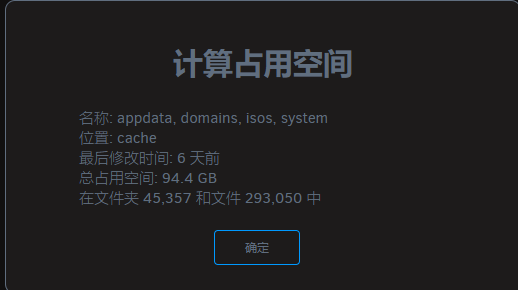
我发现我两块固态硬盘一块cache一块放阵列,两块在仪表盘显示的容量和进入硬盘计算得到的容量不一致,cache仪表盘显示容量比计算少10G左右,阵列的多10G

-
是个好方法,不过系统集成的代理还有其他用途,不止docker拉取可以用,现在找到办法了
-
这是我偶然间发现我没设置代理服务器仍然能正常拉取docker,并且后面一天我重启unraid后,无论设不设置代理服务器都不能拉取docker了
-
Unraid Version: Unraid 7.0.0 Summary of the Issue: The Outgoing Proxy Manager setting appears to have no actual effect on Docker's network behavior. Even when disabled, Docker could pull images previously. After rebooting, enabling the proxy causes timeouts, and subsequent tests show that the setting neither enables nor disables proxy usage reliably. Steps to Reproduce: Unraid system previously operated with Outgoing Proxy Manager disabled, yet Docker could successfully pull images from Docker Hub from within mainland China. After I added a new disk to the Array Devices and system reboot, pulling Docker images failed with the following error: Error response from daemon: Get "https://registry-1.docker.io/v2/": net/http: request canceled while waiting for connection (Client.Timeout exceeded while awaiting headers) curl -v https://registry-1.docker.io/v2/ works fine, proving outbound proxy is functional. Manually restarting Docker via /etc/rc.d/rc.docker restart and then re-enabling Outgoing Proxy Manager allows image pulling to work again. docker info | grep -i proxy also confirms proxy is set correctly at this point. Disabling Outgoing Proxy Manager afterward does not remove the proxy from Docker (confirmed via the same docker info command). Restarting the Docker service again after disabling the proxy makes the proxy actually stop working. Trying to reproduce the above behavior again fails — regardless of the Enable/Disable toggle, Docker does not receive or remove the proxy settings. Expected Behavior: Enabling Outgoing Proxy Manager should immediately and consistently apply HTTP proxy settings to Docker Daemon and other relevant services. Disabling it should cleanly remove those proxy settings. These changes should persist and be applied correctly on system or service restart. Environment Details: Network: IPv4 only, no IPv6. Proxy Setup: Unraid connects via a manually provided HTTP proxy, shared from a PC plugin. VPN/Networking Plugins: WireGuard (Unraid native), Tailscale was installed but later removed without use. Hardware: Can provide diagnostics if needed. Diagnostics: Available if necessary, though the above steps should be reproducible.大佬研究过网卡直通吗?8111网卡直通创建虚拟机时会提示链路训练失败。8125的绑定vfio后重启会出现中断风暴,导致cpu100%占用,分配给虚拟机直通后才能正常。原先买的精粤b760i双网口给我坑惨了。两个网口一个都不能直通。有直通网口这方面的需求。When attempting to pass through the 8111 network interface (Realtek RTL8111) to a virtual machine running on Unraid, the VM fails to start and QEMU throws an assertion failure related to PCI IRQ handling: internal error: QEMU unexpectedly closed the monitor (vm='openwrt'): qxl_send_events: spice-server bug: guest stopped, ignoring qemu-system-x86_64: ../hw/pci/pci.c:1633: pci_irq_handler: Assertion 0 <= irq_num && irq_num < PCI_NUM_PINS' failed. Steps to Reproduce: Configure a virtual machine in Unraid. Pass through the 8111 network interface (Realtek RTL8111) to the VM. Start the virtual machine. The VM fails to launch, and the error message appears in the log. Expected Behavior: The virtual machine should start successfully with the 8111 network interface passed through, without any errors related to PCI IRQ handling. Actual Behavior: The virtual machine fails to launch, and QEMU throws an assertion failure related to pci_irq_handler in pci.c. Environment: Host OS: Unraid Guest OS: OpenWrt Network Interface: 8125 (used for host connectivity) 8111 (passed through to VM, causing error) Logs: Feb 6 13:54:00 mewtwo rc.docker: Containers started. Feb 6 13:55:40 mewtwo kernel: br0: port 2(vnet0) entered blocking state Feb 6 13:55:40 mewtwo kernel: br0: port 2(vnet0) entered disabled state Feb 6 13:55:40 mewtwo kernel: vnet0: entered allmulticast mode Feb 6 13:55:40 mewtwo kernel: vnet0: entered promiscuous mode Feb 6 13:55:40 mewtwo kernel: br0: port 2(vnet0) entered blocking state Feb 6 13:55:40 mewtwo kernel: br0: port 2(vnet0) entered forwarding state Feb 6 13:55:41 mewtwo kernel: pcieport 0000:00:1c.1: broken device, retraining non-functional downstream link at 2.5GT/s Feb 6 13:55:42 mewtwo kernel: pcieport 0000:00:1c.1: retraining failed Feb 6 13:55:43 mewtwo kernel: pcieport 0000:00:1c.1: Data Link Layer Link Active not set in 1000 msec Feb 6 13:55:44 mewtwo kernel: pcieport 0000:00:1c.1: Data Link Layer Link Active not set in 1000 msec Feb 6 13:55:44 mewtwo kernel: vfio-pci 0000:03:00.0: Unable to change power state from D0 to D3hot, device inaccessible Feb 6 13:55:44 mewtwo kernel: br0: port 2(vnet0) entered disabled state Feb 6 13:55:44 mewtwo kernel: vnet0 (unregistering): left allmulticast mode Feb 6 13:55:44 mewtwo kernel: vnet0 (unregistering): left promiscuous mode Feb 6 13:55:44 mewtwo kernel: br0: port 2(vnet0) entered disabled state Feb 6 13:55:44 mewtwo kernel: vfio-pci 0000:03:00.0: Unable to change power state from D3cold to D0, device inaccessible Feb 6 13:55:44 mewtwo kernel: vfio-pci 0000:03:00.0: Unable to change power state from D3cold to D0, device inaccessible Feb 6 13:55:50 mewtwo kernel: vfio-pci 0000:03:00.0: Unable to change power state from D3cold to D0, device inaccessible After a while of system startup, the 8111 graphics card displays "Unknown header type 7f" and The error message when creating a virtual machine changes to ‘internal error: Unknown PCI header type '127' for device '0000:03:00.0'
