





Ascent
Members
-
Joined
-
Last visited
-
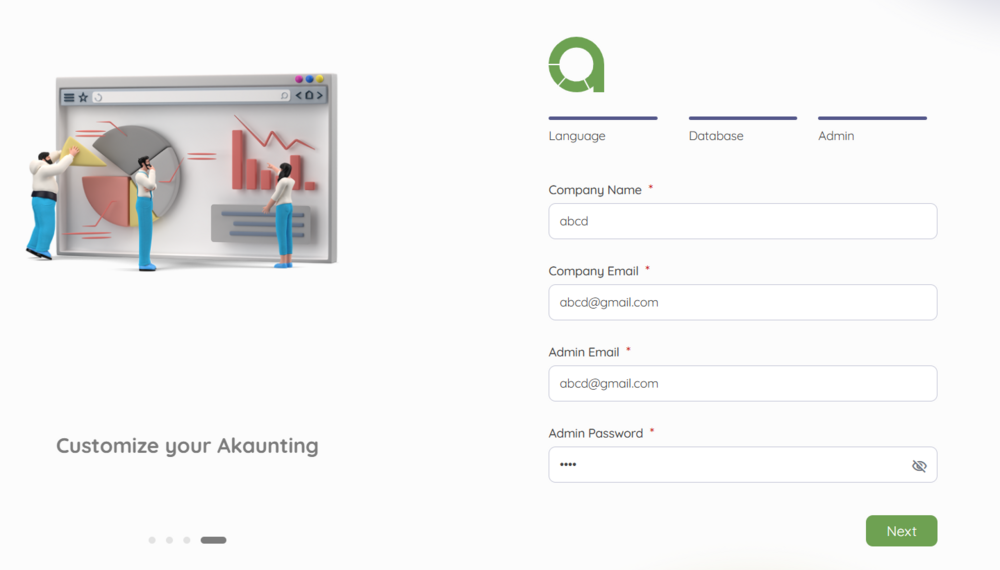
I am stuck here at the admin setup and can not figure it out no matter what I put in. I found another forum about the password but it did not work for me.
-
I just spent 3 hours trying to get this running and seem to have the same issues. i can not get it started...
-
Is this still an active thread and still being supported? or is there a better option?
-
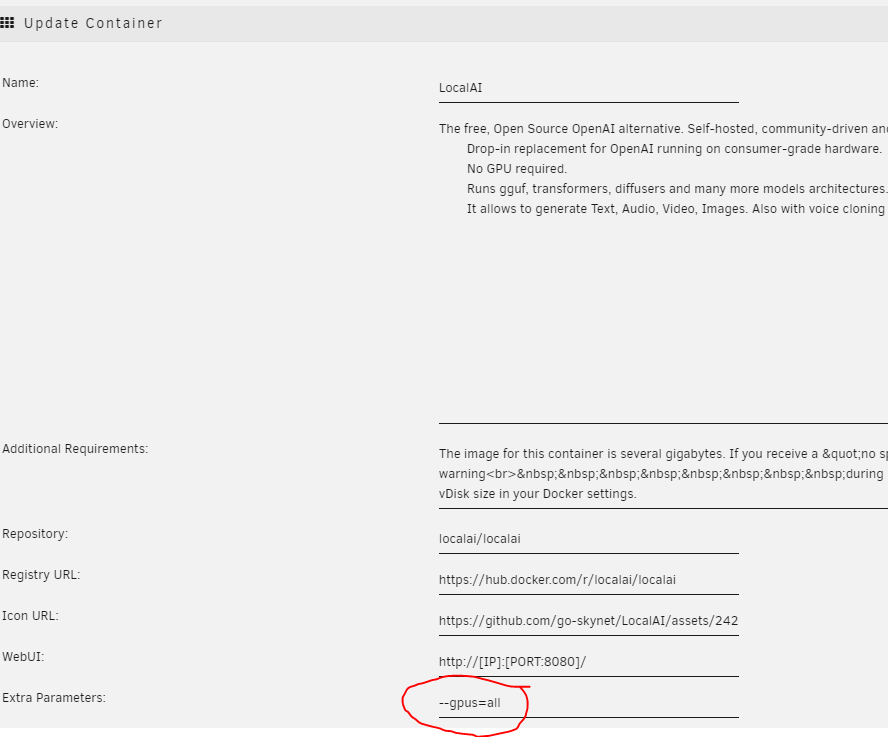
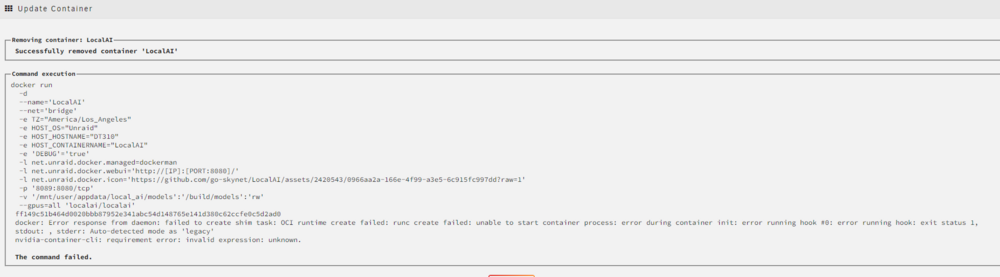
Ok I am having issues with the NVIDA GPU as soon as i add the "--gpus=all" updating the container fails... Any ideas?
-
Any Guidance I really dont want this to crash again.... Should I start with the database, using a different repository, I am at a loss. Thanks
-
Good afternoon, I am wanting some help with updating my nextcloud install. It seems every time I update the whole thing crashes and I spend days getting it back up, so I have not updated for a while. I do not remember what the last issue was but, to get it back running the fix I found was to use this repository. lscr.io/linuxserver/nextcloud:24.0.6-ls204 I am currently running: version: 25.0.13 SQLite3 3.35.5 PHP: 7.4.26 Nextcloud is really slow IMO so I am guessing moving to another database might help... I started with sqlite because I only have 5 users. What would be the recommended steps to updating without crashing this again. Thank you in advance!!!!!
-
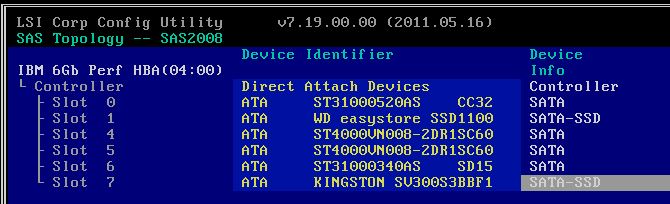
I went into the HBA card and all of the drives show ATA but it does have the device info as SATA. This issue also started when I put in the SSD. I have not had an issue with mechanical drives....
-
So thinking back over the last year I had an issue with UD after an update so I rolled it back to around 2022.11ish, I fixed my issues over the last few months and updated to 2023.06 or 2023.07 and that seems to be when these new issues started. UD is up to date now. I also just realized that I have UD plus that is on 2022.11.06, and UD preclear on 2022.09.02 Could this old versions be an issue?
-
no drives have been removed, everything seemed well from last week so just decided to reboot to see if any issues would arise and here we are...
-
Ill check all the cables again. reboot was initiated from the dashboard...
-
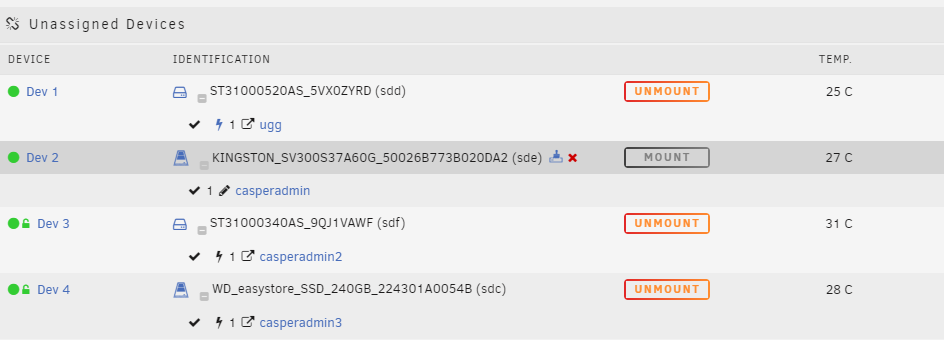
So everything has been running fine over the last week till I rebooted this morning and now my drive is not showing a partition again... any help would be greatly appreciated. Jul 26 07:36:51 DT310 kernel: sd 1:0:3:0: [sde] 117231408 512-byte logical blocks: (60.0 GB/55.9 GiB) Jul 26 07:36:51 DT310 kernel: sd 1:0:3:0: [sde] Write Protect is off Jul 26 07:36:51 DT310 kernel: sd 1:0:3:0: [sde] Mode Sense: 7f 00 00 08 Jul 26 07:36:51 DT310 kernel: sd 1:0:3:0: [sde] Write cache: enabled, read cache: enabled, doesn't support DPO or FUA Jul 26 07:36:51 DT310 kernel: sde: sde1 Jul 26 07:36:51 DT310 kernel: sd 1:0:3:0: [sde] Attached SCSI disk Jul 26 07:37:16 DT310 emhttpd: KINGSTON_SV300S37A60G_50026B773B020DA2 (sde) 512 117231408 Jul 26 07:37:16 DT310 emhttpd: read SMART /dev/sde Jul 26 07:37:36 DT310 unassigned.devices: Partition 'sde1' does not have a file system and cannot be mounted. dt310-diagnostics-20230726-0841.zip
-
I have done the same thing and now it seems like it is working after a few reboots dt310-diagnostics-20230718-1551.zip
-
Disks are in a R710 with backplane, going to an hba controler. yes i have a few disks with errors and that is why I am trying to replace them with these new drives the server has redundant 870W PSUs... would not think that is the issue. so the issue just happened again.... I am trying to get this one share back up and working. I installed a different drive cleared the drive formatted to xfs-encrypted, set password set the disk password under the unassigned devices settings changed the disk mount point the the share name that has been used in the past on the old drive (could this be causing the issue?) mount the drive transfer data from backup everything seems to be working, rebooted and the disk shows a grayed out mount box and does not have a file system and can not be mounted
-
FS: vfat Executing file system check: /sbin/fsck.vfat -n /dev/sdd1 2>&1 File system corruption detected! would you recommend trying to repair it or reformat the disk? xfs encrypted at the moment I do not have another linux box to put it in. I am not worried about loosing the data at the moment because i have a recent backup. I am more concerned at why this has happened twice in the last week and keeping it form doing it again...
-
It renamed itself to dev3 now I will work on the vfat disk later on... the unmountable disk is xfs-encrypted. I will see what I can do for another computer.


