





Daniel15
Members
-
Joined
-
Last visited
Everything posted by Daniel15
-
Are you actually using the SlimSAS port, or does even simply changing this config (without even using the port) cause the boot loop? Won't this cause it to use a lot more power, since it'll prevent it from entering deeper idle states?
-
It only takes unbuffered. You'll need a more expensive server board if you want to use buffered RAM.
-
Did you check `dmesg`?
-
I asked about this and the guy at Intel said that ACPI C3 is equivalent to CPU C10.
-
I emailed Rui Zhang (one of the maintainers of Intel_idle) and Arjan van de Ven (maintainer of powertop) at Intel earlier today to ask about this, and Rui just sent this reply: (RPL = Raptor Lake)
-
I just search the mailing list and found this thread: https://lore.kernel.org/linux-pm/[email protected]/ It looks like Intel wanted to measure the latency of transitions between C-states on Raptor Lake to determine if the previous table from Alder Lake could be reused, or if Raptor Lake should have its own configuration. They said "Hopefully we will have a patch in a couple of weeks" around a year ago, but a followup email from August 2023 says it's still a work in progress. Having said that, it sounds like the ACPI states should be fine, at least from how I'm reading that thread. Not sure. If you want to try it out, the first post in that thread (https://lore.kernel.org/linux-pm/[email protected]/) has a patch that enables intel_idle support for Raptor Lake by reusing the Alder Lake config. You could build an Unraid kernel with that patch if you want to try it out and see if it helps.
-
I opened that issue. I'm not very familiar with the Intel_idle code but I didn't see any handling for Raptor Lake in it. I was going to email the maintainer of Intel_idle (who I think is a different person to the maintainer of powertop) and ask them about it, but I haven't gotten around to that yet. If someone submits a patch to add Raptor Lake support, it's likely that it could be backported to the kernel version that Unraid uses. I'm a software developer but I'm not familiar enough with C (or the internals of Intel processors) to try attempt it myself.
-
The powertop Github issue that post links to is one that I created. I only recently looked at the code. I still haven't heard back from the maintainer of the repo (who as far as I know still works at Intel). I was going to email the maintainer of Intel_idle to ask them about it too.
-
I don't reach any pkg C-states and haven't had time to figure out why What CPU do you have, and what PCIe devices do you have in the system? Some PCIe devices prevent the CPU from reaching deeper states than C3. You could try booting from a live CD with all PCIe cards removed and see if that helps.
-
You need to use the updated version from here:
-
In my case, my NAS stores backups from production web and email servers as well as important photos and documents (tax documents, title deed for house and car, etc) so data integrity is important. I don't store many 'disposable' files (TV shows, etc) on it. I take daily backups using Borgbackup (and retain one backup per month indefinitely) but there's a risk that silent corruption can also result in backups getting corrupted too. Totally understand that some people are happy not using ECC, and that's fine too.
-
Only because Intel artificially limit ECC to workstation and server boards. There's no technical reason ECC couldn't work on consumer boards given the memory controller is on-die. Thanks, Intel.
-
They're using a 400W PSU which would help a bit. PSUs are pretty inefficient if you're only using a very small percentage of their capacity. 80 Plus Gold requires 87% efficiency at 20% load, but has no requirements at lower loads so it's not uncommon to only see 50-60% efficiency at 5-10% load. Properly size your PSU based on how much power you expect to use. They perform best around 50-60% load. I've got a similar PSU (Be Quiet Pure Power 12 M) but the lowest wattage I could find here was 550W, which is really oversized for what I need. I'll try get some power measurements when I get some free time. Right now the CPU isn't properly entering idle states (powertop shows 0% for all the idle states) even though I have everything configured properly in the BIOS, so I have to figure that out too. I think my 10Gbps network card is causing issues with idle states.
-
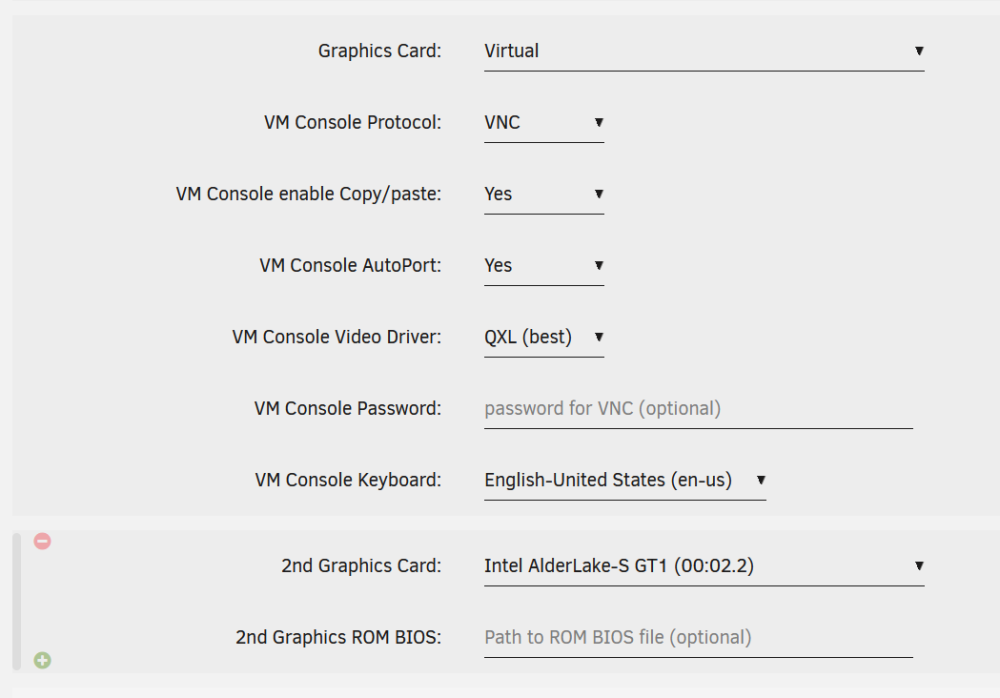
If you want to use VNC and also use the iGPU (or Nvidia GPU, whatever) in a VM, you need to have TWO video devices. The GPU should be added as the 2nd Graphics Card. There's a "+" button you can click to add the second one.
-
That's caused by "fast boot". Disable that option and it'll work fine. For some reason, fast boot breaks booting from USB. This is a common problem across many different motherboards.
-
If you want to pass a whole drive to a VM, it's usually a better idea to have it as an unassigned drive in Unraid, and pass it through as a block device from `/dev/disk/by-id/`. Don't use the legacy devices like /dev/sda as the order can change between reboots or if you add a new drive. When creating/editing the VM, select VirtIO for vDisk bus and enter the path in vDisk location. Performance will essentially be the same as passing the SATA device through directly, but it means you'll still see SMART data for the drive in Unraid.
-
Yeah you can either reduce the power limits from their defaults in the BIOS, or configure the CPU governor to use powersave mode and reduce the maximum clock speed. The "Tips and Tweaks" plugin can do some of that - it sets some powersave settings (but not all of them), and lets you disable turbo.
-
The speed shown here is arbitrary and honestly I don't know why Unraid even shows it. The clock speed on modern CPUs varies per core so I don't know where it's getting a single speed from. It might be the average across all cores at some arbitrary point in time. There's no such thing as a base clock with Intel's scaling driver - it uses a minimum and maximum, and scales between them. You can run this command to watch the current speed across all cores, updated once per 100ms: watch -n0.1 'cat /proc/cpuinfo | grep MHz' This will show you the configured minimum frequency in Hz, per core. For my i5-13500 it's 800Mhz by default: cat /sys/devices/system/cpu/cpu*/cpufreq/scaling_min_freq This will show the max (4.8Ghz for mine): cat /sys/devices/system/cpu/cpu*/cpufreq/scaling_max_freq These are both configurable - for example, if you want to save power, the max may be lower than the actual maximum supported by the processor. Check cpuinfo_min_freq and cpuinfo_max_freq (cpuinfo_ prefix instead of scaling_ prefix) to see the minimum and maximum supported by the processor. If scaling_max_freq is lower than cpuinfo_max_freq, you can run this to set it to the maximum: for x in /sys/devices/system/cpu/cpu*/cpufreq/; do cat $x/cpuinfo_max_freq > $x/scaling_max_freq done (stick it in /boot/config/go to make it run on every boot) You can bump the minimum higher if you want to, too. Also check if /sys/devices/system/cpu/cpu*/cpufreq/scaling_governor is set to "powersave" - that'll tell the CPU to prefer lower clock speeds. Finally, check if turbo is disabled: cat /sys/devices/system/cpu/intel_pstate/no_turbo (0 means enabled and 1 means disabled)
-
Hmm... I'll have to try and figure out why mine is crashing. I tested five times and could consistently repro the crash on 6.12.5, whereas it never happens with 6.12.4. Unfortunately I don't have a test system with an Intel CPU, just my production system, so I'll probably just have to stick to 6.12.4 for now. @domrocktand @neunghaha28 - which CPU are you using?
-
@ich777 I just reverted to 6.12.4 and can confirm that in my case at least, your version of the plugin works fine in 6.12.4 but it crashes the i915 driver in 6.12.5.
-
I'm trying it now, but installing the plugin is causing a null pointer deference which breaks the entire driver. One this happens, all interactions with the driver hang indefinitely, and the plugin installation never completes - it hangs when reading `sriov_numvfs`: ├─plugin -q /usr/local/emhttp/plugins/dynamix.plugin.manager/scripts/plugin installhttps://raw.githubusercontent.co │ └─bash /tmp/inline.sh │ └─cat /sys/devices/pci0000:00/0000:00:02.0/sriov_numvfs I went directly from 6.12.3 to 6.12.5... I'll try 6.12.4 and see if that's any better. Log: [ 224.133372] Setting dangerous option enable_guc - tainting kernel [ 224.133729] i915 0000:00:02.0: Running in SR-IOV PF mode [ 224.134491] i915 0000:00:02.0: [drm] VT-d active for gfx access [ 224.134494] BUG: kernel NULL pointer dereference, address: 00000000000000d0 [ 224.135129] #PF: supervisor read access in kernel mode [ 224.135759] #PF: error_code(0x0000) - not-present page [ 224.136386] PGD 6a580f067 P4D 6a580f067 PUD 6d2a94067 PMD 0 [ 224.137020] Oops: 0000 [#1] PREEMPT SMP NOPTI [ 224.137651] CPU: 10 PID: 10228 Comm: modprobe Tainted: P U O 6.1.63-Unraid #1 [ 224.138309] Hardware name: ASUSTeK COMPUTER INC. System Product Name/Pro WS W680M-ACE SE, BIOS 2606 07/24/2023 [ 224.138988] RIP: 0010:kill_device+0xb/0x27 [ 224.139673] Code: 31 c0 48 39 16 0f 94 c0 c3 cc cc cc cc 0f 1f 44 00 00 48 8b 47 40 48 8b 40 50 c3 cc cc cc cc 0f 1f 44 00 00 48 8b 4f 48 31 d2 <8a> 81 d0 00 00 00 a8 01 75 0b 83 c8 01 b2 01 88 81 d0 00 00 00 89 [ 224.141119] RSP: 0018:ffffc90046ed7ae0 EFLAGS: 00010246 [ 224.141836] RAX: ffff88810808cc90 RBX: ffff88810808cc10 RCX: 0000000000000000 [ 224.142567] RDX: 0000000000000000 RSI: ffffffffa13d08e1 RDI: ffff88810808cc10 [ 224.143297] RBP: ffff88810808cc90 R08: 0000000000000000 R09: ffffffff829513f0 [ 224.144028] R10: 00003fffffffffff R11: fefefefefefefeff R12: 00000e6000000000 [ 224.144763] R13: ffff8881011ed000 R14: ffff8881011ed000 R15: ffff888262ff2638 [ 224.145480] FS: 000014c1f1174740(0000) GS:ffff88903f680000(0000) knlGS:0000000000000000 [ 224.146188] CS: 0010 DS: 0000 ES: 0000 CR0: 0000000080050033 [ 224.146890] CR2: 00000000000000d0 CR3: 00000006ac8f4000 CR4: 0000000000750ee0 [ 224.147597] PKRU: 55555554 [ 224.148290] Call Trace: [ 224.148965] <TASK> [ 224.149621] ? __die_body+0x1a/0x5c [ 224.150277] ? page_fault_oops+0x329/0x376 [ 224.150930] ? do_user_addr_fault+0x12e/0x48d [ 224.151581] ? exc_page_fault+0xfb/0x11d [ 224.152228] ? asm_exc_page_fault+0x22/0x30 [ 224.152871] ? kill_device+0xb/0x27 [ 224.153499] device_del+0x3f/0x31d [ 224.154116] ? i915_ggtt_probe_hw+0x6c4/0x6ef [i915] [ 224.154802] platform_device_del+0x21/0x70 [ 224.155420] platform_device_unregister+0xf/0x19 [ 224.156031] sysfb_disable+0x2b/0x54 [ 224.156632] aperture_remove_conflicting_pci_devices+0x1e/0x82 [ 224.157248] i915_driver_probe+0x6b3/0xb35 [i915] [ 224.157917] ? slab_free_freelist_hook.constprop.0+0x3b/0xaf [ 224.158542] local_pci_probe+0x3d/0x81 [ 224.159170] pci_device_probe+0x190/0x1e4 [ 224.159792] ? sysfs_do_create_link_sd+0x71/0xb7 [ 224.160408] really_probe+0x115/0x282 [ 224.161016] __driver_probe_device+0xc0/0xf2 [ 224.161619] driver_probe_device+0x1f/0x77 [ 224.162210] ? __device_attach_driver+0x97/0x97 [ 224.162794] __driver_attach+0xd7/0xee [ 224.163378] ? __device_attach_driver+0x97/0x97 [ 224.163964] bus_for_each_dev+0x6e/0xa7 [ 224.164548] bus_add_driver+0xd8/0x1d0 [ 224.165125] driver_register+0x99/0xd7 [ 224.165689] i915_init+0x1d/0x80 [i915] [ 224.166286] ? 0xffffffffa14f3000 [ 224.166833] do_one_initcall+0x82/0x19f [ 224.167378] ? kmalloc_trace+0x43/0x52 [ 224.167917] do_init_module+0x4b/0x1d4 [ 224.168446] __do_sys_init_module+0xb6/0xf9 [ 224.168960] do_syscall_64+0x68/0x81 [ 224.169456] entry_SYSCALL_64_after_hwframe+0x64/0xce [ 224.169941] RIP: 0033:0x14c1f1298dfa [ 224.170407] Code: 48 8b 0d 21 20 0d 00 f7 d8 64 89 01 48 83 c8 ff c3 66 2e 0f 1f 84 00 00 00 00 00 0f 1f 44 00 00 49 89 ca b8 af 00 00 00 0f 05 <48> 3d 01 f0 ff ff 73 01 c3 48 8b 0d ee 1f 0d 00 f7 d8 64 89 01 48 [ 224.171405] RSP: 002b:00007ffe6cf96f88 EFLAGS: 00000246 ORIG_RAX: 00000000000000af [ 224.171907] RAX: ffffffffffffffda RBX: 0000000000429440 RCX: 000014c1f1298dfa [ 224.172412] RDX: 000000000042f710 RSI: 0000000000523d48 RDI: 000014c1f008f010 [ 224.172910] RBP: 000000000042f710 R08: 0000000000000007 R09: 000000000042fb00 [ 224.173401] R10: 0000000000000005 R11: 0000000000000246 R12: 000014c1f008f010 [ 224.173881] R13: 0000000000000016 R14: 0000000000429570 R15: 000000000042f710 [ 224.174350] </TASK> [ 224.174805] Modules linked in: i915(O+) drm_buddy drm_display_helper intel_gtt xt_CHECKSUM ipt_REJECT nf_reject_ipv4 ip6table_mangle iptable_mangle vhost_net vhost vhost_iotlb tap ipvlan wireguard curve25519_x86_64 libcurve25519_generic libchacha20poly1305 chacha_x86_64 poly1305_x86_64 ip6_udp_tunnel udp_tunnel libchacha xt_nat xt_tcpudp veth xt_conntrack nf_conntrack_netlink nfnetlink xfrm_user xfrm_algo xt_addrtype br_netfilter xt_mark iptable_nat xt_MASQUERADE xfs nfsd auth_rpcgss oid_registry lockd grace sunrpc cmac algif_hash algif_skcipher af_alg md_mod ip6table_nat nf_nat nf_conntrack nf_defrag_ipv6 nf_defrag_ipv4 tun bnep tcp_diag inet_diag ipmi_devintf nct6775 nct6775_core hwmon_vid ip6table_filter ip6_tables iptable_filter ip_tables x_tables efivarfs af_packet 8021q garp mrp bridge stp llc zfs(PO) intel_rapl_msr intel_rapl_common iosf_mbi x86_pkg_temp_thermal intel_powerclamp zunicode(PO) zzstd(O) coretemp kvm_intel zlua(O) zavl(PO) kvm icp(PO) crct10dif_pclmul ast [ 224.174839] crc32_pclmul crc32c_intel ghash_clmulni_intel sha512_ssse3 drm_vram_helper i2c_algo_bit drm_ttm_helper ttm aesni_intel drm_kms_helper crypto_simd cryptd zcommon(PO) rapl drm znvpair(PO) btusb ipmi_ssif btrtl intel_cstate spl(O) mei_hdcp mei_pxp wmi_bmof btbcm i2c_i801 agpgart i2c_smbus intel_uncore btintel syscopyarea sysfillrect cp210x tpm_crb sysimgblt acpi_ipmi nvme ahci mei_me tpm_tis bluetooth video cdc_ether libahci input_leds mei sr_mod tpm_tis_core i2c_core fb_sys_fops igc usbserial usbnet ecdh_generic ecc led_class atlantic nvme_core cdrom mii vmd fan thermal wmi ipmi_si tpm backlight joydev acpi_tad intel_pmc_core acpi_pad button unix [ 224.184229] CR2: 00000000000000d0 [ 224.185027] ---[ end trace 0000000000000000 ]--- [ 226.593327] RIP: 0010:kill_device+0xb/0x27 [ 226.594162] Code: 31 c0 48 39 16 0f 94 c0 c3 cc cc cc cc 0f 1f 44 00 00 48 8b 47 40 48 8b 40 50 c3 cc cc cc cc 0f 1f 44 00 00 48 8b 4f 48 31 d2 <8a> 81 d0 00 00 00 a8 01 75 0b 83 c8 01 b2 01 88 81 d0 00 00 00 89 [ 226.595851] RSP: 0018:ffffc90046ed7ae0 EFLAGS: 00010246 [ 226.596697] RAX: ffff88810808cc90 RBX: ffff88810808cc10 RCX: 0000000000000000 [ 226.597547] RDX: 0000000000000000 RSI: ffffffffa13d08e1 RDI: ffff88810808cc10 [ 226.598404] RBP: ffff88810808cc90 R08: 0000000000000000 R09: ffffffff829513f0 [ 226.599265] R10: 00003fffffffffff R11: fefefefefefefeff R12: 00000e6000000000 [ 226.600161] R13: ffff8881011ed000 R14: ffff8881011ed000 R15: ffff888262ff2638 [ 226.601044] FS: 000014c1f1174740(0000) GS:ffff88903f680000(0000) knlGS:0000000000000000 [ 226.601977] CS: 0010 DS: 0000 ES: 0000 CR0: 0000000080050033 [ 226.602877] CR2: 00000000000000d0 CR3: 00000006ac8f4000 CR4: 0000000000750ee0 [ 226.603796] PKRU: 55555554 [ 226.604718] note: modprobe[10228] exited with irqs disabled
-
Hey @ich777, thanks for your work. Will this version of the plugin work in 6.12.5 too, or does it have to be updated?
-
This article is for network cards not GPUs, and it's for a very old kernel (2.6.32). Checking if there's a BIOS update is a good idea though. Your BIOS may have limitations that prevent SR-IOV from working.
-
ECC RAM generally doesn't let you change the timings. The ECC functionality is only guaranteed to work properly at the standard speed. Having said that, this RAM is 4800MT/s so I'm not sure why it's only being detected at 4200.
-
I understand, you mean that in addition to the virtualized GPUs 00:02.1 and 00:02.2, I also have a real GPU, 00.02.00, which is used on the host machine. Technically they're all virtualized When SR-IOV is enabled, all three are virtual functions. There's nothing different about virtual function 0 other than the fact that the driver on the host uses it as its display by default. The physical card no longer appears as a PCIe device when SR-IOV is enabled since all access to it is now via the virtual functions.



