





Daniel15
Members
-
Joined
-
Last visited
Everything posted by Daniel15
-
Sorry for the delay in replying. Settings are below: Are there other settings that affect the iGPU?
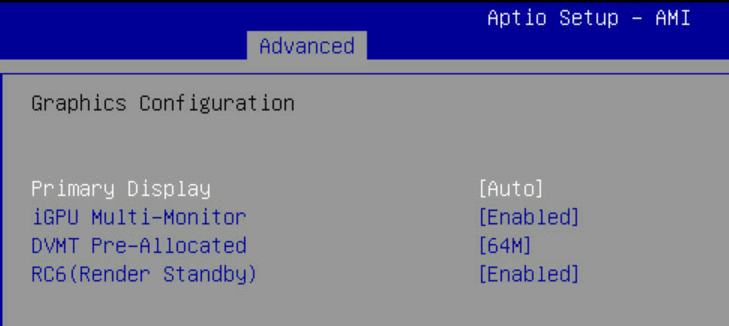
-
Not 100% sure, but from what I can tell, this commit is talking about physical video connections on the BMC itself. The Asus boards have a VGA connection that goes through the BMC. I'm one of the people still on 6.12.4 and the iGPU is working for me without a dummy plug attached. I'll try the upgrade to the latest Unraid version at some point. I did try upgrading to 6.12.6 a while back and the SR-IOV addin started causing kernel panics on boot so I had to revert.
-
For VictoriaMetrics, I'd update the 'overview' and 'additional requirements' to recommend using VictoriaMetrics with Home Assistant's Prometheus integration rather than its InfluxDB one. Prometheus has cleaner labels, is better supported in VMUI, and VictoriaMetrics uses PromQL-compatible queries so it's better to use data sources that were designed for that.
-
I do. I've got IPMI + iGPU + SR-IOV all working. I'm still on Unraid 6.12.4 though, and I've heard from other posts in this thread that it breaks if you upgrade to 6.12.6 or above. Maybe a kernel bug? Unraid is on a fairly old kernel series (6.1.x) so I might try booting a live CD of a different distro with a newer kernel and see if it has the same issue.
-
Which filesystem are you using?
-
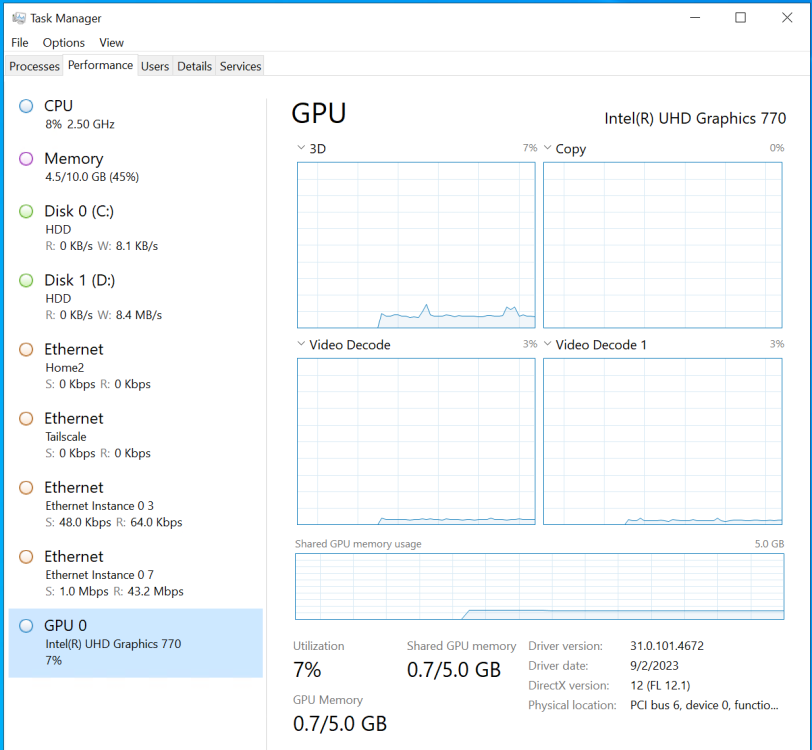
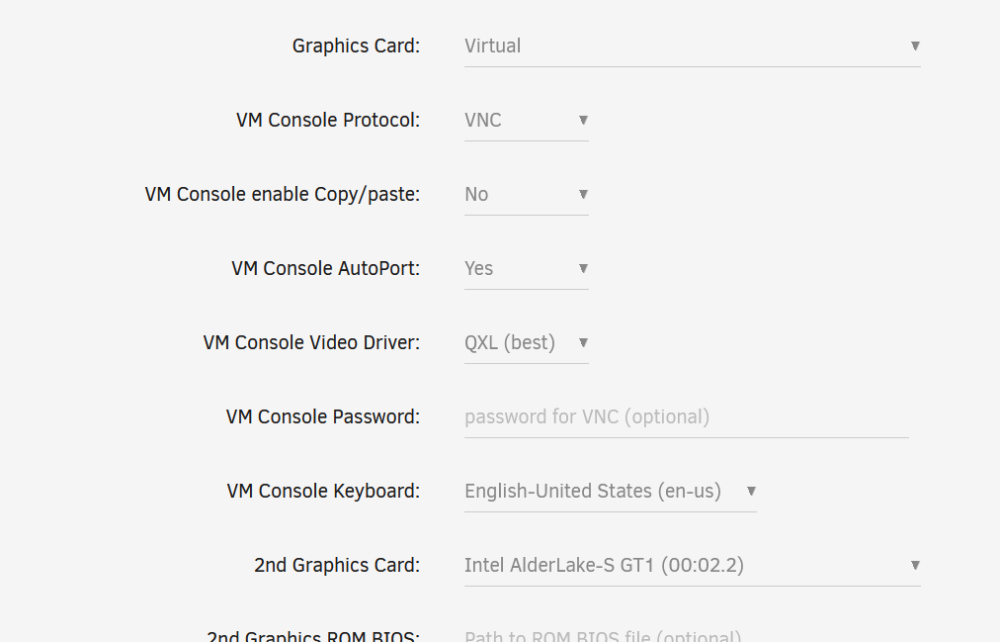
Works for me. I'm still on Unraid 6.12.4 though, so I'm not sure if it broke in newer Unraid versions. I'm running Windows Server 2022 and am running Blue Iris with Intel video acceleration to record my security cameras. It doesn't use a lot of GPU power, but it's definitely using it: iGPU is configured as second graphics card, to allow VNC to still work properly:
-
I sometimes use it to watch the boot process (make sure nothing fails during Unraid startup) and the shutdown process (e.g. see if VMs are not shutting down cleanly or filesystems aren't unmounting cleanly), so losing it isn't ideal. I'll try dig into it when I have time, but it's hard for me to get enough free time to do that.
-
Ahh, interesting. I'm still on 6.12.4 because the SR-IOV plugin didn't support newer Unraid versions for a while. That's been fixed now, but I haven't had time to upgrade. I'd guess that some change in the Linux kernel between those two versions is causing the issue. 6.12.4 uses Linux kernel 6.1.49 whereas 6.12.6 uses Linux 6.1.64. I don't see many changes to the ASpeed `ast` driver in the 6.1.x kernel branch: https://git.kernel.org/pub/scm/linux/kernel/git/stable/linux.git/log/drivers/gpu/drm/ast?h=linux-6.1.y. I do see some changes in November 2023 in the latest dev branch, at least in Linus' kernel repo: https://github.com/torvalds/linux/commits/master/drivers/gpu/drm/ast. Those changes were for Linux 6.8 but I wonder if some of them have been backported into the kernel that Unraid uses. Of course, it could also be a change outside the ast driver that's causing the issues. Has anyone reported this as a kernel bug yet?
-
Technically there is a way to have bitrot protection on a single disk, but it halves the amount of disk space you can use. You can configure ZFS to store two copies on the same disk. That'd affect write speeds too, since each write actually does two writes. I don't know if anyone actually uses this feature for a whole disk on a production system though. Where it's more useful is if you create a separate dataset and set copies=2 just for that dataset (e.g. for your most important files)
-
Yeah - this depends a lot on your use case. For me, most of the files on my NAS aren't 'disposable' files like TV shows and movies - they're things like family photos, personal documents (taxes, mortgage paperwork, etc), backups of several other servers, email backups going back nearly 20 years, music that I've ripped from CD in the past and is very difficult to find these days, etc. I also don't have many drives. For my use case, ZFS' bitrot protection is more important than drives powering down while idle. You need to use a ZFS pool to take advantage of its bitrot protection. The other option is to use an Unraid array of individual ZFS drives. This is similar to what you'd do for XFS drives today. It gives some of ZFS' advantages (like snapshots and compression), but doesn't provide its main benefits (like bitrot protection). This is described as the "hybrid approach" on this page: https://unraid.net/blog/zfs-guide
-
You could try limiting the power draw too (reduce the maximum wattage). I just saw this article this morning: https://www.tomshardware.com/pc-components/cpus/is-your-intel-core-i9-13900k-crashing-in-games-your-motherboard-bios-settings-may-be-to-blame-other-high-end-intel-cpus-also-affected There's two settings in the BIOS for it: One for max power draw normally, and one for max power draw during turbo.
-
ZFS works well enough in the current version of Unraid that I'd definitely recommend using it rather than waiting for the next major version of Unraid. My system is a lot smaller than yours though: I've got 2 x 2TB NVMe drives in a ZFS mirror, 2 x 20TB drives in a ZFS mirror, and a standalone (unassigned) 14TB drive for security camera footage. I've got 64GB RAM and am using 32GB of that for ZFS cache. So far, I haven't really needed L2ARC for my use cases. The only caveat I've found is that currently you need at least one drive in the Unraid array (i.e. outside of a ZFS pool). I have an unused USB stick in mine as a workaround. I've heard they're going to make that more flexible in a future release. There's a plugin called "ZFS Master" that adds a bunch of ZFS features that are missing from Unraid, like the ability to create and manage datasets and snapshots.
-
This is not a two-sided market so I'm not sure how "enshittification" is relevant.
-
Do you see the drives in the UEFI ("BIOS")? That'll at least narrow down if it's an issue with Unraid or if it's an issue with the hardware itself. If you see them in the UEFI, then run `lsblk` in Unraid and see if you see them there. If you don't, try booting a Live CD of another linux distro (like a Ubuntu live CD) and see if you see the drives there. I've got the mATX version which only has 2 M.2 slots, but I'm using both without issue (two M.2 drives in a ZFS mirror in Unraid) Interesting... The NH-D9L moves about half as much air compared to the NH-D15, but that wouldn't explain such a large difference. I'd recommend reapplying the thermal paste since my guess is that the CPU is making poor contact with the cooler. Remove the cooler, totally remove any existing thermal paste (using isopropyl alcohol if needed), then apply new thermal paste. If you're not sure how much to put or the pattern to use, watch Noctua's videos about it. The other thing you could try is bumping the fan speed to 100% and see if it helps at all. Log in to the IPMI then go to settings → Fan control → Auto mode → Full speed mode. That'll force it to run at 100% all the time. I think 1600RPM is close to 100% speed for that fan though, so maybe it won't do anything.
-
I'm suprised Invision is still around... I was a developer on SMF nearly 20 years ago, and even back then Invision (or IPB as it was known back then) was losing popularity. it's quite expensive for what you get. For search, Google with `site:forums.unraid.net` in the query seems to work well enough. Interestingly, around 10 years ago they got rid of their perpetual licenses and forced people to switch to subscriptions.
-
If people could read and search, this forum would have 80% fewer posts 😛
-
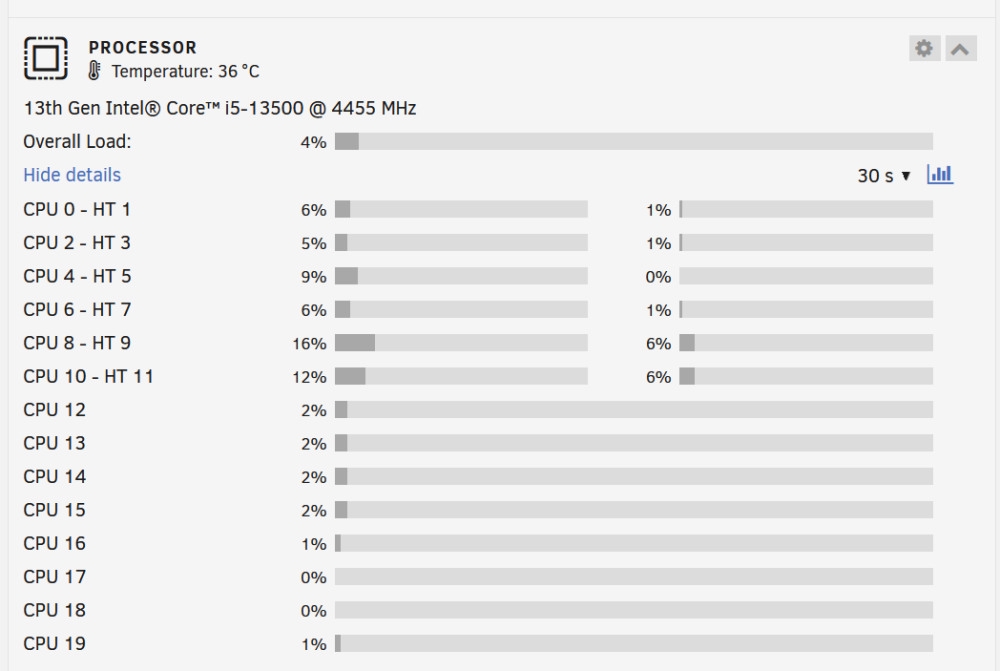
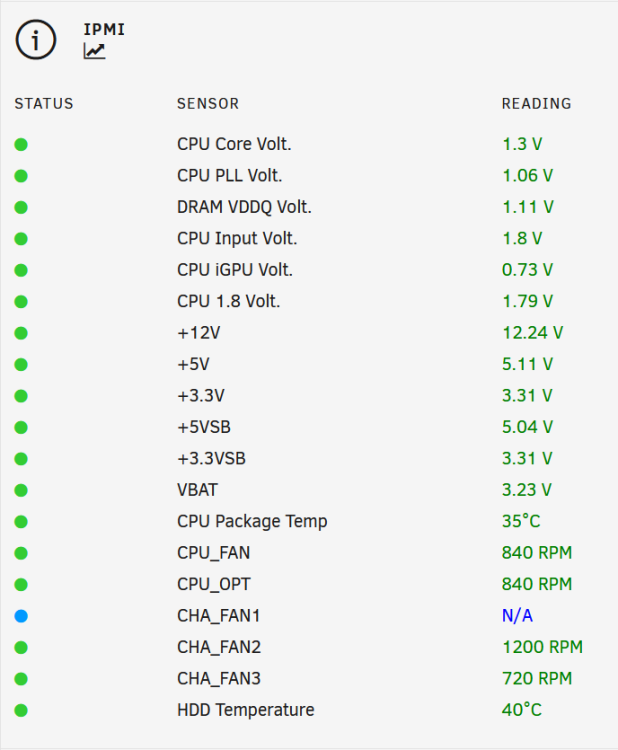
Are you sure the CPU cooler is working? Mine is usually around a comfortable 36-40C, but I do have a Noctua NH-D15 cooler on it, which is large enough that it barely fits in my case (Fractal Design Node 804). My CPU isn't as powerful as yours (I've got an i5-13500) but the i9 shouldn't be *that* much higher. The heaviest thing I'm running is a Windows Server 2022 VM running Blue Iris recording six security cameras 24/7, pinned to CPU 8, 9, 10 and 11. If you install the "IPMI Tools" plugin in Unraid, it'll let you see the fan speeds along with a bunch of other stats:
-
Won't this cause issues when trying to view the system via IPMI? There's a multi monitor setting in the BIOS that lets you use both the iGPU and the Aspeed GPU at the same time.
-
I haven't hit this issue, but the reset through the IPMI should be a hard reset if you do "Orderly shutdown" (or "immediate shutdown" if it's locked up and doesn't respond to an orderly shutdown) then "Power on server". "Reset server" is a soft reboot.
-
This didn't work for me. Previous Apps only had 5 containers listed, but I had around 20 of them. I had to recreate them one by one using the "Select a template" dropdown. At least the previous templates had all my customizations intact.
-
There's a "multi monitor" option in the BIOS that you have to enable so that it enables both the ASPEED and the iGPU. Did you enable that?
-
Note that if it says "GVT-g" then you need this plugin instead: https://forums.unraid.net/topic/108650-plugin-intel-gvt-g/
-
Are you using the newer version from this thread? See the "recommended post" at the top. The version in the apps section in Unraid does not work properly with newer Unraid versions.
-
You can do it using ipmitool or ipmiview. `ipmitool user list` to list the users, then `ipmitool user set password 1 blah` where `1` is the user ID from the list and `blah` is the password.
-
@WobbleBobble2 In your VM settings, change the graphics card (near the bottom of your screenshot) from 00:02.0 to one of the other functions (e.g. 00:02.1). 00:02.0 is reserved for the system itself and must not be used by a VM. Also make sure that each VM you want to pass the graphics card through to is using a different one (e.g. 00:02.1 for this VM, 00:02.2 for another VM, etc). Using it in a Plex Docker should work fine. I've got a Plex container that has transcoding enabled, plus an Unmanic container that transcodes antenna TV recordings from MPEG2 to H.265, and I'm also using the iGPU in a Windows Server 2022 VM for Blue Iris at the same time. All works fine.






