





Daniel15
Members
-
Joined
-
Last visited
Everything posted by Daniel15
-
This is the right approach.
-
Thank you!! Somehow I missed this post.
-
Is there an article I can read about this? The latest article I've seen was the one I linked that mentions 6.11. I haven't been following the mailing list very closely though.
-
There'll be mainline support once the Xe drivers are ready though. The last post about it on Phoronix from about a month ago says that they're working on SR-IOV now: https://www.phoronix.com/news/Linux-6.11-DRM-Intel-Xe-Next If I remember correctly, Linux 6.11 (which they're targeting) is scheduled for release around September or October. We'll see if Intel's driver is complete by then.
-
As per the documentation for the kernel module being used (https://github.com/strongtz/i915-sriov-dkms), the module has to be loaded in both the host (that's Unraid) and the guest VM. It only supports Linux 6.5 and older, so you may need to downgrade the kernel in the VM before installing it. The Windows Intel iGPU driver already has SR-IOV support built-in, which is why Windows VMs "just work" with no changes needed. It'll be built-in to Linux as well once the new Xe driver is available.
-
There's only one physical GPU so I think you'll only see stats from the first one. I think that should be total stats for everything though. Edit: for Intel top, I think there's a command line argument to show info on the SR-IOV devices? Try running it with --help. They didn't say they were. They were just quoting the error message, which says this.
-
Do you mean that VNC doesn't work? When editing the VM, you need to configure the VNC virtual graphics as the first graphics adapter, and the Intel one as the second one. There's a little green plus button (that's easy to miss) to add another graphics adapter.
-
Which CPU do you have? 13900K and 14900K have known stability/reliability issues (not just on this motherboard). Other CPUs in the same generations should be OK though. Are you using SR-IOV by any chance (to share the iGPU with multiple VMs and the host)? I've had a few crashes caused by it. Like the other reply said, set up syslog and check the messages when it locks up. There should be a crash of some sort. It might be a CPU stall.
-
This used to be possible with GVT-g (5th to 10th gen Core) but I don't think Intel ever fully implemented DMA-BUF for SR-IOV. That might change with the upcoming Xe driver. We'll see...
-
Makes sense. Thanks for the info. I did see some code for SR-IOV in the i915 driver in Intel's 6.9 kernel. If I get some free time, I'll try to see if those changes can be extracted into a DKMS module again. I don't have any kernel development experience though. Anything that depends on functionality in the i915 driver will need to be updated.
-
Intel are adding a new graphics driver that has native SR-IOV support: https://www.phoronix.com/news/Intel-Xe-DRM-Linux-6.9-Pull https://lore.kernel.org/dri-devel/CAPj87rO4K6QS8hVn-d6N8CEi+Uibmgo6mZ5bNGz2rZDUMshvxA@mail.gmail.com/T/ This driver is for Intel Xe graphics, which includes the integrated graphics in Tiger Lake (11th gen) and newer, as well as their discrete GPUs. The pull request says it's experimental for Tiger Lake (11th gen) to Meteor Lake (1st gen of Core Ultra mobile CPUs, released December 2023), and will be used as the primary driver for the next generation onwards. What's unclear to me is: Is this driver ready to test in 6.9, or are more improvements needed? Will it support SR-IOV in integrated GPUs or only discrete GPUs? When will the driver be considered production-ready? (i.e. no longer "experimental") Unfortunately, Unraid 7 beta 1 uses Linux 6.8 which doesn't contain this driver, so we can't try it out with Unraid yet. 6.8 is EOL so they're planning to upgrade to 6.9 before RC1.
-
unRAID 7.0.0 beta 1 was released today, and it has a much newer kernel (6.8.12). Has anyone tested as to if the new kernel fixes this issue? Unfortunately I don't have time to try it for a few weeks.
-
I've got the latest BIOS but I've only got the 1.1.11 BMC firmware instead of 1.1.12. I'll try upgrade it.
-
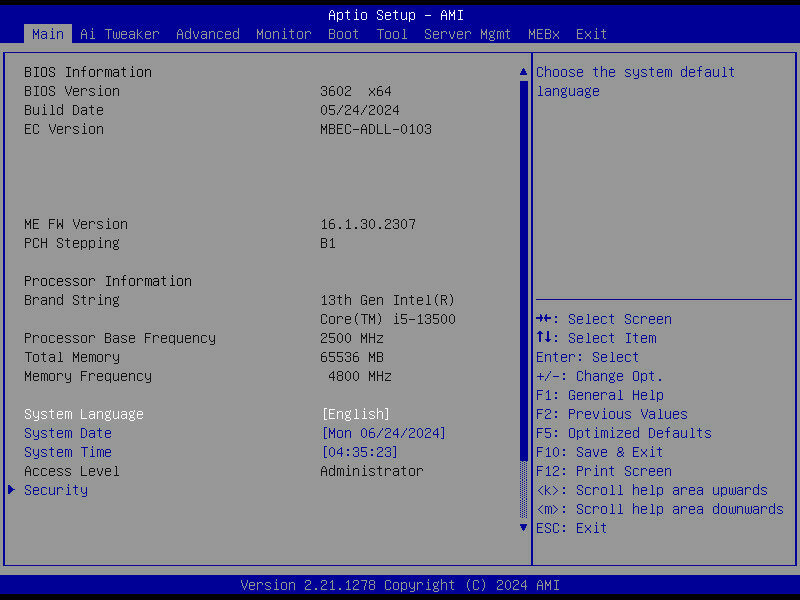
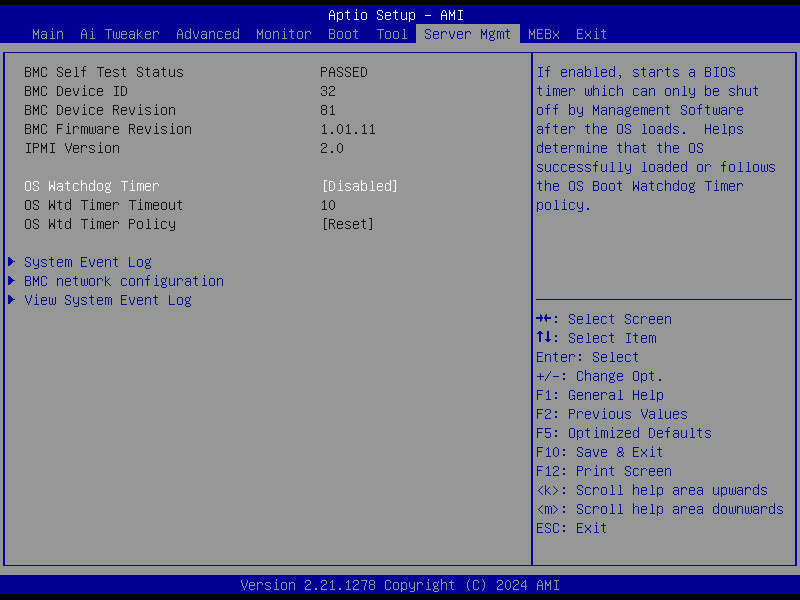
I've got the mATX board, and mine doesn't have an "IPMI" tab. There's tab labelled "Server Mgmt" instead, but it doesn't have an option like the one you mentioned:
-
TOTP is good and much better than what exists in Unraid today, but FIDO2/WebAuthn would be ideal. Many companies are slowly trying to migrate away from TOTP, as it doesn't really solve the way that passwords are most commonly stolen - phishing attacks. A fake login form can just ask for the TOTP code in addition to the username and password, and in the backend immediately authenticate then store the session cookie for later use. My employer completely moved away from TOTP codes internally, and I know Google tries to nudge people away from it these days too. WebAuthn usually uses biometrics (eg fingerprint on phones and laptops that support it) or a hardware token like a Yubikey. Ideally we'd also get SSO (OIDC or SAML) support one day, so that everything in our home lab can use the same log in system (like Authentik) and permissions for everything can be centrally managed. Probably extremely low priority for Unraid though. I can dream
-
Can you please provide a screenshot of this setting?
-
Yeah - this is the 6.12.10 thread after all Thanks for the info. I guess I'll stick to 6.12.4 until 6.13.x is available.
-
This sounds like fast boot is enabled. Disable it and it should work. This is a problem across multiple different motherboard manufacturers - fast boot can't handle booting from USB for whatever reason.
-
Does the kernel version in this release still have the issue with the ASPEED IPMI/BMC? I'm currently still on 6.12.4 because of that:
-
If it needs a real monitor to be connected, it's possible it'd need a dummy HDMI plug. I'm not sure. You could try searching for "headless Moonlight" or "headless Parsec" and see if you find anything. Unfortunately I'm not familiar with this software. Maybe someone else here knows.
-
If you see the GPU in task manager -> performance tab then SR-IOV is working fine and you may need to ask for support in the Parsec or Moonlight communities.
-
The repo for the SR-IOV DKMS module itself (which is the core functionality of this plugin) is still maintained; it was last updated 3 days ago: https://github.com/strongtz/i915-sriov-dkms Last I heard, Intel were working on mainlining SR-IOV support, but they had to delay it due to higher priority kernel work. I haven't seen any recent updates though, so I'm not sure if they still plan to do it. Here's the thread: https://github.com/intel/linux-intel-lts/issues/33
-
@Lolight Silent corruption definitely has to do with ECC. With non-ECC RAM, data can get corrupted in memory before being written to disk, or corrupted when being transferred from the memory to the CPU. This is silent corruption because there's no way to tell that it happened, since a checksum written to disk (like what ZFS does for bitrot protection) will be a checksum of the corrupted data. For every byte (8 bits) of RAM, ECC can detect and automatically correct an error in one bit, and can detect (but not correct) an issue in two bits. It's very rare to have memory data corruption in more than a single bit per byte.
-
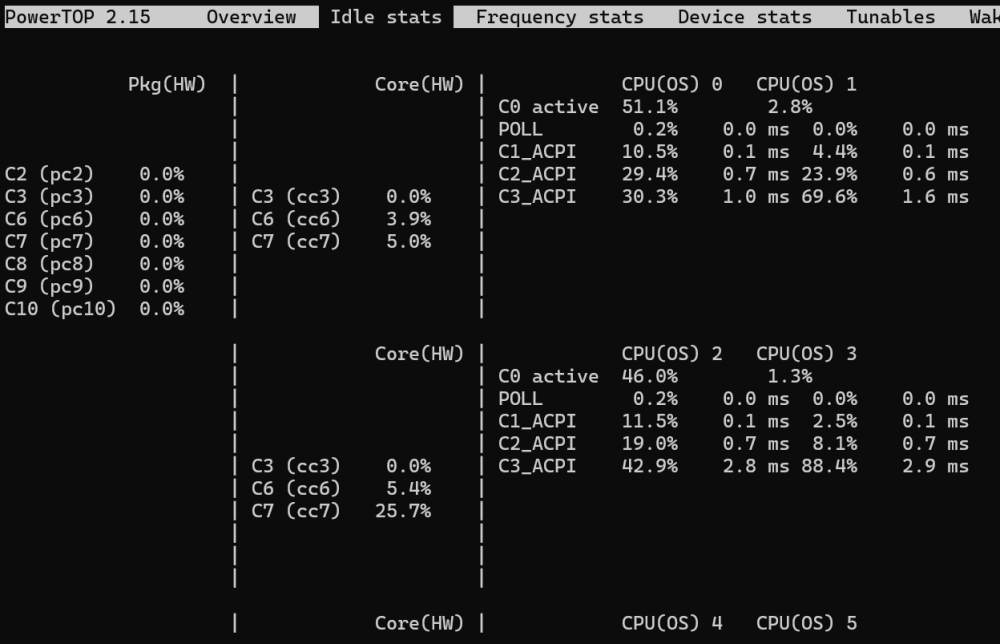
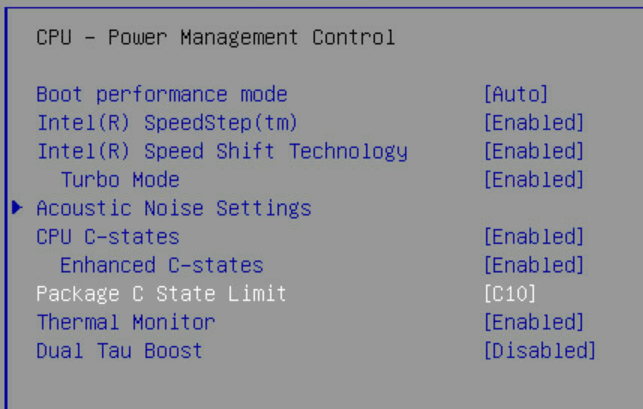
I've been trying a bunch of things but I'm still unable to reach any package C-states: C-states are enabled in the BIOS, and I even tried manually increasing the package C-state limit to C10: I'm using an i5-13500 and an Asus Pro WS W680M-ACE SE motherboard. I'm already running powertop --auto-tune on boot.
-
Your hardware looks good. Since you're getting this board, you may as well get ECC RAM. That RAM you're getting is not ECC RAM - note that "on die ECC" is not the same thing as regular ECC, even if some manufacturers try to advertise it as such. All DDR5 has on-die ECC, and its purpose is mostly to increase manufacturing yield. It doesn't give you the protection that regular ECC does. 2 x 32GB Kingston KSM48E40BD8KM-32HM or KSM48E40BD8KI-32HA doesn't cost much more than the Crucial RAM you picked, and it supports ECC. 850W PSU is overkill for a server, even with a CPU like the 14700K, unless you're planning on putting a high-end graphics card in it. PSUs are usually pretty inefficient if you're only using less than 20-25% of their capacity and using a smaller PSU will save you some money (both in the cost of the PSU, and the cost of electricity). I guess you may want to have a higher-power PSU in case you ever reuse it for something else in the future? I'm running my server on a 550W PSU because it's the smallest I can find, and even that is overkill (at least for me) since power draw at the wall for my system is always less than 150W. 400-450W is usually good for a server, but now that GPUs consume huge amounts of power, it's very difficult to find 'regular' PSUs that are that size, only server PSUs (which are small and have very loud fans since they're designed for 1U rackmount servers).



