





Daniel15
Members
-
Joined
-
Last visited
Everything posted by Daniel15
-
Can I modify this code myself or is it compiled/obfuscated in some way?
-
My Unraid server locked up today. The web UI stopped responding, and I couldn't SSH in. Ping still worked though. When I tried to shut it down via IPMI, it got stuck at "Starting diagnostics collection": Diagnostics after rebooting: danserver-diagnostics-20230901-1104.zip I've enabled "Mirror syslog to flash" to collect syslogs in case it happens again. I'm using an Asus Pro WS W680M-ACE SE motherboard, Intel Core i5-13500, and 64 GB of ECC memory. Any ideas?
-
Yes, it needs to be updated for v6.1.49. There's a list of supported kernels here: https://github.com/zhtengw/unraid-i915-sriov/tree/master/packages I would have built it myself but unfortunately there's no build instructions in the repo.
-
Thanks. Maybe you could continue hiding 08 like you do today, but explicity allow the Coral to show up based on device ID. It's not uncommon to pass these devices through to VMs - in my case I'd be using it with Blue Iris in a Windows Server 2022 VM. Currently trying to migrate from a Proxmox server (which has a bit of a nicer interface for passing through PCIe devices, and you don't have to configure VFIO or reboot)
-
Is there a reason there's a blocklist? Is it just to try to prevent people from being silly and passing through things like core system components? IMO, showing them in the UI but graying them out would be a better user experience for this. Is there a way I can hack the UI code to remove the blocklist, at least for 08:80? 01 is storage, not video. 03 is video. 08:80 is just "system peripheral" which is a bit vague. https://admin.pci-ids.ucw.cz/read/PD/08/80 https://admin.pci-ids.ucw.cz/read/PD
-
Did you ever work this out? I'm hitting the same issue.
-
Thank you for this great plugin! Can you please recompile it for the kernel version in the latest uNRAID 6.12.4? (kernel v6.1.49)
-
I've got the mATX with built-in IPMI. Both use the same system chip and software (ASPEED AST2600A3-GP, AMI MegaRAC SP-X, ASMB12-iKVM) so they should function identically.
-
Seems like it works: I had to adjust the alerts in the IPMI web interface because I'm using a Noctua NH-D15 CPU cooler and the fans spin so slowly at the lowest setting (360RPM) that it thought the fans were broken, so I kept seeing alerts about low fan speed 😂. Out-of-the-box, the IPMI systems tend to expect the small, high RPM server fans. Unfortunately the PSU I'm using doesn't support SMBUS/PMBUS so I can't connect it to the motherboard to get data from it. I don't think there's any modern non-server PSUs that support it - Corsair were the last company to support it via their "Corsair Link" feature but they dropped support a while back. Also most of my case fans are connected to the case's fan controller but I wonder if I should connect them to the motherboard instead. Hmm. I've only got three drives at the moment, and the motherboard supports 8 SATA devices (4 onboard SATA ports plus a SlimSAS port that can connect another 4 SATA devices), so I'm set for drives. I just need one PCIe for a 10Gbps network card and one for a Google Coral TPU (which I use with Blue Iris in a VM for AI-based object detection for my security cameras).
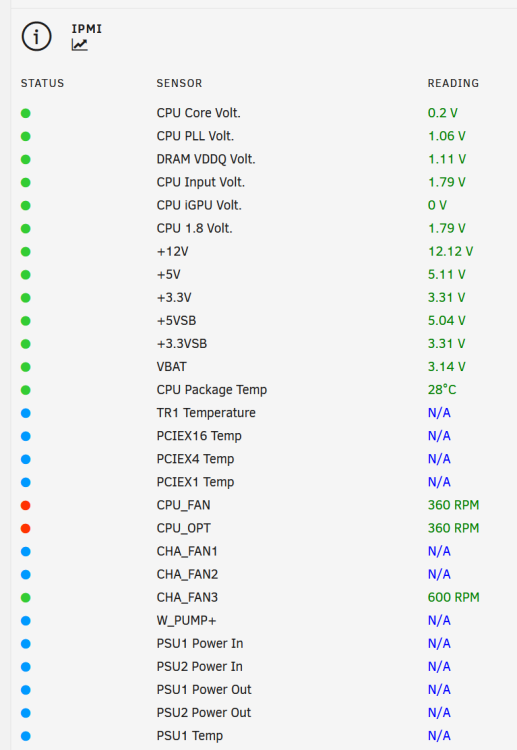
-
I just purchased the MicroATX version of this board: The Asus Pro WS W680M-ACE SE. Bought it directly from Asus since stores don't have it in stock yet (it was only launched a few weeks ago), and it arrived within a few days. It's very similar to the full-size ATX version but only has two M.2 slots and three PCIe slots (one 5.0 x16, one 4.0 x4 and one 3.0 x1). It also has the IPMI/BMC directly onboard rather than using a separate card. Haven't tried it with Unraid yet - will likely set it up over the weekend. As far as I know, the only RAM that supports multi-bit ECC at the moment is buffered memory, whereas this motherboard only takes unbuffered. "Proper" expensive enterprise servers almost always use buffered RAM, so unbuffered ECC RAM has a much smaller market. I bought 2 x 32GB Kingston KSM48E40BD8KM-32HM DDR5 ECC since it's one of the only models that's listed in the compatibility list for this motherboard, and I could get them for $100 each with an employee discount at one of the suppliers we use at work. It's only single-bit ECC though.


