





Daniel15
Members
-
Joined
-
Last visited
Everything posted by Daniel15
-
Get a USB port inside the computer, by using something like this part from StarTech that connects to a USB header on the motherboard: StarTech.com2 Port USB Motherboard Header AdapterConnect two internal USB devices directly to the motherboard header connectionOf course, to protect against local attacks you'd also need a case that locks (and sets a flag in the BIOS if it's been opened), plus a Kensington lock to secure the server to a solid object that's not easily moved, so that somebody doesn't just steal the whole thing. To log in with just a username and Yubikey, the site needs to support passkeys. At the moment, many sites only accept a Yubikey as a two-factor authentication method, not as primary authentication. I still have most of my passwords in my Bitwarden vault, with traditional TOTP two-factor, and use the Yubikey to authenticate to Bitwarden and other important things that support FIDO2 or passkeys. Note that to use the Yubikey with SSH cross-platform, you currently need one with either PIV or OpenPGP support, and the Bio has neither of those. OpenSSH added support for FIDO auth a few years ago, but according to Yubico it currently only works on Linux (not implemented on Windows at all, and disabled in the version of OpenSSH bundled with MacOS). See https://developers.yubico.com/SSH/ for more details and https://www.yubico.com/store/compare/ for a chart comparing all the different Yubikeys. I'd get a version with NFC, since it makes it easy to use the Yubikey with your phone by just tapping it to the back of the phone. In any case, when you buy a USB security key, you should really buy at least two. Everywhere you want to use it, register both of them. Use one of them for day-to-day use, and store the other one in a safe place. It'll prevent you from being locked out if you ever lose or damage the primary one.
-
Thanks for this Docker image. It works well and I was able to get up and running with no prior knowledge of any Unifi products. I'm usually a TP-Link Omada user, but the Flex Mini 2.5G is such a good deal (US$49 for a managed five-port 2.5Gbps switch??), and some of their newer wifi access points look like a good replacement for my 2 x EAP670 if I ever want to upgrade those.
-
They're following Docker best practices, which is to have one container per service. It's not as common with Unraid, but the majority of production deployments of Docker use docker-compose to handle orchestrating apps that need multiple containers.
-
This board only supports UDIMMs, as per the specs: https://www.asus.com/us/motherboards-components/motherboards/workstation/pro-ws-w680-ace/techspec/ As far as I know, all W680 boards only support UDIMMs. I checked ASRock Rack and theirs are only UDIMM too: https://www.asrockrack.com/general/products.asp?Model=w680 Generally, only server-grade boards with server CPUs (Intel Xeon, AMD EPYC, etc) support RDIMMs.
-
Good catch! I've never seen mine above 55C (especially since it's used infrequently for ~100ms at a time, rather than it having constant load) but I'll definitely keep it in mind. I'm surprised they don't factory-install a heatsink, but I guess for $25 for the single TPU / $40 for the dual TPU we can't expect everything
-
Yes, it's only 2 watts maximum. 4 watts if you have the dual TPU.
-
Thanks - I rebooted and now I see both, and both are working fine. Very strange! For what it's worth, mine doesn't have a heat sink and it's been fine. Never gotten anywhere near the temperatures at which it thermal throttles. I used to pass it through to a Windows VM to use with Blue Iris and CodeProjectAI and that's worked fine for maybe 2 years now, but now I'm moving CodeProjectAI to be a Docker container instead, mostly to make maintenance easier. My security cameras have onboard motion detection using tripwires though (it only alerts if something crosses a line I've drawn in the config, rather than on any motion) so the Coral is only used when there's actually something to analyze.
-
@dnoyeb I forgot to mention... When you're setting up the system, make sure you go into the BIOS and disable fast boot, otherwise it'll just hang on boot. It's a common issue with Unraid, but it's easy to forget.
-
Is this still the right topic for support with the Coral TPU drivers? I have a dual-edge TPU, meaning it contains two separate TPUs. This appears on the system as two PCIe devices: 05:00.0 System peripheral: Global Unichip Corp. Coral Edge TPU 06:00.0 System peripheral: Global Unichip Corp. Coral Edge TPU However, it seems like this plugin/driver is only using one of them? The Coral driver settings only shows "Coral TPU1", and I only have /dev/apex_0. /dev/apex_1 is missing. Any ideas?
-
I've got 2 x Kingston server KSM48E40BD8KM-32HM (32GB DDR5 ECC 4800MT/s) and 2 x KSM56E46BD8KM-32HA (5600MT/s) for a total of 128GB. They're both listed in Asus' compatibility list. It's all running at 4800MT/s with no issues. The only reason the speeds differ is that the 5600MT/s sticks weren't available when I first set up the server with 64GB RAM. When I went to upgrade it, the 5600MT/s sticks were the same price as the 4800MT/s used to be, so it didn't make sense to buy the slower ones. I'll have to upgrade the slower ones if I ever want to use the faster speeds though. RAM has gone up a LOT since I got mine. I got the 4800MT/s sticks in August 2023 and the 5600MT/s sticks in July 2024. They were $101 each through a supplier we use at work (we get a discount for personal purchases). As of a few months ago, they were double the price, and if you're in the USA then they may go up even more thanks to tariffs. The model numbers ending with "M" are Hynix M-die while the ones ending in "A" are Hynix A-die. The part numbers may be different now - you can search Kingston's site. If you want to max it out, you'll need 4 x 48GB for 192GB total. The Kingston part number is KSM56E46BD8KM-48HM. Do not overclock ECC RAM, as ECC handling is only verified at the base speed.
-
I'd definitely get it again. The quirks don't really matter too much once it's up and running. The price may seem expensive, but you need to consider the fact that it has IPMI built-in. You'd need to pair a cheaper motherboard with something like a PiKVM / NanoKVM to get similar functionality. The difference with AMD is that while many motherboards support it with consumer-grade Ryzen CPUs, it's not "officially" supported by AMD. They don't advertise it as a feature, don't validate it (meaning they don't test and certify it to ensure it works properly), and won't provide support if something goes wrong. From what I've seen online, the ECC support on Ryzen is incomplete. For "official" ECC support with AMD, you need to go with Threadripper or EPYC. On the other hand, Intel does officially support ECC on their consumer-grade CPUs, but artificially limit it to workstation (like W680) and server motherboard chipsets instead. I say "artificially limit" because the memory controller is on the CPU, so there's no technical reason that consumer-grade motherboards can't support it - it's purely to differentiate consumer-grade vs workstation vs server product lines.
-
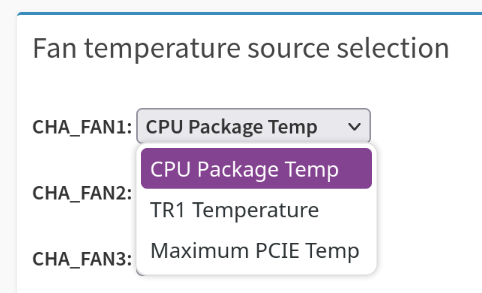
There's an option in the BIOS called something like "iGPU multi monitor support". I think that has to be enabled. As far as I know, HDD temperature isn't supported as a fan temperature source. It's not in the list in the IPMI web UI: and `ipmisensors` doesn't show any HDD temperature sensor attached to the IPMI. I've never tried it, but the "Dynamix System Autofan" plugin might be useful? AFAIK it can control fan speed based on HDD temperature sensors. To be honest, I'd just get quiet fans (like Noctuas) and run them at a fast speed all the time. There's not really such a thing as too much cooling
-
intel_idle is not modular, so it won't work with modprobe. This is mentioned in the documentation (https://docs.kernel.org/admin-guide/pm/intel_idle.html). To check if it's in use, you need to instead do: cat /sys/devices/system/cpu/cpuidle/current_driver Your terminal output shows the cores idling quite a bit. Was there a particular issue you're trying to solve?
-
cdc_ether is the driver for a virtual Ethernet port on the IPMI, used for some sort of network redirection (not 100% sure). It's unrelated to video adapters.
-
i440fx is a legacy option for backwards compatibility and doesn't have a native PCIe bus, so I'd recommend using Q35.
-
Interesting... I've had issues with it not starting cleanly sometimes. I'm not sure if it's the same issue though - my server is in a closet and I cant easily see the flashback LED. I've never had to pull the power to make it boot successfully though. I only ever boot it via IPMI. Usually if I go to the IPMI and power off, wait ~10 seconds, then power it back on, it boots OK.
-
SR-IOV lets you share the iGPU across multiple VMs (up to 7). For example, you could use Plex in Docker and also have a Windows VM, both of which can use GPU acceleration at the same time. If you don't need VMs or your VMs don't need hardware acceleration (for example, to encode/decode video), you don't need SR-IOV. Mine is currently 2 x 32GB Kingston server 4800MT/s DDR5 ECC and 2 x 32GB Kingston 5600MT/s DDR5 ECC. When I was upgrading fom 64GB to 128GB, the 5600MT/s was the same price as the 4800MT/s, which is why they're mismatched. They run fine together at 4800MT/s.
-
I love this so much. Thanks for posting it! I'll leave some feedback in the repo.
-
Diagnostics: danhome-diagnostics-20250126-1952.zip No, I use Firefox.
-
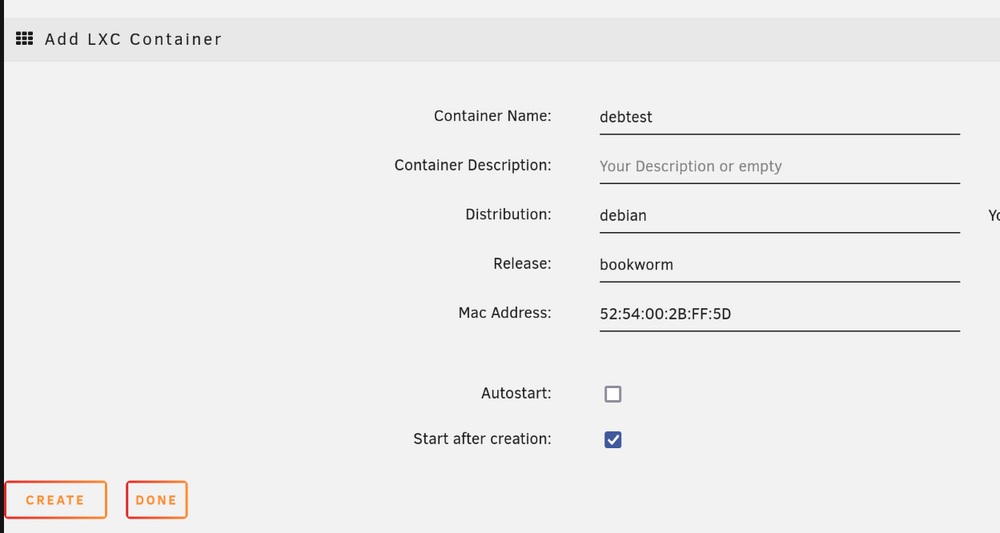
I'm hitting the same issue. I set the name, distro and release, but after clicking "Create", it just refreshes the page. I'm on Unraid 7.0.0
-
Where can we find the source code for this plugin?
-
How do we report security issues? Do we just email [email protected] after reserving a CVE ID? I can't seem to find a security contact on the Unraid site.
-
I see 5600 available as an option in the UEFI/BIOS so I assume it'd work. I can try it some time, although it's a pain to remove RAM because my server is in a closet and the CPU cooler (Noctua NH-D15) overhangs the RAM slots. I had to try very carefully to add the new RAM without removing the CPU cooler. It's working fine at 4800 for me. I didn't see any difference in speed between 64GB and 128GB.
-
For what it's worth, I've got 2 x 32GB Kingston server 4800MT/s DDR5 ECC and 2 x 32GB Kingston 5600MT/s DDR5 ECC. The only reason they're mismatched is that when I first built the system, the 5600 version didn't exist yet. When I wanted to upgrade from 64GB to 128GB ram, the 5600 RAM was the same price as the 4800, so it didn't make sense to get the 4800. It's running fine with mismatched RAM, although of course it's all only running at the slower 4800MT/s speed. I'd love to swap the 4800 RAM for 5600, but the price has gone up a lot.
-
Switching System Agent (SA) Configuration → Graphics Configuration → Primary Display from "Auto" to "CPU Graphics" seems to have fixed it. KVM via the IPMI still works, and I see the iGPU in lspci again. Not sure why the old config worked fine with 6.12.x but not with 7.x. The SR-IOV plugin still locks up the system after a few minutes (which I also started encountering after upgrading from 6.12.4 to 6.12.14) but I'll have to figure that out separately. For now I'll remove the iGPU from my VMs and only use it in Docker containers.



