






Nirvash
Members
-
Joined
-
Last visited
Everything posted by Nirvash
-
I was going to ask if it could be possible to add an option to the plugin to rename the Recycle bin folder to something else because, you know, not everyone uses English. But given this almost ten year old (!) reply I see it was not possible. Did something change in the last 10 years? Could it be changed now?
-
Do all ARC GPUs have the same encoder decoder cores or the more expensive cards encode video faster? I've found mixed info regarding that. If a A310 is as fast as a A770 then I would just get the cheapest (and less power hungry!) card for AV1 encoding. Edit: well, after reading the previous post I better wait for Unraid 7, unmanic support for Arc / AV1 and maybe even Battlemage.
-
After all I stopped preclearing, fixed the cables and started again, Unraid picked up everything and it's working fine. Again, can't wait to tidy up my jank setup and stop using shitty sata extension cables. 💀
-
I realized the drive is available to be mounted in Unassigned Disk Devices. I can access the data just fine from there. Could I move the data somewhere else and reformat the drive? I don't want to stop the machine since I already started preclearing the disks...
-
Nevermind, it's NOT solved! Look at what I get when I try to access the contents: unraid-diagnostics-20241119-1927.zip

-
It was that, I wiggled the cables a little bit and it's all good now. (Man, I can't wait for my Jonsbo N5 to get home. My setup is rather jank right now)
-
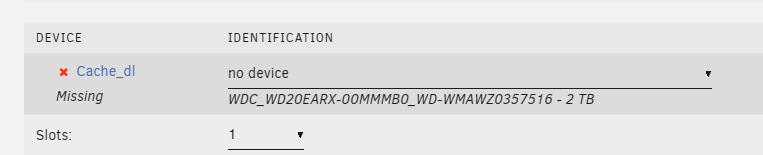
Hi! I had some maintenance done on my server today: I upgraded my PSU and added three 18 TB drives. Server booted back up fine and my array is visible and shows no error, but one of my cache drives, a 2TB spinner that is used as intake for downloads (to not keep spinning up my array) is visible but has this message: "Unmountable: Unsupported or no file system". What can I do here? Thank you very much. unraid-diagnostics-20241119-1700.zip Edit: I stopped the array and the disk shows as missing. Probably a cable is not correctly connected! I'll shut down the server and recheck the cables.
-
Huh! I did what you said and took this change to finally install the LSI card I bought quite a long time a go. After re-checking that all the SATA power cables were OK I checked again in unraid and everything is back there. Curious what happened there. Maybe this old Z87 motherboard is starting to be faulty. Thank you for the quick answer and fix. Could you tell me where in the logs did you find the issue? I looked around but I don't now what to look for. unraid-diagnostics-20241103-1916.zip
-
Today I found my 2TB HDD I use as intake for downloads is readonly, folders are there but most are empty, and the disk usage remains as it should be. I use this cache drive to not spin up my array when downloading stuff or seeding torrents. I don't mind if I lose the files in that cache drive, I knew the risks of using cache instad of the array, but I would like to recover if possible, and know what happened and how to prevent this. Attached is the diagnostic zip. Affected share is named "cache_dl". WDC_WD20EARX-00MMMB0_WD-WMAWZ0357516 - 2 TB (sdi). Thank you. unraid-diagnostics-20241103-1554.zip
-
Turns out I just needed to edit /data/nginx/stream/1.conf in appdata, restart NPM, and then change all the proxies from hostname to IP and everything is working fine again.
-
I don't know if I should be asking this here on in Pi-hole's forum but here we go. 🤔 I have set a DNS Record in pihole to resolve unraid's IP to a local hostname (192.168.1.130 -> unraid.nas) and a bunch of CNAMES for each subdomain. Then NginxProxyManager resolving IP:PORTS to subdomains, the usual stuff. In Unraid's network settings the DNS resolver points to Pihole at 192.168.1.20 and everything is fine and dandy. Here's where my issue really starts: I want to remove Unraid from Pihole, I don't want Pihole to filter Unraid's DNS queries because my Unraid is very noisy and It's not blocking anything anyway, so I changed the IPv4 DNS server to 1.1.1.1 and now I can't no longer access my services through subdomain.unraid.nas. If I return to 192.168.1.20 it works again. Looking at the NPM log I can see that it's complaining a lot: nginx: [emerg] host not found in upstream "unraid.nas" in /data/nginx/stream/1.conf:12 I understand that NPM can no longer resolve unraid.nas and that's why it's not properly booting and of course that's why I can't access my services through subdomain.unraid.nas. Now, how could I fix this? Is there a way to edit the HOSTS file where I can point it to the right address? Modifying the hosts file does nothing sadly. Thank you very much for the help.
-
I'll change the memory speeds. I did a Memtest some months ago (because I was already having these problems) for 24h and it didn't found any problem. Might try it again if this keeps happening after changing the RAM to the default profile.
-
Happened again. Between 20:27:23 and 20:30:56. I just can't figure out why it's rebooting on its own. I might just need to get a new PSU and RMA this one, it's not even 2 years old. syslog-127.0.0.1 (1).log
-
Hi! I have this old computer that I'm using as Unraid server. It has an ASUS motherboard (MAXIMUS VI HERO), 5 HDDS, 3 SSD, all Sata, the 2.0 Phillips USB is plugged to the internal motherboard header with an adapter so it gets a little bit of airflow (I hope), all powered with a 700W EVGA PSU. My problem is that at random times, without any rime or reason, regardless of hour or system load, my system reboots and it goes back to the BIOS. The uptime can vary from weeks with no issues to barely some hours. I've already tried to disable all "Fast Boot" features from the BIOS, I've ensured that the USB drive is properly configured as first boot device, and any option regarding what to do if a boot error happens is set to "continue" (like "Press F1 if error"). I suspect is some sort of hardware error since everything except the drives are pretty old, but I hope you can give me any suggestion. The last time this happened was at 17:41:29 and I rebooted the server at 19:01:21. I've attached a syslog and diagnostics. Thank you for your time! unraid-diagnostics-20240609-1910.zipsyslog-127.0.0.1.log
-
I was watching this Jeff Geerling video, searched if unraid could run on that thing and found this thread... Looks like that ARM NAS hardware is finally starting to appear, but it's still very far to be consumer hardware.
-
Could this script be turned into a plugin? That way it could be downloaded through the CA store and have a convenient button to run it, or schedule it. I'd also add a log of locked files and maybe (if it's not too difficult) a log of files that have been tried to be modified but were locked by the plugin. And I was wondering... has this been "field tested"? With this I mean, did someone get a ransomware infection and their unraid data survived?
-
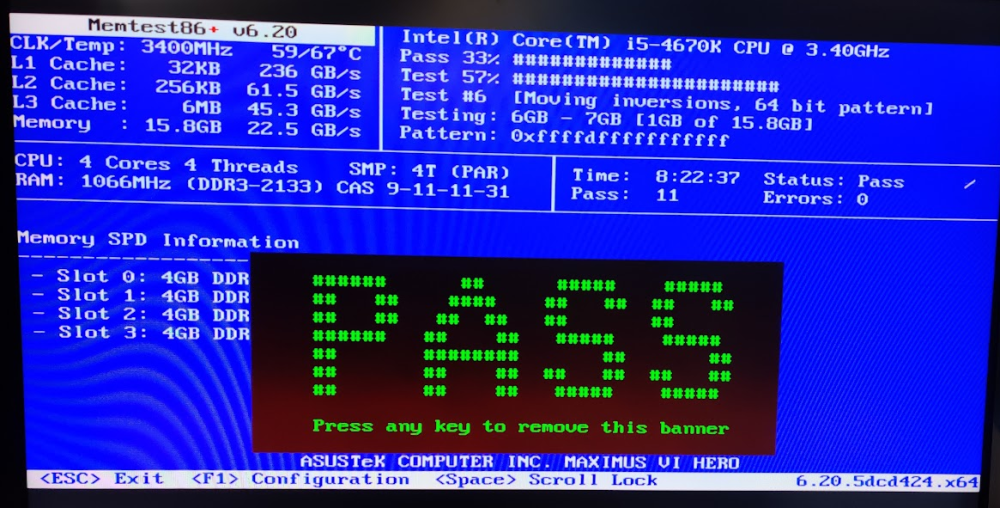
Yup, I would have used DFM initially but since it's too manual I decided to give unbalanced a go. I also find very weird that unbalanced is crashing the server. No, buy I ought to, really. I didn't think about running it so I'm going to do that right now! Edit: It passed the first tests but I'm going to let it run all night. Edit 2: More than 8 hours later, 11 test passed, I'm willing to call them good.
-
It just happened again. The computer has been working perfectly since friday, I've precleared a new drive, added it to the array and parity-checked without any issue, yet the moment I use unbalanced to "gather" a couples of shares into that drive, unraid reboots. This leads me to believe that unbalanced is the issue here, I'm certain about it. I never had any problem with my server until I start using that plugin. It cannot be Power related because I just have a 4670K and 6 drives with a 650W PSU, no GPU. It's plenty. And it cannot be thermally related because I've run way more intensive loads on it and it took it like a champ. It's also being watercooled. There must be something wrong with unbalanced that's not being shown in the logs. I believe it's time to open an issue in their repository.
-
It just happened again. New diagnostics with the syslog-previous included! unraid-diagnostics-20240126-2014.zip
-
Alright, thank you!! I'm going to enable the Mirror to Flash option and wait for a new crash.
-
Hello, my server has been rebooting by itself about every 2 hours, and I don't know why. This problem has been happening since my SanDisk Ultra Fit 32G died, and I replaced it with a random 2Gb USB 2.0 thumb drive. Could it be related? Also this is happening while I'm trying to unbalance a drive to remove it. Diags attached. unraid-diagnostics-20240126-1853.zip
-
Remember to do a backup first! docker exec -i postgres14 /usr/bin/pg_dumpall -U root > postgres-backup.sql
-
Thank you very much, I though as much but it's good to have confirmation.
-
Today I got an MCE event and the "Fix common problems" suggested me to post the diagnostics. I tried to look at the logs myself and there are 3 lines that contain the MCE string but they don't make any sense to me. Thanks for the help! unraid-diagnostics-20231129-1209.zip
-
My Warrior is always stuck at uploading, and never completes any task. I'm using atdr.meo.ws/archiveteam/warrior-dockerfile:latest without any changes. Edit: https://github.com/ArchiveTeam/seesaw-kit/issues/145#issuecomment-1728304787 Servers are full.



