





libook
Members
-
Joined
-
Last visited
-
Pools in unRAID usually use RAID, and when one of the drives is lost, the array continues to provide service, but after a system reboot, the RAID must be manually degraded before it can be remounted. Users may find Pool unavailable after a reboot, at which point they will need to manually troubleshoot the problem, degrade the RAID, mount and backup the files. If there is an auto-move mechanism that can automatically move files from the Pool to the Array when the Pool's RAID reports that a hard drive is lost; then it will simplify the operation that the user needs to do: the user only needs to perform a simple check and replace the damaged drive. For IO performance needs, users may set some shares to be kept only in the Pool, so this extra mover should be individually configurable as to where to move to in the Array, such as which drives to include and exclude.
-
That's a nice plugin. It would be nice if it was possible to specify the task schedule and backup destination paths separately in the advanced options of a specific container. There are some containers that I don't want to backup too often. There are containers that have external volumes that exist in the array, but I don't want the data and backups may be on the same drive.
-
有朋友想入正,大鹏YYDS似乎已经不能用了,有没有新的优惠码? 话说大鹏是不是咱这个社区的用户呀,能不能再搞个大力度的优惠码呢?
-
推测版本信息是在密钥里的,升级之后要升级密钥才行。 我是升级之后本地版本显示没有变化,但重启之后密钥显示不可用。推测可能是重启后联网验证了一下密钥,发现版本升级之后旧版密钥被销毁了。 我自己的解决方式是用邮件里的新密钥手动更新到U盘里,再重启,就正常了。
-
+1 Currently using virt-manager to connect to unraid's backend, creating a snapshot: “Error creating snapshot: Operation not supported: internal snapshots of a VM with pflash based firmware are not supported“
-
I got it. The ssh Plugin hijacks SSH-related settings, invalidating the original SSH port settings on the WebUI.
-
I changed the SSH port to 2022 in WebUI, but the actual port is still 22. Also after `/etc/rc.d/rc.ssh restart`. root@LiNas:~# cat /boot/config/ident.cfg |grep SSH USE_SSH="yes" PORTSSH="2022" root@LiNas:~# cat /etc/ssh/sshd_config |grep Port Port 22 GatewayPorts no root@LiNas:~# lsof -Pi :22 COMMAND PID USER FD TYPE DEVICE SIZE/OFF NODE NAME sshd 28306 root 3u IPv4 232676830 0t0 TCP linas.lan:22 (LISTEN) root@LiNas:~# lsof -Pi :2022 root@LiNas:~# It seems configure file in flash was changed, but sshd didn't use it. linas-diagnostics-20240117-1407.zip
-
Is there any way I can add additional mount options? For example compress and autodefrag options for btrfs devices. I didn't find any relevant discussions in this topic, if so please point me to them, thanks!
-
It would be nice if it support i18n. I can help to translate.
-
I'm a former OpenMediaVault user and the SMART checking feature is one of the features I focus on using. So it would be very helpful if someone could make a plugin that can schedule tasks to run SMART checks.
-
+1 That would make the pool be a real cache pool.
-
Currently I fill --restart=unless-stopped --user=1000:100 in Extra Parameters for setting docker container restart policy and user. I need to set restart policies for almost all containers, and set user for some containers that can't convert users to handle appdata. It seems to me that these are probably among the commonly used options, so it would be nice to have dedicated input boxes in the add and update page for containers.
-
libook changed their profile photo
-
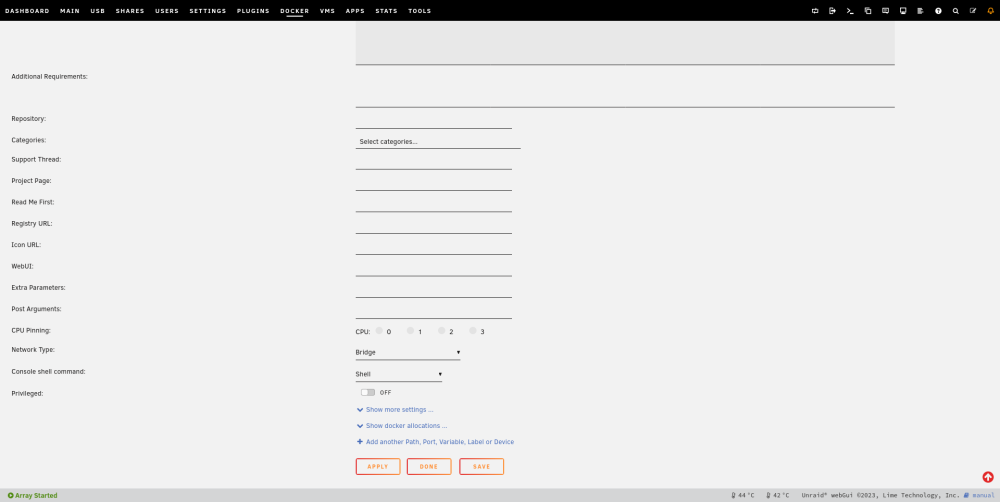
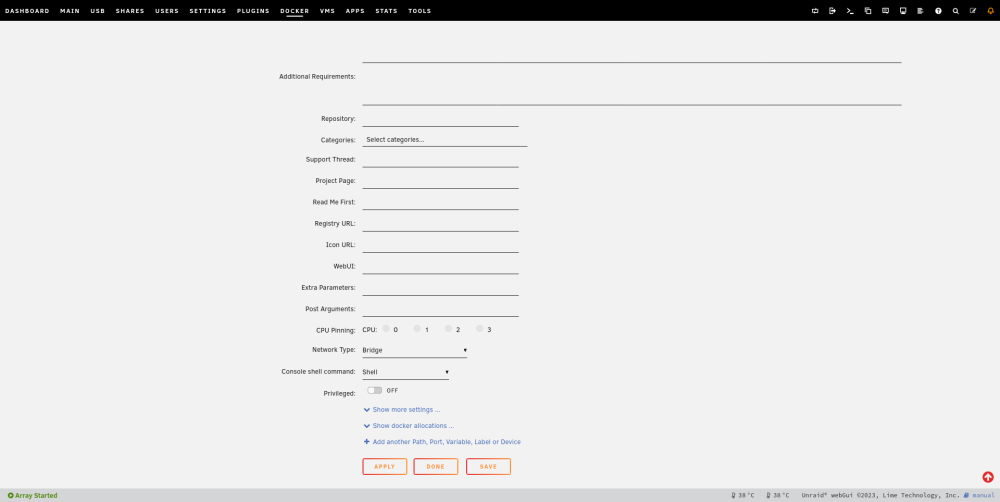
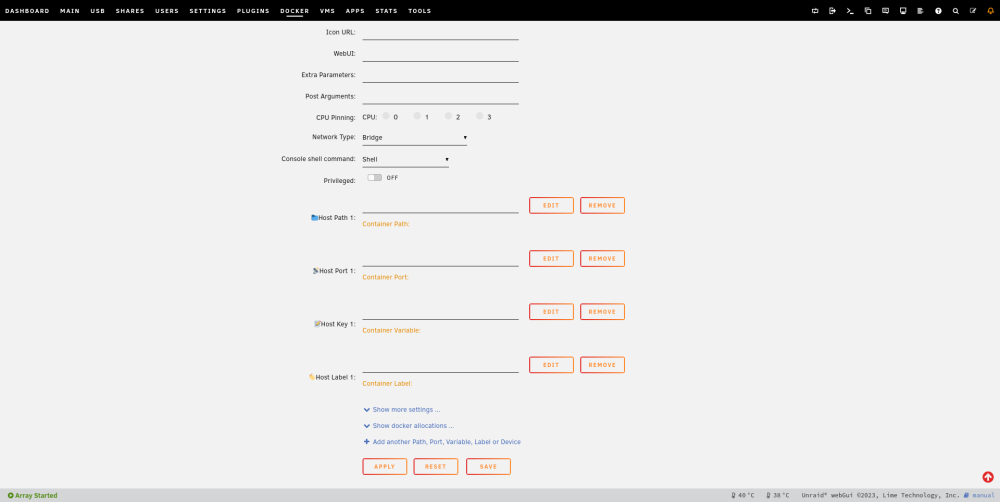
Basic part: In the current UI for adding or updating containers, the field names and input boxes are far apart, making it difficult to correctly correspond the field name to the input box. Current UI: Suggestion:Put all filed names right. For example: I just added CSS codes like: dt { text-align: right; margin-right: 1em; padding-top: 4px; } I'm sure your front-end engineers will have a better solution. Additional Part: 1. Enhanced differentiation between Path, Port, Variable, Label, Device fields. Currently there is yellow text below each field value that suggests the type of the field, but it seems to be rather weak ( to me), eyes always see the field name before the field value, so it's not sure of the type of the field at least until you see the value area. Improvement options for this problem are open, such as the possibility of placing enhanced type identifiers in the field name area. For example: Another option could be to put fields of the same type together and reinforce the type attribute of that area. You can refer to Portainer. (No example this time.) 2. Consider showing a dialog box for selecting a type first when adding Path, Port, Variable, Label or Device. Not most cases prioritize the addition of the Path attribute, so the odds are that the user will always select another type first and then fill it in. It would be possible to add a dialog box that lists all the buttons of the type. Rather than clicking on a dropdown box and then clicking on the type, this would allow the user to select the type with just one click. It also reduces the chances of clicking on the wrong option due to the dense arrangement of options in the dropdown box.
-
To share how I use UserScript for opening up user SSH access. Wish it was possible in the future to use plugins to replace this script completely. #!/bin/bash # Permmit user to access via ssh cat /etc/ssh/sshd_config | sed -e s/"AllowUsers root"/"AllowUsers root libook"/ > /etc/ssh/sshd_config.1 && mv /etc/ssh/sshd_config.1 /etc/ssh/sshd_config # Give user shell chsh -s /bin/zsh libook # Set user home usermod -d /mnt/user/home/libook libook # Make /etc/profile for multi-user cat /etc/zprofile | sed -e s/"export HOME=\/root"/"if [[ -z \$HOME ]]; then\n export HOME=\/root\nfi"/ > /etc/zprofile.1 && mv /etc/zprofile.1 /etc/zprofile # Add user to sudoers.d echo "libook ALL=(ALL:ALL) ALL" > /tmp/libook && chmod 440 /tmp/libook && mv /tmp/libook /etc/sudoers.d/libook # Reload SSHd /etc/rc.d/rc.sshd reload
-
I signed up for a forum account specifically to vote on this idea. I maintain my home server most of the time on my cell phone, via a web browser + an SSH client app.




