





IanMcLeish
Members
-
Joined
-
Last visited
Everything posted by IanMcLeish
-
root@UnraidNAS:~# lsusb -vt /: Bus 001.Port 001: Dev 001, Class=root_hub, Driver=xhci_hcd/12p, 480M ID 1d6b:0002 Linux Foundation 2.0 root hub |__ Port 002: Dev 002, If 0, Class=Hub, Driver=hub/4p, 480M ID 2109:2822 VIA Labs, Inc. |__ Port 001: Dev 005, If 0, Class=Hub, Driver=hub/4p, 480M ID 2109:2822 VIA Labs, Inc. |__ Port 002: Dev 008, If 0, Class=Hub, Driver=hub/4p, 480M ID 2109:2822 VIA Labs, Inc. |__ Port 003: Dev 003, If 0, Class=Hub, Driver=hub/4p, 480M ID 2109:2822 VIA Labs, Inc. |__ Port 001: Dev 007, If 0, Class=Hub, Driver=hub/4p, 480M ID 2109:2822 VIA Labs, Inc. |__ Port 002: Dev 010, If 0, Class=Hub, Driver=hub/4p, 480M ID 2109:2822 VIA Labs, Inc. |__ Port 005: Dev 006, If 0, Class=Human Interface Device, Driver=usbhid, 12M ID 051d:0002 American Power Conversion Uninterruptible Power Supply |__ Port 006: Dev 009, If 0, Class=Wireless, Driver=btusb, 12M ID 0cf3:e300 Qualcomm Atheros Communications QCA61x4 Bluetooth 4.0 |__ Port 006: Dev 009, If 1, Class=Wireless, Driver=btusb, 12M ID 0cf3:e300 Qualcomm Atheros Communications QCA61x4 Bluetooth 4.0 /: Bus 002.Port 001: Dev 001, Class=root_hub, Driver=xhci_hcd/6p, 10000M ID 1d6b:0003 Linux Foundation 3.0 root hub |__ Port 001: Dev 002, If 0, Class=Mass Storage, Driver=usb-storage, 5000M ID 058f:6387 Alcor Micro Corp. Flash Drive |__ Port 002: Dev 003, If 0, Class=Hub, Driver=hub/4p, 10000M ID 2109:0822 VIA Labs, Inc. |__ Port 001: Dev 005, If 0, Class=Hub, Driver=hub/4p, 10000M ID 2109:0822 VIA Labs, Inc. |__ Port 001: Dev 026, If 0, Class=Mass Storage, Driver=uas, 10000M ID 174c:55aa ASMedia Technology Inc. ASM1051E SATA 6Gb/s bridge, ASM1053E SATA 6Gb/s bridge, ASM1153 SATA 3Gb/s bridge, ASM1153E SATA 6Gb/s bridge |__ Port 002: Dev 010, If 0, Class=Mass Storage, Driver=uas, 10000M ID 174c:55aa ASMedia Technology Inc. ASM1051E SATA 6Gb/s bridge, ASM1053E SATA 6Gb/s bridge, ASM1153 SATA 3Gb/s bridge, ASM1153E SATA 6Gb/s bridge |__ Port 004: Dev 012, If 0, Class=Mass Storage, Driver=uas, 10000M ID 174c:55aa ASMedia Technology Inc. ASM1051E SATA 6Gb/s bridge, ASM1053E SATA 6Gb/s bridge, ASM1153 SATA 3Gb/s bridge, ASM1153E SATA 6Gb/s bridge |__ Port 002: Dev 007, If 0, Class=Hub, Driver=hub/4p, 10000M ID 2109:0822 VIA Labs, Inc. |__ Port 001: Dev 017, If 0, Class=Mass Storage, Driver=uas, 10000M ID 174c:55aa ASMedia Technology Inc. ASM1051E SATA 6Gb/s bridge, ASM1053E SATA 6Gb/s bridge, ASM1153 SATA 3Gb/s bridge, ASM1153E SATA 6Gb/s bridge |__ Port 002: Dev 020, If 0, Class=Mass Storage, Driver=uas, 10000M ID 174c:55aa ASMedia Technology Inc. ASM1051E SATA 6Gb/s bridge, ASM1053E SATA 6Gb/s bridge, ASM1153 SATA 3Gb/s bridge, ASM1153E SATA 6Gb/s bridge |__ Port 003: Dev 022, If 0, Class=Mass Storage, Driver=uas, 10000M ID 174c:55aa ASMedia Technology Inc. ASM1051E SATA 6Gb/s bridge, ASM1053E SATA 6Gb/s bridge, ASM1153 SATA 3Gb/s bridge, ASM1153E SATA 6Gb/s bridge |__ Port 004: Dev 024, If 0, Class=Mass Storage, Driver=uas, 10000M ID 174c:55aa ASMedia Technology Inc. ASM1051E SATA 6Gb/s bridge, ASM1053E SATA 6Gb/s bridge, ASM1153 SATA 3Gb/s bridge, ASM1153E SATA 6Gb/s bridge |__ Port 003: Dev 004, If 0, Class=Hub, Driver=hub/4p, 10000M ID 2109:0822 VIA Labs, Inc. |__ Port 001: Dev 006, If 0, Class=Hub, Driver=hub/4p, 10000M ID 2109:0822 VIA Labs, Inc. |__ Port 001: Dev 011, If 0, Class=Mass Storage, Driver=uas, 10000M ID 174c:55aa ASMedia Technology Inc. ASM1051E SATA 6Gb/s bridge, ASM1053E SATA 6Gb/s bridge, ASM1153 SATA 3Gb/s bridge, ASM1153E SATA 6Gb/s bridge |__ Port 002: Dev 014, If 0, Class=Mass Storage, Driver=uas, 10000M ID 174c:55aa ASMedia Technology Inc. ASM1051E SATA 6Gb/s bridge, ASM1053E SATA 6Gb/s bridge, ASM1153 SATA 3Gb/s bridge, ASM1153E SATA 6Gb/s bridge |__ Port 003: Dev 016, If 0, Class=Mass Storage, Driver=uas, 10000M ID 174c:55aa ASMedia Technology Inc. ASM1051E SATA 6Gb/s bridge, ASM1053E SATA 6Gb/s bridge, ASM1153 SATA 3Gb/s bridge, ASM1153E SATA 6Gb/s bridge |__ Port 004: Dev 018, If 0, Class=Mass Storage, Driver=uas, 10000M ID 174c:55aa ASMedia Technology Inc. ASM1051E SATA 6Gb/s bridge, ASM1053E SATA 6Gb/s bridge, ASM1153 SATA 3Gb/s bridge, ASM1153E SATA 6Gb/s bridge |__ Port 002: Dev 009, If 0, Class=Hub, Driver=hub/4p, 10000M ID 2109:0822 VIA Labs, Inc. |__ Port 001: Dev 019, If 0, Class=Mass Storage, Driver=uas, 10000M ID 174c:55aa ASMedia Technology Inc. ASM1051E SATA 6Gb/s bridge, ASM1053E SATA 6Gb/s bridge, ASM1153 SATA 3Gb/s bridge, ASM1153E SATA 6Gb/s bridge |__ Port 002: Dev 021, If 0, Class=Mass Storage, Driver=uas, 10000M ID 174c:55aa ASMedia Technology Inc. ASM1051E SATA 6Gb/s bridge, ASM1053E SATA 6Gb/s bridge, ASM1153 SATA 3Gb/s bridge, ASM1153E SATA 6Gb/s bridge |__ Port 003: Dev 023, If 0, Class=Mass Storage, Driver=uas, 10000M ID 174c:55aa ASMedia Technology Inc. ASM1051E SATA 6Gb/s bridge, ASM1053E SATA 6Gb/s bridge, ASM1153 SATA 3Gb/s bridge, ASM1153E SATA 6Gb/s bridge |__ Port 004: Dev 025, If 0, Class=Mass Storage, Driver=uas, 10000M ID 174c:55aa ASMedia Technology Inc. ASM1051E SATA 6Gb/s bridge, ASM1053E SATA 6Gb/s bridge, ASM1153 SATA 3Gb/s bridge, ASM1153E SATA 6Gb/s bridge |__ Port 003: Dev 013, If 0, Class=Mass Storage, Driver=uas, 10000M ID 174c:55aa ASMedia Technology Inc. ASM1051E SATA 6Gb/s bridge, ASM1053E SATA 6Gb/s bridge, ASM1153 SATA 3Gb/s bridge, ASM1153E SATA 6Gb/s bridge |__ Port 004: Dev 015, If 0, Class=Mass Storage, Driver=uas, 10000M ID 174c:55aa ASMedia Technology Inc. ASM1051E SATA 6Gb/s bridge, ASM1053E SATA 6Gb/s bridge, ASM1153 SATA 3Gb/s bridge, ASM1153E SATA 6Gb/s bridge /: Bus 003.Port 001: Dev 001, Class=root_hub, Driver=vhci_hcd/8p, 480M ID 1d6b:0002 Linux Foundation 2.0 root hub /: Bus 004.Port 001: Dev 001, Class=root_hub, Driver=vhci_hcd/8p, 10000M ID 1d6b:0003 Linux Foundation 3.0 root hub root@UnraidNAS:~# Thanks for looking, I didn't know about Unraid when I started buying hardware, just wanted to rescue data off a very old, neglected and dying Windows media centre.
-
Things went wrong at the weekend on my unraid box - constant 500 server errors, like every 2 minutes. I read some stuff and removed some plugins and got that sorted out, so far at least, but at one point I couldnt even ssh into the box so I had to do a hard reset. It was just starting a scheduled parity check at that time, just a few percent done, so the unclean shutdown wasn't (I thought!) going to be a huge pain. I started the server up and the array started with a parity check, which Ithought got to about 18% when I left it for the night. I came back in the morning and it was at 0.6%. 10 hours later I have reached 1.6%! My setup is a little unfortunate - I bought a 10 bay Sabrent hard drive cage which was for das disks, this was before I even knew unraid was a thing! I then bought a Protectli Vault to run unraid - my original thoughts were just to have storage I could attach to my laptop as when and if needed. I have since bought another 10 bay same model and I now have an array of 12 8TB data drives and 2 parity drives. I knoiw disk access would NOT be the fastest as they are both connected nominally over usb 3. whatever, claimed to be 10GBS. One cage is C to C, the other C to A as the pc only has a single usbC port. I has worked fine, but parity checks would take a couple of days usually. I really only use unraid for the Arrs and Emby server. And an unmanic transcoder server doing no work, sending jobs to 2 second hand ThinkCentre mini pcs. I am a bit concerned about some log entries about something probably being "busted" also saw an out of memory error in the log recently. Normally it sits at around this according to the main tab; System: 6.69 GiB ZFS cache: 11.5 GiB Docker: 12.3 GiB Free: 32.2 GiB When the server was down I pulled the usb connections and reconnected them, they seem ok - I checked them with a usb cable checker. Apart from putting all the drives into a case and attaching all to a new motherboard - basically starting again I don't know what to do, but I have to say it was running fine with no issues until the weekend. Would someone look at my diagnostics and give me some pointers as to what is going wrong please ? I really don't have a clue about linux in generall, nor what log entry is relevant and what is not. Thanks Ian unraidnas-diagnostics-20250805-1752.zip
-
1. You can reference local icons, but I couldn't find a way to easily paste the path to the file - gonna have to copy the path and then type the name in exactly as the file is named. But it does work. 2. I don't know.
-
Sorry, not the blue icon! Have to expand thefolder and use the old fashioned unenhanced menu, that does work. Maybe it is just the enhanded menu that is not working right. Yes! If you edit the folder and change from advanced view to default it works as expected.
-
Me too with this issue. I started to change all my docker compose files to use FullIPAddress:PORT instead of [IP]:[PORT] which works, but I changed them all back - I'll just use the blue icons under/beside the Icon until the plugin is updated - they still work, just not the one presented by FolderView2 in the enhanced menu. It does seem to be a FolderView2 Unraid 7.1.0 issue. No problem until I updated this morning.
-
Which version do you use? I have been trying the binhex container and I seem to have no end of issues with pcs not backing up when they should? I have uninstalled everything and reinstalled all, but still have issues.
-
I have installed and removed this combination multiple times. It will not get an IPV4 address. I tried adding a static ip in pfsense using both the docker macs and the vm machines mac addresses. No joy. I gave up on that and installed a qcow2 image directly. In one configuration it did get an ipv4 address and I could load the observer page at 4357 but it still would not load 8123. So that was a fail again. I pretty much gave up.
-
Hi, running the latest version of Unraid 6.12.13 and Threadfin uodated overnight I believe to version 1.2.18. Threadfin seems stuck in maintenance mode- the log stops at 11.13 and it is now 12.30, so no updates on the log for the last 45 minutes. There is an error about (I believe) one TV channel. 2024/11/19 10:51:04 [Threadfin] [WARNING] Plex can not handle more than 480 streams. If you do not use Plex, you can ignore this warning. 2024/11/19 10:51:04 [Threadfin] All streams: 158864 2024/11/19 10:51:04 [Threadfin] Active streams: 10851 2024/11/19 10:51:04 [Threadfin] Filter: 10 2024/11/19 10:51:04 [Threadfin] Web Interface: http://172.17.0.4:34400/web/ | Threadfin is also available via the other 1 IP. 2024/11/19 10:51:04 [Threadfin] XEPG: Parse XMLTV file: IPTV Ian 2024/11/19 10:51:18 [Threadfin] XEPG: Update database 2024/11/19 11:12:39 [Threadfin] Create Dummy Guide: Time offset +0000 - UK ▎GREAT! ACTION SD 2024/11/19 11:12:39 [Threadfin] [ERROR] strconv.Atoi: parsing "threadfin-28934bf482007ea4bd23bf8d4b68a762": invalid syntax () - EC: 0 2024/11/19 11:13:04 Serving existing m3u file For help run: /home/threadfin/bin/threadfin -h Could I delete this from the xepg file? "x-ID.1668": { "_file.m3u.id": "MX0I3N5E1UIWRWLZG7WI", "_file.m3u.name": "IPTV Ian's", "_file.m3u.path": "/home/threadfin/conf/data/MX0I3N5E1UIWRWLZG7WI.m3u", "group-title": "UK ▎MOVIES", "name": "UK ▎GREAT! ACTION SD", "tvg-id": "threadfin-28934bf482007ea4bd23bf8d4b68a762", "tvg-logo": "https://img.logo-cdn.cc/greattv.png", "tvg-name": "UK ▎GREAT! ACTION SD", "tvg-chno": "", "url": "http://line.**********.cc:80/********/**********/1478414", "_uuid.key": "tvg-name", "_uuid.value": "UK ▎GREAT! ACTION SD", "_values": "threadfin-28934bf482007ea4bd23bf8d4b68a762 UK ▎GREAT! ACTION SD UK ▎MOVIES UK ▎GREAT! ACTION SD", "x-active": false, "x-category": "movie", "x-channelID": "1087", "x-epg": "x-ID.1668", "x-group-title": "UK ▎MOVIES", "x-mapping": "threadfin-28934bf482007ea4bd23bf8d4b68a762", "x-xmltv-file": "Threadfin Dummy", "x-ppv-extra": "", "x-backup-channel-1": "", "x-backup-channel-2": "", "x-backup-channel-3": "", "x-hide-channel": false, "x-name": "UK ▎GREAT! ACTION SD", "x-update-channel-icon": false, "x-update-channel-name": false, "x-description": "", "live": true, "is_backup_channel": false, "backup_channel_1_url": "", "backup_channel_2_url": "", "backup_channel_3_url": "" }, Could I just delete this entire channel - I don't now, but I did see a log with an error that stopped at this TV channel, so I am assuming that this is the problem file. But what to delete? All of it? Maybe this wouldnt even help, but I spent hours getting to where I am with threadfin and I dont want to lose all! Asterisks in the logs are url username and password, they are all correct, so I hid them. I have tried to restart, twice or more but always the same result - 30% cpu usage in the docker page, eventually dropping to 8 or so, but it uswed to go to zero when it had done its job, and still no logging for over an hour - I guess it has crashed? If anyone could give me any suugestions, would be most appreciated!
-
This may not be the place to post this, but I am getting errors that I have too many remote workers going on and that I should consider paying to increase this. I would happily pay, but how do I go about doing that? I would like to know, and also suggest that the red banner popup includes a link to how to!? And.... How can I enable the gpu for my laptop (discrete NVidia) and Desktop (Intel graphics) if I am using the windows launcher rather than the docker setting? Be happy to know how to pay, I will mess around witht e other stuff, and it is running fine on CPU for the moment. I doubt I will need multiple PC at this down the line? So, How to remove worker limit with my wallet?
-
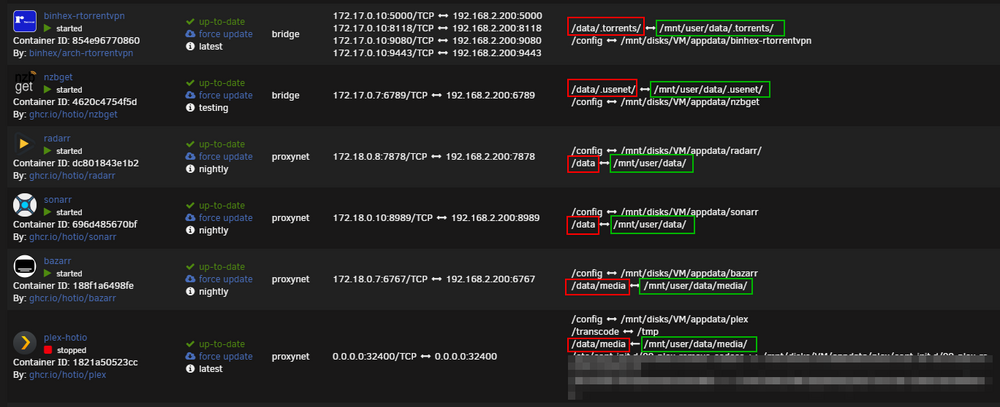
Hi, I set up all my "arrs" following Spaceinvader Ones's excellent videos, but I saw recently that there is a better way using Trash's Guide, which I am trying to follow. I think I am geting there and for the moment I have disabled all my arr apps and also SabVpn and Deluge vpn. Currently I am copying (not moving yet) the movie folder to data/movies, but that is gonna take a while and there is still music and tv shows to go. One question after following the guide though - in the picture of the final result (he used rtorrent and NZBget) there is a period, a dot, a full stop before his torrents and usenet folders. His data/.torrents -> mnt/user/data/.torrents and data/.usenet -> mnt/user/data/.usenet My deluge binhex deluge container has Container Path: /data set to /mnt/user/data/torrents/ I'm so sorry if this is a dumb question, but why to both of his examples have a preceeding period in the path? I am no linux expert, but does that imply that those folders are hidden? If so, why are mine not hidden?? I still don't really understand how a movies folder in data/torrents/movies can "magically" also appear to be or be a foler in data/media/movies. ?? I have all my dockers stopped until I can copy the medai to the new data share, so I am in no hurry about this, but I would like to know if I made a Snafu, or I am missing something simple. Of course my 2 download clients are different from Trash's, but that period is worrying me! Any input be gratefully read. Thanks
-
Well, sorry mate, you got further than I did. Hopefully someone else will come along g to help you?
-
I did a preclear on Disk 1 and a new config. The array is back up and writing parity. I wasn't sure what you meant by "can check parity is valid", but if there was another option to rebuild disk 1 I blew it, but perhaps the corruption would have remained anyway as the array wouldn't start with the drive emulated? I had VMs on that drive, but only 2 for messing, so no big loss there. I did lose all my dockers, but I copied appdata to my PC, so I'm hoping after the parity is done and mover runs, I'll reinstall the docker images and then hopefully just paste the appdata over the "new ones" - it would take me an age to get them back to the way they were, though SpaceInvader One would get a lot more ad revenue😃 Thanks for all your help, it is much appreciated.
-
So I ran that command against disk1 which is listed in array devices as sde, so I ran wipefs -a /dev/sda1 and this gave some output of deleting blocks, I'm sorry I didn't sopy this output. Maybe I did this the wrong way, but I mounted the sde disk1 using unassigned devices and did the wipe there. Was that the wrong thing to do? Anyway, I put the disk back in as Disk 1 into the array, but attempting to start leaves me in the same place - stuck with Disk1 mounting. I attached another syslog download having left the server running overnight, but things seem to stop at the kernel panic error? Can I ask, even if i do a preclear, will the parity drives rebuild the drive corrupted anyway? Has the corruption been "saved" on the parity drives. I am not sure what is on disk 1, and I realise that I should have a backup of stuff, but I was just setting this up after recovering from multiple failing drives on a Windows Homeserver build from 15years ago. It sat idle for a long time. But I suppose for a simpleton like me, it worked. All the drives were precleared when they were put into the system, which I understand significantly stresses them, and I don't know if it is a good idea to do that again when it was done only 2 months ago, but all these drives are first use, and I know drives can fail early on as well. Thanks for all help suugestions so far! Ian unraidnas-syslog-20231230-0459.zip
-
And many thanks for your reply, much appreciated!
-
So I will preclear disk one and put it back in?
-
Please ignore the screen capture, I uploaded an old one when it was working by accident.
-
My Unraid worked fine after I installed it on version 6.12.4. And I recently upgraded to 6.12.6 a week or so ago, I think. I put everything on ZFS, only because knowing little it seemed to be the way to go? I do have a strange setup because I bought the stuff before I even knew about Unraid, but apart from having to change the USB C cable, which connects the external “DAS” unit to the Protectli computer, because it was causing errors, it has worked without issues for a couple of months. I have a UPS for the Unraid as well, and all was fine until 2 nights ago. In the morning, Jellyfin wasn’t working, and I found I was unable to login to the Unraid GUI remotely, though I was able to ping it. Seeing as it was running in Non GUI mode, all I could do was quick press the power on the computer, and wait. An hour later with no joy, I pressed the button for longer to force a shutdown. Restarting in GUI mode, everything seemed OK, until I attempted to start the array, which seemed to freeze on disk 1 “mounting”. Hours later it was still there, starting the array, and I wasn’t able to cleanly shut it down. I did try shutting down in the terminal, but it wouldn’t so I powered off again. I read a fair bit about pool corruption causing this issue, and I tried to start the array with no pool drives assigned. Fail. As the Disk 1 was the one which was stuck on mounting, I tried to restart the array with that disk removed. Failed. I then (Hard shutdown again) and added the disk 1 back. It is now going to be in emulated mode and all data will be destroyed. I guessed with 2 parity drives that might be ok? Memtest ran for nearly 24 hours with no errors. 11 passes, no errors. We did have a bit of a storm the night things went wrong, but nothing else seemed to be troubled the morning I found the issue, and the UPS powers the Disk cage and Protectli computer. I can’t download diagnostics with the array attempting to start, it won’t complete, but I have downloaded 2 system logs, attached as zips and diagnostics with the array turned off. I also attach results of zpool import, I think this clearly shows an issue with disk 1, but why are there 2 disk ones showing in the result?? I am not sure if this issue is the same as other threads I have been reading about as mine doesn’t obviously involve cache drives, it seems (to me) the main array that has an issue. I shall stop messing with it until someone PLEASE gives me some advice! I am new to this, so I will need simple instructions please! Many thanks, Ian screencapture-192-168-0-10-42a43a9b4c02c56ad8f9e8bba99a59f40828e42f-myunraid-net-Main-2023-12-09-21_34_22.pdf unraidnas-diagnostics-20231229-0814.zip unraidnas-syslog-20231228-1101.zip unraidnas-syslog-20231228-1342.zip zpool import result.txt
-
As I say I haven't got it to work either. But, did you login to your Dropbox account by clicking the link in the logs? If you haven't done that, and you do, I reckon you will see you are stuck at the same place as me? In the docker tab, click Dropbox and select logs...
-
I am new, very, and I am not sure where to post this - it may be a pfsense issue, or a Jellyfin issue or something else. Upgraded to 6.12.6, this may or not be relevant, perhaps coincidental. My Jellyfin address was 192.168.0.10:8096 and it was working on various firesticks as clients, but it all stopped working, I noticed this the same day I upgraded. That is likely a coincidence? I run Pfsense on a separate unit, and I set up No IP to update my IP address there using the address carricknamadoo.ddns.net a while ago. I am unaware of changing anything in pfsense of late. Now to get to my Jellyfin I have to find the server at 192.168.0.10:8096/http://carricknamadoo.ddns.net Opening the docker WebUi (BinHex Jellyfin) took me there which gave me the clue the address had changed, as that was the resulting address in the address bar. I have no idea what caused this, but I can get around it using the longer address on my local network, but I would love to know if anyone could suggest a reason as to why? A similar thing happened when I installed Unraid connect - the resulting address was not what was typed, but that didn't break connectivity on my 5 firesticks. This time the address change did. I am posting here as i have no idea if this is a pfsense, jellyfin, or 6.12.6 issue, or even if it an issue at all, but i feel it is to me. Any thoughts or suggestions please? I will move this somewhere else if someone tells me to, but i have no idea where to place it other than here. Thanks.
-
Did you get Dropbox working!? So, did you login using the link shown in logs and link yur Dropbox account to the app? If you did, how did you manage the error i mentioned? I hope you are further along than I got, if so you should find a Dropbox folder in your shares? But I think you have to set that folder up before installling the dropbox container, as you need to point to it in the install files? But I am as new as you here!
-
My first post, so I am a total newb. Running Unraid 6.12.4. I tried otherguys Dropbox first, only as it had more downloads, but I couldn't get it working because of the [ALERT]: Dropbox needs to rename your existing folder or file named Dropbox to finish installing. Please close any open documents and try again. I have read what I can about this, and from what I could see Otherguy support seemed to not explain this, so I deleted that container and the Dropbox folder and started again with ken-ji's, this docker, but I have the same problem and no understanding of how to perhaps force a no update to dropbox? As I had read elsewhere, I would have thought forcing a no update would not fix the issue as I read elsewhere that Dropbox would eventually say "nope" to an older piece of software, but I AM A COMPLETE NEWB. Little experience of Linux over the years apart from copy pasting scripts to copy other folks fixes, mostly on a smoothwall server. Watched a lot of SpaceInvader One videos, but though they are excellent, many seem to age quickly as unraid updates. Any suggestions for a complete new guy on this or should I give up? My next thought was binhex-rclone, but I may fair worse with that!? Thank you
