





PhantomICEMAN
Members
-
Joined
-
Last visited
-
Hi am having exactly the same problem and its driving me insane. I used to have it before occasionaly when i put a certain level of demand on it now it happens daily even when the server doesn't appear to be doing anything (more so over night),I'm running out of things to try.The problem seems to have got worse since i added an additional drive. In term of hardware setup ive got : - Intel 13600K Strix B760 i motherboard 64gb Corsair Vengeance 6200mts RAM WD 850 SNx 1tb cache drive Samsung SSD 500gb drive LSI 9300 8i HBA 4x seagate x18 16tb exos drives Ive tried all sorts to see if it resolves the problem: - Updated the bios to the latest version. Ran memtest and that passed with flying colors Added a HBA, previously i was using a Chinese nvme SATA expansion card , i thought it might be the nvme getting overwhelmed as its usually designed to manage the IO of 1 drive not 4. Switched Splitlocking detection off Set docker containers to ipvlan for Macvlan Ran a smart test against the new drive and no issues have been found. I also switched off docker service for a bit and woke up in the morning to find the server had locked up again. so i don't think its the containers. I'm lost as to what else i could be . I'll try and upload what has been requested above.
-
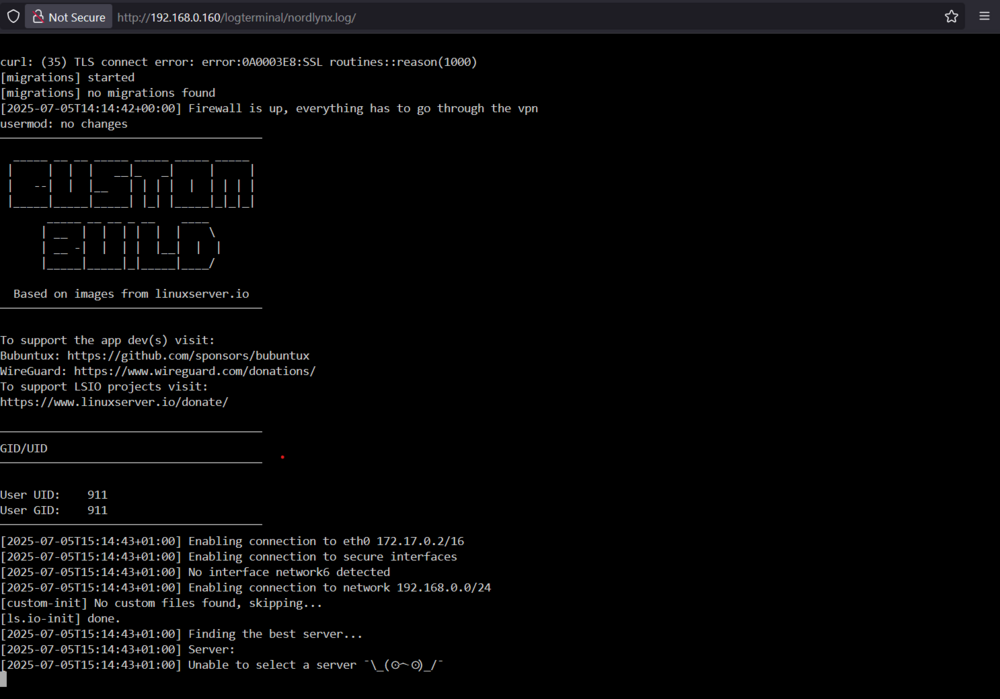
Hi everyone — up until recently, NordLynx had been working perfectly on my setup. But yesterday, I noticed Radarr searches weren't going through. On closer inspection, it turns out NordLynx wasn’t connecting at all — it couldn’t establish a link to a server and instead threw the error shown in the attached screenshot. I haven’t changed anything major — just the usual Unraid and container updates — so I’m not sure what's causing the issue. I did manage to get things partially working through a rather convoluted routing tweak, but it's clearly a temporary fix and not ideal long-term. Is anyone else experiencing this? Or does anyone have suggestions for a more permanent solution?
-
Hi all, Recently i have started experiencing a lot of buffering on my plex server when trying to stream 4k content. either to a device outside my network or a device within it. One of the reasons I had in the past was i had no direct connection to my internet router so recently updated my network card to a 10gb nic which now connected to a 10b switch which is connected with CAT6A Ethernet. The server itself has a 13600k CPU with 64gb 6200mts ddr5 ram. Therefore it should be more than capable of transcoding and now with the inclusion with a 10gb direct connection i was hoping it would run faster but that doesn't seem to be the case. Granted my router only supports up to 2.5gb but even at bandwidth it should be more than enough to stream 4K.I tend usually to stream to a firestick connected to my tv or my phone . I tended to find previously that if i was viewing a stream at home on my phone within the network the video tended to play pretty much immediately now it either buffers for ages or fails to run at all. The only time it doesn't have an issue is if the video has been compressed down using x265. I just wanted to ask are there any specific optimisations i need to do on the server to get it to run optimally . Happy to post any screenshots or logs if you can advise on what you require.
-
The problem with doing that is that server then puts all cards to sleep so you able to reawaken the motherboard Ethernet but the Connectx-3 remains in sleep mode therefore all you can do is reboot the server to make it accessible again.
-
Hi Does anyone know how you can enable the Wake up on Lan on the connect X3 card on unraid. I usually put the server to sleep during periods when its not being used and re-awaken it using an app on my phone. I was able to do it on the ethernet port thats on the motherboard but cannot do it with the card. i have seen some instructions to enable it that are somewhat convoluted . Does anyone have anything simple that works.
-
Hi has anyone found a solution to this as im having this issue as well. I have found this happen mostly when im transcoding 4k to a mobile device and the server randomly drops off. ive got reasonalble amount of fans in my compact unraid server. all noctua ones. generally my temps looks good unless the transcode is over heating the cpu and its just locking up,Ive got quite a chuncky noctua fan on the cpu too. im running a 13600k with 64gb ddr5 ram. Just had another crash , it looks like if im trying to transcode a large 4k movie which is uncompressed ie not X265 it seems to have a wobbler but cant see why as my setup should be more than capable of handling this. I also recently upgraded to 10gb connectivity with a 2.5gb feed going to my wireless router so it should more than capable of streaming to a wireless device.
-
Evening so i have finally set everything up this evening so the way eveything is setup is the ethernet for my internet goes into a nicgiga cheap switch the same as yours mame and then i have an spf+ dac line that goes into the CRS305 switch(running switch OS). i then have two spf+ dac lines going to my main machine(windows 11) and my unraid server connected to via mellonox connect-x3 cards on both sides. I have flashed the latest firmware on both cards to ensure they are upto date.However the issue i have found is that i am not hitting the 1+Gigabytes a second 10gb is supposed to acheive. I seem to hover beween around 90mb to 700mb , mostly the lowest figure but cannot understand why. Both machines have a very fast nvme which is the WD SN850, unraid is set to write to nvme cache pool before moving to the array. Im i missing something.. why am i not able to hit the higher speed and hold it consistently instead of it dropping to double digits most of the time.Ive check in unraid and it says 10000mb full duplex and windows says my connection is 10gbs. I have also ran iperf and that stated that i had just under 10gb worth of bandwidth so unsure what im missing.
-
Evening . So I received the x3 cards today, the next thing on the shopping list is the switch and the rj45 spf transceiver. Just had 1 quick question that I touched upon earlier. I've got my sights on crs305 and I'm planning to get a 10gb spf to connect my broadband feed with the switch. The switch will have a 10g connector but the broadband router only supports upto 2.5. Will it a negotiate okay and what speed will it actually run at ?
-
no worries just wondering if you sourced them from elsewhere. I've found the deal you are referring uptop. just wanted to ask do you to have to use specific sfp transceivers with the card. I've read on another post you need a qsfp one. can you suggest a fibre aoc that will go with this card or would a standard dac be sufficient. Some of these cables are expensive and I don't want to order the wrong one.
-
Where did you get it from mate?
-
Would this work mate , Its x8 not not x4 but i know these guys are legit and they based not to far from me either. My motherboard on my main machine has 3 pci 4.0 x16 ports one of them has got my 3090 in it the rest are free. https://www.bargainhardware.co.uk/mellanox-connectx-3-pro-mcx312b-xccs-dual-port-sfp-10gbe-fh-pcie3-0-x8-ethernet
-
sorry as in i will only have 2 evices that will be 10gb abled. my work laptop is 1gb and i have a CAT 6A cable going to my internet router which is 2.5gb enabled. essentially i will be using all 4 ports on the switch. Im just looking at some mellanox cards, i noticed they selling them on Aliexpress for a reasonalble price but are they legit or do you have to look for ones exclusively pulled from a server.Its always minefield buying these type of cards as you never know if they are cheap replicas or the real deal.
-
Cheers mate your advice is invaluable.. I'm going to start pricing this up and get ordering, going of that picture looks like your using a hell of a lot of fibre in your setup.. Does the 309 offer anything more over the 305 besides the additional ports. Also are you able to manage the switch via the sfp ports or do you have to plug something into the dedicated management port to access the management software?.
-
Cheers mate i think im going to go for the CRS 305 its nice and compact,can support 10g accross all port and most importantly its cheap. I did look at the unifi flex switch which is close to £300 not factoring the cost of the nics.ive got some CAT 8 but i think im going to down the fibre route as its cheaper and lower latency.Im probably looking at two fibre dacs, and two RJ45 (1 running 10gb spf+ running at 2.5gb to start off with and one that can a be a gig). I assume based on your above comment that fibre isnt conducive to the same heating issues as RJ45 both on the switch side as well the nic.I need to find a decent spf+ nic that will work with windows 11 and of course unraid. Any recommendations?
-
Its most likely going to be RJ45 though if theres other options im willing to explore them, i wouldnt mind exploring fibre in the future.I dont have a whole lot of devices to connect to it.I have wondered what the difference is between having an SFP+ port over a standard port, besides being able to change betwen connectors are there any other performance benefits. All i currently have is my main machine my unraid server and my work laptop and i have an ethernet going to my ISP router (2.5gb port) that brings my internet feed and i can use it to stream my plex library. I primarily want the 10gb connectivity between my unraid sever and machine. Hence investing in a expensive large switch wouldnt make sense. I did have a look at the mickrotik switches though im not very savvy when it comes to adminstering a network hence why i opted for a unmanaged switch. Is there any particular one you would recommend.
