





foo98
Members
-
Joined
-
Last visited
-
I am in the same boat this week. It is April 22, 2026 and I have been trying to fix this for a few days. Here is my situation: cannot load plex locally (http://x.x.x.x/web or https://app.plex.tv/desktop/#!/) If I turn on a vpn, I can access my server I have removed tailscale from unraid and my appletv and still cannot connect server is working fine as a server outside my LAN but not inside my LAN lifetime licence Any help would be greatly appreciated.
-
I updated Unraid and started using Folder View 2 and the problem went away.
-
Had the same problem today with a Plex update. Got a 400 error. Cleared last 24h of cookies and Plex web is working again.
-
Thanks...I'll look at other options.
-
I have had to regularly do "chown -R sshd:sshd <nextcloud-data-folder> because the ownership keeps changing to "nobody" every few days. Once it changes, I can't use Nextcloud until I rerun the chown command and get everything back to sshd. Anything anyone can suggest to stop this from happening? I searched for a solution but didn't find one, please direct me to the correct discussion if this has already been answered. Thanks for your help...BTW, this is a great community
-
I used another computer to download 6.12.13 from the website. Then I deleted everything from the usb except the config directory. Then I copied all the contents of the downloaded 6.12.13 except the config directory onto the usb. It rebooted back into 6.12.13 with my all my settings intact. Then when it was running, I removed the network driver plugin, updated, and it worked out. https://docs.unraid.net/unraid-os/download_list/
-
@JorgeB could it really be as simple as the RTL8168 Drivers I have installed???? YES IT WAS!!!! Thanks for the help! Everything is up and running fine once again. Removing the RTL8168 Driver before updating fixed the crash after the update to 6.12.14
-
Been using Unraid for over a year now and the updates have not caused any problems. Today I tried to update from 6.12.13 to 6.12.14. It all goes well until I reboot. Once I reboot the whole system fails to do anything (it does power on). Shares don't work, gui doesn't load, nothing. I waited 20 min and it just hangs. If I reboot a few times, I get a gui for a few minutes and then it also stops working. My brother has a similar set up and he didn't have any problems updating. I had to remove the USB, delete all the files, and copy over the files from the backup I made before I updated. Loaded up just fine so I then ran a diagnostic and hoped it would tell me something but instead it was a downloaded zip file I am unsure how to use. Any ideas? Is it just me? If you need me to upload diagnostics can you please let me know if I should upload the whole zip file or is there a specific file I should upload? Thanks for all your help
-
Thanks for taking the time to answer the question. The "Extra" arguments solved the original problem. Turns out the problem was also the gpu. It was a 1660 Super with 6GB and it was running out of memory when generating 512x512 images. It worked once I changed the resolution to 400x400. I have since changed out the gpu for a 3060 with 12 GB of memory and it is generating 1024x1024 images without any problems. Thanks again
-
Still no answers....sorry.
-
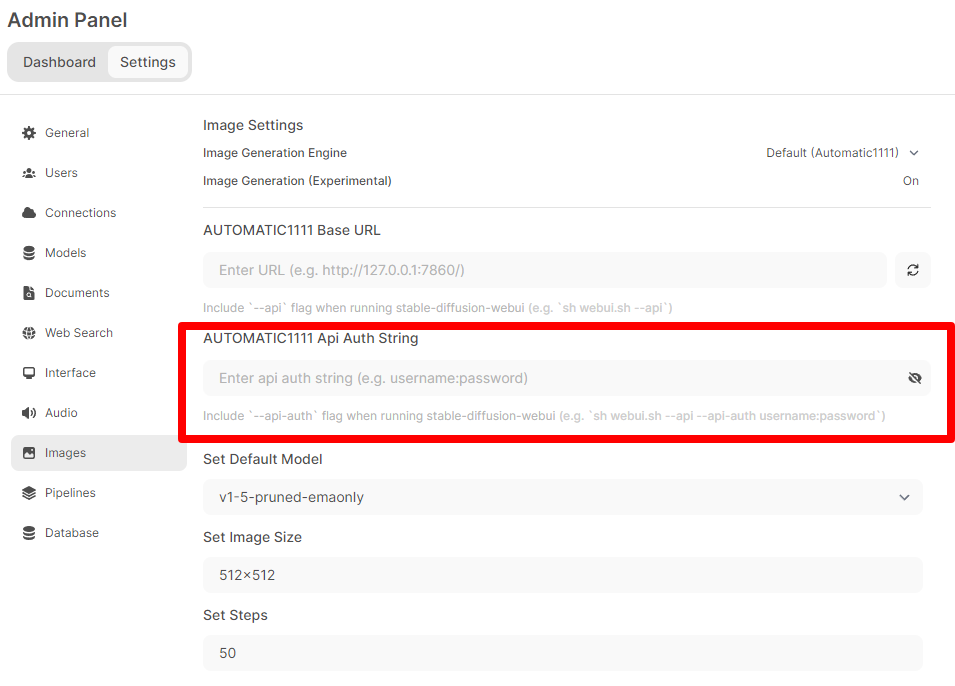
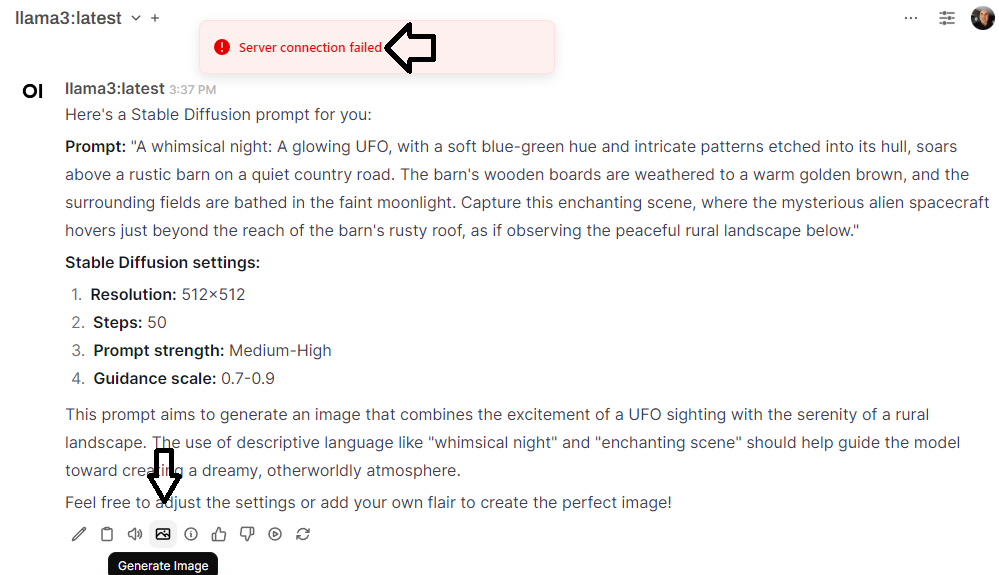
Thanks for the Automatic1111 container. I have it working. I also use the Open-Webui and have turned on the image generation feature. When I fill in the Base URL and hit the load button it verifies it can see the Automatic1111 server. However, I fails to validate when I use the generate image button from the chat. See images below. Do you have a default username:password that should go into the api auth string? Do you know where I should put the --api in the container settings? (I got it to work once but don't know why or how)
-
Hopeful bump for feedback.
-
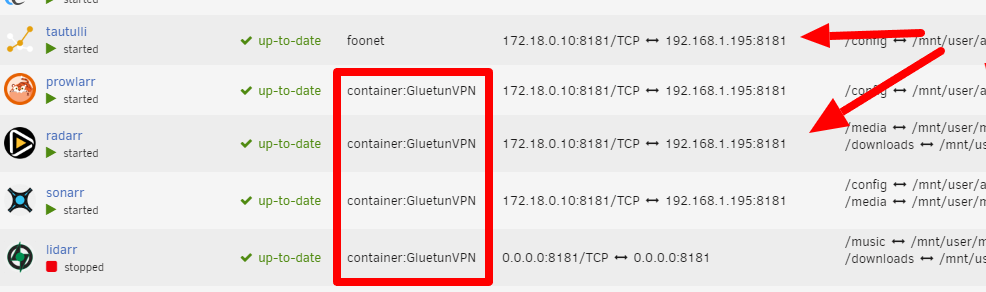
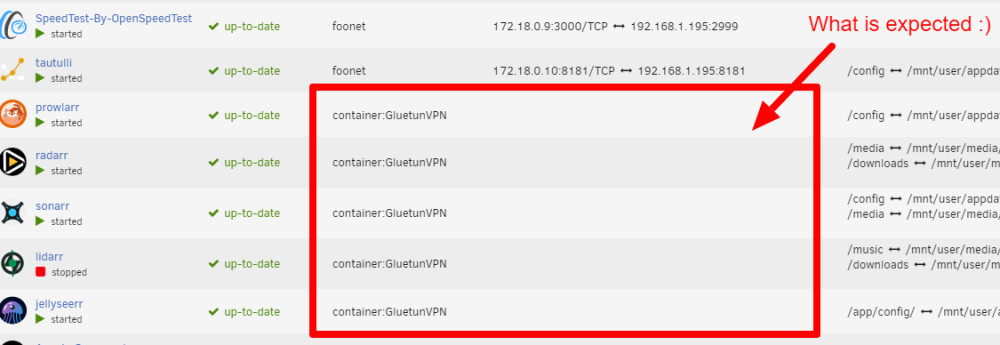
I did a search and could not find a similar problem and thought I would try posting it here in General Support. I apologize if this has already been addressed, I just wasn't sure what to search for. I use Gluetun to connect to my VPN (PIA) and then have a few docker containers use Gluetun as the network using "--net=container:GluetunVPN" in extra parameters and assign the ports in Gluetun instead of the forwarded container template. It all works fine....but after a few days it starts showing IP addresses and port numbers from other running containers. I have a couple of screen shots that show what happens. Also, even though it shows the wrong IP address and port number when I run "curl ifconfig.io" in the console it shows the IP address of the Gluetun container. So it seems like it is working like it should but showing the wrong network information in the Docker tab. Finally my questions: Is this a bug? Am I doing something wrong? Is this something to worry about? BTW, if I edit the network in the container template from "none" to "bridge (or anything)" back to "none" the container redeploys and the IP and ports are cleared as expected....but they pick up weird IP and port numbers again after a few days. Thanks for your help
-
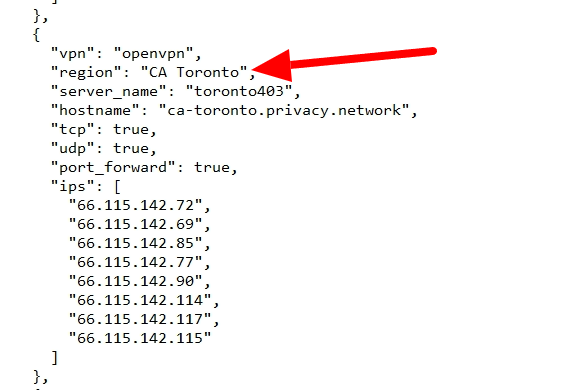
Feeling dumb right now. I was using the wrong info. Once I used the correct region info it worked just fine. Thanks!!! PS. For multiple regions eg. "CA Toronto, CA Ontario" it did not work...... But it does work if you don't use a space after the comma.... "CA Toronto,CA Ontario" ... Thanks again! Here is a screenshot for anyone who runs into this in the future.

-
Hi. I just switched from a linux box with portainer to unraid this week. I use PIA as my VPN provider. On the old system I was able to set a country (Canada or USA) as where I wanted gluetun to connect. I did all configuration using portainer. Gluetun on unraid will let me set country, region, or city but it won't connect. It won't even let me look at the logs. If I leave country, region, and city blank, it will connect to a random location anywhere in the world. Am I missing something regarding how to set where I want to exit PIA. Specifically I want to use cities such as Toronto, Buffalo, NY, Montreal, or countries such as USA or Canada, as well as regions such as Eastern USA and Eastern Canada. Can you please help me out. Thanks


