





emp83
Members
-
Joined
-
Last visited
Everything posted by emp83
-
Have you solved the problem with C States or are they still disabled? I'm in the exact same situation, same processor, motherboard and amount of ram.
-
Changing C state in bios from auto to on solved the problem.
-
I built an unraid server about 5 days ago but i have some problems. The server becomes unresponsive after after a few hours of idle time. I noticed that if it is in use, such as configuring docker applications, watching movies, etc it works without problems but if I don't do anything on the server after a while it freezes. I can not access network shares, ssh to the server, or access the GUI. The only resolution is to power the server off and turn it back on. If i connect the hdmi the monitor stays black. I have some errors in the log related to RAM and ACPI. Hardware: MSI H110M ECO Motherboard (used) i3 7100 CPU (used) 32 GB RAM Corsair (new) Samsung SSD 870 EVO 500GB Cache (New) WD 8TB HDD (New) Sagate 2TB (Used) maxime-server-syslog-20241008-1735.zip
-
Tailscale it is working but it's a bit complicated, I also manage other friends' servers and they all have the same subnet 192.168.1.1. In Tailscale they are all connected at the same time and the same subnet is causing problems. With WireGuard I can connect when I need to whoever I want.
-
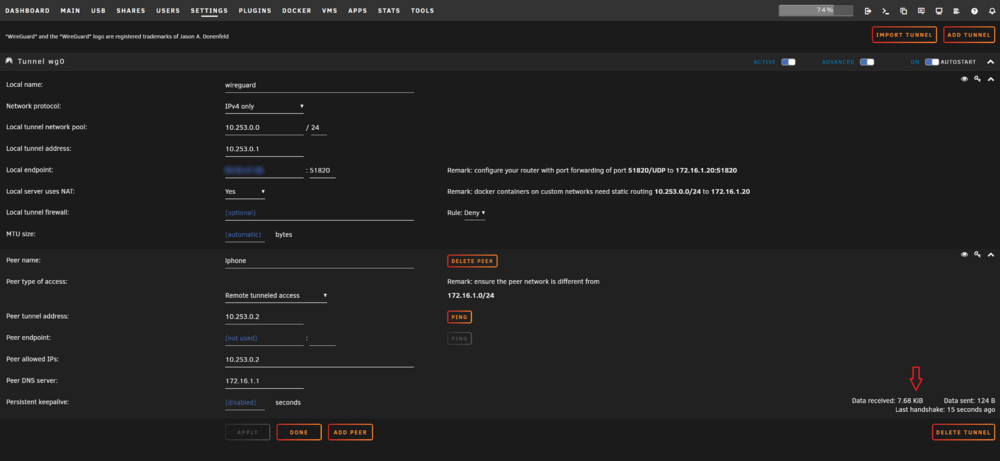
Hello, I need some help. I've been struggling for some time to make wireguard work and I can't. If I run wireguard in docker it works without problems. It seems that the handshake it is ok but the unRAID does not send data. Any help is appreciated. Thank You WireGuard log: wg-quick up wg0 [#] ip link add wg0 type wireguard [#] wg setconf wg0 /dev/fd/63 [#] ip -4 address add 10.253.0.1 dev wg0 [#] ip link set mtu 1420 up dev wg0 [#] ip -4 route add 10.253.0.2/32 dev wg0 [#] logger -t wireguard 'Tunnel WireGuard-wg0 started';/usr/local/emhttp/webGui/scripts/update_services [#] iptables -t nat -A POSTROUTING -s 10.253.0.0/24 -o br0 -j MASQUERADE;iptables -t nat -A POSTROUTING -s 10.253.0.0/24 -o vhost0 -j MASQUERADE [#] ip -4 route flush table 200 [#] ip -4 route add default via 10.253.0.1 dev wg0 table 200 [#] ip -4 route add 172.16.1.0/24 via 172.16.1.1 dev br0 table 200 wg-quick down wg0 [#] ip link delete dev wg0 [#] logger -t wireguard 'Tunnel WireGuard-wg0 stopped';/usr/local/emhttp/webGui/scripts/update_services [#] iptables -t nat -D POSTROUTING -s 10.253.0.0/24 -o br0 -j MASQUERADE;iptables -t nat -D POSTROUTING -s 10.253.0.0/24 -o vhost0 -j MASQUERADE [#] ip -4 route flush table 200 [#] ip -4 route add unreachable default table 200 [#] ip -4 route add 172.16.1.0/24 via 172.16.1.1 dev br0 table 200 Here is my configuration:
-
Is built-in on 7.0 but is not out yet.
-
So did I, I came to see why it appears like this. 😀
-
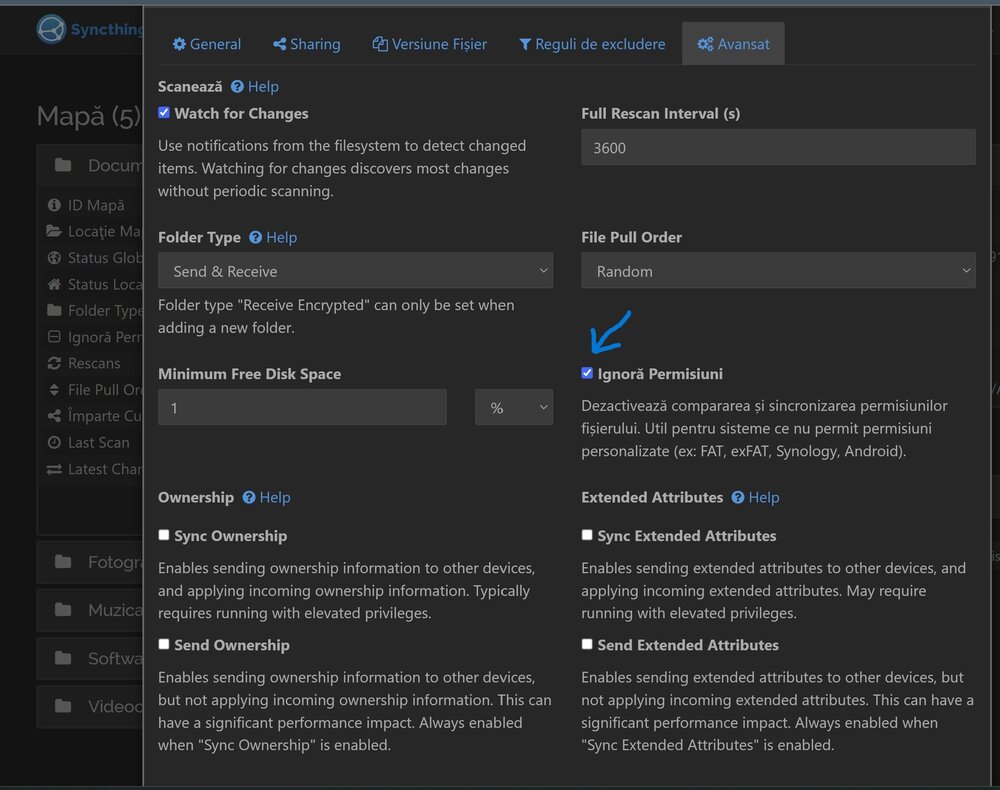
This solved my problem, only in unRAID folder sync did I activate the "ignore permissions" option.
-
Did you find a solution to this problem? I'm exactly in the same boat as you I don't know how to solve i.
-
Hello, Does anyone have an idea how to find this mout point? I want to remove him from Glances. Thanks
-
Hello, I have exactly the same problem. tower-diagnostics-20240217-1908.zip


