






icezolation
Members
-
Joined
-
Last visited
Everything posted by icezolation
-
Updated binhex-jellyfin just now. As I feared, another update where the container starts but the webinterface is not reachable afterwards. Did a backup before I updated the container and guess I will sit this one out. binhex-jellyfin.log
-
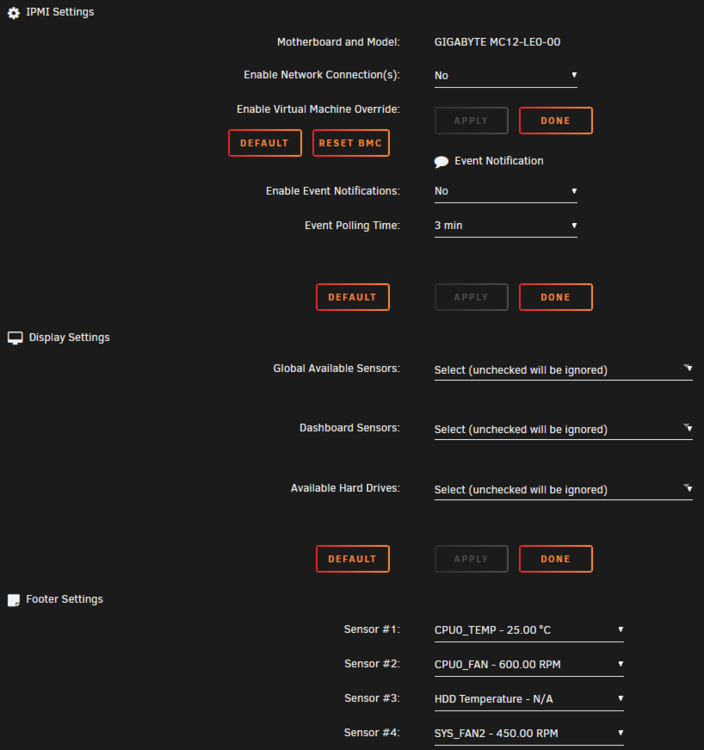
Hey there, Unraid 7.0.1 - on a Gigabyte MC12-LE0, I can't seem to make the Fan Control tab to show up in the settings, neither with Network Connection setting disabled or enabled. Sensors under Display Settings show up as expected and I can set them up to be displayed in the footer. What am I missing?
-
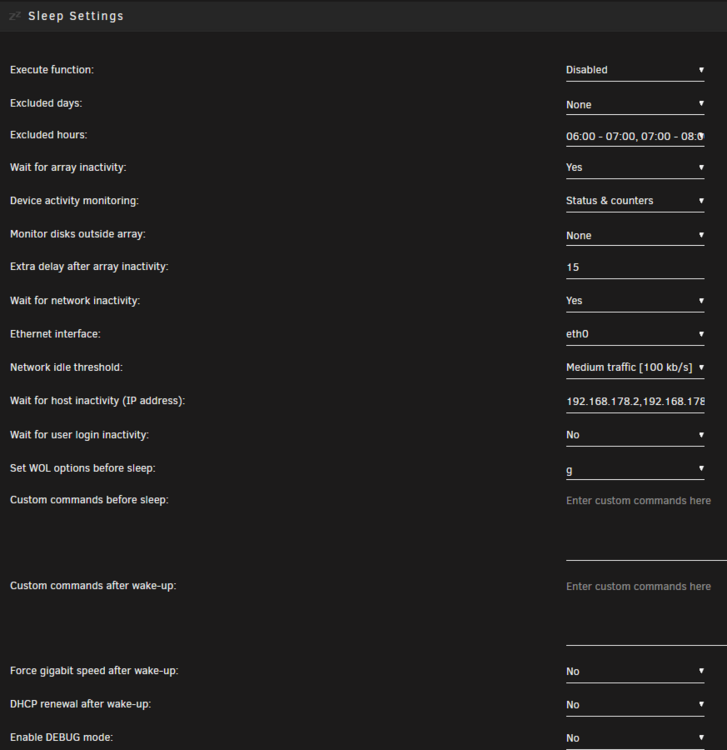
Added my parity drive to the "Monitor disks outside array" and will test that out. Thank you. Just find it a bit weird that the plugin doesn't wait for sleep/shutdown when a parity check is running. "Execute function" - yes, I disabled it when I noticed that the server was shutdown during the night because of the Dynamic S3 Sleep.
-
Anyone willing to catch me up on the Dynamic S3 Sleep plugin? I am trying to figure out why the plugin is completely ignoring a parity check running. I've set it up like this (see screenshot). Am I missing something?
-
Unschön. Habe mich seit nicht ganz einem Monat in Unraid reingetüftelt und es als gute Lösung empfunden. Würde mich nicht darauf verlassen, dass bereits geholte Lizenzen zukunftssicher sind. Da wird das ursprüngliche Projekt eben vernachlässigt und aufs "neue" verwiesen, welches gewünschte Updates und Features enthält. Behältst also deine Lifetime-Lizenz, aber sie nützt dir nichts mehr. Wie MPC561 geschrieben hat. Solche Vorhaben gab's oft genug in der Vergangenheit.
-
@jj1987 Habe die Möglichkeit mit den 10ern, weil diese vorhanden sind. 12 TB hole ich dazu.
-
Hey miteinander, bin erst vor kurzem auf Unraid aufmerksam geworden und von dem, was ich mir bereits an Infos einverleibt habe, klingt es äußerst ansprechend. Bei mir frickelt noch eine betagte Synology DS716+II im Heimnetzwerk. Hat einen guten Dienst geleistet, halt mehr Datengrab als alles andere. Speicher wird knapp und somit muss eine modernere Lösung her, die gerne nicht nur als NAS fungieren darf. Der Zweitrechner: Intel Core i7-7820K ASUS Prime X299-Deluxe GeForce GTX 1050 Ti Kingston KHX3000C 32GB DDR4 SATA Corsair Neutronx GTX (alte, knuffige 240 GB SSD) NVMe Samsung 960 EVO (500 GB) Könnte mir vorstellen diesen mit 4 WD Red Plus auszustatten: 1x 12 TB (Parity) | 3x 10 TB (Daten) Spricht etwas gegen diese Konstellation? So wie mir es erklärt wurde muss die Parity die selbe Größe (oder mehr) der größten Datenplatte vorweisen - nicht das Gesamtvolumen aller Datenplatten? Fürs Einarbeiten beabsichtige ich Unraid als Lösung für NAS, Plex-Server und io-Broker-Instanz zu nutzen. Fürs erste hiermit machbar oder gibt es Flaschenhälse, die ich übersehe? Besten Dank!


