





Journeyman1
Members
-
Joined
-
Last visited
Everything posted by Journeyman1
-
I dont see how Mover Tuning plugin can acomplish this There should be an option to fire mover as soon as cache hits 100% I regularly hit 100% when torrenting, though i have 10GB set as minimum free space on my 256GB cache array. Im currently forced to do a manual move or wait for scheduled move and my torrents just stop with error untill the move is sompleted, though its obvious that move should happen as soon as cache is full. I literally cant belive this is not implemented, its clear as sky it should be this way. To clarify, i only use cache as data pre-cache, and dont use it for appdata or other system shares
-
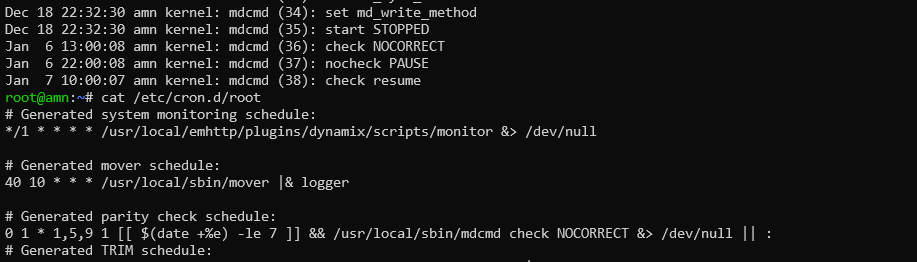
Following up your answer in https://forums.unraid.net/topic/137710-plugin-appdatabackup/page/65/ Yes, it seems it's running NOCORRECT indeed. So i can change cron file and remove NOCORRECT, right?
-
Sorry, my bad, wrong thread
-
Hello. When scheduled parity check runs using this plugin, i get a notification Scheduled Non-Correcting Parity-Check (58.8% completed) [AMN] Scheduled Non-Correcting Parity-Check finished (0 errors) Why it's called Non-Correcting Parity-Check? I have "Write corrections to parity disk" set to Yes
-
It's surely quite usefull to stop some containers that generate reads on the reference volume. Is there any alternative option on how to implement this? For ex. can i run userscript using this plugin?
-
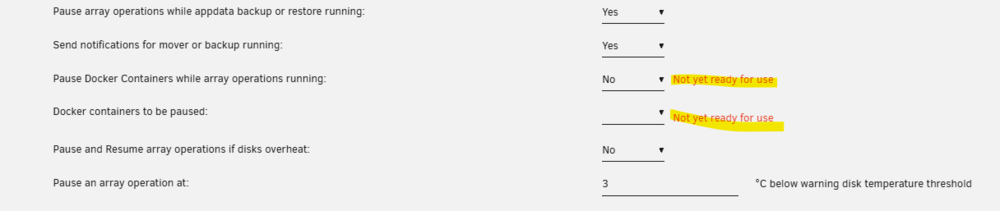
Hello, can anyone explain why i have this message on docker container options. Docker is working fine, i have 6.12.10
-
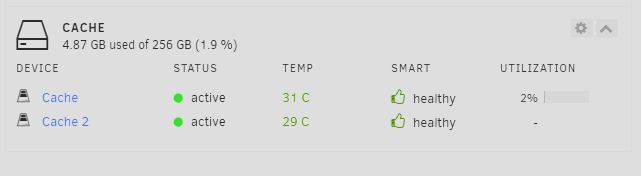
Incorrect sensor is used for nvme disk, actual temp is 49, in gui is 33. How to change this behavior? smartctl 7.4 2023-08-01 r5530 [x86_64-linux-6.1.79-Unraid] (local build) Copyright (C) 2002-23, Bruce Allen, Christian Franke, www.smartmontools.org === START OF INFORMATION SECTION === Model Number: Patriot M.2 P300 128GB Serial Number: P300HHBB231112000165 Firmware Version: APF1M3R1 PCI Vendor/Subsystem ID: 0x1ed0 IEEE OUI Identifier: 0x2c3ebf Total NVM Capacity: 128,035,676,160 [128 GB] Unallocated NVM Capacity: 0 Controller ID: 1 NVMe Version: 1.3 Number of Namespaces: 1 Namespace 1 Size/Capacity: 128,035,676,160 [128 GB] Namespace 1 Formatted LBA Size: 512 Namespace 1 IEEE EUI-64: 2c3ebf fff00000a5 Local Time is: Tue Apr 30 17:28:20 2024 EEST Firmware Updates (0x12): 1 Slot, no Reset required Optional Admin Commands (0x0017): Security Format Frmw_DL Self_Test Optional NVM Commands (0x0056): Wr_Unc DS_Mngmt Sav/Sel_Feat Timestmp Log Page Attributes (0x0a): Cmd_Eff_Lg Telmtry_Lg Maximum Data Transfer Size: 64 Pages Warning Comp. Temp. Threshold: 80 Celsius Critical Comp. Temp. Threshold: 85 Celsius Supported Power States St Op Max Active Idle RL RT WL WT Ent_Lat Ex_Lat 0 + 3.50W - - 0 0 0 0 0 0 1 + 1.90W - - 1 1 1 1 0 0 2 + 1.50W - - 2 2 2 2 0 0 3 - 0.0700W - - 3 3 3 3 1000 1000 4 - 0.0050W - - 4 4 4 4 5000 45000 Supported LBA Sizes (NSID 0x1) Id Fmt Data Metadt Rel_Perf 0 + 512 0 1 1 - 4096 0 0 === START OF SMART DATA SECTION === SMART overall-health self-assessment test result: PASSED SMART/Health Information (NVMe Log 0x02) Critical Warning: 0x00 Temperature: 33 Celsius Available Spare: 100% Available Spare Threshold: 5% Percentage Used: 0% Data Units Read: 842,815 [431 GB] Data Units Written: 686,167 [351 GB] Host Read Commands: 3,062,703 Host Write Commands: 5,473,868 Controller Busy Time: 11 Power Cycles: 113 Power On Hours: 449 Unsafe Shutdowns: 67 Media and Data Integrity Errors: 0 Error Information Log Entries: 0 Warning Comp. Temperature Time: 0 Critical Comp. Temperature Time: 0 Temperature Sensor 1: 49 Celsius Error Information (NVMe Log 0x01, 16 of 16 entries) No Errors Logged Self-test Log (NVMe Log 0x06) Self-test status: No self-test in progress No Self-tests Logged
-
It started working this morning with no changes from my side. Does unraid do some driver updates on it's own?
-
No such option, and it works in windows, as i mentioned
-
It works phisically, it doesnt invoke acpi event in unraid it seems. So i press power on the pc with booted unraid - nothing happens. I does work if i boot windows and install chipset drivers though. It seems like some sort of driver problem, but i dont know how to debug this MB i have now H610M-ITX/eDP Cpu i5-13600T
-
I ened up with /bin/bash -c 'add-apt-repository --yes ppa:ubuntuhandbook1/handbrake && apt update && apt install -y handbrake-cli && s6-pause -th'
-
How can i possibly install handbrake 1.7+ into the image and keep it running normally? /bin/bash -c 'add-apt-repository --yes ppa:ubuntuhandbook1/handbrake && apt update && apt install -y handbrake-cli' in post arguments keeps stopping the container after the execution

