





lqpnote
Members
-
Joined
-
Last visited
-
Hi everyone, I’m trying to diagnose a strange Plex performance issue on my Unraid server and would appreciate any ideas. I apologise in advance if this is not the right place for this post I wasnt sure where it fits because the issue is still unclear to me System: Unraid kernel: Linux 6.12.24-Unraid x86_64 Motherboard: Supermicro X10DRi-T4+ CPU: Dual Intel Xeon E5-2699 v4 RAM: 128 GB DDR4 ECC GPU: Intel Arc A380 Plex container appdata: 2 TB WD m.2 NVME cache drive, fs BTRFS Media storage: ~340 TB Unraid array Plex running in Docker on Unraid The issue: Plex browsing is extremely slow. Posters, metadata, home screen rows, and library sections take a long time to load. However, once I click play, playback is perfect. Direct play and transcoding both work without buffering. So the problem is not playback performance. It seems specifically related to metadata/library loading. Here is an example of what I mean https://imgur.com/a/rREBqrn What I tested: Existing Plex Docker on Unraid (at first i had thought it was a database/plex config error) I've deleted plex appdata and started everything from scratch - made no difference Slow browsing/loading metadata Fresh Plex Docker install on Unraid, same libraries. Tried different repos as well - binhex, official (plexinc/pms-docker), lscr.io/linuxserver/plex Same slow browsing issue Plex Media Server installed on my Windows admin PC, accessing the same Unraid media over SMB. That fixed it. Browsing was instant when the server ran on my pc. At first I though it might be that my pc has better hardware for plex. but then.. Windows 10 VM running inside the same Unraid server, Plex installed inside the VM, accessing the same Unraid media over SMB Browsing/loading is also instant!! It seems like running it on windows fixed it regardless of the hardware here is an example of how the virtual machine performed https://imgur.com/a/Zo4ovBi This is what confuses me most. Plex inside a Windows VM on the same Unraid machine performs instantly, but Plex Docker on Unraid is slow. My suspicion (as a super noob): I’m wondering if this is related to: Plex appdata being on BTRFS? BTRFS CoW/write amplification with Plex metadata/database/cache (This is what chatgpt suggested) I’m considering moving Plex appdata to an XFS or EXT4 SSD pool, or disabling CoW on the Plex appdata directory and rewriting the files. Questions: Any advice on what to test next would be appreciated
-
Hey may, Ive got an Intel ARC A310 GPU do you reckon rebuilding the cpu docker img will get it to work with the gpu? If so do you mind making a quick tutorial for the steps? Im new and feel kinda lost Ive tried cpu you only and it fries up the cpu lol
-
I have the same problem if anyone knows of a solution please let us know!
-
https://github.com/lingarr-translate/lingarr/releases Please help me have this installed in my unraid 😶🌫️
-
Hi @binhex Love your work and hope you're doing well! If you are. still taking recommendations please consider Lingarr https://hub.docker.com/r/lingarr/lingarr Thanks in advance!
-
This is a weird one boys I know... but is anyone else also nervous when dealing with your shares about accidentally a file? I follow trash guide's on file organization so everything I have.. literally everything.. all 147TB of data is in a share called "data". Initially I allowed a few friends to access my server through tailscale - filebrowser which has root access. I trust those guys with my life but I didnt trust that theyd accidentally do something dumb because I would and I double check stuff 99% for the time. After a few bad dreams about losing data, I changed some things to make filbrowser only have access to the share "data" but still they could theoratically delete the file movies and that would hit me really really hard. I could also accidentally delete a share from SMB connection thinking its a file on my windows device instead of on the server... Am I the only one here? do I need therapy? of course I do, thanks for reading
-
Thats a regular ethernet that ive connected to get the diagnostics. there is a SFP+ cable connected to the network card but unraid cant seem to detect it
-
Hi, Hope you're all well, I wanted to check If anyone can help detect the issue here. I installed a Intel X520-DA2 network card today and connected it to a network switch using an sfp+ cable. The motherboard seems to detect the card and both the switch and the NIC port light up whenever connected by nothing comes up on unraid? Thanks in advance olympus-diagnostics-20240905-1636.zip
-
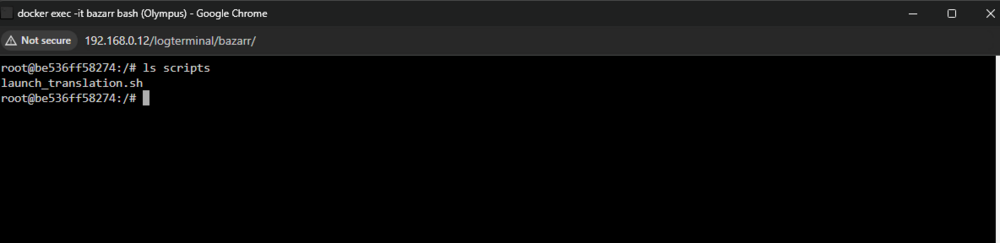
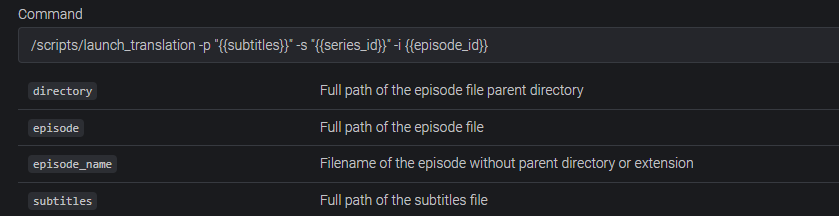
Hi everyone, I'm trying to have my containers to execute "Post-process" scripts but they struggle to see the scripts. Here's an example with Bazarr. Im quite a newbie so I'll go through what i did step by step This reddit post has the script i want to execute. I downloaded the script. added my localip and API key from bazarr -then added a bind mount from host to container "-v /mnt/user/appdata/scripts/launch_translation.sh:/scripts/launch_translation.sh'" and bazarr console sees it However when I add that script to the post process tab it doesnt seem to work I put the sh extension to test it but still no luck Any help would be greatly appreciated. Thank you!


-
Hey guys, I have a library of tv shows that only have english subs only. I would like to add spanish subtitles to them by translating the english ones. I was wondering if theres a script I can run to do then for all the episodes as it is a very long list. Thank you
-
Hi, Just updating this thread in case someone else encounters this issue I hope that helps you~ I'm fairly new to this, This issue popped up for me after doing some upgrades to my server and I think that's what triggered the errors. I did not think that the upgrades caused the issues because they didn't pop up instantly after booting the server. I understand the mistakes I did might be silly lol please bare with me.. Timeline: about a week ago I upgraded my server CPUs from E5-2630v3 to E5-2699v4 everything worked perfectly - no issues at all.. 5 days later I installed an Intel Arc310 things still worked fine - a day later 2 drives went from being healthy to disabled - no prior warnings. Rebooting the server got the HDDs to show up as "not installed contents emulated" The drives would not format, not pre-clear.. nothing I still need to figure out if they're completely dead.. @JorgeBgot me thinking about hardware issues and I thought maybe the new parts are causing issues.. went back to the motherboards manual to find out that the current ram set-up is not compatible with the new cpus or at least that's what I think fried the drives. My current ram set up is 4x8gb 2133mhz, manual states the v4 generation require 2400mhz. I understand Im getting a bit beyond unraid support, but I would really appreciate some help when it comes to Ram slotting https://prnt.sc/AfQlpeV9Dvio Here it says where the slots should be placed however, there is another chart saying how to populate the modules? https://prnt.sc/AGku2WcmRe2d I cant really figure out what they mean by this chart https://prnt.sc/b_4Mr8XaXNqX This is a picture of the motherboard appreciate any help. Thanks!
-
Yes. It says contents are emulated and I can access them through /mnt/disk9 and /mnt/disk14/ Its just weird because they both went from being healthy to dead within a few minutes!


-
I've tried swapping the cables again and got the same results, these must be truly dead. Unfortunate [medium or hardware error (serious)] This error keeps coming up
-
This has no output at all No output fdisk: cannot open /dev/sdk: Input/output error
-
smartctl 7.4 2023-08-01 r5530 [x86_64-linux-6.9.5-thor-Unraid+] (local build) Copyright (C) 2002-23, Bruce Allen, Christian Franke, www.smartmontools.org === START OF INFORMATION SECTION === Vendor: WDC Product: WUH721414AL4204 Revision: C240 Compliance: SPC-4 User Capacity: 14,000,519,643,136 bytes [14.0 TB] Logical block size: 4096 bytes LU is fully provisioned Rotation Rate: 7200 rpm Form Factor: 3.5 inches Logical Unit id: 0x5000cca264979aac Serial number: 9RJPBP8C Device type: disk Transport protocol: SAS (SPL-4) Local Time is: Mon Aug 19 08:11:03 2024 PDT device Test Unit Ready [medium or hardware error (serious)] A mandatory SMART command failed: exiting. To continue, add one or more '-T permissive' options. I added -T permissive to the command this came out smartctl 7.4 2023-08-01 r5530 [x86_64-linux-6.9.5-thor-Unraid+] (local build) Copyright (C) 2002-23, Bruce Allen, Christian Franke, www.smartmontools.org === START OF INFORMATION SECTION === Vendor: WDC Product: WUH721414AL4204 Revision: C240 Compliance: SPC-4 User Capacity: 14,000,519,643,136 bytes [14.0 TB] Logical block size: 4096 bytes LU is fully provisioned Rotation Rate: 7200 rpm Form Factor: 3.5 inches Logical Unit id: 0x5000cca264979aac Serial number: 9RJPBP8C Device type: disk Transport protocol: SAS (SPL-4) Local Time is: Mon Aug 19 08:12:23 2024 PDT device Test Unit Ready [medium or hardware error (serious)] SMART support is: Available - device has SMART capability. SMART support is: Enabled Temperature Warning: Enabled Read Cache is: Enabled Writeback Cache is: Enabled === START OF READ SMART DATA SECTION === SMART Health Status: OK Current Drive Temperature: 0 C Drive Trip Temperature: 0 C Elements in grown defect list: 4


