





jo3see
Members
-
Joined
-
Last visited
Everything posted by jo3see
-
THANK YOU for this! I have been searching for this for hours!
-
I'd love to be able to do that, but I can find no tutorial on how to quickly open, save, and close files (particularly .conf files for swag) within the Unraid GUI itself. I even struggle with trying to use the File Manager plugin itself to copy / delete files. Right now, I don't even have a clue how I'm supposed to backup the appdata folder to my NAS via SMB. Previously in Windows, I'd just use robocopy and be done with it. I'm really struggling with trying to enjoy Unraid and this has been a heck of an uphill battle for me considering how much easier it was for me to set all of this up within a Windows environment. This is a nightmare for me. I make 50 edits to a swag .conf file to try to get something to work and the quickest way is to edit these files via notepad through a SMB share mapped to appdata. Is there a way to do this just as quick within Unraid's UI? I'm not a fan of CLI and I never will be. I'm trying to make this as simple as it was on Windows. I find myself needing to directly access and edit files on the appdata share daily.
-
This seems to have fixed the issue, although a silly workaround. Now I have an additional profile on all of my Windows devices just to access shares on Unraid.
-
I'll give this a shot and report back, thank you for your reply!
-
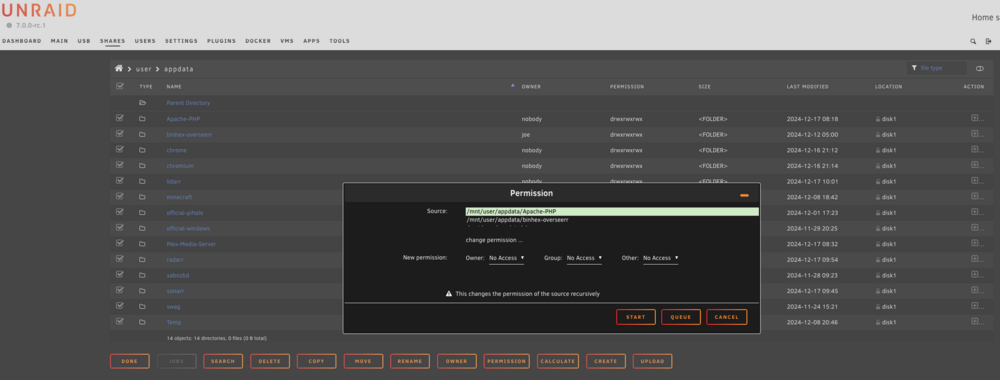
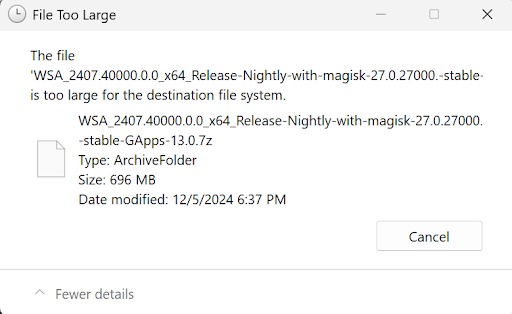
Hello everyone. I have another small problem I'm not sure what's causing it. I'm currently running 7.0.0-rc1. This happened previously on 6.X as well, I just always dealt with it manually. There are several (daily) instances where the permissions for my any share on my array reverts back to No Access, which ends up blocking me from read/write access to the share through SMB. To remedy this, I have to go in the share settings in Unraid and change them to Read/Write and hit save. (See attached photo 1). How do I keep this from happening - OR - how do I find out what's making this happen? Nothing in the logs stick out and I'm not entirely sure which log may be beneficial here, so please let me know. I also have issues when trying to copy files through the SMB share within Unraid. Let me explain. I use a Ubiquiti NAS, and only use Unraid for a Docker vessel. I've created a SMB share within Unraid for Docker to reach my NAS for obvious reasons. I don't utilize a direct drive mapping to my NAS, but rather use a SMB share through Unraid for this because I use Tailscale while working remotely for access to this setup. I've not yet been successful in setting up an exit node within Tailscale to reach other devices on my network. The issue is best described in the second photo. Oddly, when trying to send files to my NAS through the Unraid share, it says any file is too big for the file destination. If I quickly create a drive mapping directly to my NAS, I do not have this problem. It only happens when utilizing the created drive mapping through Unraid. Again, I'm not sure what error logs could be beneficial here either. Can anyone offer advice on this and what I'm doing wrong?
-
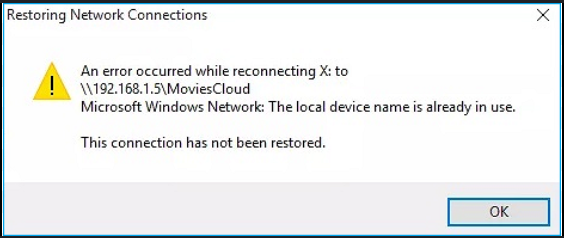
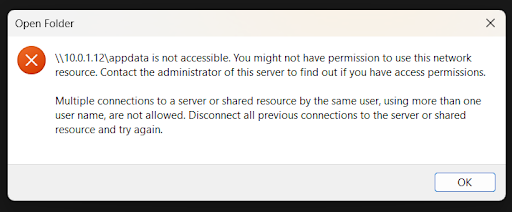
Hello everyone. Running Unraid 7.0.0-rc1. Aside from a couple of small issues, it's running rather well. Today's issue is this: I set up a share (can either be a share hosted on the Unraid array (which in my case is only used for containers and their respective data) or through an SMB share - mapped SMB shares from my NAS). Once I set up the user, then it's as simple as mapping the drive in Windows / macOS with the required authentication and I hit the ground running. There's only one problem. Those mapped drives only work for an unspecified amount of time, and the only way to regain access to these SMB shares is to disconnect the share and reconnect. Sometimes I need to reboot to remap the drive. I've had to reboot both Unraid as well as my Windows system to resolve this. I can't find a common denominator to this madness. This leads me to think this is some kind of authentication issue, but I don't know how to figure this out. It's super annoying and basically pointless to map a drive, as I can't get them to 'stick'. Things of note: 1. I don't know what logs here may be beneficial, so please let me know. 2. I'm utilizing compatible 10G SFP+ ports between Unraid and my system with the drive mappings. Not sure if there's something in the configuration that may be causing the issue, but I also experience this in Wi-Fi connected devices, so I think I can rule that out. 3. The normal error I get once this happens is (Error 1 photo attached) Microsoft Windows Network: The local device name is already in use." 4. The other error I sometimes get is (Error 2 photo attached) Multiple connections to a server or shared resource by the same user, using more than one user name, are not allowed." 5. Sometimes, I have to reboot either the client OS or Unraid in its entirety to resolve. 6. This happens with both drive mappings between the Unraid array as well as a SMB share within Unraid. 7. This does not happen if I map a SMB share directly to my NAS. It's strictly related to Unraid. The way I have shares structured is with only 2 accounts. I've created 1 user called "unraid" so I can map the NAS shares to Docker containers. I do not have any problems with drive mappings within Docker. The other is called "joe" and this is the one I have consistent issues with. I've also created another user to see if the problem occurs, and it does. What am I doing wrong? Any help is greatly appreciated!
-
I have been running a home server for years on Windows and my friend finally got me on board with Unraid / Docker when I recently upgraded hardware, however I am having multiple networking issues after migrating my applications, and I'm confident I'm doing something wrong. I have been working for weeks on trying to figure out my problem and not sure what it is. Because I need the ability to utilize Intel ARC GPU for Plex transcoding, I am running 7.0.0-rc1. My friend told me to create a proxynet (primarily for Swag) and just use an available port on the host IP for anything I want to run in Docker, then call it up by the Unraid host IP and whatever port I selected. That works great for containers that I want to access internally, but I have a couple of things that I want to set specific IP's for (like PiHole and an Apache) to make it easy to map things externally. Example: My network is 10.0.1.XXX. Unraid is running 10.0.1.12. I have several things running successfully on 10.0.1.12 utilizing their specific ports for sonarr, radarr, etc. etc. I can hit them both locally via the WebUI (internal IP / port) as well as thru Swag externally. I have PiHole running on its own IP, 10.0.1.9. It's running, no errors in the log (attached). I am unable to ping the container locally, nor am I able to hit 10.0.1.9/admin internally. Things I've tried: 1. Different IP 2. Different Port 3. Removing and redeploying the container 4. Confirmed I can hit it locally utilizing the host IP I also have an Apache server running as well with its own IP and having the same symptom. This has to be something missing that I don't fully understand. Because I'm using IP addresses instead of URL's, I'm ruling out DNS as an issue. I've tried disabling PiHole but there's no difference in symptoms utilizing my ISP's DNS servers. I'd appreciate any advice anyone could offer. Once I get beyond this, other than other strange SMB share issues I still can't figure out, I should be good. PiHole Log.rtf
-
This has been an excellent container for me for the past several months for our family server, however this afternoon the server will no longer load and i'm fully up to date. This is my log file: text error warn system array login [mc-image-helper] 16:03:36.791 ERROR : 'install-fabric-loader' command failed. Version is 1.40.6 reactor.core.Exceptions$ReactiveException: java.net.UnknownHostException: Failed to resolve 'meta.fabricmc.net' [A(1)] at reactor.core.Exceptions.propagate(Exceptions.java:410) at reactor.core.publisher.BlockingSingleSubscriber.blockingGet(BlockingSingleSubscriber.java:102) at reactor.core.publisher.Mono.block(Mono.java:1779) at me.itzg.helpers.fabric.FabricLauncherInstaller.installUsingVersions(FabricLauncherInstaller.java:70) at me.itzg.helpers.fabric.InstallFabricLoaderCommand.call(InstallFabricLoaderCommand.java:93) at me.itzg.helpers.fabric.InstallFabricLoaderCommand.call(InstallFabricLoaderCommand.java:15) at picocli.CommandLine.executeUserObject(CommandLine.java:2045) at picocli.CommandLine.access$1500(CommandLine.java:148) at picocli.CommandLine$RunLast.executeUserObjectOfLastSubcommandWithSameParent(CommandLine.java:2465) at picocli.CommandLine$RunLast.handle(CommandLine.java:2457) at picocli.CommandLine$RunLast.handle(CommandLine.java:2419) at picocli.CommandLine$AbstractParseResultHandler.execute(CommandLine.java:2277) at picocli.CommandLine$RunLast.execute(CommandLine.java:2421) at picocli.CommandLine.execute(CommandLine.java:2174) at me.itzg.helpers.McImageHelper.main(McImageHelper.java:161) Suppressed: java.lang.Exception: #block terminated with an error at reactor.core.publisher.BlockingSingleSubscriber.blockingGet(BlockingSingleSubscriber.java:104) ... 13 common frames omitted Caused by: java.net.UnknownHostException: Failed to resolve 'meta.fabricmc.net' [A(1)] at io.netty.resolver.dns.DnsResolveContext.finishResolve(DnsResolveContext.java:1150) at io.netty.resolver.dns.DnsResolveContext.tryToFinishResolve(DnsResolveContext.java:1097) at io.netty.resolver.dns.DnsResolveContext.query(DnsResolveContext.java:455) at io.netty.resolver.dns.DnsResolveContext.onResponse(DnsResolveContext.java:662) at io.netty.resolver.dns.DnsResolveContext.access$500(DnsResolveContext.java:70) at io.netty.resolver.dns.DnsResolveContext$2.operationComplete(DnsResolveContext.java:513) at io.netty.util.concurrent.DefaultPromise.notifyListener0(DefaultPromise.java:590) at io.netty.util.concurrent.DefaultPromise.notifyListeners0(DefaultPromise.java:583) at io.netty.util.concurrent.DefaultPromise.notifyListenersNow(DefaultPromise.java:559) at io.netty.util.concurrent.DefaultPromise.notifyListeners(DefaultPromise.java:492) at io.netty.util.concurrent.DefaultPromise.setValue0(DefaultPromise.java:636) at io.netty.util.concurrent.DefaultPromise.setSuccess0(DefaultPromise.java:625) at io.netty.util.concurrent.DefaultPromise.trySuccess(DefaultPromise.java:105) at io.netty.resolver.dns.DnsQueryContext.trySuccess(DnsQueryContext.java:308) at io.netty.resolver.dns.DnsQueryContext.finishSuccess(DnsQueryContext.java:299) at io.netty.resolver.dns.DnsNameResolver$DnsResponseHandler.channelRead(DnsNameResolver.java:1491) at io.netty.channel.AbstractChannelHandlerContext.invokeChannelRead(AbstractChannelHandlerContext.java:444) at io.netty.channel.AbstractChannelHandlerContext.invokeChannelRead(AbstractChannelHandlerContext.java:420) at io.netty.channel.AbstractChannelHandlerContext.fireChannelRead(AbstractChannelHandlerContext.java:412) at io.netty.handler.codec.MessageToMessageDecoder.channelRead(MessageToMessageDecoder.java:103) at io.netty.channel.AbstractChannelHandlerContext.invokeChannelRead(AbstractChannelHandlerContext.java:444) at io.netty.channel.AbstractChannelHandlerContext.invokeChannelRead(AbstractChannelHandlerContext.java:420) at io.netty.channel.AbstractChannelHandlerContext.fireChannelRead(AbstractChannelHandlerContext.java:412) at io.netty.channel.DefaultChannelPipeline$HeadContext.channelRead(DefaultChannelPipeline.java:1357) at io.netty.channel.AbstractChannelHandlerContext.invokeChannelRead(AbstractChannelHandlerContext.java:440) at io.netty.channel.AbstractChannelHandlerContext.invokeChannelRead(AbstractChannelHandlerContext.java:420) at io.netty.channel.DefaultChannelPipeline.fireChannelRead(DefaultChannelPipeline.java:868) at io.netty.channel.epoll.EpollDatagramChannel.processPacket(EpollDatagramChannel.java:662) at io.netty.channel.epoll.EpollDatagramChannel.recvmsg(EpollDatagramChannel.java:697) at io.netty.channel.epoll.EpollDatagramChannel.access$300(EpollDatagramChannel.java:56) at io.netty.channel.epoll.EpollDatagramChannel$EpollDatagramChannelUnsafe.epollInReady(EpollDatagramChannel.java:536) at io.netty.channel.epoll.EpollEventLoop.processReady(EpollEventLoop.java:501) at io.netty.channel.epoll.EpollEventLoop.run(EpollEventLoop.java:399) at io.netty.util.concurrent.SingleThreadEventExecutor$4.run(SingleThreadEventExecutor.java:997) at io.netty.util.internal.ThreadExecutorMap$2.run(ThreadExecutorMap.java:74) at io.netty.util.concurrent.FastThreadLocalRunnable.run(FastThreadLocalRunnable.java:30) at java.base/java.lang.Thread.run(Unknown Source) Caused by: io.netty.resolver.dns.DnsErrorCauseException: Query failed with SERVFAIL at io.netty.resolver.dns.DnsResolveContext.onResponse(..)(Unknown Source) [init] Running as uid=1000 gid=1000 with /data as 'drwxrwxrwx 1 1000 100 4096 Dec 1 15:48 /data' [init] Resolving type given fabric [init] [ERROR] Failed to installFabric launcher given 1.21, LATEST, LATEST I'm rather new to the Unraid world, so I don't even know where to begin. Would anyone be able to assist? This server container is the only one I know with a variable that lets you select which version of MC server you wish to run. Right now, I need to stay on 1.21 due to compatability. All other server options within Unraid auto update to the newest version.
-
I want to THANK YOU for posting this. I have spent hours today trying to figure this out. I could see a codec fail, but I've recently switched my server from Windows to a docker/unraid setup. Things immediately started working after following this.
-
Hi there. I have been on an incredible unlucky journey to getting a fabric server up and running. I've been running my own vanilla server for quite some time, but this is really kicking my butt. I've gotten used to using the Console by just selecting it in Docker, but your version is missing, so I'm trying to use the rcon capabililty. I've downloaded mcrcon and every time I try to connect, it says connect failed. This is on a local server with all the defaults. In the server.properties, I've left the rcon.password=minecraft and rconport=25575 defaults, but still no luck. What am I doing wrong? As silly as this is, I'm trying to give myself /op so I can run chunky commands at the server level.

