





Yusseiin
Moderators
-
Joined
-
Last visited
Everything posted by Yusseiin
-
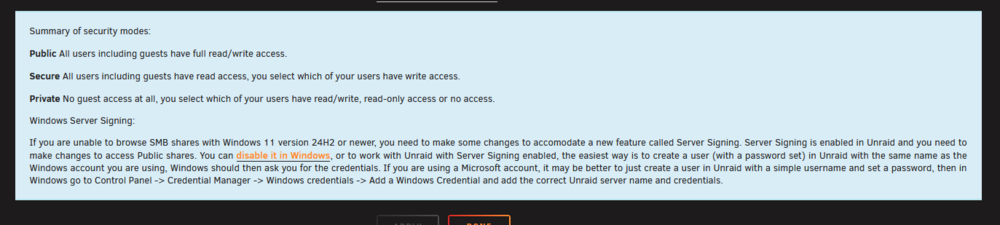
il livello di sicurezza cambia solamente se vuoi garantire gli accessi ad utenti guest o no, ho già sentito parlare di un problema del genere ma non per Root. Solitamente root accede sempre. Puoi postare la diagnostica https://docs.unraid.net/unraid-os/troubleshooting/diagnostics/capture-diagnostics-and-logs/ così possiamo controllare meglio la radice del problema.
-
Se provi ora con l'utente di root ti fa entrare in SMB?
-
Mi sto perdendo. Faccio un recap. Nella dashboard di Unraid puoi accedere solamente con l'utente Root gli altri utenti non possono accedervi. Per le cartelle in SMB invece puoi creare ulteriori utenti che vi possono accedere. Tu adesso se usi l'utente di root riesci ad accedere alle cartelle smb ?
-
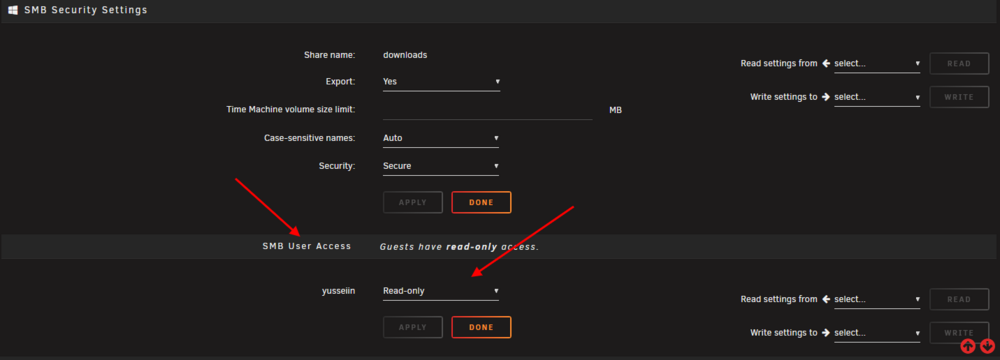
Come hai impostato lo share?
-
Ciao rollerine e benvenuto :) Non ho ben capito dove non riesci ad accedere, se su smb o sulla gui di unraid. Se in smb hai impostato l'utente dallo share?
-
Se clicchi sull'iconea arancio dell'errore nella dashboard puoi "accettare l'errore". L'importante che lo SMART non restituisca errori :)
-
Lascia che faccia i suoi giri tranquilli
-
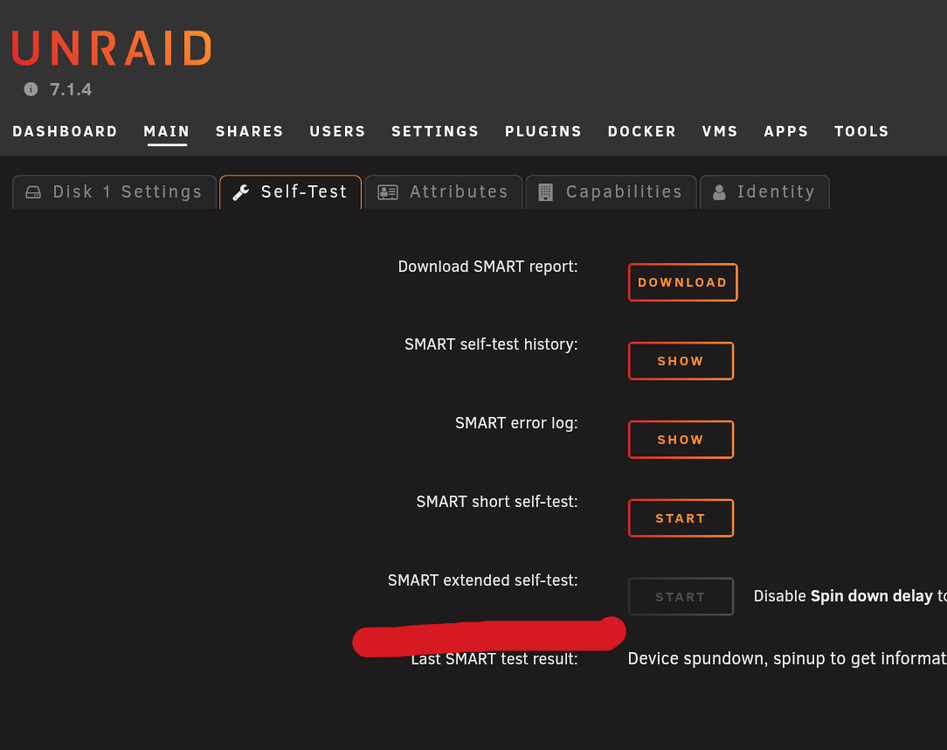
Clicchi sul disco che hai in errore poi vai in self test e poi extended test
-
Ma non ho capito, dopo che hai cambiato i sata hai rifatto un test completo o no? Se no gli errori sono ancora i vecchi, se si è hai ancora errori allora é altro hardware
-
Un test completo
-
Ma hai rifatto un check completo?
-
ma sempre errore UDMA CRC error ?
-
Nel gruppo telegram hanno risolto con questi di marca: https://amzn.eu/d/eQWeI8z L'altro errore invece capita se hai spento in malo modo. Cambia i cavi e rifai i check di parità.
-
In che senso hai provato un attributo alla volta? Se vai sul disco in questione sotto Attributi hai UDMA CRC error count in errore? Comunque l'errore UDMA CRC non è un problema del disco ma solitamente un problema ai cavi o all alimentazione dei dischi https://docs.unraid.net/unraid-os/troubleshooting/diagnostics/udma-crc-errors/ Controlla bene i cablaggi e nel caso sostituisci i cavi SATA
-
set it to 1, it will set it to 1 KB
-
Ciao Orazio, ti giro questa guida su come leggere i parametri SMART. https://ma.juii.net/blog/interpret-smart-attributes Conta che il valore RAW indica un valore completo, quindi con tanti numeri dopo la virgola, ed è un valore incrementale mentre il normalizzato è un valore approssimato ed è decrescente per entrambi il produttore dei dischi ha dei valori limite che non è detto che siano uguali ed è per questo che ti trovi questa incongruenza. Su quale parametro sei fuori?
-
You are missing the --create flag on the cmd unraid-api apikey --create --name "Home Assistant Integration" -r ADMIN -p "ARRAY:read,INTO:read,SHARE:read" You can easily create the API Key in the WEB UI under Settings → Management Access → Developer Options

-
Have you installed the plugin? For UNRAID PRE-7.2 the Unraid API is not build it in. Read the docs on how to install and enabled it https://docs.unraid.net/API/
-
Can you provide some logs of the mover and for Plex? The logs for the mover are under /tmp/ca.mover.tuning after you enabled it from the sheduler tabs.
-
I think it is better to start on watching some YouTube video. https://youtube.com/@spaceinvaderone and https://youtube.com/@ibracorp can guide you on the basic setup of your unraid server ( folder permission, management and so on ). Then for the photos you can follow the Guide that I have sent to you. There will be no straight tutorial for what are you searching but a lot of different video/tutorial to understand how UNRAID works and how to do what you are trying to accomplish :)
-
I understand, yeah indeed moving in different folder should be the faster and easier approach :)
-
Ahhaha mine too :) 2008 and still rocking 💪 I use Smart Audiobook Player. I don't know Piccard but can't you have two version of it one for music and one for audiobooks with different moving rules? Like two distinct app? Like I have 2 sonarr ones for Classic TV Series and ones for Animes because it is hard to setup one for both function.
-
Yes for me it is better to move it in the audiobook folders, than you can add It in your original Plex music library or create a new ones with only audiobooks. I also listen to them in my car but I do not have Android Auto so I just start them from the audiobook app.
-
What software are you using for the automoves? I think imo it will be better to have Audiobook and Music in different root folder like: Audio |- Music |- Audiobooks So that in Audiobookshelf you will pass only the Audiobooks Folder and in Plex you will still be able to pass both passing the Audio Root folder. In my Unraid i have different folder for music and audiobooks so that i can easily managed them since they are used in different application.
-
Hi @d100200 , For the Phots/Video Management you can use https://immich.app/ where you can find the guide on how to setup it directly in its documentation https://docs.immich.app/install/unraid/ For step 1 i am missing if you want to move the files only or all the HDD.




