





Yusseiin
Moderators
-
Joined
-
Last visited
Everything posted by Yusseiin
-
Hi, someone has already tried this on the new internal boot ? The old "flash backup" will still backup the internal boot too ?
-
Is the a way to order the Folder once they are created? Like if i want to have "Database" at the bottom ?
-
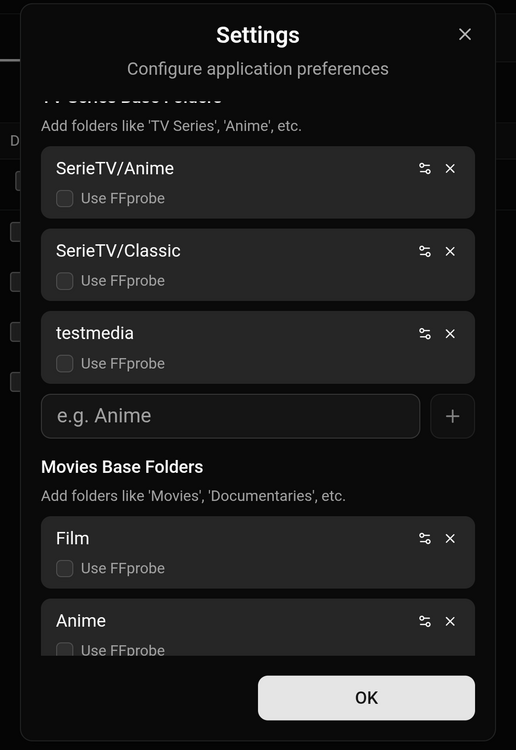
In the settings you can set default path for movies and tv series. You can have multiple path as you like in the image i have SerieTV/Anime and SerieTV/Classic already configured i can choose them in the rename process. It should move and rename .srt, .ass too, i will check this. For now there is no plan on adding new features since for me it has all the things i need and the other user that are using it are thinking the same. I am open to any suggestions to improve it :) It won't have any automatic feature, it is meant to be a "Mobile FileBot with the ability to copy?move", it is not meant to be a copy of *arr.
-
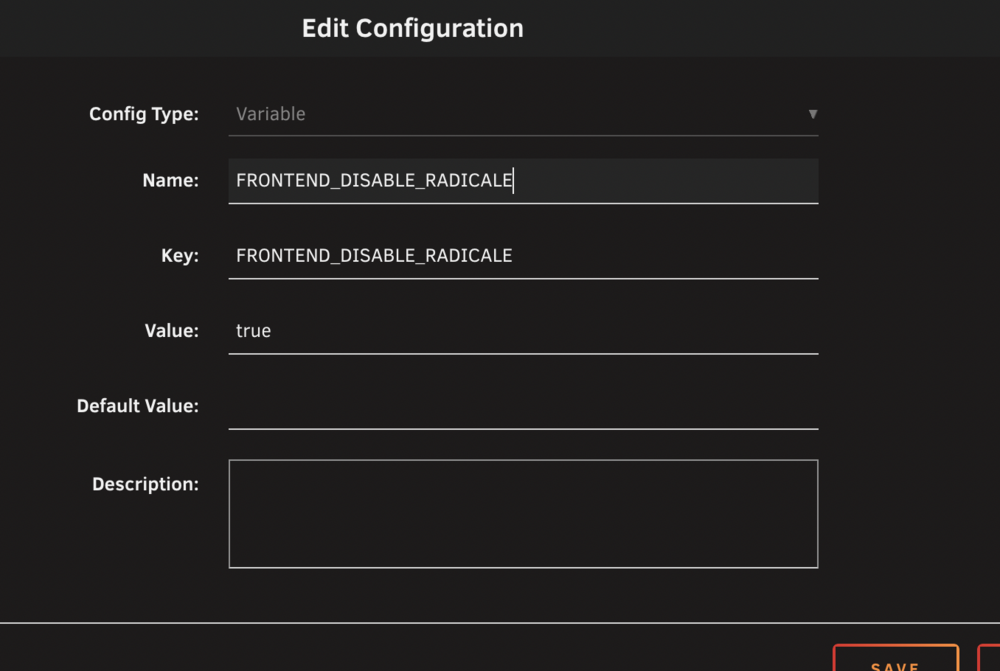
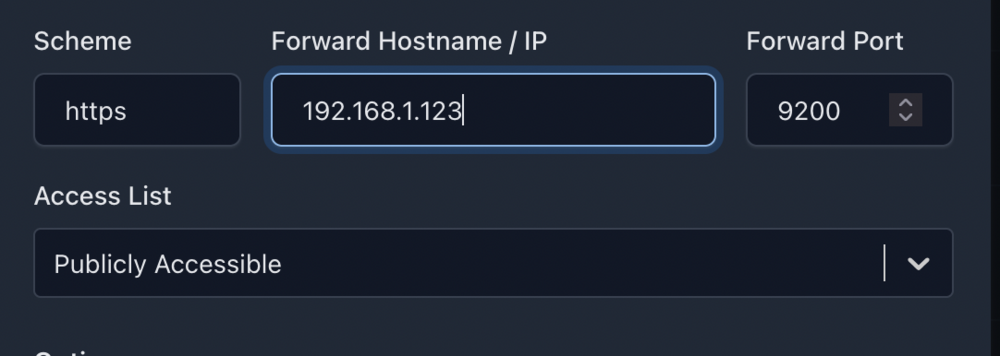
OpenCloud è una piattaforma di file self-hosted che consente di archiviare, organizzare e condividere file direttamente dal proprio server, con un'interfaccia web pulita che funziona bene per la gestione quotidiana di documenti e file multimediali. Offre account utente, gruppi e controllo dei permessi adeguati e semplifica la creazione di link di condivisione pubblici senza dover ricorrere a servizi di archiviazione di terze parti. È inoltre possibile estenderla con applicazioni web opzionali che compaiono nell'app switcher e, se in seguito si desidera una collaborazione completa sui documenti, è possibile integrare servizi come Collabora o OnlyOffice. Su Unraid in particolare, si adatta perfettamente a una configurazione che privilegia le prestazioni: mantiene la configurazione su SSD/cache per garantire la reattività, mentre archivia i file di grandi dimensioni sull'array per garantire la capacità. Creare cartelle e impostare i permessi (terminale Unraid)Aprite il terminale di Unraid e digitate un comando per volta: Creazione cartelle # Creare la cartella web app per installazione app aggiuntive (per OpenCloud “App Store” downloads che vanno installate a mano) # Cambiate i permessi a UID/GID 1000 # Cambiate i permessi della cartella a 751 (solo cartelle) Installate l app OpenCloud dal CA, va scelta quella di joly0 Nella configurazione dovete cambiare l' OpenCloud URL con il vostro dominio, l'admin password con una password a vostra scelta e aggiungere una nuova variabile FRONTEND_DISABLE_RADICALE impostandola a true Create il reverse proxyA seconda del servizio che usate create la regola di reverse proxy attenzione che il servizio è in https. Ad esempio con Nginx Primo login From Admin Settings, you can add users, groups, and manage spaces. Installazione “App Store” web apps (Draw.io, External Sites, etc.) OpenCloud’s App Store scarica un zip/archive, ma noi dobbiamo scaricarlo manualmente e metterlo nella cartella che abbiamo creato prima: Ora vediamo un esempio per Draw.io Create una cartella (example: Draw.io) Esempio di come deve essere (il nome dipende dall app che avete scaricato): Riavviate OpenCloud e la nuova app sarà presente nell'elenco app.
-
Si male che vada rimetti la starter dentro e riparti da dov'eri. Una volta modificato il config della chiavetta nuova ti basta metterla nel NAS.
-
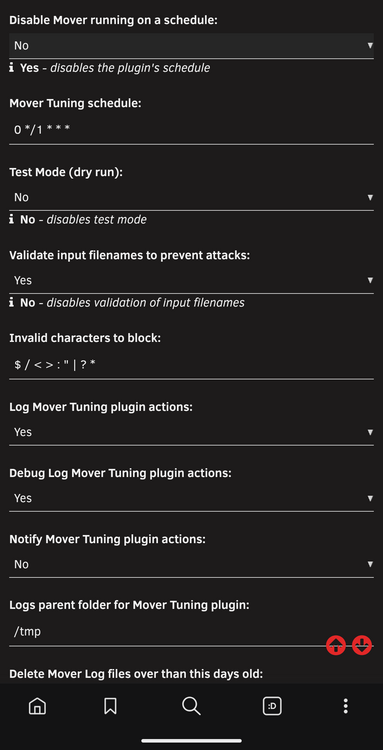
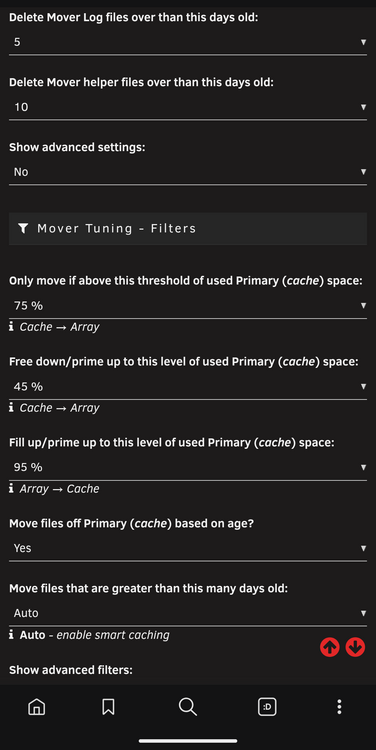
There were no bad settings, the problem was that i have 75% threshold and an ignore file. If your cache reach > 75% every x time ( 1 hours in my case ) the mover tries to empty it. This behavior is intended. The problem is that if this > 75% is made with file that are being ignored by the mover ( they are in the ignore list or they are being used ) the moving is getting triggered making your array drive spinning, but it wont move anything. This is getting an infinite loop until the cache reach a value <75%
-
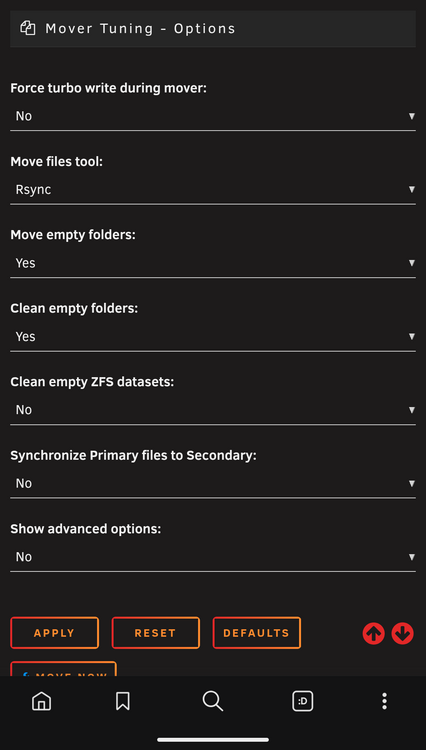
It was him* My settings are this
-
The disks always spun up at the same time, which was the same time the mover was called up. To figure this out, I stopped any app that could access the files (*arr, plex, etc.) and watched the behavior. In the end, it was still doing it, so I also stopped the mover, and in the end, it was him. To solve this, I increased the mover thresholds.
-
Both does not show who is accessing the file but knowing what file is getting called can lead to that. If you have no file showing but disk still spinning you could be in the same situation as me. In my case it was ca.mover that was trying to move file from cache to the array but since those file was in an ignored list or being used it was not able to move it, but it was still spinning the disk
-
Ciao Tiziano, Sarebbe stato più semplice fare l upgrade della tua Starter ad Unleashed e comprare una nuova starter :) Ora per non perdere la configurazione dovresti creare una nuova chiavetta con l unleshed, copiare da quella con lo starter il file config e sostituirlo in quello dell unleshed e poi scambiare le chiavette. Procedura un po' rischiosa ma funziona :) Fai il backup a tutto ciò che hai di importante prima di fare qualsiasi cosa.
-
I should have fixed the error, i think you where running it in HTTP but the cookie for the login was set on HTTPS only. Update it and try now
-
I will debug it, sorry for the problem
-
Is the settings.json being created in the config folder?
-
Application Name: WeightTracker Template: https://github.com/Yusseiin/unraid-templates/blob/main/templates/Weight_Tracker.xml Source container: https://github.com/Yusseiin/weighttracker Registry: https://hub.docker.com/r/yusseiin/weighttracker OverviewWeightTracker is a self-hosted mobile-first web application that helps you track your weight, water consumption, and fitness progress. Log daily entries with activity type and sleep quality, visualize trends with interactive charts, and customize everything to your preferences. FeaturesWeight Tracking - Log daily weight with activity type and sleep quality indicators Water Consumption - Track daily water intake with quick-add buttons (Cup, 0.5L, 1L) and custom amounts Progress Chart - Interactive line chart with time filters (1M, 3M, 6M, All) and statistics Custom Activities - Create up to 12 custom activities with 50+ icons and color options History Table - Compact table view with weight difference, activity icons, and click-to-edit Multi-User Support - Each user has their own data stored separately with admin/user roles Customizable Date Formats - 9 preset formats, custom patterns, 5 locales (EN, IT, DE, FR, ES) Unit Preferences - Support for kg/lb and ml/oz Dark Mode - Automatic theme switching based on system preference Mobile-First Design - Responsive UI with bottom drawers on mobile, dialogs on desktop Steps Tracking - Log daily steps with goal setting and progress visualization Blood Pressure Monitoring - Track systolic/diastolic readings with category indicators (Normal, Elevated, High) Medication Tracking - Log medication adherence with customizable medication presets and daily reminders Motivational Quotes - Daily inspirational quotes with show/hide toggle InstallationInstall from Community Applications or add the repository manually Set your config path: Config Path: Where your data will be stored (e.g., /mnt/user/appdata/weight-tracker) Access the app at http://your-server:3000 Login with default credentials: Username: admin Password: changeme Change your password in Settings and start tracking! Enjoy :)
-
Added in v0.0.23, i have translated all the text with Deepl, please let me know if any translation needs to be change. If you want you can even pull a change directly in the Github if you prefer https://github.com/Yusseiin/UnMove/blob/main/locales/de.json
-
Unfortunately not, i have contact zimacube on discord but they told me that they need more info to investigate the problem, but i cannot get more info from unRaid 😅 One other people on the discord has the same problem.
-
I can add it, it should not be a problem since Italian/English are working fine :)
-
Yes, it is more a Filebot 2.0 or just a simple file copy/mover that works from mobile. You can copy/move after renaming, or without renaming, multiple series/film renaming at the same time, mobile responsiveness
-
Congratulations :)
-
Oh my bad, now it is working. Hope it will updated with the filter and sortable logic like file activity v2
-
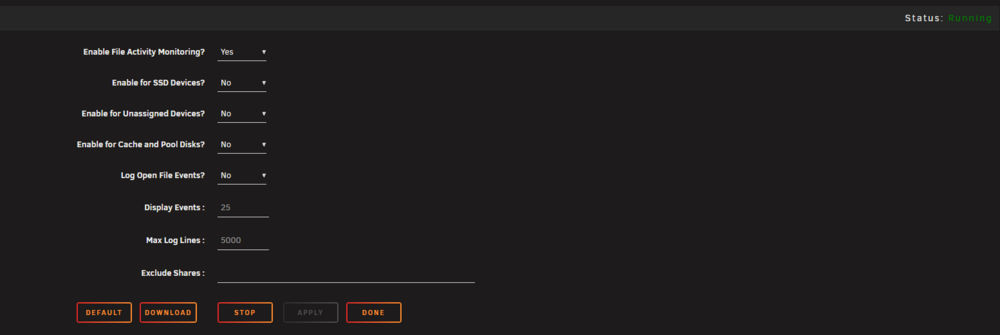
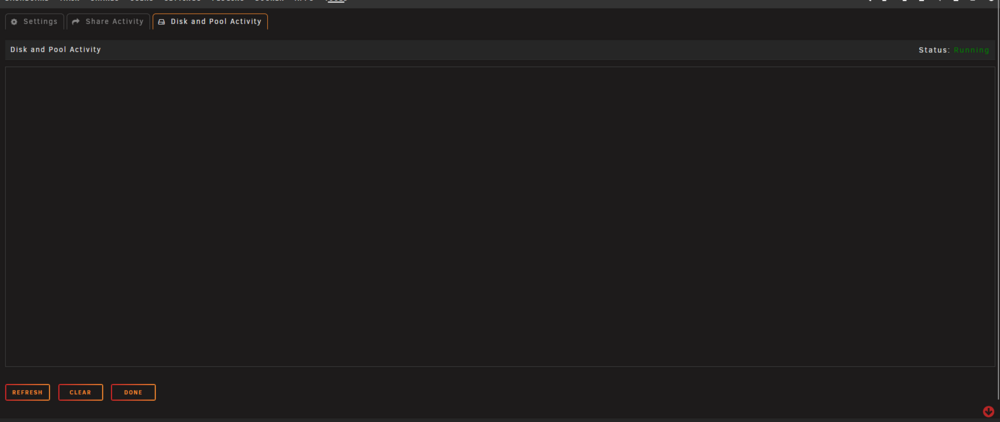
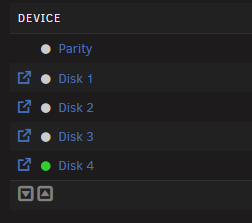
Sorry for ultra late reply, installed and i am gonna test it. Is indeed running, hope this will find what is making the disk spinning EDIT. : Still not working even with this. The test that i am doing is simple, all the disk stopped, i start a video from plex, one disk start spinning but file activity is not registering it.
-
Puoi provare con threadfin anche se l'idea è uguale
-
Figurati :) Buone feste e buon unRAID
-
Sicuramente è un argomento di interesse, se non nell immediato sicuramente lo sarà nel futuro per qualcuno che passerà di qua', non per forza italiano :) Se hai tempo e voglia fai pure una guida se no anche solo un post per raccontare l esperienza, ti ricordo se mai avessi bisogno di un supporto rapido che abbiamo un gruppo telegram molto attivo ti lascio il link nel caso Link canali ufficiali
-
Funzionerà tutto senza problemi. Unraid assegna i dischi in base al numero di serie, non alla porta o al punto di montaggio, quindi, a meno che il nuovo sistema non nasconda in qualche modo i numeri di serie i dischi, questi finiranno negli slot corretti. All'inizio forse è meglio se disabiliti l'avvio automatico dell'array all'avvio del sistema, in modo da poter verificare che tutto sia corretto.








