





s11
Members
-
Joined
-
Last visited
-
Hallo :) Genau, ich konnte es lösen indem ich im Bios die Sata Schnittstellen mit Hotplug=Disabled gesetzt habe. Ansonsten hätte ich aber noch den Kernel Boot Param gesetzt: ahci.mobile_lpm_policy=3 https://forums.unraid.net/topic/108966-strom-sparen-mit-powertop-stromverbrauch-von-unraid-verbessern/page/47/#findComment-1622876 Dann hätte ich geschaut ob es damit klappt. Hmm sonst könnte man noch versuchen das Bios vom Dell Board so hinzubiegen, dass du dort die Hotswapfunktion auf disabled setzen kannst. Aber ich weiß nicht ob es dafür gute Tools gibt. Ich habe ähnliches hier auf meinem Gigabyte Board gemacht, um die Powerlimits mit einer Xeon CPU wieder einstellen zu können bzw. das verweigert das Board regulär. Dafür habe ich dieses Tool hier genommen https://github.com/BoringBoredom/UEFI-Editor (ich weiß aber nicht ob Dell auf ein AMI Bios von der Stange hat) und mit flahrom geflasht. Aber das würde ich erst mal als sehr experimentell ansehen ;)
-
Hallo :) Ich weiß nicht wie sich das mit dem Github Issue verhält, aber bei mir war es definitiv messbar bzw. vor dem Unraid/Kernel update war das Setzen link_power_management_policy=med_power_with_dipm durch powertop problemlos möglich -> sata power management in powertop = good . Dadurch wurde C7 möglich. Verbrauch Idle ~11 Watt Nach dem Update war das Setzen nicht mehr möglich -> sata power management in powertop = bad . Dadurch wurde nur C2 möglich. Verbrauch Idle ~13-14 Watt Also gemerkt habe ich es hier schon ;)
-
Ah ok. Ja ich komme hier auch maximal auf C7 bzw. das liegt hier auch ein der PCIe Karte. Ich habe hier allerdings einen Adapter drinne, welcher mir die x16 Lanes aufteilt -> https://www.amazon.com.be/-/en/Bewinner-Expansion-Compatible-Double-Personal/dp/B0BMWS83R9 Ohne die Karte wird es hier auch C10. Ich denke damit muss man sich dann abfinden bzw. das viele PCI(e) Karten keine tiefen C-States zulassen bzw. in diesem Fall sind es wohl auch die NVMe's die über die Karte direkt durchgeschliffen werden. PowerTop 2.16 habe ich hier noch nicht laufen. Ach so, um eine schnelle Analyse zu erhalten kann man auch einfach mal die Ausgaben von dmesg und/oder lspci einer KI reindrücken ;) So lange da nichts empfindliches an Daten drinne steht (bzw. sollte eigentlich nicht) erhält man so recht schnell gute Anhaltspunkte. Zumindest war es bei mir vorhin so.
-
Update: In Powertop sieht nun wieder alles gut aus hier 😀 Zuvor konnte Powertop das Sata PowerManagement nicht korrekt setzen bzw. nur: link_power_management_policy: max_performance Das ganze war im KernelLog ersichtlich per dmesg: 0.737130] ata1: SATA max UDMA/133 abar m2048@0xa1715000 port 0xa1715100 irq 134 lpm-pol 1 ext Die Sata Hosts wurden als extern (Das ext am Ende der Zeile) behandelt, da ich diese im Bios mit Hotplug=enabled gesetzt hatte. Im älteren Kernel war die Policy für das PowerManagement und external Sata Hosts wohl nicht ganz so restriktiv. Nach umsetzen im Bios auf disabled kann powertop nun wieder /sys/class/scsi_host/host.../link_power_management_policy: med_power_with_dipm setzen. Somit sollte sich das erledigt haben bzw. das Problem waren hier zumindest Bioseinstellungen.
-
Hmm, das gleiche bei mir seit Update auf 7.3: Bad Enable SATA link power management for host2 Bad Enable SATA link power management for host3 Bad Enable SATA link power management for host0 Bad Enable SATA link power management for host1 Und als C-State wird nur noch Level 2 erreicht und nicht mehr 6 oder 7 wie davor. Mal gucken.
-
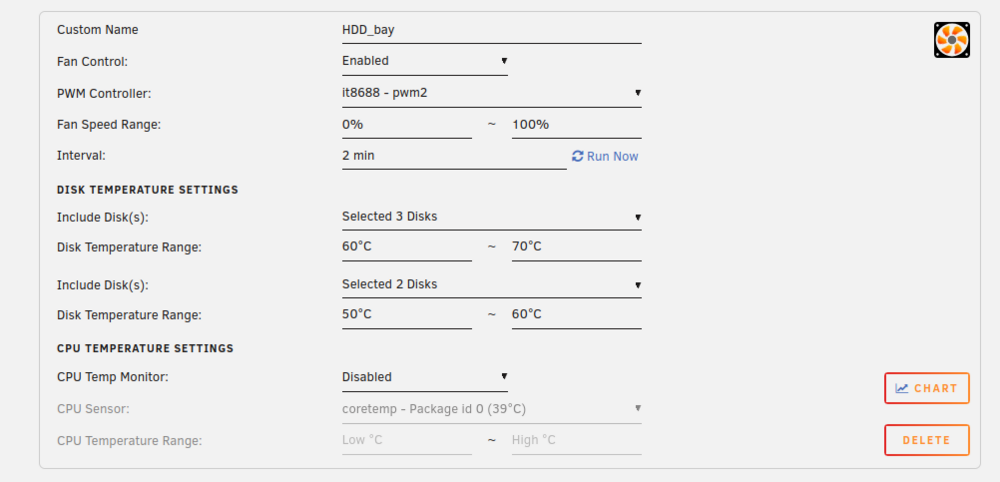
Hi 😀 Maybe another feature request: Would it be possible to have multiple disk temperature settings per fan? Which looks like (maybe more generic so not 2 settings limited like I did in this mock🫠): Because I have e.g. the situation that a specific fan is cooling two different types of storage so HDD and SSD😉 Greetings
-
Not a problem :) Im looking forward 👍 I thought about creating a PR but unfortunately I felt not that familiar with SmartAttibutes and if there are standards for different types of drives, so if its always right to have Temperature_Celsius for HDDs or Airflow_Temperature_Cel for Sata SSDs.
-
Hi :) Yes the [M2_bay_right_side] and [M2_bay_left_side] PWM values are totally fine because I configured it like that so the fan should not spin. This is all right :) It was just the issue with my HDD_bay where I have no HDD drives but SSD drives😉 It seems the awk command used in your plugin is not able to parse the smart attribute by its name correctly. I created a more or less detailed issue in your repository -> https://github.com/ck9393/fanctrlplus/issues/23#issue-3265817330
-
Hi :) Thank you for this plugin, which also recognizes my nvme temps correctly compared to the autofan plugin. But unfortunately it doesn't recognize my array data disk temps (the HDD bay): Jul 23 01:12:40 nas fanctrlplus: [M2_bay_right_side] Temp=33°C → PWM=0 → RPM=0 Jul 23 01:12:40 nas fanctrlplus: [HDD_bay] Temp=0°C → PWM=0 → RPM=0 Jul 23 01:12:40 nas fanctrlplus: [M2_bay_left_side] Temp=28°C → PWM=0 → RPM=0
-
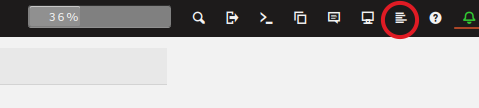
Hi 🙂 Yes you asking the right question. I like and hate Unraid. it feels so unpolished in many ways. No general information panel or view or some generic automatic integration for plugins and show related log information😮💨 Anyway to answer your question: You will find those log outputs when you enable autofan and then take a look at syslog. You will find recent syslogs in top right menu here -> Or in the "Tools" section here -> Or on command line you can filter for logs like e.g.: less /var/log/syslog.2 | grep autofan

-
I have also issues with this plugin. Got currently some alerts like: BLAKE3 hash key mismatch, /mnt/.../fileA.txt 1e3f8cf2153ccfe4ed87a42e7d2508ada78dfe7fba6da3ed75c292eb9fa4236e /mnt/.../fileB.txt is corrupted ... Looks like the tool compares the wrong file hashes 😑The files itself are fine and valid. I think for me the best option would be to just change the FS of the array to btrfs where I have the scrubbing possibility. So you don't need to relay on plugins.
-
Regarding Autofan I have again some issues with unraid 7.1.4. Maybe it was also before the case. It seems like the temp of "nvmeXnX" drives is not correctly detected. For my sata ssd drives temp retrieving works. In the logs I can only see 0C for the nvme drives: autofan: Highest disk temp is 0C, adjusting fan speed from: FULL (100% @ 4753rpm) to: OFF (0% @ 0rpm) autofan: Highest disk temp is 0C, adjusting fan speed from: FULL (100% @ 5000rpm) to: OFF (0% @ 0rpm) autofan: Highest disk temp is 27C, adjusting fan speed from: FULL (100% @ 2227rpm) to: OFF (0% @ 0rpm)
-
Regarding the Autofan plugin -> For me it works again after update to Unraid 7.1.3 🙂
-
Good fix 👍 I guess it was right or the data was given when the nvme temps were set explicit but to get values implicit it was necessary to use the unraid get_nvme_info method or your own impl using nvme id-ctrl command.
-
Ok, thanks for your answer. Yes you should be right regarding the HBA card but, I guess to be 100% sure I have to repeat it, I tried it also without the card and got deeper states. I can not imagine that the reason for that are the two WDSN850X which I assembled on the card, but Im not that sure about it. Concerning the gigabyte support I had a request for them too and I received not an adequate response or at least a helpful one. It was regarding missing aptio bios options for the cpu power limits which I had with the initial bios version but vanished in current F2/F4 version. In the end I patched the F4 bios myself and brought back those options. But good to know that there might be no solution for the nvme compatibility 🫠



